Block 1 - SerpAPI
- Type / Role
- @n8n/n8n-nodes-langchain.toolSerpApi - toolSerpApi
- Config choices
- Version 1


 Early Deal
This workflow is provided as-is. Please review and test before using in production.
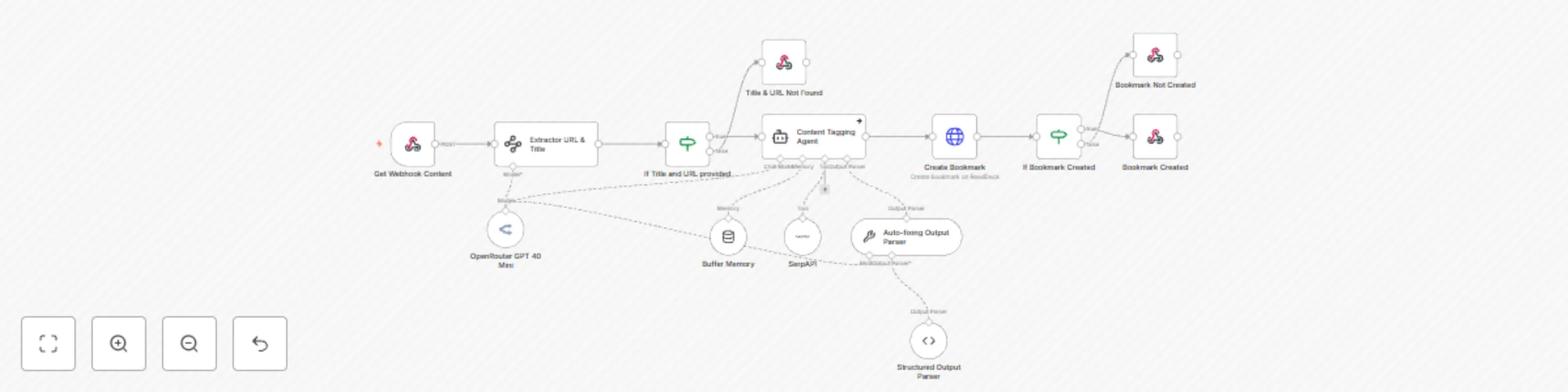
This workflow is for automating and centralizing your bookmarking process using AI powered tagging and seamless integration between your Android device and a self hosted Read Deck platform (https:/...
@n8n/n8n-nodes-langchain.toolserpapi, @n8n/n8n-nodes-langchain.outputparserautofixing, @n8n/n8n-nodes-langchain.outputparserstructured, n8n-nodes-base.webhook, @n8n/n8n-nodes-langchain.informationextractor, n8n-nodes-base.if, @n8n/n8n-nodes-langchain.agent, @n8n/n8n-nodes-langchain.lmchatopenrouter
This workflow is cataloged by N8N Workflows and links back to its original n8n.io source page by Udit Rawat.
Original n8n.io sourceThis workflow is for automating and centralizing your bookmarking process using AI-powered tagging and seamless integration between your Android device and a self-hosted Read Deck platform (https://readeck.org/en/). This workflow eliminates manual entry, organizes links with smart AI-generated tags, and ensures your bookmarks are always accessible, searchable, and secure.
How It Works
📱 Android Shortcut Integration
Use the HTTP Shortcuts app to create a 1-tap trigger that sends URLs and titles from your Android phone directly to n8n.
🤖 AI-Powered Tagging & Processing Leverage ChatGPT-4 to analyze content context and auto-generate relevant tags (e.g., “Tech Tutorials,” “Productivity Tools”). Extract clean titles and URLs from messy shared data (even from apps like Twitter or Reddit).
🔗 Readeck Integration Automatically save processed bookmarks to your self-hosted Readeck-like platform with structured metadata (title, URL, tags).
⚡ Silent Automation It runs in the background—no pop-ups or interruptions.
🔒 Pro Security Optional authentication (API tokens, headers) to protect your data.
Perfect for researchers, content creators, or anyone drowning in tabs who wants to:
1️⃣ Set Up Android Shortcut
2️⃣ Configure n8n Workflow Import the template and add your Read Deck API token (or similar service).
3️⃣ Test & Scale Share a link from your phone—watch it appear in Read Deck instantly!
Add error handling or notifications for advanced use.
Note: For self-hosted platforms, ensure your instance is publicly accessible (or use a VPN).
Zero Manual Entry: Save hours of copying/pasting. AI Organization: Say goodbye to chaotic bookmark folders. Privacy First: Host your data on your terms.
Transform your bookmarking chaos into a streamlined system—try “Save: Bookmark” today! 🚀
This catalog entry is organized from the workflow JSON. The node-level section below shows the executable blocks available for review before importing the template.
| Workflow | Android to n8n automation | Save links to with Readeck, Openrouter, SerpAPI |
|---|---|
| Complexity | intermediate |
| Nodes | 14 |
| Categories | Personal Productivity, AI Summarization |
| Author | Udit Rawat |
| Published | 10 Mar 2025 |
Use the JSON export at /data/workflows/3117/3117.json as the source template for this automation.
Open n8n, import the downloaded JSON, and review each node before activating the workflow.
Replace placeholder credentials, API keys, webhook URLs, account IDs, and environment-specific values with your own settings.
Run the workflow manually or in a staging workspace, inspect node output, and confirm downstream systems receive the expected data.
Enable the workflow only after testing, then monitor executions, errors, and rate limits during the first production runs.
Review imported nodes carefully before activation. This catalog entry is intended to help you inspect the workflow structure, understand required services, and find related templates faster.
Node names, credentials, schedules, webhook paths, and external service limits may need adjustment for your workspace.
This workflow is for automating and centralizing your bookmarking process using AI powered tagging and seamless integration between your Android device and a self hosted Read Deck platform (https:/...
Review the workflow JSON, configure any required credentials in n8n, and test the automation in a safe workspace before using it in production.
Yes. Use the block-by-block analysis and the downloadable JSON to inspect each node, then adjust credentials, prompts, schedules, filters, or destinations for your Personal Productivity, AI Summarization use case.