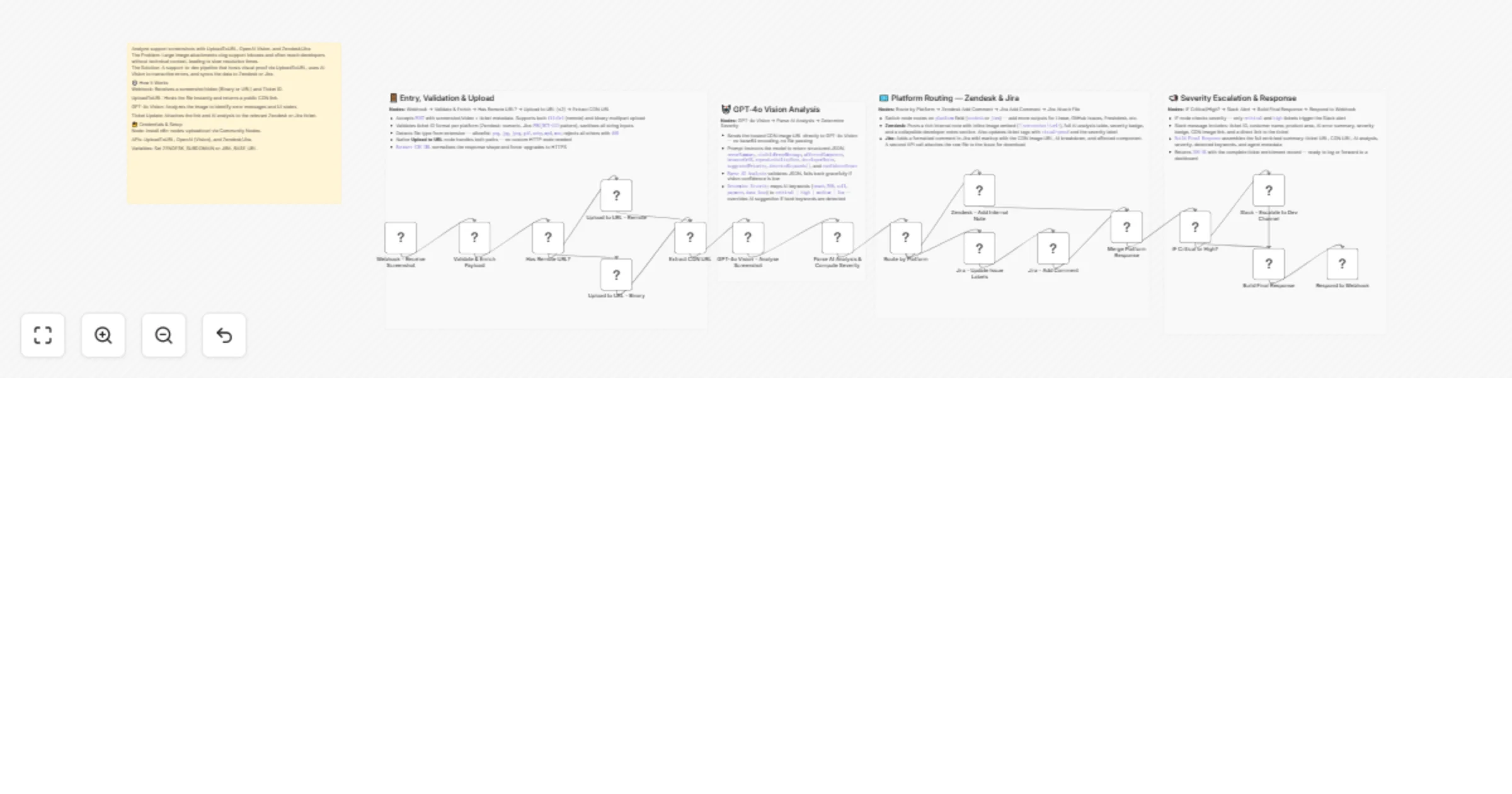
Analyze support screenshots with UploadToURL, GPT-4o Vision, Zendesk, and Jira

Workflow preview

Workflow preview
100%
Analyze support screenshots with UploadToURL, GPT-4o Vision, Zendesk, and Jira preview
Open on n8n.io

1. Workflow Overview

Eliminate the manual chaos of HR and legal document management. This workflow automates the transition from a raw document upload to a structured, audit ready archive by combining UploadToURL for i...

Best for

  • Ticket Management automation workflows
  • AI Summarization automation workflows
  • advanced n8n builders looking for reusable templates

Tools used

n8n-nodes-base.stickynote, n8n-nodes-base.webhook, n8n-nodes-base.code, n8n-nodes-base.if, n8n-nodes-uploadtourl.uploadtourl, @n8n/n8n-nodes-langchain.openai, n8n-nodes-base.switch, n8n-nodes-base.zendesk

Source and attribution

This workflow is cataloged by N8N Workflows and links back to its original n8n.io source page by Jitesh Dugar.

Original n8n.io source

1.1 Workflow description

Title
Analyze support screenshots with UploadToURL, GPT-4o Vision, Zendesk, and Jira
Workflow name
Analyze support screenshots with UploadToURL, GPT-4o Vision, Zendesk, and Jira

Eliminate the manual chaos of HR and legal document management. This workflow automates the transition from a raw document upload to a structured, audit-ready archive by combining UploadToURL for instant CDN hosting, Google Drive for long-term storage, and Airtable for status tracking and database management.

๐ŸŽฏ What This Workflow Does

Transforms loose document scans into a structured corporate filing system:

  1. ๐Ÿ“ Captures Legal Assets - Receives signed contracts or IDs via mobile scan (binary) or remote URL.
  2. ๐Ÿ›ก๏ธ Duplicate Prevention - Checks Airtable first to ensure a contract isn't already filed for that specific Employee ID.
  3. โ˜๏ธ Instant CDN Hosting - UploadToURL hosts the document to provide a high-speed link for immediate HR review.
  4. ๐Ÿ“ Smart Folder Logic - Automatically navigates or creates a structured Google Drive path: HR/Contracts/{Year}/{Department}/{EmployeeName}/.
  5. ๐Ÿ—ƒ๏ธ Database Synchronization - Updates (or creates) an Airtable record to tick "Contract Received," logging both the Drive URL and the CDN backup.
  6. ๐Ÿ“ง Automated Confirmation - Sends a professional HTML email to HR and the employee with access links and filing metadata.

โœจ Key Features

  • UploadToURL Integration: Provides a redundant, accessible CDN link stored alongside your primary Drive storage for total data reliability.
  • Auto-Nomenclature: Renames files using a strict audit-ready format: {EmployeeID}_{LastName}_{Type}_{Date}.pdf.
  • Intelligent Folder Creation: Never manually create a folder again; the workflow builds the entire hierarchy on the fly.
  • Audit Trail Generation: Captures "Filed By," "Filed At," and unique "Upload IDs" for every document.
  • Conflict Handling: Built-in 409 Conflict logic prevents accidental overwrites or double-filing of critical legal papers.

๐Ÿ’ผ Perfect For

  • HR Teams: Managing onboarding documents and employment contracts at scale.
  • Legal Departments: Archiving NDAs, vendor agreements, and compliance certifications.
  • Small Businesses: Moving away from "loose files in folders" to a searchable, automated database.
  • Remote Teams: Enabling employees to "upload and forget" their paperwork via a simple link.

๐Ÿ”ง What You'll Need

Required Integrations

  • UploadToURL - To host documents and provide public CDN backup links.
  • n8n Community Node - n8n-nodes-uploadtourl must be installed.
  • Google Drive - OAuth2 credentials for secure document storage.
  • Airtable - Personal Access Token to manage your employee/document database.
  • Gmail / SMTP - To send automated filing confirmations.

Configuration Variables

  • GDRIVE_ROOT_FOLDER_ID: The ID of your main HR folder in Google Drive.
  • AIRTABLE_BASE_ID: Your specific Airtable base for HR/Legal tracking.

๐Ÿš€ Quick Start

  1. Import Template - Copy the JSON and import it into your n8n workspace.
  2. Install Node - Ensure the UploadToURL community node is active.
  3. Set Credentials - Link your UploadToURL, Google Drive, Airtable, and Gmail accounts.
  4. Define Variables - Set your Root Folder ID and Airtable Base details in n8n variables.
  5. Test the Pipeline - Send a test POST with a sample PDF to the Webhook URL.
  6. Activate - Enable the workflow to begin hands-free archiving.

๐ŸŽจ Customization Options

  • Expiration Alerts: Add a node to calculate 1-year expiry dates and set an automated reminder in Slack.
  • OCR Processing: Integrate an OCR step to read the content of scans and verify names automatically.
  • Watermarking: Add a "Confidential" or "Draft" watermark to documents before they are uploaded to the CDN.
  • Multi-Base Routing: Route documents to different Airtable bases depending on the "Department" field.

๐Ÿ“ˆ Expected Results

  • 100% Consistency in file naming and folder structures across the entire organization.
  • Zero manual data entryโ€”employee records and checkboxes update automatically.
  • Audit-ready in minutes: Every file has a timestamped trail and redundant storage links.
  • Instant Accessibility: HR can view documents via the CDN link before Drive permissions even propagate.

๐Ÿ† Use Cases

High-Growth Onboarding

A startup hiring 20 people a month can automate all contract filings, ensuring the "Contract Received" flag is always accurate for payroll.

Compliance Audits

When auditors ask for specific contracts, use the Airtable "Structured Filename" column to find and share the relevant Drive or CDN links in seconds.

Field Service Scans

Technicians in the field can upload signed site reports via a mobile app; the workflow handles the filing and notifies the office immediately.

๐Ÿ’ก Pro Tips

  • Folder IDs: You can find your GDRIVE_ROOT_FOLDER_ID by looking at the last string in the URL when you are inside that folder in your browser.
  • Structured JSON: Use the returned auditTrail object to build a log of all uploads in a separate "Master Audit" spreadsheet.
  • Employee IDs: If no ID is provided, the workflow generates a temporary one using a timestamp to ensure the archive never breaks.

Ready to secure your document pipeline? Import this template and connect UploadToURL to build a world-class archiving system in under 20 minutes.

Need help with Airtable field mapping? The workflow includes detailed sticky notes explaining the exact field names required for the automation to run.

1.2 Logical Blocks

This catalog entry is organized from the workflow JSON. The node-level section below shows the executable blocks available for review before importing the template.

2. Block-by-Block Analysis

Block 1 - ๐Ÿ“‹ Overview

Type / Role
n8n-nodes-base.stickyNote - stickyNote
Config choices
Version 1

Block 2 - Entry & Upload

Type / Role
n8n-nodes-base.stickyNote - stickyNote
Config choices
Version 1

Block 3 - AI Vision Analysis

Type / Role
n8n-nodes-base.stickyNote - stickyNote
Config choices
Version 1

Block 4 - Platform Routing

Type / Role
n8n-nodes-base.stickyNote - stickyNote
Config choices
Version 1

Block 5 - Escalation & Response

Type / Role
n8n-nodes-base.stickyNote - stickyNote
Config choices
Version 1

Block 6 - Webhook - Receive Screenshot

Type / Role
n8n-nodes-base.webhook - webhook
Config choices
Version 2

Block 7 - Validate & Enrich Payload

Type / Role
n8n-nodes-base.code - code
Config choices
Version 2

Block 8 - Has Remote URL?

Type / Role
n8n-nodes-base.if - if
Config choices
Version 2

Block 9 - Upload to URL - Remote

Type / Role
n8n-nodes-uploadtourl.uploadToUrl - uploadToUrl
Config choices
Version 1

Block 10 - Upload to URL - Binary

Type / Role
n8n-nodes-uploadtourl.uploadToUrl - uploadToUrl
Config choices
Version 1

Block 11 - Extract CDN URL

Type / Role
n8n-nodes-base.code - code
Config choices
Version 2

Block 12 - GPT-4o Vision - Analyse Screenshot

Type / Role
@n8n/n8n-nodes-langchain.openAi - openAi
Config choices
Version 1.5

Block 13 - Parse AI Analysis & Compute Severity

Type / Role
n8n-nodes-base.code - code
Config choices
Version 2

Block 14 - Route by Platform

Type / Role
n8n-nodes-base.switch - switch
Config choices
Version 3

Block 15 - Zendesk - Add Internal Note

Type / Role
n8n-nodes-base.zendesk - zendesk
Config choices
Version 1

Block 16 - Jira - Update Issue Labels

Type / Role
n8n-nodes-base.jira - jira
Config choices
Version 1

Block 17 - Jira - Add Comment

Type / Role
n8n-nodes-base.jira - jira
Config choices
Version 1

Block 18 - Merge Platform Response

Type / Role
n8n-nodes-base.code - code
Config choices
Version 2

Block 19 - IF Critical or High?

Type / Role
n8n-nodes-base.if - if
Config choices
Version 2

Block 20 - Slack - Escalate to Dev Channel

Type / Role
n8n-nodes-base.slack - slack
Config choices
Version 2.2

Block 21 - Build Final Response

Type / Role
n8n-nodes-base.code - code
Config choices
Version 2

Block 22 - Respond to Webhook

Type / Role
n8n-nodes-base.respondToWebhook - respondToWebhook
Config choices
Version 1.1

3. Summary Table

Workflow Analyze support screenshots with UploadToURL, GPT-4o Vision, Zendesk, and Jira
Complexity advanced
Nodes 22
Categories Ticket Management, AI Summarization
Author Jitesh Dugar
Published 20 Feb 2026

4. Reproducing the Workflow from Scratch

  1. 1. Download the workflow JSON

    Use the JSON export at /data/workflows/13546/13546.json as the source template for this automation.

  2. 2. Import the template into n8n

    Open n8n, import the downloaded JSON, and review each node before activating the workflow.

  3. 3. Configure credentials and variables

    Replace placeholder credentials, API keys, webhook URLs, account IDs, and environment-specific values with your own settings.

  4. 4. Test with sample data

    Run the workflow manually or in a staging workspace, inspect node output, and confirm downstream systems receive the expected data.

  5. 5. Activate and monitor

    Enable the workflow only after testing, then monitor executions, errors, and rate limits during the first production runs.

5. General Notes & Resources

Review imported nodes carefully before activation. This catalog entry is intended to help you inspect the workflow structure, understand required services, and find related templates faster.

Node names, credentials, schedules, webhook paths, and external service limits may need adjustment for your workspace.

Frequently asked questions

What does Analyze support screenshots with UploadToURL, GPT-4o Vision, Zendesk, and Jira do?

Eliminate the manual chaos of HR and legal document management. This workflow automates the transition from a raw document upload to a structured, audit ready archive by combining UploadToURL for i...

What do I need before importing this workflow?

Review the workflow JSON, configure any required credentials in n8n, and test the automation in a safe workspace before using it in production.

Can I customize this workflow?

Yes. Use the block-by-block analysis and the downloadable JSON to inspect each node, then adjust credentials, prompts, schedules, filters, or destinations for your Ticket Management, AI Summarization use case.