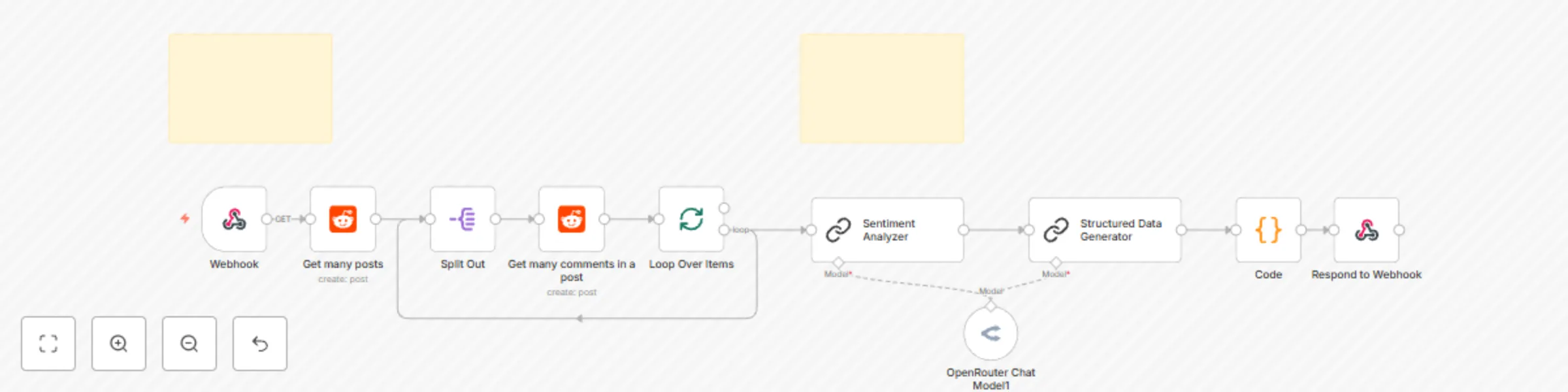
Analyze Reddit content and comments for sentiment with Deepseek AI

Workflow preview

Workflow preview
100%
Analyze Reddit content and comments for sentiment with Deepseek AI preview
Open on n8n.io

Important notice

This workflow is provided as-is. Please review and test before using in production.

1. Workflow Overview

Reddit Sentiment Analysis with AI Powered Insights Automatically analyze Reddit posts and comments to extract sentiment, emotional tone, and actionable community insights using AI. This powerful n8...

Best for

  • Market Research automation workflows
  • AI Summarization automation workflows
  • intermediate n8n builders looking for reusable templates

Tools used

n8n-nodes-base.stickynote, n8n-nodes-base.reddit, n8n-nodes-base.webhook, n8n-nodes-base.splitout, n8n-nodes-base.splitinbatches, @n8n/n8n-nodes-langchain.lmchatopenrouter, @n8n/n8n-nodes-langchain.chainllm, n8n-nodes-base.code

Source and attribution

This workflow is cataloged by N8N Workflows and links back to its original n8n.io source page by Gerald Denor.

Original n8n.io source

1.1 Workflow description

Title
Analyze Reddit content and comments for sentiment with Deepseek AI
Workflow name
Analyze Reddit content and comments for sentiment with Deepseek AI

Reddit Sentiment Analysis with AI-Powered Insights

Automatically analyze Reddit posts and comments to extract sentiment, emotional tone, and actionable community insights using AI.

This powerful n8n workflow combines Reddit's API with advanced AI sentiment analysis to help community managers, researchers, and businesses understand public opinion and engagement patterns on Reddit. Get structured insights including sentiment scores, toxicity levels, trending concerns, and moderation recommendations.

Features

  • Comprehensive Sentiment Analysis: Categorizes content as Positive, Negative, or Neutral with confidence scores
  • Emotional Intelligence: Detects emotional tones like excitement, frustration, concern, or sarcasm
  • Content Categorization: Identifies discussion types (questions, complaints, praise, debates)
  • Toxicity Detection: Flags potentially harmful content with severity levels
  • Community Insights: Analyzes engagement quality and trending concerns
  • Actionable Intelligence: Provides moderation recommendations and response urgency levels
  • Batch Processing: Efficiently processes multiple posts and their comments
  • Structured JSON Output: Returns organized data ready for further analysis or integration

How It Works

The workflow follows a two-stage process:

  1. Data Collection: Fetches recent posts from specified subreddits along with their comments
  2. AI Analysis: Processes content through DeepSeek AI to generate comprehensive sentiment and contextual insights

Use Cases

  • Community Management: Monitor sentiment trends and identify posts requiring moderator attention
  • Brand Monitoring: Track public opinion about your products or services on Reddit
  • Market Research: Understand customer sentiment and concerns in relevant communities
  • Content Strategy: Identify what type of content resonates positively with your audience
  • Crisis Management: Quickly detect and respond to negative sentiment spikes

Required Credentials

Before setting up this workflow, you'll need to obtain the following credentials:

Reddit OAuth2 API

  1. Go to Reddit App Preferences
  2. Click "Create App" or "Create Another App"
  3. Choose "web app" as the app type
  4. Fill in the required fields:
    • Name: Your app name
    • Description: Brief description of your app
    • Redirect URI: http://localhost:8080/oauth/callback (or your n8n instance URL + /oauth/callback)
  5. Note down your Client ID and Client Secret

OpenRouter API

  1. Visit OpenRouter
  2. Sign up for an account
  3. Navigate to your API Keys section
  4. Generate a new API key
  5. Copy the API key for use in n8n

Step-by-Step Setup Instructions

Step 1: Import the Workflow

  1. Copy the workflow JSON from this template
  2. In your n8n instance, click the "+" button to create a new workflow
  3. Select "Import from URL" or "Import from Clipboard"
  4. Paste the workflow JSON and click "Import"

Step 2: Configure Reddit Credentials

  1. Click on any Reddit node (e.g., "Get many posts")
  2. In the credentials dropdown, click "Create New"
  3. Select "Reddit OAuth2 API"
  4. Enter your Reddit app credentials:
    • Client ID: Your Reddit app client ID
    • Client Secret: Your Reddit app client secret
    • Auth URI: https://www.reddit.com/api/v1/authorize
    • Access Token URI: https://www.reddit.com/api/v1/access_token
  5. Click "Connect my account" and authorize the app
  6. Save the credentials

Step 3: Configure OpenRouter Credentials

  1. Click on the "OpenRouter Chat Model1" node
  2. In the credentials dropdown, click "Create New"
  3. Select "OpenRouter API"
  4. Enter your OpenRouter API key
  5. Save the credentials

Step 4: Test the Webhook

  1. Click on the "Webhook" node
  2. Copy the webhook URL (it will look like: https://your-n8n-instance.com/webhook/reddit-sentiment)
  3. Test the webhook using a tool like Postman or curl with this sample payload:
{
  "subreddit": "technology",
  "query": "AI",
  "limit": 5
}

Step 5: Customize the Analysis

  1. Modify the Structured Data Generator prompt: Edit the prompt in the "Structured Data Generator" node to adjust the analysis criteria or output format
  2. Change the AI model: In the "OpenRouter Chat Model1" node, you can switch to different models like anthropic/claude-3-haiku or openai/gpt-4 based on your preferences and budget
  3. Adjust post limits: Modify the limit parameter in the "Get many posts" and "Get many comments in a post" nodes to control how much data you process

Usage Instructions

Making API Calls

Send a POST request to your webhook URL with the following parameters:

Required Parameters:

  • subreddit: The subreddit name (without r/)
  • limit: Number of posts to analyze (recommended: 5-15)

Optional Parameters:

  • query: Search term to filter posts (optional)

Example Request:

curl -X POST https://your-n8n-instance.com/webhook/reddit-sentiment \
  -H "Content-Type: application/json" \
  -d '{
    "subreddit": "CustomerService",
    "limit": 10
  }'

Understanding the Output

The workflow returns a JSON array with detailed analysis for each post:

[
  {
    "sentiment_analysis": {
      "overall_sentiment": {
        "category": "Negative",
        "confidence_score": 8
      },
      "emotional_tone": ["frustrated", "concerned"],
      "intensity_level": "High"
    },
    "content_categorization": {
      "discussion_type": "Complaint",
      "key_themes": ["billing issues", "customer support"],
      "toxicity_level": {
        "level": "Low",
        "indicators": "No offensive language detected"
      }
    },
    "contextual_insights": {
      "community_engagement_quality": "Constructive",
      "potential_issues_flagged": ["service disruption"],
      "trending_concerns": ["response time", "resolution process"]
    },
    "actionable_intelligence": {
      "moderator_attention_needed": {
        "required": "Yes",
        "reason": "Customer complaint requiring company response"
      },
      "response_urgency": "High",
      "suggested_follow_up_actions": [
        "Escalate to customer service team",
        "Monitor for similar complaints"
      ]
    }
  }
]

Workflow Nodes Explanation

Data Collection Nodes

  • Webhook: Receives API requests with subreddit and analysis parameters
  • Get many posts: Fetches recent posts from the specified subreddit
  • Split Out: Processes individual posts for analysis
  • Get many comments in a post: Retrieves comments for each post

Processing Nodes

  • Loop Over Items: Manages batch processing of multiple posts
  • Sentiment Analyzer: Primary AI analysis node that processes content
  • Structured Data Generator: Formats AI output into structured JSON
  • Code: Parses and cleans the AI response
  • Respond to Webhook: Returns the final analysis results

Customization Options

Adjusting Analysis Depth

  • Modify the limit parameters to analyze more or fewer posts/comments
  • Update the AI prompts to focus on specific aspects (e.g., product mentions, competitor analysis)

Adding Data Storage

  • Connect database nodes to store analysis results for historical tracking
  • Add email notifications for high-priority findings

Integrating with Other Tools

  • Connect to Slack/Discord for real-time alerts
  • Link to Google Sheets for easy data visualization
  • Integrate with CRM systems for customer feedback tracking

Tips for Best Results

  1. Choose Relevant Subreddits: Focus on communities where your target audience is active
  2. Monitor Regularly: Set up scheduled executions to track sentiment trends over time
  3. Customize Prompts: Tailor the AI prompts to your specific industry or use case
  4. Respect Rate Limits: Reddit API has rate limits, so avoid excessive requests
  5. Review AI Output: Periodically check the AI analysis accuracy and adjust prompts as needed

Troubleshooting

Common Issues

"Reddit API Authentication Failed"

  • Verify your Reddit app credentials are correct
  • Ensure your redirect URI matches your n8n instance
  • Check that your Reddit app is set as "web app" type

"OpenRouter API Error"

  • Confirm your API key is valid and has sufficient credits
  • Check that the selected model is available
  • Verify your account has access to the chosen model

"Webhook Not Responding"

  • Ensure the workflow is activated
  • Check that the webhook URL is correct
  • Verify the request payload format matches the expected structure

"AI Analysis Returns Errors"

  • Review the prompt formatting in the Structured Data Generator
  • Check if the selected AI model supports the required features
  • Ensure the input data is not empty or malformed

Performance Considerations

  • Rate Limits: Reddit allows 60 requests per minute for OAuth applications
  • AI Costs: Monitor your OpenRouter usage to manage costs
  • Processing Time: Larger batches will take longer to process
  • Memory Usage: Consider n8n instance resources when processing large datasets

Contributing

This workflow can be extended and improved. Consider adding:

  • Support for multiple subreddits in a single request
  • Historical sentiment tracking and trend analysis
  • Integration with visualization tools
  • Custom classification models for industry-specific analysis

Ready to start analyzing Reddit sentiment? Import this workflow and start gaining valuable insights into online community discussions!

1.2 Logical Blocks

This catalog entry is organized from the workflow JSON. The node-level section below shows the executable blocks available for review before importing the template.

2. Block-by-Block Analysis

Block 1 - Sticky Note

Type / Role
n8n-nodes-base.stickyNote - stickyNote
Config choices
Version 1

Block 2 - Get many comments in a post

Type / Role
n8n-nodes-base.reddit - reddit
Config choices
Version 1

Block 3 - Get many posts

Type / Role
n8n-nodes-base.reddit - reddit
Config choices
Version 1

Block 4 - Webhook

Type / Role
n8n-nodes-base.webhook - webhook
Config choices
Version 2

Block 5 - Split Out

Type / Role
n8n-nodes-base.splitOut - splitOut
Config choices
Version 1

Block 6 - Loop Over Items

Type / Role
n8n-nodes-base.splitInBatches - splitInBatches
Config choices
Version 3

Block 7 - OpenRouter Chat Model1

Type / Role
@n8n/n8n-nodes-langchain.lmChatOpenRouter - lmChatOpenRouter
Config choices
Version 1

Block 8 - Structured Data Generator

Type / Role
@n8n/n8n-nodes-langchain.chainLlm - chainLlm
Config choices
Version 1.7

Block 9 - Code

Type / Role
n8n-nodes-base.code - code
Config choices
Version 2

Block 10 - Respond to Webhook

Type / Role
n8n-nodes-base.respondToWebhook - respondToWebhook
Config choices
Version 1.4

Block 11 - Sticky Note1

Type / Role
n8n-nodes-base.stickyNote - stickyNote
Config choices
Version 1

Block 12 - Sentiment Analyzer

Type / Role
@n8n/n8n-nodes-langchain.chainLlm - chainLlm
Config choices
Version 1.7

3. Summary Table

Workflow Analyze Reddit content and comments for sentiment with Deepseek AI
Complexity intermediate
Nodes 12
Categories Market Research, AI Summarization
Author Gerald Denor
Published 26 Jul 2025

4. Reproducing the Workflow from Scratch

  1. 1. Download the workflow JSON

    Use the JSON export at /data/workflows/6477/6477.json as the source template for this automation.

  2. 2. Import the template into n8n

    Open n8n, import the downloaded JSON, and review each node before activating the workflow.

  3. 3. Configure credentials and variables

    Replace placeholder credentials, API keys, webhook URLs, account IDs, and environment-specific values with your own settings.

  4. 4. Test with sample data

    Run the workflow manually or in a staging workspace, inspect node output, and confirm downstream systems receive the expected data.

  5. 5. Activate and monitor

    Enable the workflow only after testing, then monitor executions, errors, and rate limits during the first production runs.

5. General Notes & Resources

Review imported nodes carefully before activation. This catalog entry is intended to help you inspect the workflow structure, understand required services, and find related templates faster.

Node names, credentials, schedules, webhook paths, and external service limits may need adjustment for your workspace.

Frequently asked questions

What does Analyze Reddit content and comments for sentiment with Deepseek AI do?

Reddit Sentiment Analysis with AI Powered Insights Automatically analyze Reddit posts and comments to extract sentiment, emotional tone, and actionable community insights using AI. This powerful n8...

What do I need before importing this workflow?

Review the workflow JSON, configure any required credentials in n8n, and test the automation in a safe workspace before using it in production.

Can I customize this workflow?

Yes. Use the block-by-block analysis and the downloadable JSON to inspect each node, then adjust credentials, prompts, schedules, filters, or destinations for your Market Research, AI Summarization use case.