Analyze email performance & optimize campaigns with GPT-4, SendGrid, and Airtable

Workflow preview

Workflow preview
100%
Analyze email performance & optimize campaigns with GPT-4, SendGrid, and Airtable preview
Open on n8n.io

Important notice

This workflow is provided as-is. Please review and test before using in production.

1. Workflow Overview

Analyze email performance and optimize campaigns with AI using SendGrid and Airtable This n8n template creates an automated feedback loop that pulls email metrics from SendGrid weekly, tracks perfo...

Best for

  • Social Media automation workflows
  • AI Summarization automation workflows
  • advanced n8n builders looking for reusable templates

Tools used

n8n-nodes-base.manualtrigger, n8n-nodes-base.httprequest, n8n-nodes-base.airtable, n8n-nodes-base.merge, n8n-nodes-base.stickynote, n8n-nodes-base.code, @n8n/n8n-nodes-langchain.openai, n8n-nodes-base.scheduletrigger

Source and attribution

This workflow is cataloged by N8N Workflows and links back to its original n8n.io source page by Connor Provines.

Original n8n.io source

1.1 Workflow description

Title
Analyze email performance & optimize campaigns with GPT-4, SendGrid, and Airtable
Workflow name
Analyze email performance & optimize campaigns with GPT-4, SendGrid, and Airtable

Analyze email performance and optimize campaigns with AI using SendGrid and Airtable

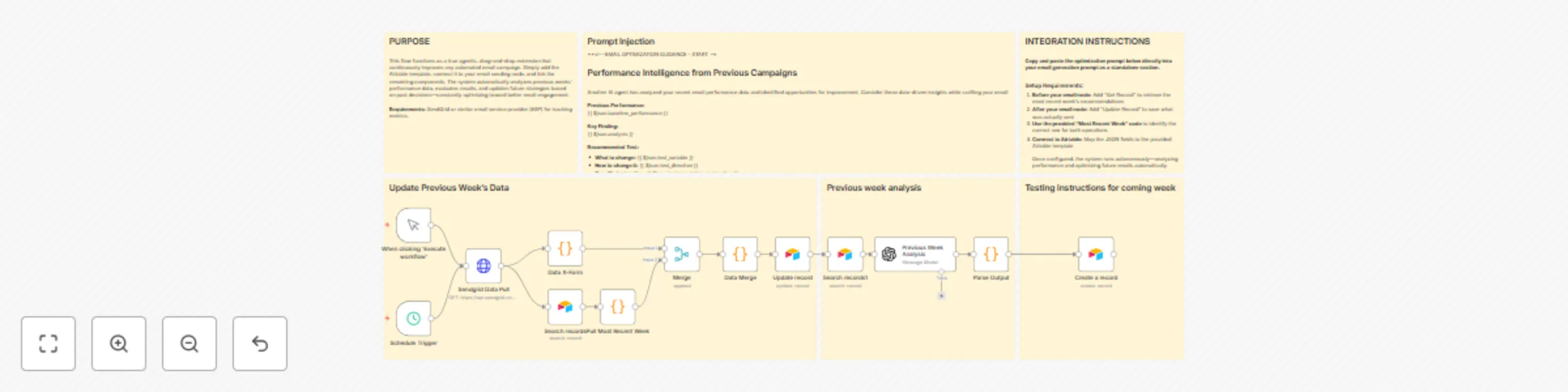
This n8n template creates an automated feedback loop that pulls email metrics from SendGrid weekly, tracks performance in Airtable, analyzes trends across the last 4 weeks, and generates specific recommendations for your next campaign. The system learns what works and provides data-driven insights directly to your email creation process.

Who's it for

Email marketers and growth teams who want to continuously improve campaign performance without manual analysis. Perfect for businesses running regular email campaigns who need actionable insights based on real data rather than guesswork.

Good to know

  • After 4-6 weeks, expect 15-30% improvement in primary metrics
  • Requires at least 2 weeks of historical data to generate meaningful analysis
  • System improves over time as it learns from your audience
  • Implementation time: ~1 hour total

How it works

  • Schedule trigger runs weekly (typically Monday mornings)
  • Pulls previous week's email statistics from SendGrid (delivered, opens, clicks, rates)
  • Updates the previous week's record in Airtable with actual performance data
  • GPT-4 analyzes trends across the last 4 weeks, identifying patterns and opportunities
  • Creates a new Airtable record for the upcoming week with specific recommendations: what to test, how to change it, expected outcome, and confidence level
  • Your email creation workflow pulls these recommendations when generating new campaigns
  • After sending, the actual email content is saved back to Airtable to close the loop

How to set up

  1. Create Airtable base: Make a table called "Email Campaign Performance" with fields for week_ending, delivered, unique_opens, unique_clicks, open_rate, ctr, decision, test_variable, test_hypothesis, confidence_level, test_directive, implementation_instruction, subject_line_used, email_body, icp, use_case, baseline_performance, success_metric, target_improvement
  2. Configure SendGrid: Add API key to the "SendGrid Data Pull" node and test connection
  3. Set up Airtable credentials: Add Personal Access Token and select your base/table in all Airtable nodes
  4. Add OpenAI credentials: Configure GPT-4 API key in the "Previous Week Analysis" node
  5. Test with sample data: Manually add 2-3 weeks of data to Airtable or run if you have historical data
  6. Schedule weekly runs: Set workflow to trigger every Monday at 9 AM (or after your weekly campaign sends)
  7. Integrate with email creation: Add an Airtable search node to your email workflow to retrieve current recommendations, and an update node to save what was sent

Requirements

  • SendGrid account with API access (or similar ESP with statistics API)
  • Airtable account with Personal Access Token
  • OpenAI API access (GPT-4)

Customizing this workflow

  • Use different email platform: Replace SendGrid node with Mailchimp, Brevo, or any ESP that provides statistics API—adjust field mappings accordingly
  • Add more metrics: Extend Airtable fields to track bounce rate, unsubscribe rate, spam complaints, or revenue attribution
  • Change analysis frequency: Adjust schedule trigger for bi-weekly or monthly analysis instead of weekly
  • Swap AI models: Replace GPT-4 with Claude or Gemini in the analysis node
  • Multi-campaign tracking: Duplicate the workflow for different campaign types (newsletters, promotions, onboarding) with separate Airtable tables

1.2 Logical Blocks

This catalog entry is organized from the workflow JSON. The node-level section below shows the executable blocks available for review before importing the template.

2. Block-by-Block Analysis

Block 1 - When clicking ‘Execute workflow’

Type / Role
n8n-nodes-base.manualTrigger - manualTrigger
Config choices
Version 1

Block 2 - Sendgrid Data Pull

Type / Role
n8n-nodes-base.httpRequest - httpRequest
Config choices
Version 4.2

Block 3 - Update record

Type / Role
n8n-nodes-base.airtable - airtable
Config choices
Version 2.1

Block 4 - Search records

Type / Role
n8n-nodes-base.airtable - airtable
Config choices
Version 2.1

Block 5 - Merge

Type / Role
n8n-nodes-base.merge - merge
Config choices
Version 3.2

Block 6 - Search records1

Type / Role
n8n-nodes-base.airtable - airtable
Config choices
Version 2.1

Block 7 - Create a record

Type / Role
n8n-nodes-base.airtable - airtable
Config choices
Version 2.1

Block 8 - Sticky Note

Type / Role
n8n-nodes-base.stickyNote - stickyNote
Config choices
Version 1

Block 9 - Sticky Note1

Type / Role
n8n-nodes-base.stickyNote - stickyNote
Config choices
Version 1

Block 10 - Sticky Note2

Type / Role
n8n-nodes-base.stickyNote - stickyNote
Config choices
Version 1

Block 11 - Sticky Note3

Type / Role
n8n-nodes-base.stickyNote - stickyNote
Config choices
Version 1

Block 12 - Sticky Note5

Type / Role
n8n-nodes-base.stickyNote - stickyNote
Config choices
Version 1

Block 13 - Pull Most Recent Week

Type / Role
n8n-nodes-base.code - code
Config choices
Version 2

Block 14 - Data X-Form

Type / Role
n8n-nodes-base.code - code
Config choices
Version 2

Block 15 - Data Merge

Type / Role
n8n-nodes-base.code - code
Config choices
Version 2

Block 16 - Previous Week Analysis

Type / Role
@n8n/n8n-nodes-langchain.openAi - openAi
Config choices
Version 1.8

Block 17 - Parse Output

Type / Role
n8n-nodes-base.code - code
Config choices
Version 2

Block 18 - Sticky Note4

Type / Role
n8n-nodes-base.stickyNote - stickyNote
Config choices
Version 1

Block 19 - Schedule Trigger

Type / Role
n8n-nodes-base.scheduleTrigger - scheduleTrigger
Config choices
Version 1.2

3. Summary Table

Workflow Analyze email performance & optimize campaigns with GPT-4, SendGrid, and Airtable
Complexity advanced
Nodes 19
Categories Social Media, AI Summarization
Author Connor Provines
Published 09 Oct 2025

4. Reproducing the Workflow from Scratch

  1. 1. Download the workflow JSON

    Use the JSON export at /data/workflows/9430/9430.json as the source template for this automation.

  2. 2. Import the template into n8n

    Open n8n, import the downloaded JSON, and review each node before activating the workflow.

  3. 3. Configure credentials and variables

    Replace placeholder credentials, API keys, webhook URLs, account IDs, and environment-specific values with your own settings.

  4. 4. Test with sample data

    Run the workflow manually or in a staging workspace, inspect node output, and confirm downstream systems receive the expected data.

  5. 5. Activate and monitor

    Enable the workflow only after testing, then monitor executions, errors, and rate limits during the first production runs.

5. General Notes & Resources

Review imported nodes carefully before activation. This catalog entry is intended to help you inspect the workflow structure, understand required services, and find related templates faster.

Node names, credentials, schedules, webhook paths, and external service limits may need adjustment for your workspace.

Frequently asked questions

What does Analyze email performance & optimize campaigns with GPT-4, SendGrid, and Airtable do?

Analyze email performance and optimize campaigns with AI using SendGrid and Airtable This n8n template creates an automated feedback loop that pulls email metrics from SendGrid weekly, tracks perfo...

What do I need before importing this workflow?

Review the workflow JSON, configure any required credentials in n8n, and test the automation in a safe workspace before using it in production.

Can I customize this workflow?

Yes. Use the block-by-block analysis and the downloadable JSON to inspect each node, then adjust credentials, prompts, schedules, filters, or destinations for your Social Media, AI Summarization use case.