Block 1 - Schedule Trigger
- Type / Role
- n8n-nodes-base.scheduleTrigger - scheduleTrigger
- Config choices
- Version 1.2


 Early Deal
This workflow is provided as-is. Please review and test before using in production.
Zoho CRM → AI Sentiment Analysis for customer interactions & Automatic Alerts Workflow This workflow analyzes newly created Notes (in Any module) in Zoho CRM, detects customer sentiment using an AI...
n8n-nodes-base.scheduletrigger, n8n-nodes-base.httprequest, n8n-nodes-base.code, @n8n/n8n-nodes-langchain.chainllm, @n8n/n8n-nodes-langchain.lmchatgooglegemini, @n8n/n8n-nodes-langchain.outputparserstructured, n8n-nodes-base.if, n8n-nodes-base.gmail
This workflow is cataloged by N8N Workflows and links back to its original n8n.io source page by WeblineIndia.
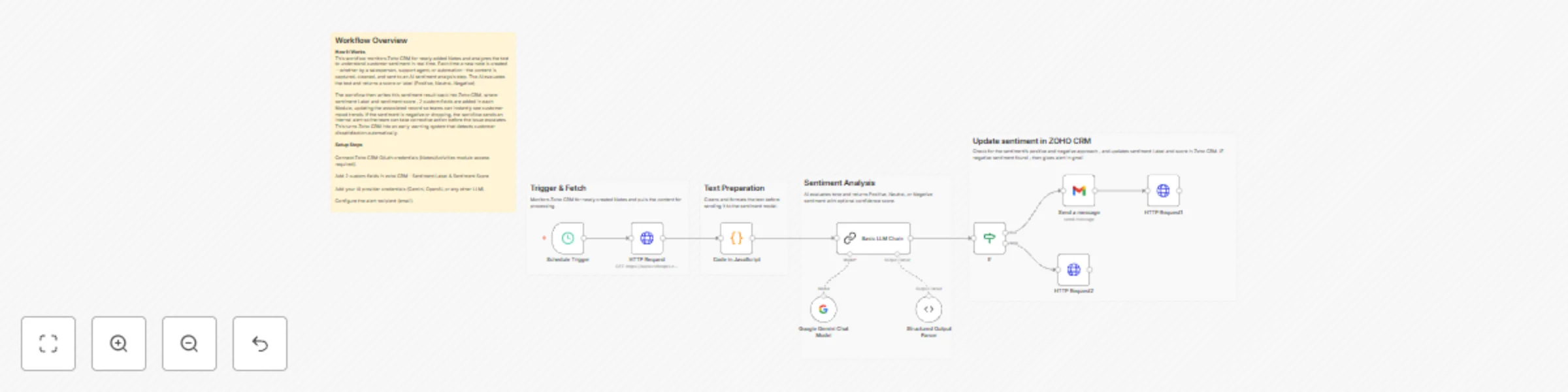
Original n8n.io sourceThis workflow analyzes newly created Notes (in Any module) in Zoho CRM, detects customer sentiment using an AI model, updates the related CRM record with custom fields - sentiment label and score, and sends an instant alert whenever negative sentiment is detected. It runs on a scheduled interval and gives teams real-time visibility into customer emotions and potential risks.
Sentiment_Label and Sentiment_Score This workflow automatically monitors Zoho CRM Notes. When a new Note is detected, the text is extracted and analyzed through an AI-powered sentiment model. The AI classifies the text as Positive, Neutral or Negative and produces a numeric sentiment score.
The workflow updates the related CRM module with these values. If the sentiment is negative, a Gmail alert is triggered so your team can follow up quickly. This automation helps organizations maintain high customer satisfaction and detect potential issues early.
Runs periodically to check for new or updated Notes.
Retrieves the most recently modified Note.
Extracts Note text, note_id, parent_id and module name.
Sends text to the AI (via LangChain chain) for sentiment classification.
Writes sentiment data back into the related parent record.
| Issue | Possible Cause | Solution |
|---|---|---|
| Sentiment not updating | Missing Zoho fields | Add custom fields in CRM |
| Note not detected | Fetching only latest note | Increase frequency or widen fetch scope |
| AI output invalid | Prompt mismatch | Update prompt and parser |
| Alerts not sending | Gmail OAuth expired | Reconnect Gmail |
| Incorrect sentiment | Weak prompt instructions | Refine prompt wording |
WeblineIndia can help you configure, customize and extend workflows like this.
We specialize in:
Reach out if you'd like assistance building or enhancing similar n8n automation solutions.
This catalog entry is organized from the workflow JSON. The node-level section below shows the executable blocks available for review before importing the template.
| Workflow | Analyze customer sentiment with Zoho CRM, Google Gemini & send Gmail alerts |
|---|---|
| Complexity | advanced |
| Nodes | 15 |
| Categories | CRM, AI Summarization |
| Author | WeblineIndia |
| Published | 19 Nov 2025 |
Use the JSON export at /data/workflows/11011/11011.json as the source template for this automation.
Open n8n, import the downloaded JSON, and review each node before activating the workflow.
Replace placeholder credentials, API keys, webhook URLs, account IDs, and environment-specific values with your own settings.
Run the workflow manually or in a staging workspace, inspect node output, and confirm downstream systems receive the expected data.
Enable the workflow only after testing, then monitor executions, errors, and rate limits during the first production runs.
Review imported nodes carefully before activation. This catalog entry is intended to help you inspect the workflow structure, understand required services, and find related templates faster.
Node names, credentials, schedules, webhook paths, and external service limits may need adjustment for your workspace.
Zoho CRM → AI Sentiment Analysis for customer interactions & Automatic Alerts Workflow This workflow analyzes newly created Notes (in Any module) in Zoho CRM, detects customer sentiment using an AI...
Review the workflow JSON, configure any required credentials in n8n, and test the automation in a safe workspace before using it in production.
Yes. Use the block-by-block analysis and the downloadable JSON to inspect each node, then adjust credentials, prompts, schedules, filters, or destinations for your CRM, AI Summarization use case.