Block 1 - Workflow Configuration
- Type / Role
- n8n-nodes-base.set - set
- Config choices
- Version 3.4


 Early Deal
This workflow is provided as-is. Please review and test before using in production.
Zoho CRM Conversation Intelligence Analyzer This workflow automatically processes customer call recordings, transcribes them using OpenAI Whisper, extracts key topics, identifies commitments, analy...
n8n-nodes-base.set, @n8n/n8n-nodes-langchain.openai, @n8n/n8n-nodes-langchain.informationextractor, @n8n/n8n-nodes-langchain.lmchatopenai, n8n-nodes-base.zohocrm, n8n-nodes-base.webhook, n8n-nodes-base.stickynote
This workflow is cataloged by N8N Workflows and links back to its original n8n.io source page by WeblineIndia.
Original n8n.io sourceThis workflow automatically processes customer call recordings, transcribes them using OpenAI Whisper, extracts key topics, identifies commitments, analyzes sentiment, generates follow-up suggestions and updates the corresponding Zoho CRM Lead — all without manual efforts.
It eliminates the need for listening to calls or writing summaries and equips your sales team with instant AI-generated insights.
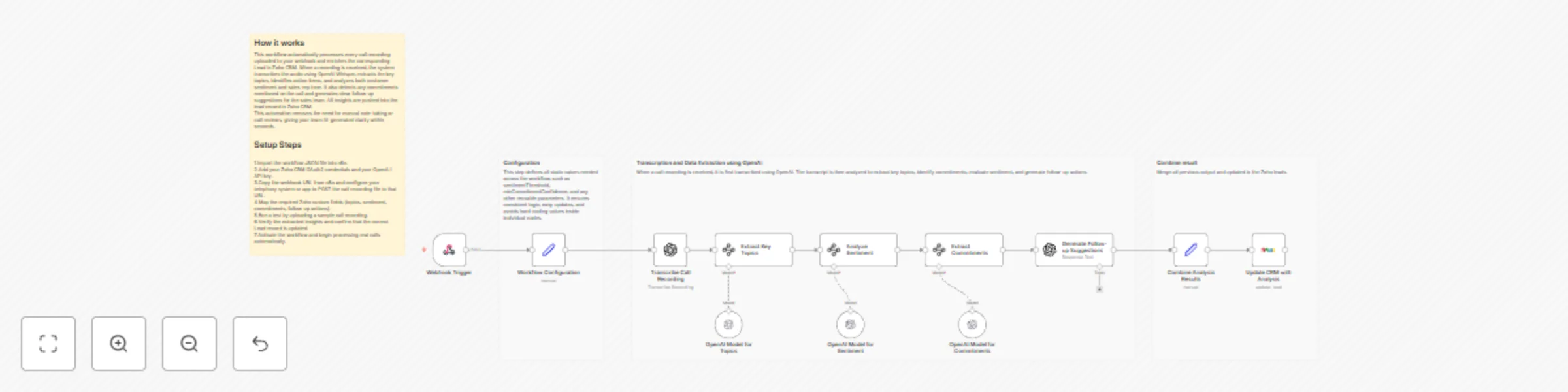
This workflow turns every incoming call recording into structured insights which your sales & customer support team can immediately use. When a recording is received, the call is automatically transcribed using OpenAI’s Whisper model. That transcript is then processed by multiple AI nodes that detect topics, customer sentiment, commitments and possible follow-up actions.
All extracted data — such as mood, sentiment score, subjects, action items and commitments is merged into a clean result object and pushed to the matching Lead in Zoho CRM. The sales team gets ready-to-use call intelligence instantly, improving decision-making, accuracy and speed.
This automation works 24/7 and replaces hours of manual review work with reliable AI-generated summaries.
To use this workflow, you need:
Your call system sends an audio file (.mp3, .wav, etc.) to the webhook. The workflow starts instantly—no polling required.
Static values like:
sentimentThreshold = 0.7minCommitmentConfidence = 0.8
ensure consistent logic across nodes.The audio file is converted to text. This transcript becomes the base for all analysis nodes.
AI identifies:
AI analyzes:
AI detects commitments using a structured JSON schema.
GPT generates 3–5 follow-up suggestions based on the transcript & commitments.
A Set node merges transcription, topics, sentiment, commitments and follow-up text.
Updates Zoho custom fields so the sales team gets immediate insights.
| Issue | Possible Cause | Solution |
|---|---|---|
| Workflow not triggered | Telephony not hitting webhook | Recheck webhook URL & logs |
| Transcript empty | Unsupported/corrupted audio | Validate file before sending |
| CRM not updating | Wrong Zoho field IDs | Verify field IDs in Zoho |
| Commitments missing | Transcript unclear | Improve audio quality or edit schema |
| Sentiment inaccurate | Model interpretation | Adjust sentimentThreshold |
If you want to customize this workflow, integrate telephony systems or want to build advanced level CRM automation, then our n8n workflow development team at WeblineIndia team is happy to help.
We’re here to support setup, scaling, and custom enhancements.
This catalog entry is organized from the workflow JSON. The node-level section below shows the executable blocks available for review before importing the template.
| Workflow | Analyze call recordings with OpenAI and update Zoho CRM leads automatically |
|---|---|
| Complexity | advanced |
| Nodes | 16 |
| Categories | CRM, AI Summarization |
| Author | WeblineIndia |
| Published | 17 Nov 2025 |
Use the JSON export at /data/workflows/10913/10913.json as the source template for this automation.
Open n8n, import the downloaded JSON, and review each node before activating the workflow.
Replace placeholder credentials, API keys, webhook URLs, account IDs, and environment-specific values with your own settings.
Run the workflow manually or in a staging workspace, inspect node output, and confirm downstream systems receive the expected data.
Enable the workflow only after testing, then monitor executions, errors, and rate limits during the first production runs.
Review imported nodes carefully before activation. This catalog entry is intended to help you inspect the workflow structure, understand required services, and find related templates faster.
Node names, credentials, schedules, webhook paths, and external service limits may need adjustment for your workspace.
Zoho CRM Conversation Intelligence Analyzer This workflow automatically processes customer call recordings, transcribes them using OpenAI Whisper, extracts key topics, identifies commitments, analy...
Review the workflow JSON, configure any required credentials in n8n, and test the automation in a safe workspace before using it in production.
Yes. Use the block-by-block analysis and the downloadable JSON to inspect each node, then adjust credentials, prompts, schedules, filters, or destinations for your CRM, AI Summarization use case.