Analyze brand visibility in AI SERPs with SE Ranking and OpenAI GPT-4.1 mini

Workflow preview

Workflow preview
100%
Analyze brand visibility in AI SERPs with SE Ranking and OpenAI GPT-4.1 mini preview
Open on n8n.io

Important notice

This workflow is provided as-is. Please review and test before using in production.

1. Workflow Overview

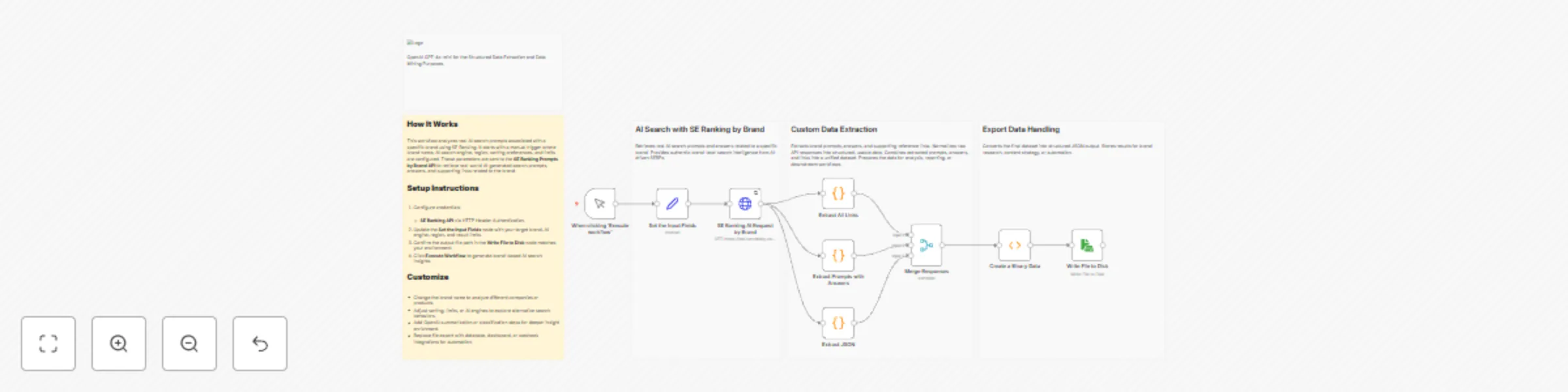
This workflow automates brand intelligence analysis across AI powered search results by combining SE Ranking’s AI Search data with structured processing in n8n. It retrieves real AI generated promp...

Best for

  • Market Research automation workflows
  • AI Summarization automation workflows
  • intermediate n8n builders looking for reusable templates

Tools used

n8n-nodes-base.manualtrigger, n8n-nodes-base.set, n8n-nodes-base.readwritefile, n8n-nodes-base.function, n8n-nodes-base.stickynote, n8n-nodes-base.code, n8n-nodes-base.httprequest, n8n-nodes-base.merge

Source and attribution

This workflow is cataloged by N8N Workflows and links back to its original n8n.io source page by Ranjan Dailata.

Original n8n.io source

1.1 Workflow description

Title
Analyze brand visibility in AI SERPs with SE Ranking and OpenAI GPT-4.1 mini
Workflow name
Analyze brand visibility in AI SERPs with SE Ranking and OpenAI GPT-4.1 mini

This workflow automates brand intelligence analysis across AI-powered search results by combining SE Ranking’s AI Search data with structured processing in n8n.

It retrieves real AI-generated prompts, answers, and cited sources where a brand appears, then normalizes and consolidates this data into a clean, structured format. The workflow eliminates manual review of AI SERPs and makes it easy to understand how AI search engines describe, reference, and position a brand.

Who this is for

This workflow is designed for:

  • SEO strategists and growth marketers analyzing brand visibility in AI-powered search engines
  • Content strategists identifying how brands are represented in AI answers
  • Competitive intelligence teams tracking brand mentions and narratives
  • Agencies and consultants building AI SERP reports for clients
  • Product and brand managers monitoring AI-driven brand perception

What problem is this workflow solving?

Traditional SEO tools focus on rankings and keywords but do not capture how AI search engines talk about brands.

Key challenges this workflow addresses:

  • No visibility into AI-generated prompts and answers mentioning a brand
  • Difficulty extracting linked sources and references from AI SERPs
  • Manual effort required to normalize and structure AI search responses
  • Lack of export-ready datasets for reporting or downstream automation

3. What this workflow does

At a high level, this workflow:

  • Accepts a brand name and AI search parameters

  • Fetches real AI search prompts, answers, and citations from SE Ranking

  • Extracts and normalizes:

    • Prompts with answers
    • Supporting reference links
    • Raw AI SERP JSON
  • Merges all outputs into a unified structured dataset

  • Exports the final result as structured JSON ready for analysis, reporting, or storage

This enables brand-level AI SERP intelligence in a repeatable and automated way

Setup

Prerequisites

  • n8n (self-hosted or cloud)
  • Active SE Ranking API access
  • HTTP Header authentication configured in n8n
  • Local or server file system access for JSON export

Setup Steps

If you are new to SE Ranking, please signup on seranking.com

  1. Configure Credentials
  • SE Ranking using HTTP Header Authentication. Please make sure to set the header authentication as below. The value should contain a Token followed by a space with the SE Ranking API Key.

  1. Set Input Parameters

    • Brand name
    • AI engine (e.g., Perplexity)
    • Source/region
    • Sorting preferences
    • Result limits
  2. Configure Output

    • Update file path in the “Write File to Disk” node
    • Ensure write permissions are available
  3. Execute Workflow

    • Click Execute Workflow
    • Generated brand intelligence is saved as structured JSON

How to customize this workflow

You can easily adapt this workflow to your needs:

  • Change Brand Focus

    • Modify the brand input to analyze competitors or product names
  • Switch AI Engines

    • Compare brand narratives across different AI search engines
  • Add AI Enrichment

    • Insert OpenAI or Gemini nodes to summarize brand sentiment or themes
  • Classification & Tagging

    • Categorize prompts into awareness, comparison, pricing, reviews, etc.
  • Replace File Export

    • Send results to:

      • Databases
      • Google Sheets
      • Dashboards
      • Webhooks or APIs
  • Scale for Monitoring

    • Schedule runs to track brand perception changes over time

Summary

This workflow delivers true AI SERP brand intelligence by combining SE Ranking’s AI Search data with structured extraction and automation in n8n.

It transforms opaque AI-generated brand mentions into actionable, exportable insights, enabling SEO, content, and brand teams to stay ahead in the era of AI-first search.

1.2 Logical Blocks

This catalog entry is organized from the workflow JSON. The node-level section below shows the executable blocks available for review before importing the template.

2. Block-by-Block Analysis

Block 1 - When clicking ‘Execute workflow’

Type / Role
n8n-nodes-base.manualTrigger - manualTrigger
Config choices
Version 1

Block 2 - Set the Input Fields

Type / Role
n8n-nodes-base.set - set
Config choices
Version 3.4

Block 3 - Write File to Disk

Type / Role
n8n-nodes-base.readWriteFile - readWriteFile
Config choices
Version 1

Block 4 - Create a Binary Data

Type / Role
n8n-nodes-base.function - function
Config choices
Version 1

Block 5 - Sticky Note

Type / Role
n8n-nodes-base.stickyNote - stickyNote
Config choices
Version 1

Block 6 - Sticky Note1

Type / Role
n8n-nodes-base.stickyNote - stickyNote
Config choices
Version 1

Block 7 - Sticky Note2

Type / Role
n8n-nodes-base.stickyNote - stickyNote
Config choices
Version 1

Block 8 - Sticky Note3

Type / Role
n8n-nodes-base.stickyNote - stickyNote
Config choices
Version 1

Block 9 - Sticky Note4

Type / Role
n8n-nodes-base.stickyNote - stickyNote
Config choices
Version 1

Block 10 - Extract All Links

Type / Role
n8n-nodes-base.code - code
Config choices
Version 2

Block 11 - Extract Prompts with Answers

Type / Role
n8n-nodes-base.code - code
Config choices
Version 2

Block 12 - Extract JSON

Type / Role
n8n-nodes-base.code - code
Config choices
Version 2

Block 13 - SE Ranking AI Request by Brand

Type / Role
n8n-nodes-base.httpRequest - httpRequest
Config choices
Version 4.3

Block 14 - Merge Responses

Type / Role
n8n-nodes-base.merge - merge
Config choices
Version 3.2

3. Summary Table

Workflow Analyze brand visibility in AI SERPs with SE Ranking and OpenAI GPT-4.1 mini
Complexity intermediate
Nodes 14
Categories Market Research, AI Summarization
Author Ranjan Dailata
Published 04 Jan 2026

4. Reproducing the Workflow from Scratch

  1. 1. Download the workflow JSON

    Use the JSON export at /data/workflows/12442/12442.json as the source template for this automation.

  2. 2. Import the template into n8n

    Open n8n, import the downloaded JSON, and review each node before activating the workflow.

  3. 3. Configure credentials and variables

    Replace placeholder credentials, API keys, webhook URLs, account IDs, and environment-specific values with your own settings.

  4. 4. Test with sample data

    Run the workflow manually or in a staging workspace, inspect node output, and confirm downstream systems receive the expected data.

  5. 5. Activate and monitor

    Enable the workflow only after testing, then monitor executions, errors, and rate limits during the first production runs.

5. General Notes & Resources

Review imported nodes carefully before activation. This catalog entry is intended to help you inspect the workflow structure, understand required services, and find related templates faster.

Node names, credentials, schedules, webhook paths, and external service limits may need adjustment for your workspace.

Frequently asked questions

What does Analyze brand visibility in AI SERPs with SE Ranking and OpenAI GPT-4.1 mini do?

This workflow automates brand intelligence analysis across AI powered search results by combining SE Ranking’s AI Search data with structured processing in n8n. It retrieves real AI generated promp...

What do I need before importing this workflow?

Review the workflow JSON, configure any required credentials in n8n, and test the automation in a safe workspace before using it in production.

Can I customize this workflow?

Yes. Use the block-by-block analysis and the downloadable JSON to inspect each node, then adjust credentials, prompts, schedules, filters, or destinations for your Market Research, AI Summarization use case.