Block 1 - AI Agent
- Type / Role
- @n8n/n8n-nodes-langchain.agent - agent
- Config choices
- Version 1.6


 Early Deal
This workflow is provided as-is. Please review and test before using in production.
Youtube Video This n8n workflow is designed to assist YouTube content creators in identifying trending topics within a specific niche. By leveraging YouTube's search...
@n8n/n8n-nodes-langchain.agent, @n8n/n8n-nodes-langchain.chattrigger, @n8n/n8n-nodes-langchain.toolworkflow, @n8n/n8n-nodes-langchain.lmchatopenai, @n8n/n8n-nodes-langchain.memorybufferwindow, n8n-nodes-base.stickynote, n8n-nodes-base.httprequest, n8n-nodes-base.youtube
This workflow is cataloged by N8N Workflows and links back to its original n8n.io source page by Leonardo Grigorio.
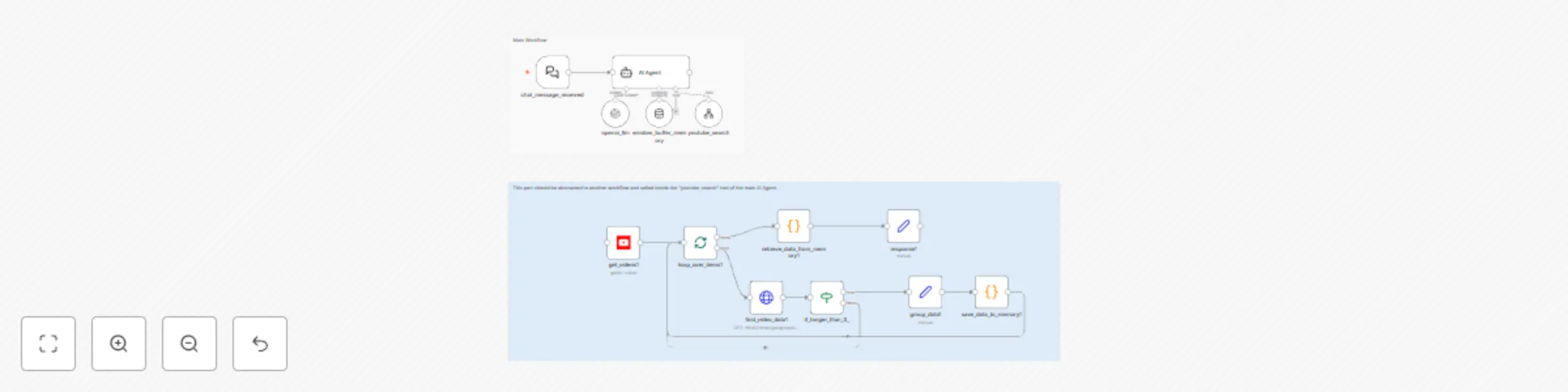
Original n8n.io sourceThis n8n workflow is designed to assist YouTube content creators in identifying trending topics within a specific niche. By leveraging YouTube's search and data APIs, it gathers and analyzes video performance metrics from the past two days to provide insights into what content is gaining traction. Here's how the workflow operates:
Trigger Setup: The workflow begins when a user sends a query through the chat_message_received node. If no niche is provided, the AI prompts the user to select or input one.
AI Agent (Language Model): The central node utilizes a GPT-based AI agent to:
YouTube Search: The youtube_search node runs a secondary workflow to query YouTube for relevant videos published within the last two days. It retrieves basic video data such as video IDs, relevance scores, and publication dates.
Video Details Retrieval: The workflow fetches additional details for each video:
Data Processing:
Output: The workflow compiles insights and presents them to the user, highlighting:
get_videos, find_video_snippet, find_video_statistics, and find_video_data nodes.window_buffer_memory node ensures the AI agent retains context during analysis, enhancing the quality of the generated insights.This workflow is ideal for YouTubers or marketers seeking data-driven inspiration for creating content that aligns with current trends, maximizing the potential to engage their audience.
For the niche "digital marketing":
This catalog entry is organized from the workflow JSON. The node-level section below shows the executable blocks available for review before importing the template.
| Workflow | AI YouTube trend finder based on niche |
|---|---|
| Complexity | advanced |
| Nodes | 15 |
| Categories | Market Research, AI Summarization |
| Author | Leonardo Grigorio |
| Published | 05 Dec 2024 |
Use the JSON export at /data/workflows/2606/2606.json as the source template for this automation.
Open n8n, import the downloaded JSON, and review each node before activating the workflow.
Replace placeholder credentials, API keys, webhook URLs, account IDs, and environment-specific values with your own settings.
Run the workflow manually or in a staging workspace, inspect node output, and confirm downstream systems receive the expected data.
Enable the workflow only after testing, then monitor executions, errors, and rate limits during the first production runs.
Review imported nodes carefully before activation. This catalog entry is intended to help you inspect the workflow structure, understand required services, and find related templates faster.
Node names, credentials, schedules, webhook paths, and external service limits may need adjustment for your workspace.
Youtube Video This n8n workflow is designed to assist YouTube content creators in identifying trending topics within a specific niche. By leveraging YouTube's search...
Review the workflow JSON, configure any required credentials in n8n, and test the automation in a safe workspace before using it in production.
Yes. Use the block-by-block analysis and the downloadable JSON to inspect each node, then adjust credentials, prompts, schedules, filters, or destinations for your Market Research, AI Summarization use case.