AI weather forecasts with MCP integration

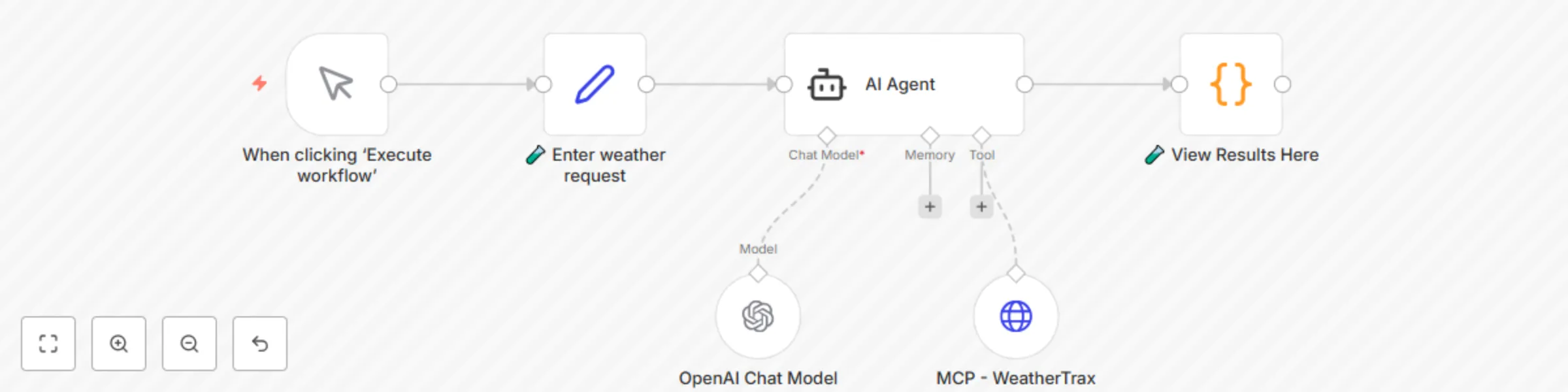
Workflow preview

Workflow preview
100%
AI weather forecasts with MCP integration preview
Open on n8n.io

Important notice

This workflow is provided as-is. Please review and test before using in production.

1. Workflow Overview

Real time Weather Forecasts with MCP Tools This n8n workflow demonstrates how to integrate real time weather intelligence into any automation using the Model Context Protocol (MCP). Get current con...

Best for

  • Personal Productivity automation workflows
  • AI RAG automation workflows
  • intermediate n8n builders looking for reusable templates

Tools used

@n8n/n8n-nodes-langchain.lmchatopenai, @n8n/n8n-nodes-langchain.agent, n8n-nodes-base.httprequesttool, n8n-nodes-base.code, n8n-nodes-base.set, n8n-nodes-base.manualtrigger

Source and attribution

This workflow is cataloged by N8N Workflows and links back to its original n8n.io source page by JaredCo.

Original n8n.io source

1.1 Workflow description

Title
AI weather forecasts with MCP integration
Workflow name
AI weather forecasts with MCP integration

Real-time Weather Forecasts with MCP Tools

This n8n workflow demonstrates how to integrate real-time weather intelligence into any automation using the Model Context Protocol (MCP). Get current conditions and 5-day forecasts with natural language queries like "What's the weather like in Miami?" or "Will it rain next Tuesday in Seattle?" - all powered by live weather data and AI.

Good to know

  • No API keys required - uses hosted MCP weather server with built-in WorldWeatherOnline integration
  • Provides current conditions and detailed 5-day forecasts
  • Natural language queries work for any location worldwide
  • Powered by WorldWeatherOnline - the world's most accurate weather system
  • Fully preconfigured and ready to run out-of-the-box
  • Enterprise-ready with error handling and rate limiting

How it works

  • Natural Language Input: Receives weather queries via webhook, chat, email, or voice
  • AI Agent Processing: n8n Agent node interprets requests and determines:
  • Location extraction from natural language
  • Weather data type needed (current or 5-day forecast)
  • Response formatting preferences
  • MCP Weather Tool: Live hosted server provides:
  • Real-time current conditions (temperature, humidity, wind, conditions)
  • 5-day detailed forecasts with daily highs/lows
  • Weather descriptions and condition codes
  • Powered by WorldWeatherOnline's premium data
  • Intelligent Responses: AI formats weather data into:
  • Conversational natural language responses
  • Structured data for downstream automation
  • Action-triggering data for workflows

How to use

  • Import the workflow into n8n from the template
  • Add your preferred AI model API key to the Agent node
  • Customize the system prompt for your specific use case
  • Connect to your preferred input/output channels
  • Run and start querying weather with natural language

Use Cases

  • Smart Home Automation: "Turn on sprinklers if no rain forecast for 3 days"
  • Travel Planning: "Check weather for my Paris trip next week"
  • Event Management: "Will outdoor wedding conditions be good Saturday?"
  • Agriculture/Farming: "Check 5-day forecast for planting schedule"
  • Logistics: "Delay shipping if severe weather forecast in delivery zone"
  • Personal Assistant: "Should I wear a jacket today in Chicago?"
  • Sports/Recreation: "Surf conditions and wind forecast for weekend"
  • Construction: "Safe working conditions for outdoor project this week"

Requirements

  • n8n instance (cloud or self-hosted)
  • AI model provider account (OpenAI, Anthropic, Google, etc.)
  • Internet connection for MCP weather server access
  • Optional: Webhook endpoints for external integrations

Customizing this workflow

  • Location Intelligence: Add geocoding for address-to-coordinates conversion
  • Data Storage: Save weather history to databases for trend analysis
  • Dashboard Integration: Connect to Grafana, Tableau, or custom visualizations
  • Voice Integration: Add speech-to-text for voice weather queries
  • Scheduling: Set up automated daily/weekly weather briefings
  • Conditional Logic: Trigger different actions based on weather conditions

Sample Input/Output

Natural Language Queries: "What's the weather like in Miami?" "Will it rain next Tuesday in Seattle?" "5-day forecast for London" "Temperature in Tokyo tomorrow" "Weather conditions for outdoor event Saturday"

Rich Responses: { "location": "Miami, FL", "current": { "temperature": "78°F", "condition": "Partly Cloudy", "humidity": "65%", "wind": "10 mph SE" }, "forecast": { "today": "High 82°F, Low 71°F, 20% rain", "tomorrow": "High 85°F, Low 73°F, Sunny" }, "ai_summary": "Perfect beach weather in Miami today! Partly cloudy with comfortable temperatures and light winds." }

Why This Workflow is Unique

  • Zero Setup Weather Data: No API key management - MCP server handles everything
  • World-Class Accuracy: Powered by WorldWeatherOnline's premium weather data
  • AI-Powered Intelligence: Natural language understanding of complex weather queries
  • Enterprise Ready: Built-in error handling, rate limiting, and reliability
  • Global Coverage: Worldwide weather data with location intelligence
  • Action-Oriented: Designed for automation decisions, not just information display

Transform your automations with intelligent weather awareness powered by the world's most accurate weather system!

🧪 Setup Steps

  1. ✅ The Agent node is already configured:
  • The system prompt is included
  • The tool endpoint is pre-set
  1. All you need to do is:
  • Add your AI model API key to the existing Agent credential
  • Hit run and you're done ✅

🔗 Full project link: Github: weathertrax-mcp-agent-demo

1.2 Logical Blocks

This catalog entry is organized from the workflow JSON. The node-level section below shows the executable blocks available for review before importing the template.

2. Block-by-Block Analysis

Block 1 - OpenAI Chat Model

Type / Role
@n8n/n8n-nodes-langchain.lmChatOpenAi - lmChatOpenAi
Config choices
Version 1.2

Block 2 - AI Agent

Type / Role
@n8n/n8n-nodes-langchain.agent - agent
Config choices
Version 2

Block 3 - MCP - WeatherTrax

Type / Role
n8n-nodes-base.httpRequestTool - httpRequestTool
Config choices
Version 4.2

Block 4 - 🧪 View Results Here

Type / Role
n8n-nodes-base.code - code
Config choices
Version 2

Block 5 - 🧪 Enter weather request

Type / Role
n8n-nodes-base.set - set
Config choices
Version 2

Block 6 - When clicking ‘Execute workflow’

Type / Role
n8n-nodes-base.manualTrigger - manualTrigger
Config choices
Version 1

3. Summary Table

Workflow AI weather forecasts with MCP integration
Complexity intermediate
Nodes 6
Categories Personal Productivity, AI RAG
Author JaredCo
Published 18 Jun 2025

4. Reproducing the Workflow from Scratch

  1. 1. Download the workflow JSON

    Use the JSON export at /data/workflows/5026/5026.json as the source template for this automation.

  2. 2. Import the template into n8n

    Open n8n, import the downloaded JSON, and review each node before activating the workflow.

  3. 3. Configure credentials and variables

    Replace placeholder credentials, API keys, webhook URLs, account IDs, and environment-specific values with your own settings.

  4. 4. Test with sample data

    Run the workflow manually or in a staging workspace, inspect node output, and confirm downstream systems receive the expected data.

  5. 5. Activate and monitor

    Enable the workflow only after testing, then monitor executions, errors, and rate limits during the first production runs.

5. General Notes & Resources

Review imported nodes carefully before activation. This catalog entry is intended to help you inspect the workflow structure, understand required services, and find related templates faster.

Node names, credentials, schedules, webhook paths, and external service limits may need adjustment for your workspace.

Frequently asked questions

What does AI weather forecasts with MCP integration do?

Real time Weather Forecasts with MCP Tools This n8n workflow demonstrates how to integrate real time weather intelligence into any automation using the Model Context Protocol (MCP). Get current con...

What do I need before importing this workflow?

Review the workflow JSON, configure any required credentials in n8n, and test the automation in a safe workspace before using it in production.

Can I customize this workflow?

Yes. Use the block-by-block analysis and the downloadable JSON to inspect each node, then adjust credentials, prompts, schedules, filters, or destinations for your Personal Productivity, AI RAG use case.