J

JaredCo

2
Workflows

Workflows by JaredCo
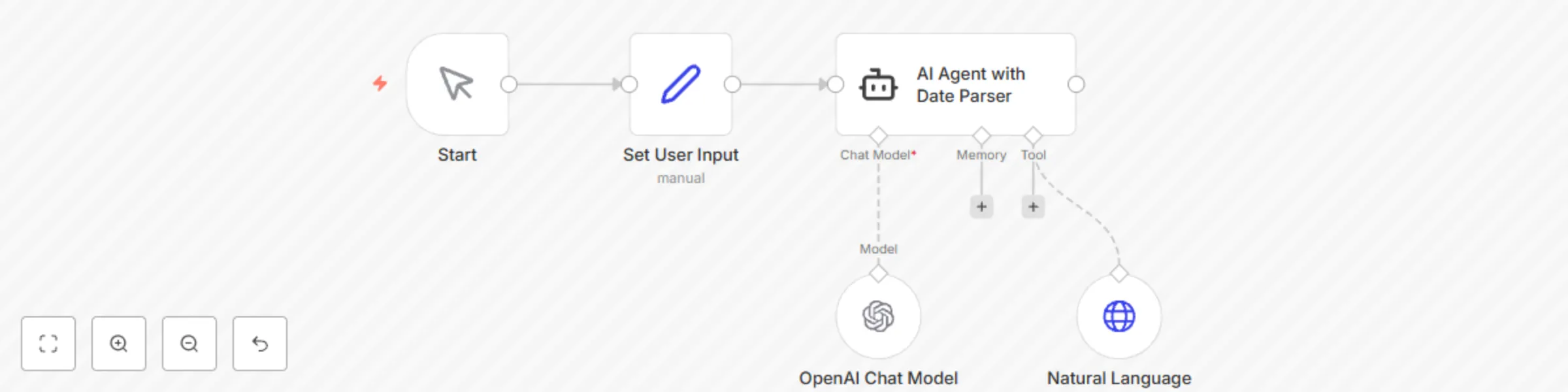
Workflow preview: Parse natural language dates with OpenAI GPT-4o for smart scheduling
Free intermediate

Parse natural language dates with OpenAI GPT-4o for smart scheduling

This n8n workflow demonstrates how to transform natural language date and time expressions into structured data with 96%+ accuracy. Parse complex expressions like "early next July", "2 weeks after project launch", or "end of Q3" into precise datetime objects with confidence scoring, timezone intelligence, and business rules validation for any automation workflow. ## **Good to know** * Achieves 96%+ accuracy on complex natural language date expressions * At time of writing, this is the most advanced open-source date parser available * Includes AI learning that improves over time with user corrections * Supports 6 languages with auto-detection (English, Spanish, French, German, Italian, Portuguese) * Sub-millisecond response times with intelligent caching * Enterprise-grade with business intelligence and timezone handling ## How it works * **Natural Language Input**: Receives date expressions via webhook, form, email, or chat * **AI-Powered Parsing**: Your world-class date parser processes the text through: - 50+ custom rule patterns for complex expressions - Multi-language auto-detection and smart translation - Confidence scoring (0.0-1.0) for AI decision-making - Ambiguity detection with helpful suggestions * **Business Intelligence**: Applies enterprise rules automatically: - Holiday calendar awareness (US + International) - Working hours validation and warnings - Business day auto-adjustment - Timezone normalization (IANA format) * **Smart Scheduling**: Creates calendar events with: - Structured datetime objects (start/end times) - Confidence metadata for workflow decisions - Alternative interpretations for ambiguous inputs - Rich context for follow-up actions * **Integration Ready**: Outputs connect seamlessly to: - Google Calendar, Outlook, Apple Calendar - CRM systems (HubSpot, Salesforce) - Project management tools (Notion, Asana) - Communication platforms (Slack, Teams) ## How to use * The webhook trigger receives natural language date requests from any source * Replace the MCP server URL with your deployed date parser endpoint * Configure timezone preferences for your organization * Customize business rules (working hours, holidays) in the parser settings * Connect calendar integration nodes for automatic event creation * Add notification workflows for scheduling confirmations ## Use Cases * **Meeting Scheduling**: "Schedule our quarterly review for early Q3" * **Project Management**: "Set deadline 2 weeks after product launch" * **Event Planning**: "Book venue for the weekend before Labor Day" * **Personal Assistant**: "Remind me about dentist appointment next Tuesday morning" * **International Teams**: "Team standup tomorrow morning" (auto-timezone conversion) * **Seasonal Planning**: "Launch campaign in late spring 2025" ## Requirements * Natural Language Date Parser MCP server (provided code) * Webhook endpoint or form trigger * Calendar integration (Google Calendar, Outlook, etc.) * Optional: Slack/Teams for notifications * Optional: Database for learning pattern storage ## Customizing this workflow * **Multi-language Support**: Enable auto-detection for global teams * **Business Rules**: Configure company holidays and working hours * **Learning System**: Enable AI learning from user corrections * **Integration Depth**: Connect to your existing calendar and CRM systems * **Confidence Thresholds**: Set minimum confidence levels for auto-scheduling * **Ambiguity Handling**: Route unclear dates to human review or clarification requests ## Sample Input/Output ### Input Examples: "early next July" "2 weeks after Thanksgiving" "next Wednesday evening" "Q3 2025" "mañana por la mañana" (Spanish) "first thing Monday" ### Rich Output: ```json { "parsed": [{ "start": "2025-07-01T00:00:00Z", "end": "2025-07-10T23:59:59Z", "timezone": "America/New_York" }], "confidence": 0.95, "method": "custom_rules", "business_insights": [{ "type": "business_warning", "message": "Selected date range includes July 4th holiday" }], "predictions": [{ "type": "time_preference", "suggestion": "You usually schedule meetings at 10 AM" }], "ambiguities": [], "alternatives": [{ "interpretation": "Early July 2026", "confidence": 0.15 }], "performance": { "cache_hit": true, "response_time": "0.8ms" } } ``` ## Why This Workflow is Unique - **World-Class Accuracy**: 96%+ success rate on complex expressions - **AI Learning**: Improves over time with user feedback - **Global Ready**: Multi-language and timezone intelligence - **Business Smart**: Enterprise rules and holiday awareness - **Performance Optimized**: Sub-millisecond cached responses - **Context Aware**: Provides confidence scores and alternatives for AI decision-making Transform your scheduling workflows from rigid form inputs to natural, conversational date requests that your users will love!

J
JaredCo
Personal Productivity
30 Jun 2025
477
0
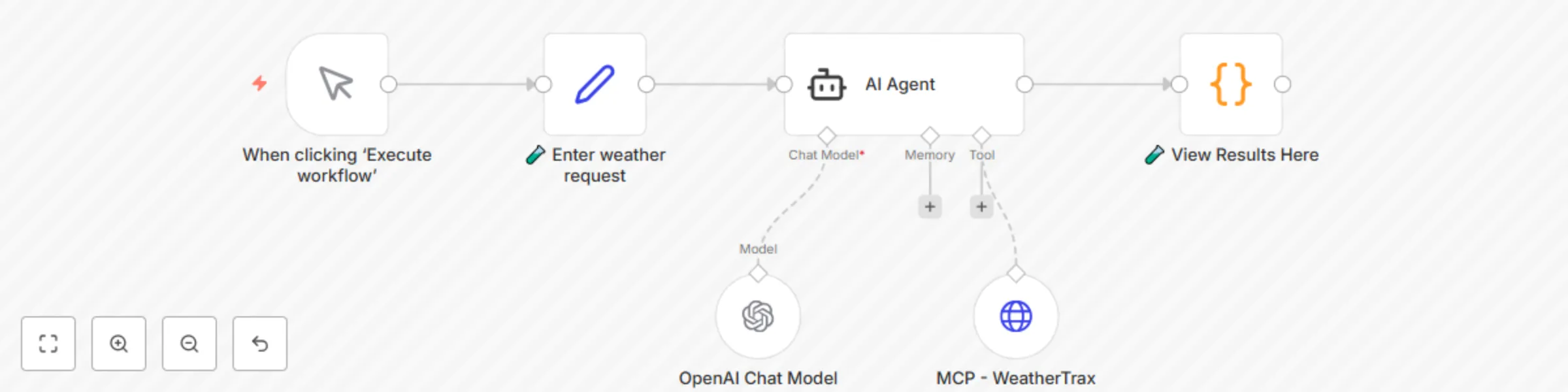
Workflow preview: AI weather forecasts with MCP integration
Free intermediate

AI weather forecasts with MCP integration

# Real-time Weather Forecasts with MCP Tools This n8n workflow demonstrates how to integrate real-time weather intelligence into any automation using the Model Context Protocol (MCP). Get current conditions and 5-day forecasts with natural language queries like "What's the weather like in Miami?" or "Will it rain next Tuesday in Seattle?" - all powered by live weather data and AI. ## **Good to know** * No API keys required - uses hosted MCP weather server with built-in WorldWeatherOnline integration * Provides current conditions and detailed 5-day forecasts * Natural language queries work for any location worldwide * Powered by WorldWeatherOnline - the world's most accurate weather system * Fully preconfigured and ready to run out-of-the-box * Enterprise-ready with error handling and rate limiting ## How it works * **Natural Language Input**: Receives weather queries via webhook, chat, email, or voice * **AI Agent Processing**: n8n Agent node interprets requests and determines: - Location extraction from natural language - Weather data type needed (current or 5-day forecast) - Response formatting preferences * **MCP Weather Tool**: Live hosted server provides: - Real-time current conditions (temperature, humidity, wind, conditions) - 5-day detailed forecasts with daily highs/lows - Weather descriptions and condition codes - Powered by WorldWeatherOnline's premium data * **Intelligent Responses**: AI formats weather data into: - Conversational natural language responses - Structured data for downstream automation - Action-triggering data for workflows ## How to use * Import the workflow into n8n from the template * Add your preferred AI model API key to the Agent node * Customize the system prompt for your specific use case * Connect to your preferred input/output channels * Run and start querying weather with natural language ## Use Cases * **Smart Home Automation**: "Turn on sprinklers if no rain forecast for 3 days" * **Travel Planning**: "Check weather for my Paris trip next week" * **Event Management**: "Will outdoor wedding conditions be good Saturday?" * **Agriculture/Farming**: "Check 5-day forecast for planting schedule" * **Logistics**: "Delay shipping if severe weather forecast in delivery zone" * **Personal Assistant**: "Should I wear a jacket today in Chicago?" * **Sports/Recreation**: "Surf conditions and wind forecast for weekend" * **Construction**: "Safe working conditions for outdoor project this week" ## Requirements * n8n instance (cloud or self-hosted) * AI model provider account (OpenAI, Anthropic, Google, etc.) * Internet connection for MCP weather server access * Optional: Webhook endpoints for external integrations ## Customizing this workflow * **Location Intelligence**: Add geocoding for address-to-coordinates conversion * **Data Storage**: Save weather history to databases for trend analysis * **Dashboard Integration**: Connect to Grafana, Tableau, or custom visualizations * **Voice Integration**: Add speech-to-text for voice weather queries * **Scheduling**: Set up automated daily/weekly weather briefings * **Conditional Logic**: Trigger different actions based on weather conditions ## Sample Input/Output Natural Language Queries: "What's the weather like in Miami?" "Will it rain next Tuesday in Seattle?" "5-day forecast for London" "Temperature in Tokyo tomorrow" "Weather conditions for outdoor event Saturday" Rich Responses: { "location": "Miami, FL", "current": { "temperature": "78°F", "condition": "Partly Cloudy", "humidity": "65%", "wind": "10 mph SE" }, "forecast": { "today": "High 82°F, Low 71°F, 20% rain", "tomorrow": "High 85°F, Low 73°F, Sunny" }, "ai_summary": "Perfect beach weather in Miami today! Partly cloudy with comfortable temperatures and light winds." } ## Why This Workflow is Unique * **Zero Setup Weather Data**: No API key management - MCP server handles everything * **World-Class Accuracy**: Powered by WorldWeatherOnline's premium weather data * **AI-Powered Intelligence**: Natural language understanding of complex weather queries * **Enterprise Ready**: Built-in error handling, rate limiting, and reliability * **Global Coverage**: Worldwide weather data with location intelligence * **Action-Oriented**: Designed for automation decisions, not just information display Transform your automations with intelligent weather awareness powered by the world's most accurate weather system! ## 🧪 Setup Steps 1. ✅ The **Agent node is already configured**: * The **system prompt is included** * The **tool endpoint is pre-set** 2. All you need to do is: * Add your AI model API key to the existing Agent credential * Hit run and you're done ✅ 🔗 Full project link: [Github: weathertrax-mcp-agent-demo](https://github.com/jaredco-ai/weathertrax-mcp-agent-demo)

J
JaredCo
Personal Productivity
19 Jun 2025
1740
0