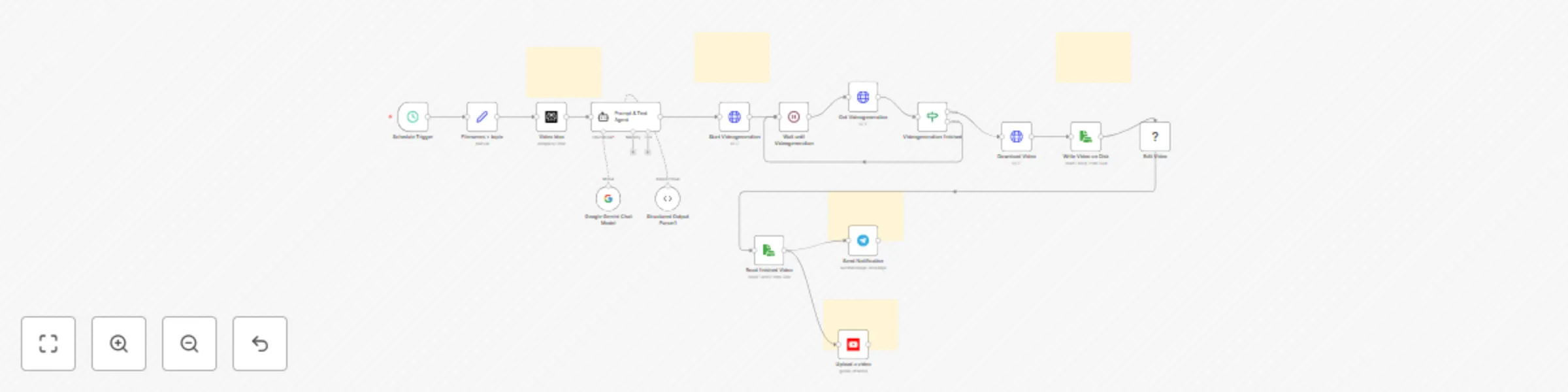
AI video automation engine - generate & publish YT shorts with Veo-3 or Sora 2

Workflow preview

Workflow preview
100%
AI video automation engine - generate & publish YT shorts with Veo-3 or Sora 2 preview
Open on n8n.io

Important notice

This workflow is provided as-is. Please review and test before using in production.

1. Workflow Overview

Scale short form content without scaling your team. This template turns idea discovery → prompt & text generation → Veo 3 video rendering → vertical formatting → multi channel publishing into one c...

Best for

  • Content Creation automation workflows
  • Multimodal AI automation workflows
  • advanced n8n builders looking for reusable templates

Tools used

n8n-nodes-base.youtube, n8n-nodes-base.scheduletrigger, @n8n/n8n-nodes-langchain.lmchatgooglegemini, @n8n/n8n-nodes-langchain.outputparserstructured, n8n-nodes-base.stickynote, n8n-nodes-base.perplexity, @n8n/n8n-nodes-langchain.agent, n8n-nodes-base.httprequest

Source and attribution

This workflow is cataloged by N8N Workflows and links back to its original n8n.io source page by SuS.

Original n8n.io source

1.1 Workflow description

Title
AI video automation engine - generate & publish YT shorts with Veo-3 or Sora 2
Workflow name
AI video automation engine - generate & publish YT shorts with Veo-3 or Sora 2

Product Overview

Scale short-form content without scaling your team. This template turns idea discovery → prompt & text generation → Veo-3 video rendering → vertical formatting → multi-channel publishing into one cohesive pipeline. It’s built natively on n8n, so you keep full control, self-host if you want, and extend every step with your own logic.


What’s Inside (Modular Building Blocks)

  • Idea Engine – AI generates concise, surprising facts and a visual metaphor per topic (swappable LLM/provider).
  • Prompt & Text Composer – Crafts an 8-second, cinematic Veo-3 prompt + title, caption, description, hashtags, tags in a consistent brand voice.
  • Renderer Integration – Kie.ai → Veo-3 (16:9, 1080p) for fast, cinematic clips.
  • Vertical Formatter – FFmpeg pipeline converts to 1080×1920, adds top/bottom text bands (15–20 words), and preserves loop smoothness.
  • Multi-Channel Distribution – Uploads to YouTube Shorts and Telegram for internal review/approvals.
  • Scheduler & Orchestration – CRON triggers, retries, and lightweight polling make the system dependable for daily publishing.

Why These Components (and why they work together)

  • Veo-3 via Kie.ai provides a sweet spot of quality + speed, ideal for short loops where style coherence matters.
  • n8n brings vendor-neutral orchestration: swap LLMs, add rate limits, branch flows, or trigger on events—without rewriting your stack.
  • FFmpeg ensures a platform-native look (9:16, crisp text bands, no blurry hacks).
  • Separation of concerns (idea → text → render → edit → publish) makes it easy to A/B test any stage independently.

Key Benefits

  • Hands-Free Consistency – Daily output with a repeatable creative pattern that audiences recognize.
  • Brand-Safe Copy – Titles, descriptions, and hashtags follow a controlled structure—polished by design.
  • Time Savings – Replace fragmented tooling with one pipeline; no manual re-formatting, captioning, or re-uploads.
  • Creator-Grade Quality – Cinematic loops optimized for watch time and retention on Shorts/Reels.
  • Own Your Stack – Self-hosted orchestration and storage; no lock-in.

Reuse & Extension Ideas

  • Topic CMS – Feed topics from Google Sheets / Notion and mark each as “published”—perfect for content calendars.
  • Multi-Language – Duplicate the text composer for EN/DE outputs; upload the same clip with localized metadata.
  • Thumbnail/Preview Track – Add an image generator step for platform cards or YouTube custom thumbnails.
  • Analytics Feedback Loop – Fetch video performance, score ideas, and prioritize winning angles automatically.
  • Compliance & Fact Trails – Store sources next to each post for quick audits and edits.
  • Storage & Delivery – Push masters to S3/Backblaze, serve via CDN for faster IG ingestion.
  • More Channels – Add TikTok, X, LinkedIn publishers or a newsletter export.
  • A/B Creative – Render multiple Veo-3 seeds, rotate captions/CTAs, and compare retention.

Who It’s For

  • Agencies wanting repeatable, branded Shorts at scale.
  • Creators & Media Teams who need daily output with minimal overhead.
  • Product Marketing looking to convert docs/reports into snackable, evergreen video facts.
  • Startups building audience fast without adding headcount.

Technical Notes (at a glance)

  • Orchestration: n8n (self-hosted or cloud)
  • Video: Veo-3 via Kie.ai (16:9 render → FFmpeg vertical remaster 1080×1920)
  • Text Stack: Any LLM provider (swappable); outputs normalized for each platform
  • Distribution: YouTube Data API v3, Telegram Bot API
  • Security: API keys via n8n credentials/ENV; public URL endpoint only serves whitelisted .mp4 filenames with proper headers
  • Reliability: CRON triggers, bounded retries/polling, and safe fallbacks to avoid stuck runs

Who to use it

To enhance the completeness, add specific step-by-step setup instructions for users to implement the workflow easily:

  1. Install Prerequisites

    • Set up n8n on your server or local machine (production mode with reverse proxy).
    • Install FFmpeg and ensure fonts (e.g., DejaVu Sans) are available.
  2. Configure API Credentials

    • Get a Perplexity API key for idea generation.
    • Request a Kie.ai API key for Veo-3 video rendering.
    • Set up YouTube OAuth2 (enable YouTube Data API v3 in Google Cloud Console).
    • Create a Telegram bot token via BotFather.
    • Store all keys as environment variables in n8n (avoid hardcoding).
  3. Prepare Storage

    • Create a working directory accessible by n8n with read/write rights.
    • Ensure enough disk space for video caching (approx. 50–200 MB per run).
  4. Set Scheduling

    • Add CRON triggers for automatic execution (e.g., twice daily).
    • Example:
      0 12 04 * * * → 04:12 AM daily
      0 12 16 * * * → 04:12 PM daily
      
  5. Define Variables

    • File naming conventions:
      • name_vorher = raw 16:9 video
      • name_nachher = final 9:16 video
    • Set topic = content niche (e.g., history, ocean, futurism).
  6. Build Workflow Steps in n8n

    • Idea Generation: Perplexity node for viral fact.
    • Prompt Agent: Expand into full package (prompt, caption, hashtags).
    • Video Generation: Kie.ai Veo-3 API request (poll until success).
    • Download & Edit: Save raw file, convert to 9:16 with FFmpeg overlays.
    • Notifications & Uploads:
      • Telegram node → send video.
      • YouTube node → upload with title, description, tags.
  7. Test End-to-End

    • Run the workflow manually once.
    • Verify video rendering, FFmpeg subtitles, Telegram message, YouTube & IG uploads.
  8. Go Live

    • Enable CRON triggers.
    • Monitor first runs for errors (API limits, FFmpeg paths, token expiry).

Why Buy This Template

You’re not buying a script—you’re buying a production-ready system with a deliberate creative pattern, best-practice formatting, and shipping-grade integrations. It reduces ramp-up from weeks to hours and gives you a flexible base you can keep evolving.


1.2 Logical Blocks

This catalog entry is organized from the workflow JSON. The node-level section below shows the executable blocks available for review before importing the template.

2. Block-by-Block Analysis

Block 1 - Upload a video

Type / Role
n8n-nodes-base.youTube - youTube
Config choices
Version 1

Block 2 - Schedule Trigger

Type / Role
n8n-nodes-base.scheduleTrigger - scheduleTrigger
Config choices
Version 1.2

Block 3 - Google Gemini Chat Model

Type / Role
@n8n/n8n-nodes-langchain.lmChatGoogleGemini - lmChatGoogleGemini
Config choices
Version 1

Block 4 - Structured Output Parser1

Type / Role
@n8n/n8n-nodes-langchain.outputParserStructured - outputParserStructured
Config choices
Version 1.3

Block 5 - Sticky Note2

Type / Role
n8n-nodes-base.stickyNote - stickyNote
Config choices
Version 1

Block 6 - Sticky Note3

Type / Role
n8n-nodes-base.stickyNote - stickyNote
Config choices
Version 1

Block 7 - Video Idea

Type / Role
n8n-nodes-base.perplexity - perplexity
Config choices
Version 1

Block 8 - Prompt & Text Agent

Type / Role
@n8n/n8n-nodes-langchain.agent - agent
Config choices
Version 2.2

Block 9 - Start Videogeneration

Type / Role
n8n-nodes-base.httpRequest - httpRequest
Config choices
Version 4.2

Block 10 - Get Videogeneration

Type / Role
n8n-nodes-base.httpRequest - httpRequest
Config choices
Version 4.2

Block 11 - Videogeneration finished

Type / Role
n8n-nodes-base.if - if
Config choices
Version 2.2

Block 12 - Sticky Note4

Type / Role
n8n-nodes-base.stickyNote - stickyNote
Config choices
Version 1

Block 13 - Sticky Note5

Type / Role
n8n-nodes-base.stickyNote - stickyNote
Config choices
Version 1

Block 14 - Download Video

Type / Role
n8n-nodes-base.httpRequest - httpRequest
Config choices
Version 4.2

Block 15 - Write Video on Disk

Type / Role
n8n-nodes-base.readWriteFile - readWriteFile
Config choices
Version 1

Block 16 - Edit Video

Type / Role
n8n-nodes-base.executeCommand - executeCommand
Config choices
Version 1

Block 17 - Read finished Video

Type / Role
n8n-nodes-base.readWriteFile - readWriteFile
Config choices
Version 1

Block 18 - Send Notification

Type / Role
n8n-nodes-base.telegram - telegram
Config choices
Version 1.2

Block 19 - Sticky Note6

Type / Role
n8n-nodes-base.stickyNote - stickyNote
Config choices
Version 1

Block 20 - Filenames + topic

Type / Role
n8n-nodes-base.set - set
Config choices
Version 3.4

Block 21 - Wait until Videogeneration

Type / Role
n8n-nodes-base.wait - wait
Config choices
Version 1.1

3. Summary Table

Workflow AI video automation engine - generate & publish YT shorts with Veo-3 or Sora 2
Complexity advanced
Nodes 21
Categories Content Creation, Multimodal AI
Author SuS
Published 09 Sept 2025

4. Reproducing the Workflow from Scratch

  1. 1. Download the workflow JSON

    Use the JSON export at /data/workflows/8429/8429.json as the source template for this automation.

  2. 2. Import the template into n8n

    Open n8n, import the downloaded JSON, and review each node before activating the workflow.

  3. 3. Configure credentials and variables

    Replace placeholder credentials, API keys, webhook URLs, account IDs, and environment-specific values with your own settings.

  4. 4. Test with sample data

    Run the workflow manually or in a staging workspace, inspect node output, and confirm downstream systems receive the expected data.

  5. 5. Activate and monitor

    Enable the workflow only after testing, then monitor executions, errors, and rate limits during the first production runs.

5. General Notes & Resources

Review imported nodes carefully before activation. This catalog entry is intended to help you inspect the workflow structure, understand required services, and find related templates faster.

Node names, credentials, schedules, webhook paths, and external service limits may need adjustment for your workspace.

Frequently asked questions

What does AI video automation engine - generate & publish YT shorts with Veo-3 or Sora 2 do?

Scale short form content without scaling your team. This template turns idea discovery → prompt & text generation → Veo 3 video rendering → vertical formatting → multi channel publishing into one c...

What do I need before importing this workflow?

Review the workflow JSON, configure any required credentials in n8n, and test the automation in a safe workspace before using it in production.

Can I customize this workflow?

Yes. Use the block-by-block analysis and the downloadable JSON to inspect each node, then adjust credentials, prompts, schedules, filters, or destinations for your Content Creation, Multimodal AI use case.