Ai research paper analysis & documentation with Decodo, GPT & Google

Workflow preview

Workflow preview
100%
Ai research paper analysis & documentation with Decodo, GPT & Google preview
Open on n8n.io

Important notice

This workflow is provided as-is. Please review and test before using in production.

1. Workflow Overview

This workflow contains community nodes that are only compatible with the self hosted version of n8n. Accelerate your research analysis with this Automated Research Intelligence System! This workflo...

Best for

  • Document Extraction automation workflows
  • AI Summarization automation workflows
  • advanced n8n builders looking for reusable templates

Tools used

n8n-nodes-base.formtrigger, n8n-nodes-base.set, n8n-nodes-base.httprequest, @n8n/n8n-nodes-langchain.agent, @decodo/n8n-nodes-decodo.decodotool, @n8n/n8n-nodes-langchain.lmchatopenai, n8n-nodes-base.googledocs, n8n-nodes-base.googlesheets

Source and attribution

This workflow is cataloged by N8N Workflows and links back to its original n8n.io source page by Yaron Been.

Original n8n.io source

1.1 Workflow description

Title
Ai research paper analysis & documentation with Decodo, GPT & Google
Workflow name
Ai research paper analysis & documentation with Decodo, GPT & Google

This workflow contains community nodes that are only compatible with the self-hosted version of n8n.

Accelerate your research analysis with this Automated Research Intelligence System!
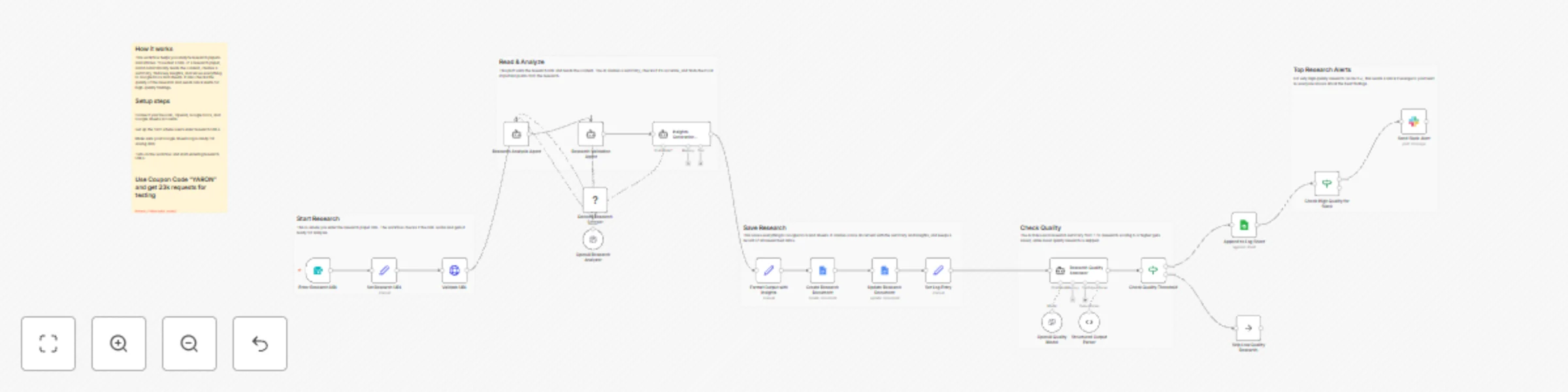
This workflow uses AI and web scraping to analyze research papers and articles, extracting key insights, validating content quality, and generating comprehensive research documents. Perfect for research teams, academics, and AI enthusiasts staying current with the latest developments in artificial intelligence and machine learning.

What This Template Does

  1. Triggers via form submission for on-demand research URL analysis.
  2. Validates URL accessibility and prepares for processing.
  3. Uses Decodo scraper to extract research content from target URLs.
  4. Analyzes research papers with AI for comprehensive understanding.
  5. Validates summaries for accuracy, completeness, and relevance.
  6. Generates key insights and actionable takeaways from research.
  7. Creates professional Google Docs with formatted research summaries.
  8. Evaluates research quality with AI-powered rating system.
  9. Saves all research to Google Sheets for historical tracking.
  10. Sends Slack alerts for high-quality research findings (9+ rating).

Key Benefits

  • Automated research analysis saves hours of manual reading time
  • AI-powered insights extraction from complex research papers
  • Quality validation ensures accurate and relevant summaries
  • Centralized research database for team collaboration
  • Real-time alerts for breakthrough research findings
  • Professional documentation automatically generated

Features

  • Form-based trigger for easy research submission
  • URL validation and accessibility checking
  • AI-powered research analysis and summarization
  • Decodo web scraping for reliable content extraction
  • Multi-stage validation for accuracy and relevance
  • Automated Google Docs report generation
  • Quality assessment with structured rating system
  • Google Sheets integration for research tracking
  • Slack notifications for premium research findings
  • Quality threshold filtering for optimal results

Requirements

  • Decodo API credentials for research scraping
  • OpenAI API credentials for AI analysis
  • Google Docs OAuth2 credentials for document creation
  • Google Sheets OAuth2 credentials with edit access
  • Slack Bot Token with chat:write permission
  • Environment variables for configuration settings

Target Audience

  • AI research teams and data scientists
  • Academic researchers and university labs
  • Machine learning engineers and developers
  • Technology innovation teams
  • Research and development departments
  • Content creators in AI/ML space

Step-by-Step Setup Instructions

  1. Connect Decodo API credentials for research scraping functionality
  2. Set up OpenAI credentials for AI analysis and quality assessment
  3. Configure Google Docs for automated research document generation
  4. Add Google Sheets credentials for research tracking and history
  5. Set up Slack credentials for high-quality research alerts
  6. Customize quality thresholds for research rating (default: 6+ for processing, 9+ for alerts)
  7. Test with sample research URLs to verify analysis and formatting
  8. Deploy the form for team access to research analysis requests
  9. Monitor research database for trends and insights

Pro Tip: Pro Tip: Use coupon code "YARON" to get 23K requests for testing

This workflow transforms complex research into actionable intelligence with automated analysis, quality validation, and professional documentation!

1.2 Logical Blocks

This catalog entry is organized from the workflow JSON. The node-level section below shows the executable blocks available for review before importing the template.

2. Block-by-Block Analysis

Block 1 - Enter Research URL

Type / Role
n8n-nodes-base.formTrigger - formTrigger
Config choices
Version 2.3

Block 2 - Set Research URL

Type / Role
n8n-nodes-base.set - set
Config choices
Version 3.4

Block 3 - Validate URL

Type / Role
n8n-nodes-base.httpRequest - httpRequest
Config choices
Version 4.2

Block 4 - Research Analysis Agent

Type / Role
@n8n/n8n-nodes-langchain.agent - agent
Config choices
Version 2.2

Block 5 - Decodo Research Scraper

Type / Role
@decodo/n8n-nodes-decodo.decodoTool - decodoTool
Config choices
Version 1

Block 6 - OpenAI Research Analyzer

Type / Role
@n8n/n8n-nodes-langchain.lmChatOpenAi - lmChatOpenAi
Config choices
Version 1.2

Block 7 - Research Validation Agent

Type / Role
@n8n/n8n-nodes-langchain.agent - agent
Config choices
Version 2.2

Block 8 - Insights Generation Agent

Type / Role
@n8n/n8n-nodes-langchain.agent - agent
Config choices
Version 2.2

Block 9 - Format Output with Insights

Type / Role
n8n-nodes-base.set - set
Config choices
Version 3.4

Block 10 - Update Research Document

Type / Role
n8n-nodes-base.googleDocs - googleDocs
Config choices
Version 2

Block 11 - Set Log Entry

Type / Role
n8n-nodes-base.set - set
Config choices
Version 3.4

Block 12 - Append to Log Sheet

Type / Role
n8n-nodes-base.googleSheets - googleSheets
Config choices
Version 4.2

Block 13 - Structured Output Parser

Type / Role
@n8n/n8n-nodes-langchain.outputParserStructured - outputParserStructured
Config choices
Version 1.3

Block 14 - Create Research Document

Type / Role
n8n-nodes-base.googleDocs - googleDocs
Config choices
Version 2

Block 15 - Research Quality Assessor

Type / Role
@n8n/n8n-nodes-langchain.agent - agent
Config choices
Version 2.2

Block 16 - OpenAI Quality Model

Type / Role
@n8n/n8n-nodes-langchain.lmChatOpenAi - lmChatOpenAi
Config choices
Version 1.2

Block 17 - Check Quality Threshold

Type / Role
n8n-nodes-base.if - if
Config choices
Version 2.2

Block 18 - Check High Quality for Slack

Type / Role
n8n-nodes-base.if - if
Config choices
Version 2.2

Block 19 - Skip Low Quality Research

Type / Role
n8n-nodes-base.noOp - noOp
Config choices
Version 1

Block 20 - Send Slack Alert

Type / Role
n8n-nodes-base.slack - slack
Config choices
Version 2.3

Block 21 - Sticky Note

Type / Role
n8n-nodes-base.stickyNote - stickyNote
Config choices
Version 1

Block 22 - Sticky Note6

Type / Role
n8n-nodes-base.stickyNote - stickyNote
Config choices
Version 1

Block 23 - Sticky Note7

Type / Role
n8n-nodes-base.stickyNote - stickyNote
Config choices
Version 1

Block 24 - Sticky Note8

Type / Role
n8n-nodes-base.stickyNote - stickyNote
Config choices
Version 1

Showing the first 24 of 26 workflow blocks. Download the JSON for the full node graph.

3. Summary Table

Workflow Ai research paper analysis & documentation with Decodo, GPT & Google
Complexity advanced
Nodes 26
Categories Document Extraction, AI Summarization
Author Yaron Been
Published 01 Nov 2025

4. Reproducing the Workflow from Scratch

  1. 1. Download the workflow JSON

    Use the JSON export at /data/workflows/10415/10415.json as the source template for this automation.

  2. 2. Import the template into n8n

    Open n8n, import the downloaded JSON, and review each node before activating the workflow.

  3. 3. Configure credentials and variables

    Replace placeholder credentials, API keys, webhook URLs, account IDs, and environment-specific values with your own settings.

  4. 4. Test with sample data

    Run the workflow manually or in a staging workspace, inspect node output, and confirm downstream systems receive the expected data.

  5. 5. Activate and monitor

    Enable the workflow only after testing, then monitor executions, errors, and rate limits during the first production runs.

5. General Notes & Resources

Review imported nodes carefully before activation. This catalog entry is intended to help you inspect the workflow structure, understand required services, and find related templates faster.

Node names, credentials, schedules, webhook paths, and external service limits may need adjustment for your workspace.

Frequently asked questions

What does Ai research paper analysis & documentation with Decodo, GPT & Google do?

This workflow contains community nodes that are only compatible with the self hosted version of n8n. Accelerate your research analysis with this Automated Research Intelligence System! This workflo...

What do I need before importing this workflow?

Review the workflow JSON, configure any required credentials in n8n, and test the automation in a safe workspace before using it in production.

Can I customize this workflow?

Yes. Use the block-by-block analysis and the downloadable JSON to inspect each node, then adjust credentials, prompts, schedules, filters, or destinations for your Document Extraction, AI Summarization use case.