AI-Powered Vendor Policy & RSS Feed Analysis with Integrated Risk Scoring

Workflow preview

Workflow preview
100%
AI-Powered Vendor Policy & RSS Feed Analysis with Integrated Risk Scoring preview
Open on n8n.io

Important notice

This workflow is provided as-is. Please review and test before using in production.

1. Workflow Overview

A dual engine, AI driven n8n workflow that automates the monitoring of both vendor policy webpages and compliance related RSS feeds. It intelligently detects recent updates, evaluates their potenti...

Best for

  • SecOps automation workflows
  • AI Summarization automation workflows
  • advanced n8n builders looking for reusable templates

Tools used

n8n-nodes-base.httprequest, @n8n/n8n-nodes-langchain.agent, n8n-nodes-base.code, n8n-nodes-base.splitout, n8n-nodes-base.rssfeedread, @n8n/n8n-nodes-langchain.lmchatgooglegemini, n8n-nodes-base.gmail, n8n-nodes-base.filter

Source and attribution

This workflow is cataloged by N8N Workflows and links back to its original n8n.io source page by Kamalraj.

Original n8n.io source

1.1 Workflow description

Title
AI-Powered Vendor Policy & RSS Feed Analysis with Integrated Risk Scoring
Workflow name
AI-Powered Vendor Policy & RSS Feed Analysis with Integrated Risk Scoring

🧠 Overview

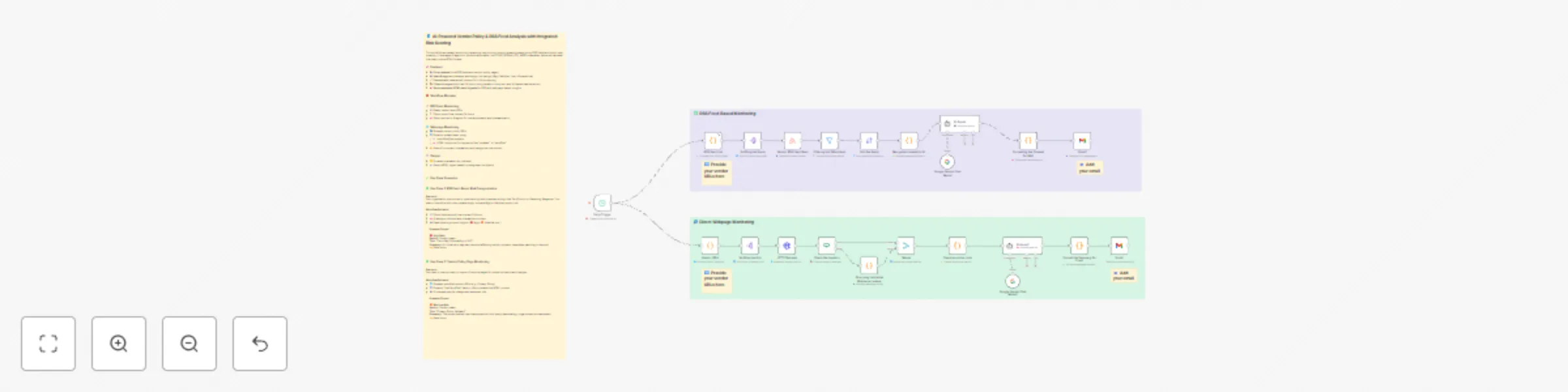
A dual-engine, AI-driven n8n workflow that automates the monitoring of both vendor policy webpages and compliance-related RSS feeds. It intelligently detects recent updates, evaluates their potential risk, and delivers a structured HTML digest categorized by severity — right to your inbox.


⚙️ How It Works

1️⃣ Scheduled Execution
⏰ Runs daily at 3 AM to ensure timely and consistent monitoring.

2️⃣ Dual Data Streams

  • 📰 RSS Feed Monitoring: Ingests articles from selected feeds focused on security, privacy, and compliance.
  • 🌐 Vendor Webpage Monitoring: Fetches specified policy URLs and checks for updates using Last-Modified headers and in-page content analysis.

3️⃣ Content Filtering
🧹 Applies logic to filter out stale or irrelevant data, focusing only on updates within the past 24 hours.

4️⃣ AI-Powered Risk Categorization
🤖 Two dedicated AI agents (one per stream) analyze content to:

  • 📝 Generate a 2-line compliance/risk-focused summary
  • 🚦 Assign a risk score: High, Medium, Low, or Informational

5️⃣ Digest Generation
🖼️ Summaries are grouped by risk level and formatted into a visually polished HTML report, using category-specific styles and color coding.

6️⃣ Email Delivery
📧 Automatically sends out two separate email reports via Gmail:

  • 🗂️ One for vendor webpage updates
  • 📰 One for RSS feed-based vendor news

✨ Key Features

  • 🔁 Automates daily monitoring across feeds and policy pages
  • 🤖 AI-driven summarization and structured risk scoring
  • 🧾 Clean, HTML-formatted digests grouped by risk category
  • 🧩 Fully customizable: feed sources, vendor URLs, AI prompts, and email styling
  • 🛡️ Designed for compliance, security, and risk teams needing proactive intelligence

1.2 Logical Blocks

This catalog entry is organized from the workflow JSON. The node-level section below shows the executable blocks available for review before importing the template.

2. Block-by-Block Analysis

Block 1 - HTTP Request

Type / Role
n8n-nodes-base.httpRequest - httpRequest
Config choices
Version 4.2

Block 2 - AI Agent

Type / Role
@n8n/n8n-nodes-langchain.agent - agent
Config choices
Version 2

Block 3 - RSS Feed List

Type / Role
n8n-nodes-base.code - code
Config choices
Version 2

Block 4 - Splitting the Feeds

Type / Role
n8n-nodes-base.splitOut - splitOut
Config choices
Version 1

Block 5 - Vendor RSS Feed Read

Type / Role
n8n-nodes-base.rssFeedRead - rssFeedRead
Config choices
Version 1.1

Block 6 - Vendor URLs

Type / Role
n8n-nodes-base.code - code
Config choices
Version 2

Block 7 - AI Agent1

Type / Role
@n8n/n8n-nodes-langchain.agent - agent
Config choices
Version 2

Block 8 - Google Gemini Chat Model1

Type / Role
@n8n/n8n-nodes-langchain.lmChatGoogleGemini - lmChatGoogleGemini
Config choices
Version 1

Block 9 - Gmail

Type / Role
n8n-nodes-base.gmail - gmail
Config choices
Version 2.1

Block 10 - Gmail1

Type / Role
n8n-nodes-base.gmail - gmail
Config choices
Version 2.1

Block 11 - Google Gemini Chat Model

Type / Role
@n8n/n8n-nodes-langchain.lmChatGoogleGemini - lmChatGoogleGemini
Config choices
Version 1

Block 12 - Filtering last 24hrs feed

Type / Role
n8n-nodes-base.filter - filter
Config choices
Version 2.2

Block 13 - Formatting the Content for Mail

Type / Role
n8n-nodes-base.code - code
Config choices
Version 2

Block 14 - Sort the feeds

Type / Role
n8n-nodes-base.sort - sort
Config choices
Version 1

Block 15 - Merge the content for AI

Type / Role
n8n-nodes-base.code - code
Config choices
Version 2

Block 16 - Merge

Type / Role
n8n-nodes-base.merge - merge
Config choices
Version 3.2

Block 17 - Format the Summary for Email

Type / Role
n8n-nodes-base.code - code
Config choices
Version 2

Block 18 - Scrapping inside the Webpage content

Type / Role
n8n-nodes-base.code - code
Config choices
Version 2

Block 19 - Cleaning up the code

Type / Role
n8n-nodes-base.code - code
Config choices
Version 2

Block 20 - Daily Trigger

Type / Role
n8n-nodes-base.scheduleTrigger - scheduleTrigger
Config choices
Version 1.2

Block 21 - Sticky Note1

Type / Role
n8n-nodes-base.stickyNote - stickyNote
Config choices
Version 1

Block 22 - Sticky Note

Type / Role
n8n-nodes-base.stickyNote - stickyNote
Config choices
Version 1

Block 23 - Sticky Note2

Type / Role
n8n-nodes-base.stickyNote - stickyNote
Config choices
Version 1

Block 24 - Sticky Note3

Type / Role
n8n-nodes-base.stickyNote - stickyNote
Config choices
Version 1

Showing the first 24 of 29 workflow blocks. Download the JSON for the full node graph.

3. Summary Table

Workflow AI-Powered Vendor Policy & RSS Feed Analysis with Integrated Risk Scoring
Complexity advanced
Nodes 29
Categories SecOps, AI Summarization
Author Kamalraj
Published 21 Jun 2025

4. Reproducing the Workflow from Scratch

  1. 1. Download the workflow JSON

    Use the JSON export at /data/workflows/5103/5103.json as the source template for this automation.

  2. 2. Import the template into n8n

    Open n8n, import the downloaded JSON, and review each node before activating the workflow.

  3. 3. Configure credentials and variables

    Replace placeholder credentials, API keys, webhook URLs, account IDs, and environment-specific values with your own settings.

  4. 4. Test with sample data

    Run the workflow manually or in a staging workspace, inspect node output, and confirm downstream systems receive the expected data.

  5. 5. Activate and monitor

    Enable the workflow only after testing, then monitor executions, errors, and rate limits during the first production runs.

5. General Notes & Resources

Review imported nodes carefully before activation. This catalog entry is intended to help you inspect the workflow structure, understand required services, and find related templates faster.

Node names, credentials, schedules, webhook paths, and external service limits may need adjustment for your workspace.

Frequently asked questions

What does AI-Powered Vendor Policy & RSS Feed Analysis with Integrated Risk Scoring do?

A dual engine, AI driven n8n workflow that automates the monitoring of both vendor policy webpages and compliance related RSS feeds. It intelligently detects recent updates, evaluates their potenti...

What do I need before importing this workflow?

Review the workflow JSON, configure any required credentials in n8n, and test the automation in a safe workspace before using it in production.

Can I customize this workflow?

Yes. Use the block-by-block analysis and the downloadable JSON to inspect each node, then adjust credentials, prompts, schedules, filters, or destinations for your SecOps, AI Summarization use case.