Block 1 - AI Agent
- Type / Role
- @n8n/n8n-nodes-langchain.agent - agent
- Config choices
- Version 1.7


 Early Deal
This workflow is provided as-is. Please review and test before using in production.
Automated Upwork Cover Letter Generator with n8n + MacOS Shortcut + P...
@n8n/n8n-nodes-langchain.agent, @n8n/n8n-nodes-langchain.vectorstorepinecone, @n8n/n8n-nodes-langchain.embeddingsgooglegemini, n8n-nodes-base.webhook, @n8n/n8n-nodes-langchain.memorybufferwindow, @n8n/n8n-nodes-langchain.lmchatgroq, n8n-nodes-base.respondtowebhook, n8n-nodes-base.markdown
This workflow is cataloged by N8N Workflows and links back to its original n8n.io source page by Udit Rawat.
Original n8n.io sourceThis n8n automation is designed to streamline the Upwork proposal process by generating highly personalized, context-aware cover letters using your own skills and project data stored in a Pinecone vector store.
With the help of an AI Agent powered by Groq’s Qwen LLM, and triggered instantly via a MacOS Shortcut, this system takes job descriptions from your clipboard and returns a ready-to-use HTML cover letter—right on your desktop.
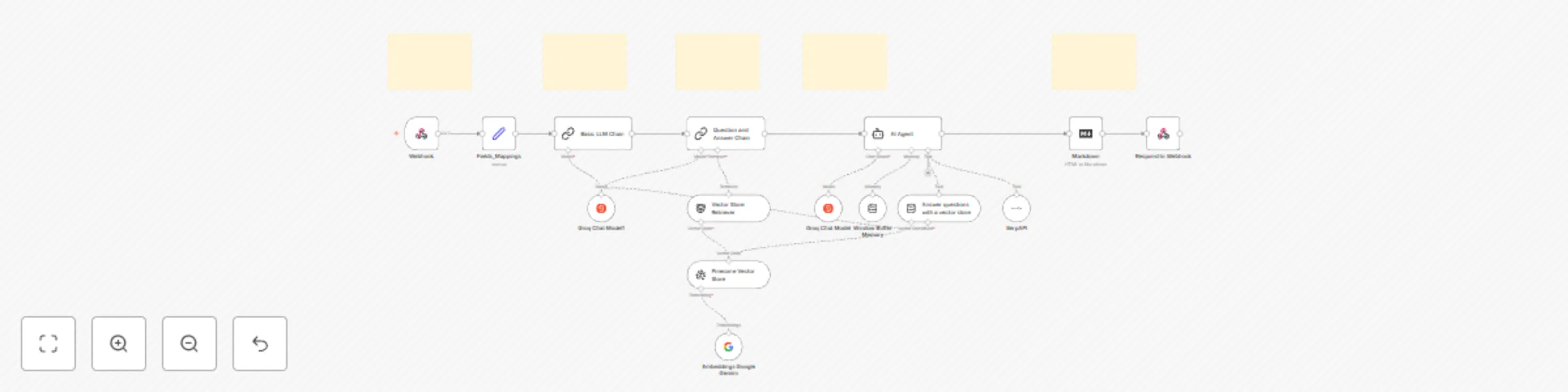
The process begins with a MacOS Shortcut that captures job description text from your clipboard and sends it to a custom webhook in n8n.
The webhook node receives the clipboard data, along with the required credentials for authentication. This node serves as the entry point to the full automation.
A series of basic logic nodes map and clean up the input fields. These are then passed to an LLM Chain to generate specific questions related to the job description.
Using your previously stored skills and project data in a Pinecone vector store, the system retrieves relevant information to answer the generated questions and builds a rich context around the job description.
With both the job post and contextual data, the AI Agent (powered by Groq’s Qwen LLM) creates a tailored cover letter.
The agent is equipped with:
This ensures the generated proposal is insightful, relevant, and professional.
The markdown output from the AI is converted into HTML using a Markdown node, making it easy to paste directly into Upwork or emails.
The final HTML response is sent back to the MacOS Shortcut, which displays it in a modal window for easy review and copy-paste.
This automation is built specifically for freelancers on Upwork (or any freelance platform) who want to:
Whether you’re a beginner or a seasoned pro, this tool elevates your workflow while staying simple to use.
n8n instance > Note: This workflow is designed for building and returning Upwork cover letters using job descriptions copied to your clipboard. All generation is context-aware and tailored per submission.
This catalog entry is organized from the workflow JSON. The node-level section below shows the executable blocks available for review before importing the template.
| Workflow | AI-powered Upwork cover letter generator – Pinecone, Groq, Google Gemin, SerpAPI |
|---|---|
| Complexity | advanced |
| Nodes | 20 |
| Categories | Content Creation, AI RAG |
| Author | Udit Rawat |
| Published | 20 Apr 2025 |
Use the JSON export at /data/workflows/3622/3622.json as the source template for this automation.
Open n8n, import the downloaded JSON, and review each node before activating the workflow.
Replace placeholder credentials, API keys, webhook URLs, account IDs, and environment-specific values with your own settings.
Run the workflow manually or in a staging workspace, inspect node output, and confirm downstream systems receive the expected data.
Enable the workflow only after testing, then monitor executions, errors, and rate limits during the first production runs.
Review imported nodes carefully before activation. This catalog entry is intended to help you inspect the workflow structure, understand required services, and find related templates faster.
Node names, credentials, schedules, webhook paths, and external service limits may need adjustment for your workspace.
Automated Upwork Cover Letter Generator with n8n + MacOS Shortcut + P...
Review the workflow JSON, configure any required credentials in n8n, and test the automation in a safe workspace before using it in production.
Yes. Use the block-by-block analysis and the downloadable JSON to inspect each node, then adjust credentials, prompts, schedules, filters, or destinations for your Content Creation, AI RAG use case.