Block 1 - AI Agent
- Type / Role
- @n8n/n8n-nodes-langchain.agent - agent
- Config choices
- Version 1.9


 Early Deal
This workflow is provided as-is. Please review and test before using in production.
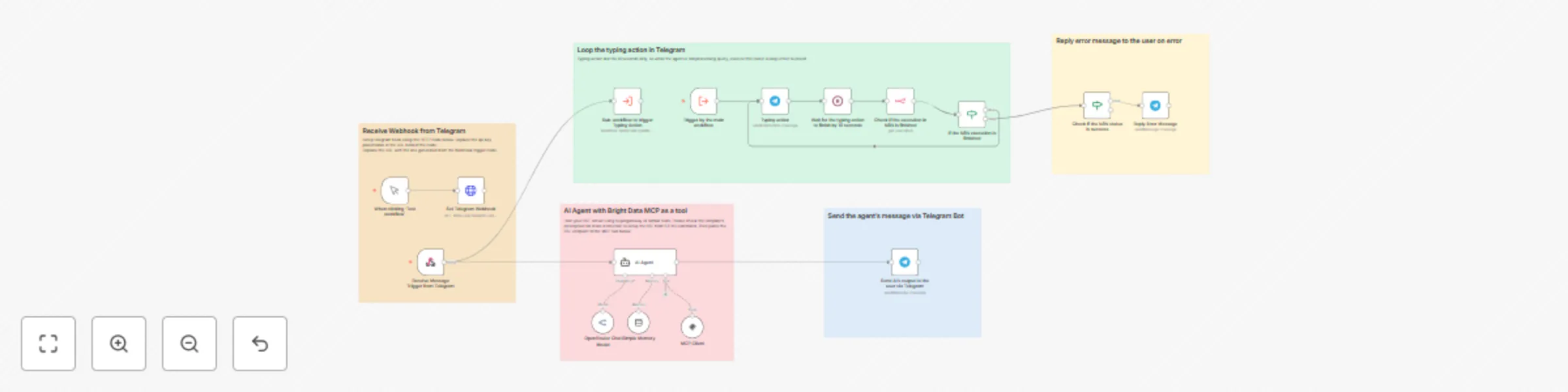
AI Agent Template with Bright Data MCP Tool Integration This template enables natural language driven automation using Bright Data MCP tools. It extracts all availa...
@n8n/n8n-nodes-langchain.agent, @n8n/n8n-nodes-langchain.memorybufferwindow, n8n-nodes-base.stickynote, @n8n/n8n-nodes-langchain.lmchatopenrouter, n8n-nodes-base.manualtrigger, n8n-nodes-base.httprequest, n8n-nodes-base.webhook, n8n-nodes-base.telegram
This workflow is cataloged by N8N Workflows and links back to its original n8n.io source page by Cyril Nicko Gaspar.
Original n8n.io sourceThis template enables natural-language-driven automation using Bright Data MCP tools. It extracts all available tools from MCP, processes the user’s query through an AI agent, then dynamically selects and executes the appropriate tool.
Traditional automation often requires users to understand APIs, interfaces, or scripts to perform backend tasks. The Bright Data MCP integration solves this by allowing natural language interaction, intelligently classifying user intent, and managing context-aware execution of complex operations—ideal for data extraction, customer support, and workflow orchestration.
Before deploying this template, make sure you have:
In your Bright Data account, obtain the following information:
The methods below will allow you to receive SSE (Server-Sent Events) from Bright Data MCP via a local Supergateway or Smithery
Method 1: Run Supergateway in a separate web service (Recommended)
This method will work for both cloud version and self-hosted N8N.
Signup to any cloud services of your choice (DigitalOcean, Heroku, Hetzner, Render, etc.).
API_TOKEN=your_brightdata_api_token
WEB_UNLOCKER_ZONE=optional_zone_name
BROWSER_ZONE=optional_browser_zone_name
npx -y supergateway --stdio "npx -y @brightdata/mcp" --port 8000 --baseUrl http://localhost:8000 --ssePath /sse --messagePath /message/sse into it.https://your_server_url/sseAPI_TOKEN=your_brightdata_api_token WEB_UNLOCKER_ZONE=optional_zone_name BROWSER_AUTH=optional_browser_auth
- Use the following Docker command to run Supergateway: docker run -it --rm -p 8000:8000 supercorp/supergateway \ --stdio "npx -y @brightdata/mcp /" \ --port 8000/sse into it.https://your_server_url/sseFor more installation guides, please refer to https://github.com/supercorp-ai/supergateway.git.
Method 2: Run Supergateway in the same web service as the N8N instance
This method will only work for self-hosted N8N.
In your server's settings to define environment variables or .env file, add:
API_TOKEN=your_brightdata_api_token
WEB_UNLOCKER_ZONE=optional_zone_name
BROWSER_ZONE=optional_browser_zone_name
npx -y supergateway --stdio "npx -y @brightdata/mcp" --port 8000 --baseUrl http://localhost:8000 --ssePath /sse --messagePath /message
Use the command above to execute it through the cloud shell or set it as a pre-deploy command.
Your SSE server should now be accessible at:
http://localhost:8000/sse
For more installation guides, please refer to https://github.com/supercorp-ai/supergateway.git.
Method 3: Configure via Smithery.ai (Easiest) If you don't want additional setup and want to test it right away, follow these instructions:
Visit https://smithery.ai/server/@luminati-io/brightdata-mcp/tools to:
Import the Workflow
Setup Telegram Integration
If you haven't setup a bot in Telegram, below is the instruction how to create one using BotFather:
/newbot to create a new bot. You'll be prompted to enter a name and a unique username for your bot.Edit the HTTP Request node in the workflow.
Configure the URL as follows:
https://api.telegram.org/bot+your_telegram_bot_token+/setWebhook?url=+your_webhook_url
Replace +your_telegram_bot_token+ with your actual Telegram bot token.
Replace +your_webhook_url+ with the URL from the Webhook Trigger node in the workflow.
This will set up Telegram to forward messages to your n8n agent.
🧠 Optional memory buffers and memory manager nodes keep the interaction context-aware.
This template equips you with a powerful no-code/low-code AI agent that translates conversation into real-world action. Using Bright Data’s MCP tools through natural language, it enables teams to automate and scale data-driven tasks effortlessly.
This catalog entry is organized from the workflow JSON. The node-level section below shows the executable blocks available for review before importing the template.
| Workflow | AI-powered Telegram bot for data extraction with Bright Data MCP |
|---|---|
| Complexity | advanced |
| Nodes | 21 |
| Categories | Market Research, AI Chatbot |
| Author | Cyril Nicko Gaspar |
| Published | 16 May 2025 |
Use the JSON export at /data/workflows/4116/4116.json as the source template for this automation.
Open n8n, import the downloaded JSON, and review each node before activating the workflow.
Replace placeholder credentials, API keys, webhook URLs, account IDs, and environment-specific values with your own settings.
Run the workflow manually or in a staging workspace, inspect node output, and confirm downstream systems receive the expected data.
Enable the workflow only after testing, then monitor executions, errors, and rate limits during the first production runs.
Review imported nodes carefully before activation. This catalog entry is intended to help you inspect the workflow structure, understand required services, and find related templates faster.
Node names, credentials, schedules, webhook paths, and external service limits may need adjustment for your workspace.
AI Agent Template with Bright Data MCP Tool Integration This template enables natural language driven automation using Bright Data MCP tools. It extracts all availa...
Review the workflow JSON, configure any required credentials in n8n, and test the automation in a safe workspace before using it in production.
Yes. Use the block-by-block analysis and the downloadable JSON to inspect each node, then adjust credentials, prompts, schedules, filters, or destinations for your Market Research, AI Chatbot use case.