AI-powered SEO content optimization with SERP analysis & Slack approval workflow

Workflow preview

Workflow preview
100%
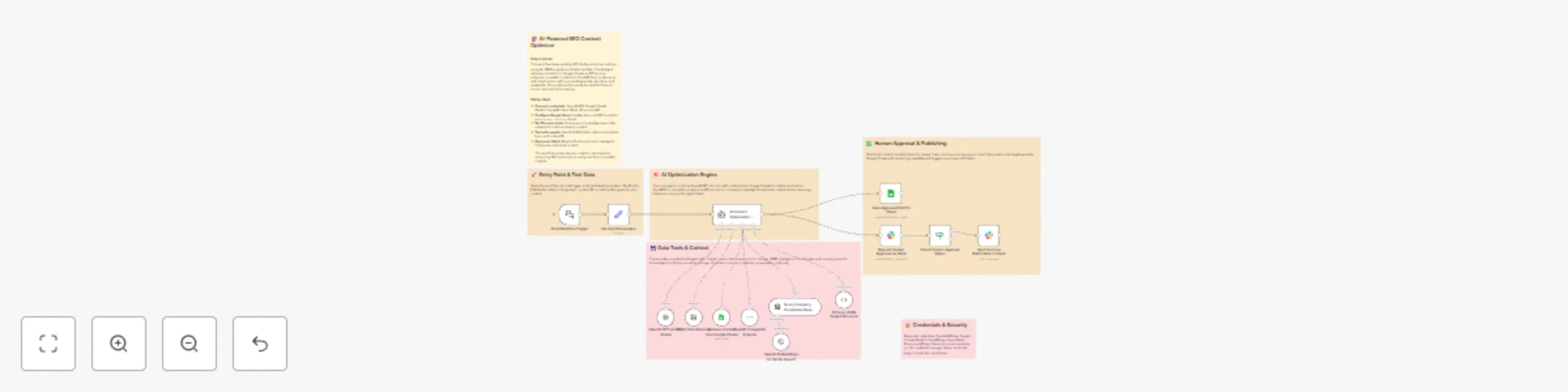
AI-powered SEO content optimization with SERP analysis & Slack approval workflow preview
Open on n8n.io

Important notice

This workflow is provided as-is. Please review and test before using in production.

1. Workflow Overview

Description Enhance content quality, SEO performance, and editorial consistency using an AI powered optimization engine that blends OpenAI, Google Sheets history, Pinecone knowledge, and real ti...

Best for

  • Content Creation automation workflows
  • Multimodal AI automation workflows
  • advanced n8n builders looking for reusable templates

Tools used

n8n-nodes-base.stickynote, @n8n/n8n-nodes-langchain.memorybufferwindow, @n8n/n8n-nodes-langchain.outputparserstructured, n8n-nodes-base.googlesheetstool, n8n-nodes-base.googlesheets, @n8n/n8n-nodes-langchain.lmchatopenai, @n8n/n8n-nodes-langchain.agent, n8n-nodes-base.set

Source and attribution

This workflow is cataloged by N8N Workflows and links back to its original n8n.io source page by Rahul Joshi.

Original n8n.io source

1.1 Workflow description

Title
AI-powered SEO content optimization with SERP analysis & Slack approval workflow
Workflow name
AI-powered SEO content optimization with SERP analysis & Slack approval workflow

πŸ“Š Description

Enhance content quality, SEO performance, and editorial consistency using an AI-powered optimization engine that blends OpenAI, Google Sheets history, Pinecone knowledge, and real-time SERP intelligence. This workflow transforms rough drafts into polished, SEO-optimized content while preserving original meaning β€” and includes human review before final publication. πŸš€βœοΈ

What This Template Does

  • Step 1: Trigger the optimization from Chat or manual run: Starts the optimization process using the Chat Trigger node, passing topic, content ID, and customization parameters. πŸ’¬
  • Step 2: Retrieve contextual knowledge: Pulls historical versions from Google Sheets and relevant company information from Pinecone vector storage to guide consistent optimization. πŸ“š
  • Step 3: Fetch SERP competitor data: Uses SerpAPI to gather ranking competitors, headings, snippets, PAA questions, and search intent to strengthen the optimized draft. πŸ”
  • Step 4: Run AI content optimization: AI Agent (GPT-4o-mini) rewrites the draft without starting from scratch, improving structure, SEO, tone, clarity, and keyword coverage. πŸ€–
  • Step 5: Enforce structured JSON output: Ensures the optimized draft follows a strict JSON schema containing title, meta description, sections, keywords, and metadata. 🧩
  • Step 6: Request human review in Slack: Sends the optimized draft to Slack and waits for approval (approve/reject). Team members can refine or confirm before finalization. πŸ’¬πŸ§‘β€πŸ’Ό
  • Step 7: Save approved version back to Google Sheets: Updates or appends a new version in the content_versions sheet with metadata, SEO fields, and version history. πŸ“Š
  • Step 8: Send success confirmation to Slack: Posts a notification confirming that the approved draft has been published. πŸ””

Key Benefits

βœ“ Eliminates manual editing and SEO refinement βœ“ Produces consistent, high-quality, conversion-focused content βœ“ Ensures factual accuracy and tone preservation βœ“ Enhances content using SERP-based competitor insights βœ“ Maintains version history for auditability βœ“ Introduces structured human approval workflow βœ“ Fully automated publishing pipeline

Features

  • AI-assisted rewrite using GPT-4o-mini
  • Google Sheets version retrieval + updating
  • Pinecone knowledge base retrieval
  • SERP competitor and keyword intelligence
  • Slack approval workflow (sendAndWait)
  • Structured JSON output enforcement
  • Version incrementing & metadata tracking
  • Secure credentials management

Requirements

  • OpenAI API Key (GPT-4o-mini or higher)
  • Google Sheets OAuth2 credentials
  • SerpAPI Key
  • Slack Bot Token with chat:write
  • Pinecone API and vector index
  • Pre-created Google Sheet for versioning
  • Optional: Existing company knowledge stored in Pinecone

Target Audience

  1. SEO content teams optimizing blog drafts
  2. Marketing teams refining landing pages
  3. Agencies managing editorial workflows
  4. Enterprises maintaining knowledge-based content
  5. Writers/editorial teams that need AI assistance + human QA
  6. Teams that require version-controlled SEO content

Step-by-Step Setup Instructions

  • Connect these credentials in n8n: OpenAI, Slack, Google Sheets, Pinecone, SerpAPI. πŸ”
  • Replace Google Sheet ID in the Sheets nodes with your own.
  • Ensure your Pinecone index exists and contains embeddings.
  • Configure Slack channel ID for approvals and notifications.
  • Update test topic/content ID in the Set Input Parameters node.
  • Run a manual test to confirm SERP retrieval, data context, and AI output.
  • Deploy and use Chat Trigger to start generating optimized content on demand.

1.2 Logical Blocks

This catalog entry is organized from the workflow JSON. The node-level section below shows the executable blocks available for review before importing the template.

2. Block-by-Block Analysis

Block 1 - Overview Sticky

Type / Role
n8n-nodes-base.stickyNote - stickyNote
Config choices
Version 1

Block 2 - Trigger Section Sticky

Type / Role
n8n-nodes-base.stickyNote - stickyNote
Config choices
Version 1

Block 3 - AI Engine Sticky

Type / Role
n8n-nodes-base.stickyNote - stickyNote
Config choices
Version 1

Block 4 - Tools Context Sticky

Type / Role
n8n-nodes-base.stickyNote - stickyNote
Config choices
Version 1

Block 5 - Approval Publishing Sticky

Type / Role
n8n-nodes-base.stickyNote - stickyNote
Config choices
Version 1

Block 6 - Security Sticky

Type / Role
n8n-nodes-base.stickyNote - stickyNote
Config choices
Version 1

Block 7 - Short-Term Memory

Type / Role
@n8n/n8n-nodes-langchain.memoryBufferWindow - memoryBufferWindow
Config choices
Version 1.3

Block 8 - Enforce JSON Output Structure

Type / Role
@n8n/n8n-nodes-langchain.outputParserStructured - outputParserStructured
Config choices
Version 1.3

Block 9 - Retrieve Context from Google Sheets

Type / Role
n8n-nodes-base.googleSheetsTool - googleSheetsTool
Config choices
Version 4.7

Block 10 - Save Approved Draft to Sheet

Type / Role
n8n-nodes-base.googleSheets - googleSheets
Config choices
Version 4.7

Block 11 - OpenAI GPT-4o Mini Model

Type / Role
@n8n/n8n-nodes-langchain.lmChatOpenAi - lmChatOpenAi
Config choices
Version 1.2

Block 12 - AI Content Optimization Agent

Type / Role
@n8n/n8n-nodes-langchain.agent - agent
Config choices
Version 2.1

Block 13 - Set Input Parameters

Type / Role
n8n-nodes-base.set - set
Config choices
Version 3.4

Block 14 - SerpAPI Competitor Analysis

Type / Role
@n8n/n8n-nodes-langchain.toolSerpApi - toolSerpApi
Config choices
Version 1

Block 15 - Chat Workflow Trigger

Type / Role
@n8n/n8n-nodes-langchain.chatTrigger - chatTrigger
Config choices
Version 1.3

Block 16 - Check Human Approval Status

Type / Role
n8n-nodes-base.if - if
Config choices
Version 2.2

Block 17 - Send Success Notification to Slack

Type / Role
n8n-nodes-base.slack - slack
Config choices
Version 2.3

Block 18 - Request Human Approval via Slack

Type / Role
n8n-nodes-base.slack - slack
Config choices
Version 2.3

Block 19 - Query Company Knowledge Base

Type / Role
@n8n/n8n-nodes-langchain.vectorStorePinecone - vectorStorePinecone
Config choices
Version 1.3

Block 20 - OpenAI Embeddings for Vector Search

Type / Role
@n8n/n8n-nodes-langchain.embeddingsOpenAi - embeddingsOpenAi
Config choices
Version 1.2

3. Summary Table

Workflow AI-powered SEO content optimization with SERP analysis & Slack approval workflow
Complexity advanced
Nodes 20
Categories Content Creation, Multimodal AI
Author Rahul Joshi
Published 14 Nov 2025

4. Reproducing the Workflow from Scratch

  1. 1. Download the workflow JSON

    Use the JSON export at /data/workflows/10832/10832.json as the source template for this automation.

  2. 2. Import the template into n8n

    Open n8n, import the downloaded JSON, and review each node before activating the workflow.

  3. 3. Configure credentials and variables

    Replace placeholder credentials, API keys, webhook URLs, account IDs, and environment-specific values with your own settings.

  4. 4. Test with sample data

    Run the workflow manually or in a staging workspace, inspect node output, and confirm downstream systems receive the expected data.

  5. 5. Activate and monitor

    Enable the workflow only after testing, then monitor executions, errors, and rate limits during the first production runs.

5. General Notes & Resources

Review imported nodes carefully before activation. This catalog entry is intended to help you inspect the workflow structure, understand required services, and find related templates faster.

Node names, credentials, schedules, webhook paths, and external service limits may need adjustment for your workspace.

Frequently asked questions

What does AI-powered SEO content optimization with SERP analysis & Slack approval workflow do?

Description Enhance content quality, SEO performance, and editorial consistency using an AI powered optimization engine that blends OpenAI, Google Sheets history, Pinecone knowledge, and real ti...

What do I need before importing this workflow?

Review the workflow JSON, configure any required credentials in n8n, and test the automation in a safe workspace before using it in production.

Can I customize this workflow?

Yes. Use the block-by-block analysis and the downloadable JSON to inspect each node, then adjust credentials, prompts, schedules, filters, or destinations for your Content Creation, Multimodal AI use case.