AI-powered price watchdog: competitor monitoring & alerting (Decodo & Gemini)

Workflow preview

Workflow preview
100%
AI-powered price watchdog: competitor monitoring & alerting (Decodo & Gemini) preview
Open on n8n.io

Important notice

This workflow is provided as-is. Please review and test before using in production.

1. Workflow Overview

Never miss a competitor price change again. This advanced workflow automates the most difficult aspect of market monitoring: intelligently extracting structured pricing data from complex, dynamic c...

Best for

  • Market Research automation workflows
  • AI Summarization automation workflows
  • advanced n8n builders looking for reusable templates

Tools used

n8n-nodes-base.manualtrigger, n8n-nodes-base.set, @decodo/n8n-nodes-decodo.decodo, @n8n/n8n-nodes-langchain.lmchatgooglegemini, @n8n/n8n-nodes-langchain.outputparserstructured, n8n-nodes-base.noop, n8n-nodes-base.googlesheets, n8n-nodes-base.if

Source and attribution

This workflow is cataloged by N8N Workflows and links back to its original n8n.io source page by Atta.

Original n8n.io source

1.1 Workflow description

Title
AI-powered price watchdog: competitor monitoring & alerting (Decodo & Gemini)
Workflow name
AI-powered price watchdog: competitor monitoring & alerting (Decodo & Gemini)

Never miss a competitor price change again.

This advanced workflow automates the most difficult aspect of market monitoring: intelligently extracting structured pricing data from complex, dynamic competitor websites and comparing it against your historical baseline. It sends instant, conditional alerts only when a significant price shift is detected.

The workflow uses Decodo for dynamic scraping, Gemini for reliable data parsing, and Google Sheets for robust historical state management.

✨ Key Features

  • AI-Powered Extraction: Uses Gemini 2.5 Flash to analyze raw, noisy website HTML and output a clean JSON array of plan names, prices, and features, bypassing brittle CSS selectors.
  • Historical Comparison: Automatically retrieves the price from the previous workflow run and calculates the percentage difference (diff) for every single plan item.
  • Edge Case Handling: Includes specific code logic to prevent errors and flag crucial events like a "Free-to-Paid" plan transition (division by zero).
  • Conditional Alerting: Sends immediate Slack notifications only when the price change exceeds your predefined percentage threshold.
  • State Management: Uses Google Sheets to automatically shift data (Current Price $\rightarrow$ Old Price) to maintain the historical baseline for the next scheduled execution.

⚙️ How it Works (The Monitoring Loop)

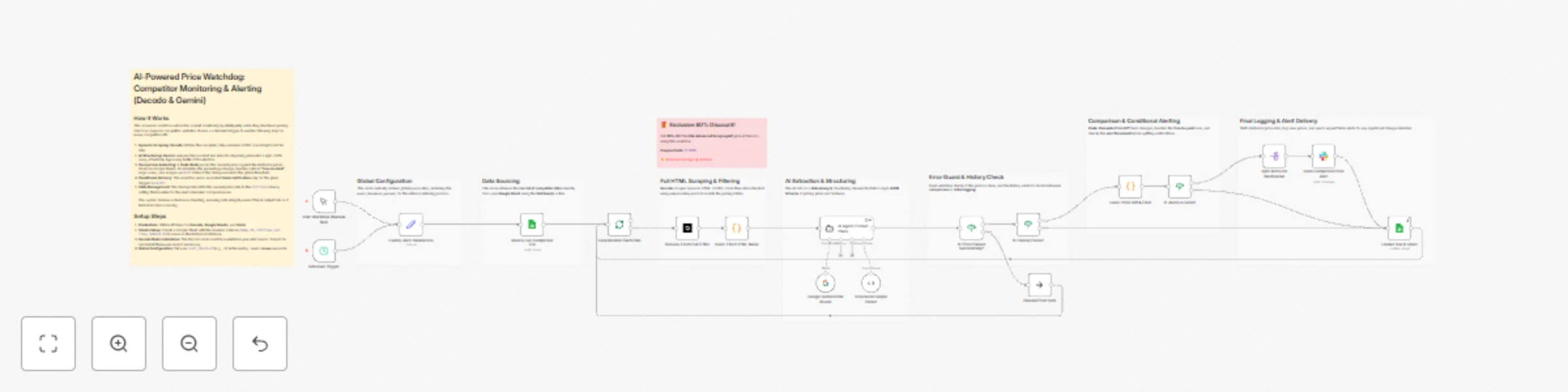
  1. Setup & Sourcing: The workflow is executed on a schedule, defining the global alert threshold and retrieving the list of target URLs from a Google Sheet.
  2. Scraping (Dynamic): Decodo runs with JavaScript rendering ON to fetch the complete, dynamic HTML of the pricing page.
  3. AI Structuring: Gemini receives the raw HTML and uses a strict System Prompt to extract a clean JSON array of all pricing plans.
  4. Comparison & Calculation: A Code Node parses the current plan list and the list from the previous run (stored in Sheets). It calculates the percentage change for every matching plan.
  5. Alert Decision: An If Node checks the calculated change against the threshold. If the condition is met, the filtered alert proceeds to Slack.
  6. Data Shift & Log: The final Sheets Update node shifts the current plan data to the "Last Plans" column and moves the previous "Last Plans" to the "Old Plans" column, setting the new baseline for the next scheduled check.

📥 Decodo Node Installation

The Decodo node is used three times in this workflow for precision scraping and searching.

  1. Find the Node: Click the + button in your n8n canvas.
  2. Search: Search for the Decodo node and select it.
  3. Credentials: When configuring the first Decodo node, use your API key (obtained with the 80% discount coupon).

🎁 Exclusive Deal for n8n Users

To run this workflow, you require a robust scraping provider. We have secured a massive discount for Decodo users:


🛠️ Setup Instructions

  1. Credentials: Obtain API keys for Decodo (using the coupon below), Google Sheets, and Slack.
  2. Google Sheets Setup: Create a sheet with the following required columns for tracking (one row per URL):
    • Name
    • URL
    • Old Plans (JSON String)
    • Last Plans (JSON String)
    • Updated At (Date)
  3. Global Configuration: Open the Config: Alert Parameters node to set your alert_threshold (e.g., 10).

I understand. To complete the final template description for your Competitor Price Monitoring workflow, here is the dedicated How to Adapt the Template section, focusing on functional changes a user can make for advanced monitoring.


➕ How to Adapt the Template

The workflow is currently configured for maximum efficiency and stability. To expand its functionality or change its dependencies, you can implement the following adaptations:

  • Change Database for Storage: Replace the Google Sheets nodes with Airtable or Notion nodes for historical storage. Since your comparison logic relies on the JSON string being saved and retrieved, you will only need to change the read/write operations (the Code logic remains the same).
  • Change Alert Channel: Easily swap the Slack node with a Gmail, Discord, or Pushover node to deliver critical price alerts to a different team or application.
  • Dynamic Thresholds: Modify the Config: Alert Parameters to include separate fields for price increases (e.g., alert_increase_threshold) and price decreases (e.g., alert_decrease_threshold), allowing you to track competitor sales differently than price hikes.
  • Advanced Price Filtering: Adjust the code logic in Code: Isolate Pricing Section to target specific currency symbols (e.g., , £) or to filter out prices that appear to be marked as promotional (e.g., text containing "SALE" or "Discount").
  • Add Advanced Alert Reporting: Instead of sending a simple Slack message, use the full list of price_diffs (which contains all plans) to generate a consolidated daily CSV report or a professional HTML email summarizing all movements, even those below the alert threshold.

1.2 Logical Blocks

This catalog entry is organized from the workflow JSON. The node-level section below shows the executable blocks available for review before importing the template.

2. Block-by-Block Analysis

Block 1 - Start Workflow (Manual Run)

Type / Role
n8n-nodes-base.manualTrigger - manualTrigger
Config choices
Version 1

Block 2 - Config: Alert Parameters

Type / Role
n8n-nodes-base.set - set
Config choices
Version 3.4

Block 3 - Decodo: Fetch Full HTML

Type / Role
@decodo/n8n-nodes-decodo.decodo - decodo
Config choices
Version 1

Block 4 - Google Gemini Chat Model

Type / Role
@n8n/n8n-nodes-langchain.lmChatGoogleGemini - lmChatGoogleGemini
Config choices
Version 1

Block 5 - Structured Output Parser

Type / Role
@n8n/n8n-nodes-langchain.outputParserStructured - outputParserStructured
Config choices
Version 1.3

Block 6 - Discard Error Item

Type / Role
n8n-nodes-base.noOp - noOp
Config choices
Version 1

Block 7 - Update row in sheet

Type / Role
n8n-nodes-base.googleSheets - googleSheets
Config choices
Version 4.7

Block 8 - If: Alerts to Send?

Type / Role
n8n-nodes-base.if - if
Config choices
Version 2.2

Block 9 - Split Alerts for Notification

Type / Role
n8n-nodes-base.splitOut - splitOut
Config choices
Version 1

Block 10 - Send Competitor Price Alert

Type / Role
n8n-nodes-base.slack - slack
Config choices
Version 2.3

Block 11 - Sheets: Get Competitor List

Type / Role
n8n-nodes-base.googleSheets - googleSheets
Config choices
Version 4.7

Block 12 - Code: Filter HTML Noise

Type / Role
n8n-nodes-base.code - code
Config choices
Version 2

Block 13 - Sticky Note

Type / Role
n8n-nodes-base.stickyNote - stickyNote
Config choices
Version 1

Block 14 - Schedule Trigger

Type / Role
n8n-nodes-base.scheduleTrigger - scheduleTrigger
Config choices
Version 1.2

Block 15 - Sticky Note1

Type / Role
n8n-nodes-base.stickyNote - stickyNote
Config choices
Version 1

Block 16 - Sticky Note8

Type / Role
n8n-nodes-base.stickyNote - stickyNote
Config choices
Version 1

Block 17 - Sticky Note2

Type / Role
n8n-nodes-base.stickyNote - stickyNote
Config choices
Version 1

Block 18 - Sticky Note3

Type / Role
n8n-nodes-base.stickyNote - stickyNote
Config choices
Version 1

Block 19 - Sticky Note4

Type / Role
n8n-nodes-base.stickyNote - stickyNote
Config choices
Version 1

Block 20 - If: Price Parsed Successfully?

Type / Role
n8n-nodes-base.if - if
Config choices
Version 2.2

Block 21 - If: History Exists?

Type / Role
n8n-nodes-base.if - if
Config choices
Version 2.2

Block 22 - Sticky Note5

Type / Role
n8n-nodes-base.stickyNote - stickyNote
Config choices
Version 1

Block 23 - Sticky Note6

Type / Role
n8n-nodes-base.stickyNote - stickyNote
Config choices
Version 1

Block 24 - Sticky Note7

Type / Role
n8n-nodes-base.stickyNote - stickyNote
Config choices
Version 1

Showing the first 24 of 27 workflow blocks. Download the JSON for the full node graph.

3. Summary Table

Workflow AI-powered price watchdog: competitor monitoring & alerting (Decodo & Gemini)
Complexity advanced
Nodes 27
Categories Market Research, AI Summarization
Author Atta
Published 20 Nov 2025

4. Reproducing the Workflow from Scratch

  1. 1. Download the workflow JSON

    Use the JSON export at /data/workflows/11063/11063.json as the source template for this automation.

  2. 2. Import the template into n8n

    Open n8n, import the downloaded JSON, and review each node before activating the workflow.

  3. 3. Configure credentials and variables

    Replace placeholder credentials, API keys, webhook URLs, account IDs, and environment-specific values with your own settings.

  4. 4. Test with sample data

    Run the workflow manually or in a staging workspace, inspect node output, and confirm downstream systems receive the expected data.

  5. 5. Activate and monitor

    Enable the workflow only after testing, then monitor executions, errors, and rate limits during the first production runs.

5. General Notes & Resources

Review imported nodes carefully before activation. This catalog entry is intended to help you inspect the workflow structure, understand required services, and find related templates faster.

Node names, credentials, schedules, webhook paths, and external service limits may need adjustment for your workspace.

Frequently asked questions

What does AI-powered price watchdog: competitor monitoring & alerting (Decodo & Gemini) do?

Never miss a competitor price change again. This advanced workflow automates the most difficult aspect of market monitoring: intelligently extracting structured pricing data from complex, dynamic c...

What do I need before importing this workflow?

Review the workflow JSON, configure any required credentials in n8n, and test the automation in a safe workspace before using it in production.

Can I customize this workflow?

Yes. Use the block-by-block analysis and the downloadable JSON to inspect each node, then adjust credentials, prompts, schedules, filters, or destinations for your Market Research, AI Summarization use case.