AI-powered NDA review & instant alert system - Jotform, Gemini, Telegram

Workflow preview

Workflow preview
100%
AI-powered NDA review & instant alert system - Jotform, Gemini, Telegram preview
Open on n8n.io

Important notice

This workflow is provided as-is. Please review and test before using in production.

1. Workflow Overview

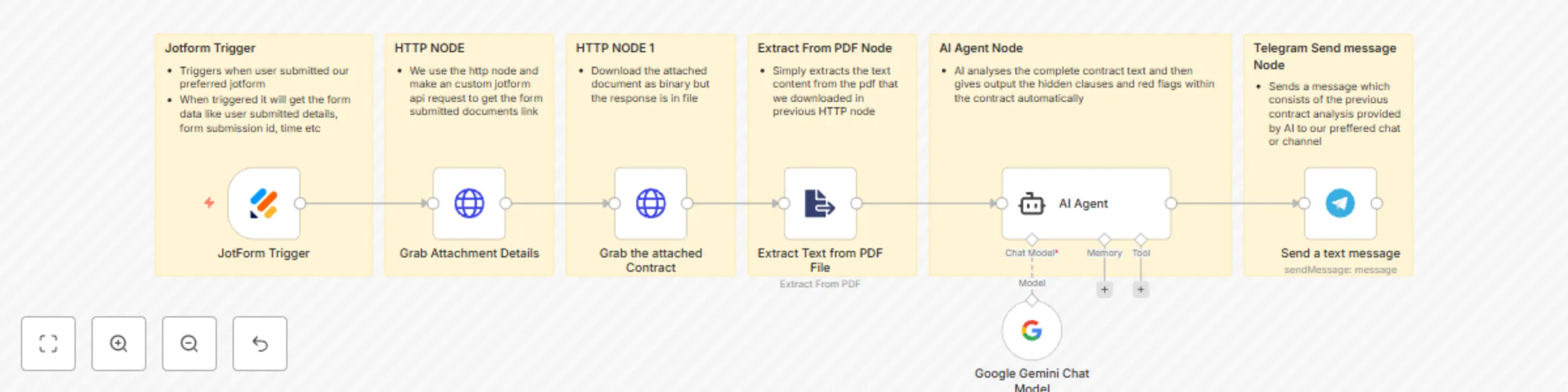
This workflow automates the process of analyzing a contract submitted via a web form. It extracts the text from an uploaded PDF, uses AI to identify potential red flags, and sends a summary report ...

Best for

  • Document Extraction automation workflows
  • AI Summarization automation workflows
  • intermediate n8n builders looking for reusable templates

Tools used

n8n-nodes-base.jotformtrigger, @n8n/n8n-nodes-langchain.agent, @n8n/n8n-nodes-langchain.lmchatgooglegemini, n8n-nodes-base.telegram, n8n-nodes-base.httprequest, n8n-nodes-base.extractfromfile, n8n-nodes-base.stickynote

Source and attribution

This workflow is cataloged by N8N Workflows and links back to its original n8n.io source page by iamvaar.

Original n8n.io source

1.1 Workflow description

Title
AI-powered NDA review & instant alert system - Jotform, Gemini, Telegram
Workflow name
AI-powered NDA review & instant alert system - Jotform, Gemini, Telegram

This workflow automates the process of analyzing a contract submitted via a web form. It extracts the text from an uploaded PDF, uses AI to identify potential red flags, and sends a summary report to a Telegram chat.


Prerequisites

Before you can use this workflow, you'll need a few things set up.

1. JotForm Form

You need to create a form in JotForm with at least two specific fields:

  • Email Address: A standard field to collect the user's email.
  • File Upload: This field will be used to upload the contract or NDA. Make sure to configure it to allow .pdf files.

2. API Keys and IDs

  • JotForm API Key: You can generate this from your JotForm account settings under the "API" section.
  • Gemini API Key: You'll need an API key from Google AI Studio to use the Gemini model.
  • Telegram Bot Token: Create a new bot by talking to the @BotFather on Telegram. It will give you a unique token.
  • Telegram Chat ID: This is the ID of the user, group, or channel you want the bot to send messages to. You can get this by using a bot like @userinfobot.

Node-by-Node Explanation

Here is a breakdown of what each node in the workflow does, in the order they execute.

1. JotForm Trigger

  • What it does: This node kicks off the entire workflow. It actively listens for new submissions on the specific JotForm you select.
  • How it works: When someone fills out your form and hits "Submit," JotForm sends the submission data (including the email and a link to the uploaded file) to this node.

2. Grab Attachment Details (HTTP Request)

  • What it does: The initial data from JotForm doesn't contain a direct download link for the file. This node takes the submissionID from the trigger and makes a request to the JotForm API to get the full details of that submission.
  • How it works: It constructs a URL using the submissionID and your JotForm API key to fetch the submission data, which includes the proper download URL for the uploaded contract.

3. Grab the Attached Contract (HTTP Request)

  • What it does: Now that it has the direct download link, this node fetches the actual PDF file.
  • How it works: It uses the file URL obtained from the previous node to download the contract. The node is set to expect a "file" as the response, so it saves the PDF data in binary format for the next step.

4. Extract Text from PDF File

  • What it does: This node takes the binary PDF data from the previous step and extracts all the readable text from it.
  • How it works: It processes the PDF and outputs plain text, stripping away any formatting or images. This raw text is now ready to be analyzed by the AI.

5. AI Agent (with Google Gemini Chat Model)

  • What it does: This is the core analysis engine of the workflow. It takes the extracted text from the PDF and uses a powerful prompt to analyze it. The "Google Gemini Chat Model" node is connected as its "brain."
  • How it works:
    • It sends the contract text to the Gemini model.
    • The prompt instructs Gemini to act as an expert contract analyst.
    • It specifically asks the AI to identify major red flags and hidden/unfair clauses.
    • It also tells the AI to format the output as a clean report using Telegram's MarkdownV2 style and to keep the response under 1500 characters.

6. Send a text message (Telegram)

  • What it does: This is the final step. It takes the formatted analysis report generated by the AI Agent and sends it to your specified Telegram chat.
  • How it works: It connects to your Telegram bot using your Bot Token and sends the AI's output ($json.output) to the Chat ID you've provided. Because the AI was instructed to format the text in MarkdownV2, the message will appear well-structured in Telegram with bolding and bullet points.

1.2 Logical Blocks

This catalog entry is organized from the workflow JSON. The node-level section below shows the executable blocks available for review before importing the template.

2. Block-by-Block Analysis

Block 1 - JotForm Trigger

Type / Role
n8n-nodes-base.jotFormTrigger - jotFormTrigger
Config choices
Version 1

Block 2 - AI Agent

Type / Role
@n8n/n8n-nodes-langchain.agent - agent
Config choices
Version 2.2

Block 3 - Google Gemini Chat Model

Type / Role
@n8n/n8n-nodes-langchain.lmChatGoogleGemini - lmChatGoogleGemini
Config choices
Version 1

Block 4 - Send a text message

Type / Role
n8n-nodes-base.telegram - telegram
Config choices
Version 1.2

Block 5 - Grab Attachment Details

Type / Role
n8n-nodes-base.httpRequest - httpRequest
Config choices
Version 4.2

Block 6 - Grab the attached Contract

Type / Role
n8n-nodes-base.httpRequest - httpRequest
Config choices
Version 4.2

Block 7 - Extract Text from PDF File

Type / Role
n8n-nodes-base.extractFromFile - extractFromFile
Config choices
Version 1

Block 8 - Sticky Note

Type / Role
n8n-nodes-base.stickyNote - stickyNote
Config choices
Version 1

Block 9 - Sticky Note1

Type / Role
n8n-nodes-base.stickyNote - stickyNote
Config choices
Version 1

Block 10 - Sticky Note2

Type / Role
n8n-nodes-base.stickyNote - stickyNote
Config choices
Version 1

Block 11 - Sticky Note3

Type / Role
n8n-nodes-base.stickyNote - stickyNote
Config choices
Version 1

Block 12 - Sticky Note4

Type / Role
n8n-nodes-base.stickyNote - stickyNote
Config choices
Version 1

Block 13 - Sticky Note5

Type / Role
n8n-nodes-base.stickyNote - stickyNote
Config choices
Version 1

3. Summary Table

Workflow AI-powered NDA review & instant alert system - Jotform, Gemini, Telegram
Complexity intermediate
Nodes 13
Categories Document Extraction, AI Summarization
Author iamvaar
Published 14 Oct 2025

4. Reproducing the Workflow from Scratch

  1. 1. Download the workflow JSON

    Use the JSON export at /data/workflows/9611/9611.json as the source template for this automation.

  2. 2. Import the template into n8n

    Open n8n, import the downloaded JSON, and review each node before activating the workflow.

  3. 3. Configure credentials and variables

    Replace placeholder credentials, API keys, webhook URLs, account IDs, and environment-specific values with your own settings.

  4. 4. Test with sample data

    Run the workflow manually or in a staging workspace, inspect node output, and confirm downstream systems receive the expected data.

  5. 5. Activate and monitor

    Enable the workflow only after testing, then monitor executions, errors, and rate limits during the first production runs.

5. General Notes & Resources

Review imported nodes carefully before activation. This catalog entry is intended to help you inspect the workflow structure, understand required services, and find related templates faster.

Node names, credentials, schedules, webhook paths, and external service limits may need adjustment for your workspace.

Frequently asked questions

What does AI-powered NDA review & instant alert system - Jotform, Gemini, Telegram do?

This workflow automates the process of analyzing a contract submitted via a web form. It extracts the text from an uploaded PDF, uses AI to identify potential red flags, and sends a summary report ...

What do I need before importing this workflow?

Review the workflow JSON, configure any required credentials in n8n, and test the automation in a safe workspace before using it in production.

Can I customize this workflow?

Yes. Use the block-by-block analysis and the downloadable JSON to inspect each node, then adjust credentials, prompts, schedules, filters, or destinations for your Document Extraction, AI Summarization use case.