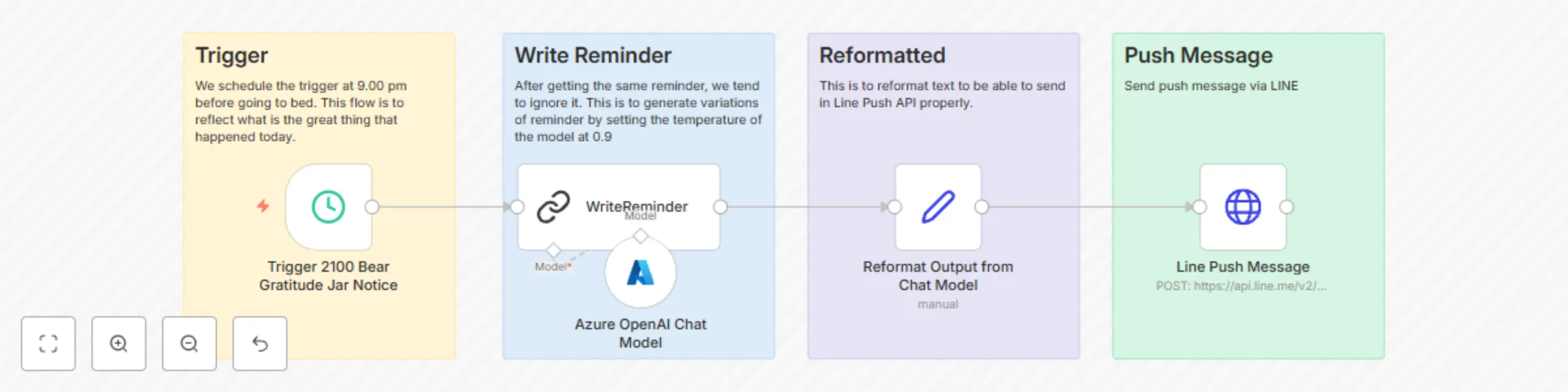
Block 1 - Trigger 2100 Bear Gratitude Jar Notice
- Type / Role
- n8n-nodes-base.scheduleTrigger - scheduleTrigger
- Config choices
- Version 1.2


 Early Deal
This workflow is provided as-is. Please review and test before using in production.
This workflow template, "Daily Gratitude Reminder Bot for LINE," is designed to help users cultivate a habit of gratitude by sending personalized, AI generated reminders every evening at 9:00 PM. U...
n8n-nodes-base.scheduletrigger, @n8n/n8n-nodes-langchain.chainllm, n8n-nodes-base.stickynote, n8n-nodes-base.set, @n8n/n8n-nodes-langchain.lmchatazureopenai, n8n-nodes-base.httprequest
This workflow is cataloged by N8N Workflows and links back to its original n8n.io source page by [email protected].
Original n8n.io sourceThis workflow template, "Daily Gratitude Reminder Bot for LINE," is designed to help users cultivate a habit of gratitude by sending personalized, AI-generated reminders every evening at 9:00 PM. Using Azure OpenAI , the bot generates varied and engaging messages to prompt users to reflect on the positive aspects of their day. The reminders are then sent directly to users via the LINE messaging platform , ensuring a seamless and impactful experience.
Whether you're a developer, counselor, or business owner, this template offers a customizable and scalable solution for promoting mental wellness and fostering a culture of gratitude.
profile Qwen2.5-Max 2:56 pm Here’s a polished and detailed description for your "Daily Gratitude Reminder Bot for LINE" template, following the submission guidelines provided. This description is structured to meet all the requirements, including SEO optimization, clarity, and user convenience.
Daily Gratitude Reminder Bot for LINE This workflow template, "Daily Gratitude Reminder Bot for LINE," is designed to help users cultivate a habit of gratitude by sending personalized, AI-generated reminders every evening at 9:00 PM. Using Azure OpenAI , the bot generates varied and engaging messages to prompt users to reflect on the positive aspects of their day. The reminders are then sent directly to users via the LINE messaging platform , ensuring a seamless and impactful experience.
Whether you're a developer, counselor, or business owner, this template offers a customizable and scalable solution for promoting mental wellness and fostering a culture of gratitude.
Developers who want to integrate AI-powered workflows into messaging platforms like LINE. Counselors & Therapists looking to encourage mindfulness and emotional well-being among their clients. Businesses & Organizations focused on employee wellness or customer engagement through positive reinforcement. Educators & Nonprofits seeking tools to promote mental health awareness and self-care practices.
Gratitude journaling has been proven to improve mental health, reduce stress, and increase overall happiness. However, many people struggle to maintain the habit due to busy schedules or forgetfulness. This workflow solves that problem by automating daily reminders to reflect on positive experiences, making it easier for users to build and sustain a gratitude practice.
Pre-Requisites
This catalog entry is organized from the workflow JSON. The node-level section below shows the executable blocks available for review before importing the template.
| Workflow | AI-powered gratitude reminder workflow for LINE |
|---|---|
| Complexity | intermediate |
| Nodes | 9 |
| Categories | Personal Productivity, Multimodal AI |
| Author | [email protected] |
| Published | 28 Feb 2025 |
Use the JSON export at /data/workflows/3040/3040.json as the source template for this automation.
Open n8n, import the downloaded JSON, and review each node before activating the workflow.
Replace placeholder credentials, API keys, webhook URLs, account IDs, and environment-specific values with your own settings.
Run the workflow manually or in a staging workspace, inspect node output, and confirm downstream systems receive the expected data.
Enable the workflow only after testing, then monitor executions, errors, and rate limits during the first production runs.
Review imported nodes carefully before activation. This catalog entry is intended to help you inspect the workflow structure, understand required services, and find related templates faster.
Node names, credentials, schedules, webhook paths, and external service limits may need adjustment for your workspace.
This workflow template, "Daily Gratitude Reminder Bot for LINE," is designed to help users cultivate a habit of gratitude by sending personalized, AI generated reminders every evening at 9:00 PM. U...
Review the workflow JSON, configure any required credentials in n8n, and test the automation in a safe workspace before using it in production.
Yes. Use the block-by-block analysis and the downloadable JSON to inspect each node, then adjust credentials, prompts, schedules, filters, or destinations for your Personal Productivity, Multimodal AI use case.