📦 AI-powered damage reporting tool for logistics with Gmail, Telegram and GPT

Workflow preview

Workflow preview
100%
📦 AI-powered damage reporting tool for logistics with Gmail, Telegram and GPT preview
Open on n8n.io

Important notice

This workflow is provided as-is. Please review and test before using in production.

1. Workflow Overview

Tags: Logistics, Supply Chain, Warehouse Operations, Paperless processes, Quality Management Context Hi! I’m Samir — Supply Chain Engineer, Data Scientist based in Paris, a...

Best for

  • Document Extraction automation workflows
  • AI Summarization automation workflows
  • advanced n8n builders looking for reusable templates

Tools used

n8n-nodes-base.telegramtrigger, n8n-nodes-base.if, n8n-nodes-base.code, n8n-nodes-base.telegram, @n8n/n8n-nodes-langchain.openai, n8n-nodes-base.set, n8n-nodes-base.gmail, n8n-nodes-base.stickynote

Source and attribution

This workflow is cataloged by N8N Workflows and links back to its original n8n.io source page by Samir Saci.

Original n8n.io source

1.1 Workflow description

Title
📦 AI-powered damage reporting tool for logistics with Gmail, Telegram and GPT
Workflow name
📦 AI-powered damage reporting tool for logistics with Gmail, Telegram and GPT

Tags: Logistics, Supply Chain, Warehouse Operations, Paperless processes, Quality Management

Context

Hi! I’m Samir — Supply Chain Engineer, Data Scientist based in Paris, and founder of LogiGreen.

> Let us use n8n to help small companies digitalise their logistics and supply chain!

This workflow helps warehouse operators generate a complete damage report without needing to write anything manually.

In warehouse operations, damaged pallets must be reported quickly and consistently.

You can automate the entire process using AI to analyse photos of the damages.

📬 For business inquiries, you can find me on LinkedIn

Example of damage report

The process starts with instructions sent with the operator:

A photo of the damaged pallets is shared with the bot:

A complete report is generated and sent by email:

🎥 Tutorial

A complete tutorial (with explanations of every node) is available on YouTube:

Who is this template for?

This template is ideal for companies with limited IT ressources:

  • Warehouse operators who need a fast reporting tool
  • Quality teams who want consistent and structured reports
  • 3PLs and logistics providers looking to digitalise damage claims
  • Manufacturers and retailers with high inbound pallet volumes
  • Anyone using Telegram on the warehouse floor for quick interactions

What does this workflow do?

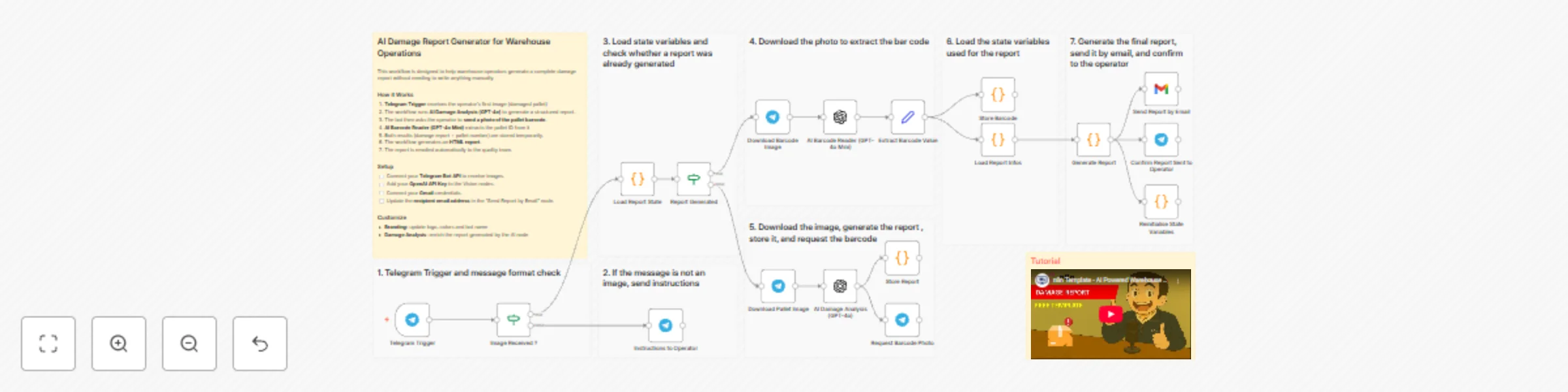
This workflow acts as an AI-powered damaged goods reporting assistant using Telegram, OpenAI Vision and Gmail.

  1. A operator sends a picture of the damaged pallet via Telegram.
  2. The workflow downloads the image and sends it to GPT-4o for damage analysis.
  3. The bot replies and asks for a photo of the pallet barcode.
  4. The barcode picture is processed by GPT-4o Mini to extract the pallet number.
  5. The workflow combines both results (damage analysis + pallet ID).
  6. It generates an HTML email report with: damage summary, observed issues, severity level and recommended actions
  7. The report is automatically sent via Gmail to the configured recipient.
  8. The operator receives a confirmation message in Telegram.

The processes does not require any data input form the operator, only to take pictures!

Next Steps

Before running the workflow, follow the sticky notes and configure:

  • Connect your Telegram Bot API
  • Add your OpenAI API Key in the AI nodes
  • Connect your Gmail credentials
  • Update the recipient email in the “Send Report by Email” node

Submitted: 20 November 2025
Template designed with n8n version 1.116.2

1.2 Logical Blocks

This catalog entry is organized from the workflow JSON. The node-level section below shows the executable blocks available for review before importing the template.

2. Block-by-Block Analysis

Block 1 - Telegram Trigger

Type / Role
n8n-nodes-base.telegramTrigger - telegramTrigger
Config choices
Version 1.2

Block 2 - Report Generated

Type / Role
n8n-nodes-base.if - if
Config choices
Version 2.2

Block 3 - Load Report Infos

Type / Role
n8n-nodes-base.code - code
Config choices
Version 2

Block 4 - Reinitialise State Variables

Type / Role
n8n-nodes-base.code - code
Config choices
Version 2

Block 5 - Image Received ?

Type / Role
n8n-nodes-base.if - if
Config choices
Version 2.2

Block 6 - Instructions to Operator

Type / Role
n8n-nodes-base.telegram - telegram
Config choices
Version 1.2

Block 7 - Request Barcode Photo

Type / Role
n8n-nodes-base.telegram - telegram
Config choices
Version 1.2

Block 8 - Download Pallet Image

Type / Role
n8n-nodes-base.telegram - telegram
Config choices
Version 1.2

Block 9 - Download Barcode Image

Type / Role
n8n-nodes-base.telegram - telegram
Config choices
Version 1.2

Block 10 - AI Damage Analysis (GPT-4o)

Type / Role
@n8n/n8n-nodes-langchain.openAi - openAi
Config choices
Version 2

Block 11 - AI Barcode Reader (GPT-4o Mini)

Type / Role
@n8n/n8n-nodes-langchain.openAi - openAi
Config choices
Version 2

Block 12 - Store Report

Type / Role
n8n-nodes-base.code - code
Config choices
Version 2

Block 13 - Extract Barcode Value

Type / Role
n8n-nodes-base.set - set
Config choices
Version 3.4

Block 14 - Store Barcode

Type / Role
n8n-nodes-base.code - code
Config choices
Version 2

Block 15 - Send Report by Email

Type / Role
n8n-nodes-base.gmail - gmail
Config choices
Version 2.1

Block 16 - Confirm Report Sent to Operator

Type / Role
n8n-nodes-base.telegram - telegram
Config choices
Version 1.2

Block 17 - Sticky Note

Type / Role
n8n-nodes-base.stickyNote - stickyNote
Config choices
Version 1

Block 18 - Sticky Note8

Type / Role
n8n-nodes-base.stickyNote - stickyNote
Config choices
Version 1

Block 19 - Sticky Note9

Type / Role
n8n-nodes-base.stickyNote - stickyNote
Config choices
Version 1

Block 20 - Sticky Note10

Type / Role
n8n-nodes-base.stickyNote - stickyNote
Config choices
Version 1

Block 21 - Sticky Note12

Type / Role
n8n-nodes-base.stickyNote - stickyNote
Config choices
Version 1

Block 22 - Sticky Note13

Type / Role
n8n-nodes-base.stickyNote - stickyNote
Config choices
Version 1

Block 23 - Sticky Note14

Type / Role
n8n-nodes-base.stickyNote - stickyNote
Config choices
Version 1

Block 24 - Sticky Note15

Type / Role
n8n-nodes-base.stickyNote - stickyNote
Config choices
Version 1

Showing the first 24 of 27 workflow blocks. Download the JSON for the full node graph.

3. Summary Table

Workflow 📦 AI-powered damage reporting tool for logistics with Gmail, Telegram and GPT
Complexity advanced
Nodes 27
Categories Document Extraction, AI Summarization
Author Samir Saci
Published 20 Nov 2025

4. Reproducing the Workflow from Scratch

  1. 1. Download the workflow JSON

    Use the JSON export at /data/workflows/11048/11048.json as the source template for this automation.

  2. 2. Import the template into n8n

    Open n8n, import the downloaded JSON, and review each node before activating the workflow.

  3. 3. Configure credentials and variables

    Replace placeholder credentials, API keys, webhook URLs, account IDs, and environment-specific values with your own settings.

  4. 4. Test with sample data

    Run the workflow manually or in a staging workspace, inspect node output, and confirm downstream systems receive the expected data.

  5. 5. Activate and monitor

    Enable the workflow only after testing, then monitor executions, errors, and rate limits during the first production runs.

5. General Notes & Resources

Review imported nodes carefully before activation. This catalog entry is intended to help you inspect the workflow structure, understand required services, and find related templates faster.

Node names, credentials, schedules, webhook paths, and external service limits may need adjustment for your workspace.

Frequently asked questions

What does 📦 AI-powered damage reporting tool for logistics with Gmail, Telegram and GPT do?

Tags: Logistics, Supply Chain, Warehouse Operations, Paperless processes, Quality Management Context Hi! I’m Samir — Supply Chain Engineer, Data Scientist based in Paris, a...

What do I need before importing this workflow?

Review the workflow JSON, configure any required credentials in n8n, and test the automation in a safe workspace before using it in production.

Can I customize this workflow?

Yes. Use the block-by-block analysis and the downloadable JSON to inspect each node, then adjust credentials, prompts, schedules, filters, or destinations for your Document Extraction, AI Summarization use case.