AI-powered Amazon product recommendations with Gemini 2.5 Flash via Telegram

Workflow preview

Workflow preview
100%
AI-powered Amazon product recommendations with Gemini 2.5 Flash via Telegram preview
Open on n8n.io

Important notice

This workflow is provided as-is. Please review and test before using in production.

1. Workflow Overview

Decodo Amazon Product Recommender delivers instant, AI powered shopping recommendations directly through Telegram. Send any product name and receive Amazon product analysis featuring price comparis...

Best for

  • Market Research automation workflows
  • AI Chatbot automation workflows
  • advanced n8n builders looking for reusable templates

Tools used

n8n-nodes-base.telegramtrigger, n8n-nodes-base.errortrigger, n8n-nodes-base.set, @decodo/n8n-nodes-decodo.decodo, n8n-nodes-base.code, @n8n/n8n-nodes-langchain.chainllm, n8n-nodes-base.telegram, @n8n/n8n-nodes-langchain.outputparserstructured

Source and attribution

This workflow is cataloged by N8N Workflows and links back to its original n8n.io source page by Khairul Muhtadin.

Original n8n.io source

1.1 Workflow description

Title
AI-powered Amazon product recommendations with Gemini 2.5 Flash via Telegram
Workflow name
AI-powered Amazon product recommendations with Gemini 2.5 Flash via Telegram

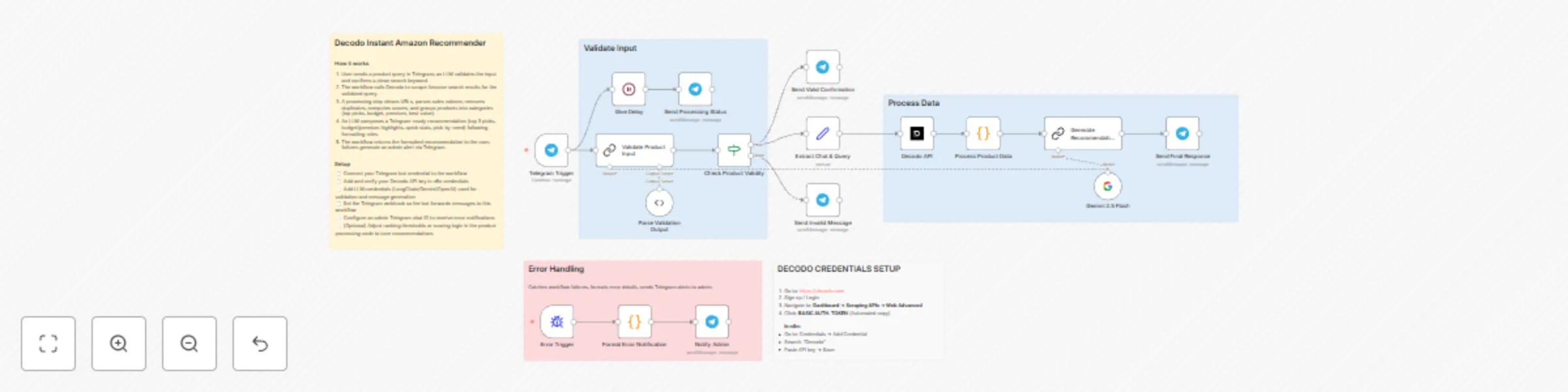
Decodo Amazon Product Recommender delivers instant, AI-powered shopping recommendations directly through Telegram. Send any product name and receive Amazon product analysis featuring price comparisons, ratings, sales data, and categorized recommendations (budget, premium, best value) in under 40 seconds—eliminating hours of manual research.

Why Use This Workflow?

Time Savings: Reduce product research from 45+ minutes to under 30 seconds

Decision Quality: Compare 20+ products automatically with AI-curated recommendations

Zero Manual Work: Complete automation from message input to formatted recommendations

Ideal For

  • E-commerce Entrepreneurs: Quickly research competitor products, pricing strategies, and market trends for inventory decisions
  • Smart Shoppers & Deal Hunters: Get instant product comparisons with sales volume data and discount tracking before purchasing
  • Product Managers & Researchers: Analyze Amazon marketplace positioning, customer sentiment, and pricing ranges for competitive intelligence

How It Works

  1. Trigger: User sends product name via Telegram (e.g., "iPhone 15 Pro Max case")
  2. AI Validation: Gemini 2.5 Flash extracts core product keywords and validates input authenticity
  3. Data Collection: Decodo API scrapes Amazon search results, extracting prices, ratings, reviews, sales volume, and product URLs
  4. Processing: JavaScript node cleans data, removes duplicates, calculates value scores, and categorizes products (top picks, budget, premium, best value, most popular)
  5. Intelligence Layer: AI generates personalized recommendations with Telegram-optimized markdown formatting, shortened product names, and clean Amazon URLs
  6. Output & Delivery: Formatted recommendations sent to user with categorized options and direct purchase links
  7. Error Handling: Admin notifications via separate Telegram channel for workflow monitoring

Setup Guide

Prerequisites

Requirement Type Purpose
n8n instance Essential Workflow execution platform
Decodo Account Essential Amazon product data scraping
Telegram Bot Token Essential Chat interface for user interactions
Google Gemini API Essential AI-powered product validation and recommendations
Telegram Account Optional Admin error notifications

Installation Steps

  1. Import the JSON file to your n8n instance
  2. Configure credentials:
    • Decodo API: Sign up at decodo.com → Dashboard → Scraping APIs → Web Advanced → Copy BASIC AUTH TOKEN
    • Telegram Bot: Message @BotFather on Telegram → /newbot → Copy HTTP API token (format: 123456789:ABCdefGHI...)
    • Google Gemini: Obtain API key from Google AI Studio for Gemini 2.5 Flash model
  3. Update environment-specific values:
    • Replace YOUR-CHAT-ID in "Notify Admin" node with your Telegram chat ID for error notifications
    • Verify Telegram webhook IDs are properly configured
  4. Customize settings:
    • Adjust AI prompt in "Generate Recommendations" node for different output formats
    • Set character limits (default: 2500) for Telegram message length
  5. Test execution:
    • Send test message to your Telegram bot: "iPhone 15 Pro"
    • Verify processing status messages appear
    • Confirm recommendations arrive with properly formatted links

Customization Options

Basic Adjustments:

  • Character Limit: Modify 2500 in AI prompt to adjust response length (Telegram max: 4096)

Advanced Enhancements:

  • Multi-language Support: Add language detection and translation nodes for international users
  • Price Tracking: Integrate Google Sheets to log historical prices and trigger alerts on drops
  • Image Support: Enable Telegram photo messages with product images from scraping results

Troubleshooting

Common Issues:

Problem Cause Solution
"No product detected" for valid inputs AI validation too strict or ambiguous query Add specific product details (model number, brand) in user input
Empty recommendations returned Decodo API rate limit or Amazon blocking Wait 60 seconds between requests; verify Decodo account status
Telegram message formatting broken Special characters in product names Ensure Telegram markdown mode is set to "Markdown" (legacy) not "MarkdownV2"

Use Case Examples

Scenario 1: E-commerce Store Owner

Challenge: Needs to quickly assess competitor pricing and product positioning for new inventory decisions without spending hours browsing Amazon
Solution: Sends "wireless earbuds" to bot, receives categorized analysis of 20+ products with price ranges ($15-$250), top sellers, and discount opportunities
Result: Identifies $35-$50 price gap in market, sources comparable product, achieves 40% profit margin

Scenario 2: Smart Shopping Enthusiast

Challenge: Wants to buy a laptop backpack but overwhelmed by 200+ Amazon options with varying prices and unclear value propositions
Solution: Messages "laptop backpack" to bot, gets AI recommendations sorted by budget ($30), premium ($50+), best value (highest discount + good ratings), and most popular (by sales volume)
Result: Purchases "Best Value" recommendation with 35% discount, saves $18 and 45 minutes of research time


Created by: Khaisa Studio
Category: AI | Productivity | E-commerce | Tags: amazon, telegram, ai, product-research, shopping, automation, gemini

Need custom workflows? Contact us

Connect with the creator:
PortfolioWorkflowsLinkedInMediumThreads

1.2 Logical Blocks

This catalog entry is organized from the workflow JSON. The node-level section below shows the executable blocks available for review before importing the template.

2. Block-by-Block Analysis

Block 1 - Telegram Trigger

Type / Role
n8n-nodes-base.telegramTrigger - telegramTrigger
Config choices
Version 1.2

Block 2 - Error Trigger

Type / Role
n8n-nodes-base.errorTrigger - errorTrigger
Config choices
Version 1

Block 3 - Extract Chat & Query

Type / Role
n8n-nodes-base.set - set
Config choices
Version 3.4

Block 4 - Decodo API

Type / Role
@decodo/n8n-nodes-decodo.decodo - decodo
Config choices
Version 1

Block 5 - Process Product Data

Type / Role
n8n-nodes-base.code - code
Config choices
Version 2

Block 6 - Generate Recommendations

Type / Role
@n8n/n8n-nodes-langchain.chainLlm - chainLlm
Config choices
Version 1.7

Block 7 - Send Final Response

Type / Role
n8n-nodes-base.telegram - telegram
Config choices
Version 1.2

Block 8 - Validate Product Input

Type / Role
@n8n/n8n-nodes-langchain.chainLlm - chainLlm
Config choices
Version 1.7

Block 9 - Parse Validation Output

Type / Role
@n8n/n8n-nodes-langchain.outputParserStructured - outputParserStructured
Config choices
Version 1.3

Block 10 - Check Product Validity

Type / Role
n8n-nodes-base.if - if
Config choices
Version 2.2

Block 11 - Send Invalid Message

Type / Role
n8n-nodes-base.telegram - telegram
Config choices
Version 1.2

Block 12 - Send Processing Status

Type / Role
n8n-nodes-base.telegram - telegram
Config choices
Version 1.2

Block 13 - Send Valid Confirmation

Type / Role
n8n-nodes-base.telegram - telegram
Config choices
Version 1.2

Block 14 - Gemini 2.5 Flash

Type / Role
@n8n/n8n-nodes-langchain.lmChatGoogleGemini - lmChatGoogleGemini
Config choices
Version 1

Block 15 - Give Delay

Type / Role
n8n-nodes-base.wait - wait
Config choices
Version 1.1

Block 16 - Format Error Notification

Type / Role
n8n-nodes-base.code - code
Config choices
Version 2

Block 17 - Notify Admin

Type / Role
n8n-nodes-base.telegram - telegram
Config choices
Version 1

Block 18 - Sticky Note2

Type / Role
n8n-nodes-base.stickyNote - stickyNote
Config choices
Version 1

Block 19 - Sticky Note3

Type / Role
n8n-nodes-base.stickyNote - stickyNote
Config choices
Version 1

Block 20 - Sticky Note

Type / Role
n8n-nodes-base.stickyNote - stickyNote
Config choices
Version 1

Block 21 - Sticky Note1

Type / Role
n8n-nodes-base.stickyNote - stickyNote
Config choices
Version 1

Block 22 - Sticky Note4

Type / Role
n8n-nodes-base.stickyNote - stickyNote
Config choices
Version 1

3. Summary Table

Workflow AI-powered Amazon product recommendations with Gemini 2.5 Flash via Telegram
Complexity advanced
Nodes 22
Categories Market Research, AI Chatbot
Author Khairul Muhtadin
Published 19 Nov 2025

4. Reproducing the Workflow from Scratch

  1. 1. Download the workflow JSON

    Use the JSON export at /data/workflows/11001/11001.json as the source template for this automation.

  2. 2. Import the template into n8n

    Open n8n, import the downloaded JSON, and review each node before activating the workflow.

  3. 3. Configure credentials and variables

    Replace placeholder credentials, API keys, webhook URLs, account IDs, and environment-specific values with your own settings.

  4. 4. Test with sample data

    Run the workflow manually or in a staging workspace, inspect node output, and confirm downstream systems receive the expected data.

  5. 5. Activate and monitor

    Enable the workflow only after testing, then monitor executions, errors, and rate limits during the first production runs.

5. General Notes & Resources

Review imported nodes carefully before activation. This catalog entry is intended to help you inspect the workflow structure, understand required services, and find related templates faster.

Node names, credentials, schedules, webhook paths, and external service limits may need adjustment for your workspace.

Frequently asked questions

What does AI-powered Amazon product recommendations with Gemini 2.5 Flash via Telegram do?

Decodo Amazon Product Recommender delivers instant, AI powered shopping recommendations directly through Telegram. Send any product name and receive Amazon product analysis featuring price comparis...

What do I need before importing this workflow?

Review the workflow JSON, configure any required credentials in n8n, and test the automation in a safe workspace before using it in production.

Can I customize this workflow?

Yes. Use the block-by-block analysis and the downloadable JSON to inspect each node, then adjust credentials, prompts, schedules, filters, or destinations for your Market Research, AI Chatbot use case.