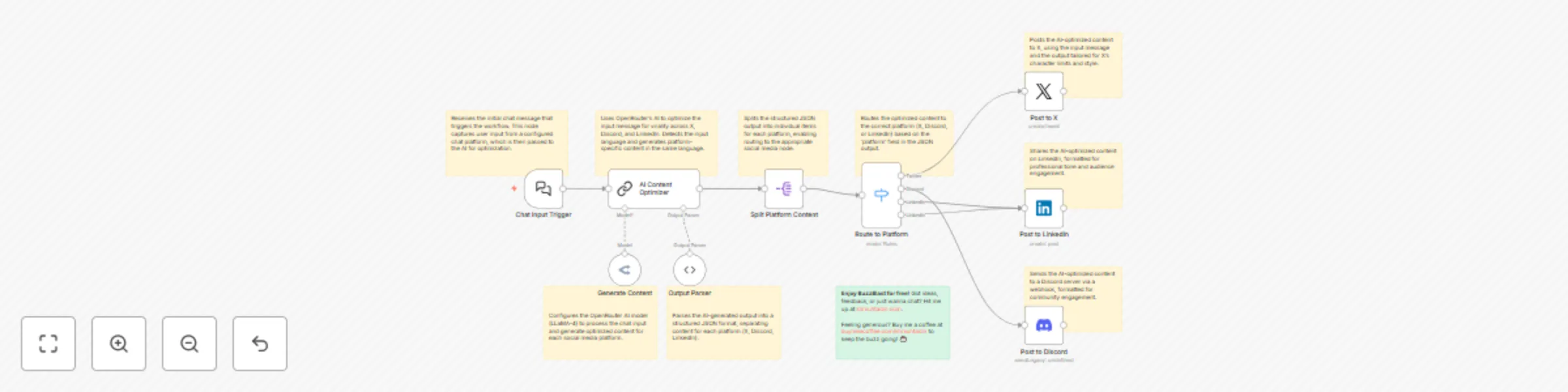
AI-optimized content posting to X, Discord & LinkedIn with OpenRouter

Workflow preview

Workflow preview
100%
AI-optimized content posting to X, Discord & LinkedIn with OpenRouter preview
Open on n8n.io

Important notice

This workflow is provided as-is. Please review and test before using in production.

1. Workflow Overview

Amplify your social media presence with BuzzBlast , an n8n workflow designed to make your content go viral across X, Discord, and LinkedIn. By sending a single chat message, BuzzBlast leverages Ope...

Best for

  • Social Media automation workflows
  • Multimodal AI automation workflows
  • advanced n8n builders looking for reusable templates

Tools used

n8n-nodes-base.stickynote, @n8n/n8n-nodes-langchain.lmchatopenrouter, @n8n/n8n-nodes-langchain.outputparserstructured, n8n-nodes-base.splitout, n8n-nodes-base.switch, n8n-nodes-base.twitter, n8n-nodes-base.linkedin, n8n-nodes-base.discord

Source and attribution

This workflow is cataloged by N8N Workflows and links back to its original n8n.io source page by Khairul Muhtadin.

Original n8n.io source

1.1 Workflow description

Title
AI-optimized content posting to X, Discord & LinkedIn with OpenRouter
Workflow name
AI-optimized content posting to X, Discord & LinkedIn with OpenRouter

Amplify your social media presence with BuzzBlast, an n8n workflow designed to make your content go viral across X, Discord, and LinkedIn. By sending a single chat message, BuzzBlast leverages OpenRouter's AI to optimize your input for each platform’s unique audience—crafting punchy tweets for X, engaging messages for Discord, and professional posts for LinkedIn. With smart language detection, it ensures the output matches your input’s language for authentic engagement.

Key Features

  • 🚀 Multi-Platform Posting: Shares optimized content to X, Discord, and LinkedIn simultaneously.
  • 🧠 AI Optimization: Uses OpenRouter’s AI to tailor content for virality on each platform.
  • 🌐 Language Detection: Matches output to your input language for seamless engagement.
  • 🔄 Smart Routing: Automatically directs content to the right platform using a switch node.
  • 📱 Chat Trigger: Initiates posts via a simple chat message.
  • Zero Hassle: No manual reformatting—BuzzBlast handles it all.

Ideal For

  • Social media managers looking to streamline cross-platform posting.
  • Content creators aiming to boost engagement with minimal effort.
  • Businesses seeking to maximize reach across diverse audiences.

Pre-Requirements

  • n8n instance: A running n8n instance (cloud or self-hosted).
  • Credentials:
    • X account with OAuth2 API access.
    • Discord Webhook API setup for your server.
    • LinkedIn account with OAuth2 API access.
    • OpenRouter account for AI language model access.
  • Chat Trigger Setup: A configured chat platform (e.g., Slack, Telegram) to send input messages to the workflow.

Setup Instructions

  1. Import the Workflow:
    • Copy the provided workflow JSON and import it into your n8n instance via the "Import Workflow" option in the n8n editor.
  2. Configure Credentials:
    • In the Post to X node, set up OAuth2 credentials for your X account.
    • In the Post to Discord node, configure a Discord Webhook for your server.
    • In the Post to LinkedIn node, add OAuth2 credentials for your LinkedIn account.
    • In the OpenRouter AI Model node, provide API credentials for your OpenRouter account.
  3. Set Up Chat Trigger:
    • In the Chat Input Trigger node, configure your preferred chat platform (e.g., Slack, Telegram) to send trigger messages.
    • Ensure the webhook is active and correctly linked to your chat platform.
  4. Test the Workflow:
    • Send a test message via your chat platform (e.g., "Announcing our new product launch!").
    • Verify that the AI optimizes the content and posts it to X, Discord, and LinkedIn as expected.
  5. Activate the Workflow:
    • Once tested, toggle the workflow to "Active" in n8n to enable automatic execution when chat messages are received.

Customization Guidance

  • Changes Chat Trigger: Adjust the chat trigger using your preference platform like telegram, discord, etc.
  • Modify AI Prompt: Adjust the prompt in the AI Content Optimizer node to change the tone or style (e.g., more professional for LinkedIn or conversational for Discord).
  • Add New Platforms: Extend the Route to Platforms node by adding conditions for additional platforms (e.g., Instagram or Facebook) and corresponding posting nodes.
  • Change AI Model: In the OpenRouter AI Model node, select a different OpenRouter model to optimize content quality or manage costs.
  • Enhance Output Format: Update the JSON schema in the Parse AI Output node to include additional fields like hashtags, emojis, or links for specific platforms.
  • Add Error Handling: Include an error-handling node after the Route to Platforms node to log failed posts or retry them automatically.

Why Choose BuzzBlast?

BuzzBlast saves time, maximizes reach, and lets AI craft platform-perfect posts that resonate with your audience. Whether you're an influencer, marketer, or business, this workflow makes cross-platform posting effortless. Ready to make waves online? Grab BuzzBlast and start buzzing!

made by: khmuhtadin Need a custom? contact me on LinkedIn or Web

1.2 Logical Blocks

This catalog entry is organized from the workflow JSON. The node-level section below shows the executable blocks available for review before importing the template.

2. Block-by-Block Analysis

Block 1 - Sticky - Chat Trigger

Type / Role
n8n-nodes-base.stickyNote - stickyNote
Config choices
Version 1

Block 2 - Sticky - AI Optimizer

Type / Role
n8n-nodes-base.stickyNote - stickyNote
Config choices
Version 1

Block 3 - Sticky - OpenRouter

Type / Role
n8n-nodes-base.stickyNote - stickyNote
Config choices
Version 1

Block 4 - Sticky - Parser

Type / Role
n8n-nodes-base.stickyNote - stickyNote
Config choices
Version 1

Block 5 - Sticky - Split

Type / Role
n8n-nodes-base.stickyNote - stickyNote
Config choices
Version 1

Block 6 - Sticky - Switch

Type / Role
n8n-nodes-base.stickyNote - stickyNote
Config choices
Version 1

Block 7 - Sticky - Post to X

Type / Role
n8n-nodes-base.stickyNote - stickyNote
Config choices
Version 1

Block 8 - Sticky - Post to Discord

Type / Role
n8n-nodes-base.stickyNote - stickyNote
Config choices
Version 1

Block 9 - Sticky - Post to LinkedIn

Type / Role
n8n-nodes-base.stickyNote - stickyNote
Config choices
Version 1

Block 10 - Generate Content

Type / Role
@n8n/n8n-nodes-langchain.lmChatOpenRouter - lmChatOpenRouter
Config choices
Version 1

Block 11 - Output Parser

Type / Role
@n8n/n8n-nodes-langchain.outputParserStructured - outputParserStructured
Config choices
Version 1.2

Block 12 - Sticky - Parser1

Type / Role
n8n-nodes-base.stickyNote - stickyNote
Config choices
Version 1

Block 13 - Split Platform Content

Type / Role
n8n-nodes-base.splitOut - splitOut
Config choices
Version 1

Block 14 - Route to Platform

Type / Role
n8n-nodes-base.switch - switch
Config choices
Version 3.2

Block 15 - Post to X

Type / Role
n8n-nodes-base.twitter - twitter
Config choices
Version 2

Block 16 - Post to LinkedIn

Type / Role
n8n-nodes-base.linkedIn - linkedIn
Config choices
Version 1

Block 17 - Post to Discord

Type / Role
n8n-nodes-base.discord - discord
Config choices
Version 2

Block 18 - Chat Input Trigger

Type / Role
@n8n/n8n-nodes-langchain.chatTrigger - chatTrigger
Config choices
Version 1.1

Block 19 - AI Content Optimizer

Type / Role
@n8n/n8n-nodes-langchain.chainLlm - chainLlm
Config choices
Version 1.6

3. Summary Table

Workflow AI-optimized content posting to X, Discord & LinkedIn with OpenRouter
Complexity advanced
Nodes 19
Categories Social Media, Multimodal AI
Author Khairul Muhtadin
Published 13 May 2025

4. Reproducing the Workflow from Scratch

  1. 1. Download the workflow JSON

    Use the JSON export at /data/workflows/4022/4022.json as the source template for this automation.

  2. 2. Import the template into n8n

    Open n8n, import the downloaded JSON, and review each node before activating the workflow.

  3. 3. Configure credentials and variables

    Replace placeholder credentials, API keys, webhook URLs, account IDs, and environment-specific values with your own settings.

  4. 4. Test with sample data

    Run the workflow manually or in a staging workspace, inspect node output, and confirm downstream systems receive the expected data.

  5. 5. Activate and monitor

    Enable the workflow only after testing, then monitor executions, errors, and rate limits during the first production runs.

5. General Notes & Resources

Review imported nodes carefully before activation. This catalog entry is intended to help you inspect the workflow structure, understand required services, and find related templates faster.

Node names, credentials, schedules, webhook paths, and external service limits may need adjustment for your workspace.

Frequently asked questions

What does AI-optimized content posting to X, Discord & LinkedIn with OpenRouter do?

Amplify your social media presence with BuzzBlast , an n8n workflow designed to make your content go viral across X, Discord, and LinkedIn. By sending a single chat message, BuzzBlast leverages Ope...

What do I need before importing this workflow?

Review the workflow JSON, configure any required credentials in n8n, and test the automation in a safe workspace before using it in production.

Can I customize this workflow?

Yes. Use the block-by-block analysis and the downloadable JSON to inspect each node, then adjust credentials, prompts, schedules, filters, or destinations for your Social Media, Multimodal AI use case.