Ai fitness coach Strava data analysis and personalized training insights

Workflow preview

Workflow preview
100%
Ai fitness coach Strava data analysis and personalized training insights preview
Open on n8n.io

Important notice

This workflow is provided as-is. Please review and test before using in production.

1. Workflow Overview

Detailed Title "Triathlon Coach AI Workflow: Strava Data Analysis and Personalized Training Insights using n8n" Description This n8n workflow enables you to build an AI driven virtual triathlon coa...

Best for

  • Personal Productivity automation workflows
  • AI Summarization automation workflows
  • advanced n8n builders looking for reusable templates

Tools used

n8n-nodes-base.stravatrigger, @n8n/n8n-nodes-langchain.lmchatgooglegemini, n8n-nodes-base.gmail, n8n-nodes-base.code, @n8n/n8n-nodes-langchain.agent, n8n-nodes-base.emailsend, n8n-nodes-base.stickynote, n8n-nodes-base.whatsapp

Source and attribution

This workflow is cataloged by N8N Workflows and links back to its original n8n.io source page by Amjid Ali.

Original n8n.io source

1.1 Workflow description

Title
Ai fitness coach Strava data analysis and personalized training insights
Workflow name
Ai fitness coach Strava data analysis and personalized training insights

Detailed Title

"Triathlon Coach AI Workflow: Strava Data Analysis and Personalized Training Insights using n8n"


Description

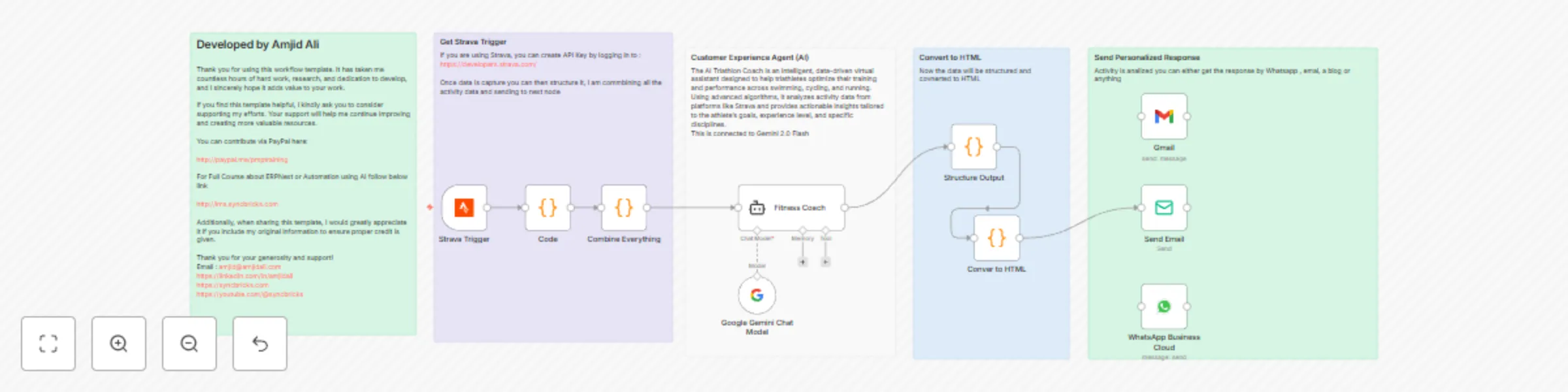
This n8n workflow enables you to build an AI-driven virtual triathlon coach that seamlessly integrates with Strava to analyze activity data and provide athletes with actionable training insights. The workflow processes data from activities like swimming, cycling, and running, delivers personalized feedback, and sends motivational and performance improvement advice via email or WhatsApp.


Workflow Details

Trigger: Strava Activity Updates
  • Node: Strava Trigger
  • Purpose: Captures updates from Strava whenever an activity is recorded or modified. The data includes metrics like distance, pace, elevation, heart rate, and more.
  • Integration: Uses Strava API for real-time synchronization.
Step 1: Data Preprocessing
  • Node: Code
  • Purpose: Combines and flattens the raw Strava activity data into a structured format for easier processing in subsequent nodes.
  • Logic: A recursive function flattens JSON input to create a clean and readable structure.
Step 2: AI Analysis with Google Gemini
  • Node: Google Gemini Chat Model
  • Purpose: Leverages Google Gemini's advanced language model to analyze the activity data.
  • Functionality:
    • Identifies key performance metrics.
    • Provides feedback and insights specific to the type of activity (e.g., running, swimming, or cycling).
    • Offers tailored recommendations and motivational advice.
Step 3: Generate Structured Output
  • Node: Structure Output
  • Purpose: Processes the AI-generated response to create a structured format, such as headings, paragraphs, and bullet lists.
  • Output: Formats the response for clear communication.
Step 4: Convert to HTML
  • Node: Convert to HTML
  • Purpose: Converts the structured output into an HTML format suitable for email or other presentation methods.
  • Output: Ensures the response is visually appealing and easy to understand.
Step 5: Send Email with Training Insights
  • Node: Send Email
  • Purpose: Sends a detailed email to the athlete with performance insights, training recommendations, and motivational messages.
  • Integration: Utilizes Gmail or SMTP for secure and efficient email delivery.
Optional Step: WhatsApp Notifications
  • Node: WhatsApp Business Cloud
  • Purpose: Sends a summary of the activity analysis and key recommendations via WhatsApp for instant access.
  • Integration: Connects to WhatsApp Business Cloud for automated messaging.

Additional Notes

  1. Customization:

    • You can modify the AI prompt to adapt the recommendations to the athlete's specific goals or fitness levels.
    • The workflow is flexible and can accommodate additional nodes for more advanced analysis or output formats.
  2. Scalability:

    • Ideal for individual athletes or coaches managing multiple athletes.
    • Can be expanded to include additional metrics or insights based on user preferences.
  3. Performance Metrics Handled:

    • Swimming: SWOLF, stroke count, pace.
    • Cycling: Cadence, power zones, elevation.
    • Running: Pacing, stride length, heart rate zones.

Implementation Steps

  1. Set Up Strava API Key:

    • Log in to Strava Developers to generate your API key.
    • Integrate the API key into the Strava Trigger node.
  2. Configure Google Gemini Integration:

    • Use your Google Gemini (PaLM) API credentials in the Google Gemini Chat Model node.
  3. Customize Email and WhatsApp Messaging:

    • Update the Send Email and WhatsApp Business Cloud nodes with the recipient’s details.
  4. Automate Execution:

    • Deploy the workflow and use n8n's scheduling features or cron jobs for periodic execution.

GET n8n Now

N8N COURSE

n8n Book

Developer Notes

By using this workflow, triathletes and coaches can elevate training to the next level with AI-powered insights and actionable recommendations.

1.2 Logical Blocks

This catalog entry is organized from the workflow JSON. The node-level section below shows the executable blocks available for review before importing the template.

2. Block-by-Block Analysis

Block 1 - Strava Trigger

Type / Role
n8n-nodes-base.stravaTrigger - stravaTrigger
Config choices
Version 1

Block 2 - Google Gemini Chat Model

Type / Role
@n8n/n8n-nodes-langchain.lmChatGoogleGemini - lmChatGoogleGemini
Config choices
Version 1

Block 3 - Gmail

Type / Role
n8n-nodes-base.gmail - gmail
Config choices
Version 2.1

Block 4 - Combine Everything

Type / Role
n8n-nodes-base.code - code
Config choices
Version 2

Block 5 - Fitness Coach

Type / Role
@n8n/n8n-nodes-langchain.agent - agent
Config choices
Version 1.7

Block 6 - Structure Output

Type / Role
n8n-nodes-base.code - code
Config choices
Version 2

Block 7 - Conver to HTML

Type / Role
n8n-nodes-base.code - code
Config choices
Version 2

Block 8 - Send Email

Type / Role
n8n-nodes-base.emailSend - emailSend
Config choices
Version 2.1

Block 9 - Code

Type / Role
n8n-nodes-base.code - code
Config choices
Version 2

Block 10 - Sticky Note

Type / Role
n8n-nodes-base.stickyNote - stickyNote
Config choices
Version 1

Block 11 - Sticky Note12

Type / Role
n8n-nodes-base.stickyNote - stickyNote
Config choices
Version 1

Block 12 - Sticky Note13

Type / Role
n8n-nodes-base.stickyNote - stickyNote
Config choices
Version 1

Block 13 - Sticky Note11

Type / Role
n8n-nodes-base.stickyNote - stickyNote
Config choices
Version 1

Block 14 - Sticky Note16

Type / Role
n8n-nodes-base.stickyNote - stickyNote
Config choices
Version 1

Block 15 - WhatsApp Business Cloud

Type / Role
n8n-nodes-base.whatsApp - whatsApp
Config choices
Version 1

3. Summary Table

Workflow Ai fitness coach Strava data analysis and personalized training insights
Complexity advanced
Nodes 15
Categories Personal Productivity, AI Summarization
Author Amjid Ali
Published 24 Jan 2025

4. Reproducing the Workflow from Scratch

  1. 1. Download the workflow JSON

    Use the JSON export at /data/workflows/2790/2790.json as the source template for this automation.

  2. 2. Import the template into n8n

    Open n8n, import the downloaded JSON, and review each node before activating the workflow.

  3. 3. Configure credentials and variables

    Replace placeholder credentials, API keys, webhook URLs, account IDs, and environment-specific values with your own settings.

  4. 4. Test with sample data

    Run the workflow manually or in a staging workspace, inspect node output, and confirm downstream systems receive the expected data.

  5. 5. Activate and monitor

    Enable the workflow only after testing, then monitor executions, errors, and rate limits during the first production runs.

5. General Notes & Resources

Review imported nodes carefully before activation. This catalog entry is intended to help you inspect the workflow structure, understand required services, and find related templates faster.

Node names, credentials, schedules, webhook paths, and external service limits may need adjustment for your workspace.

Frequently asked questions

What does Ai fitness coach Strava data analysis and personalized training insights do?

Detailed Title "Triathlon Coach AI Workflow: Strava Data Analysis and Personalized Training Insights using n8n" Description This n8n workflow enables you to build an AI driven virtual triathlon coa...

What do I need before importing this workflow?

Review the workflow JSON, configure any required credentials in n8n, and test the automation in a safe workspace before using it in production.

Can I customize this workflow?

Yes. Use the block-by-block analysis and the downloadable JSON to inspect each node, then adjust credentials, prompts, schedules, filters, or destinations for your Personal Productivity, AI Summarization use case.