Block 1 - Gmail Trigger
- Type / Role
- n8n-nodes-base.gmailTrigger - gmailTrigger
- Config choices
- Version 1.2


 Early Deal
This workflow is provided as-is. Please review and test before using in production.
This workflow is designed for freelancers, solopreneurs, and business owners who receive a high volume of irrelevant messages in their Gmail inbox — from cold offers to spammy promotions — and want...
n8n-nodes-base.gmailtrigger, @n8n/n8n-nodes-langchain.lmchatopenai, n8n-nodes-base.if, @n8n/n8n-nodes-langchain.agent, n8n-nodes-base.gmail, n8n-nodes-base.stickynote
This workflow is cataloged by N8N Workflows and links back to its original n8n.io source page by LukaszB.
Original n8n.io sourceThis workflow is designed for freelancers, solopreneurs, and business owners who receive a high volume of irrelevant messages in their Gmail inbox — from cold offers to spammy promotions — and want to automatically filter and delete them using AI. Its main purpose is to scan new emails with the help of OpenAI, classify their content, and automatically delete those considered marketing (OFFER) or junk (SPAM). The result is a cleaner inbox without the need to manually sift through low-value messages.
The classification logic uses a detailed system prompt with practical examples, so even complex or borderline messages are categorized accurately. Important emails — such as payment confirmations, shipping updates, or genuine business inquiries — remain untouched. This helps maintain a professional inbox with only valuable and relevant communication.
The entire process runs automatically in the background and can be customized further — for example, to archive instead of delete, or log deleted emails for review.
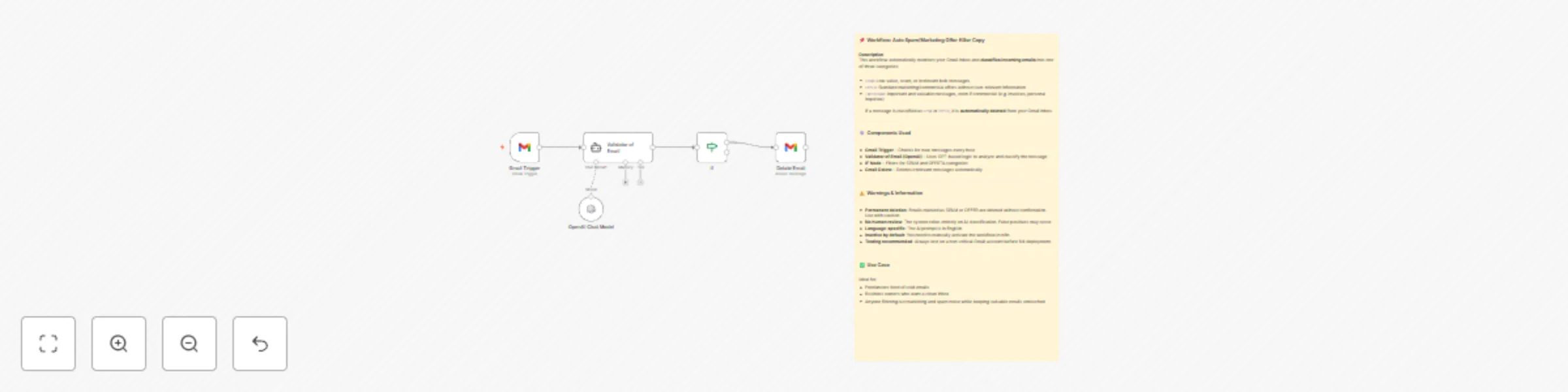
When triggered (every hour), the workflow fetches new Gmail messages using the Gmail Trigger node. Each message is passed to an AI classifier powered by OpenAI, which reads the message body (email snippet) and returns one of three labels:
SPAM: Obvious junk messages, scams, or low-effort bulk messagesOFFER: Cold outreach, discount promotions, cart reminders, or generic advertisingIMPORTANT: Valuable information for the user, even if commercial (e.g., invoices, order updates, personal inquiries)The workflow then routes the result through an IF node. If the message is marked as SPAM or OFFER, it is immediately deleted from Gmail via the Gmail Delete node. Emails marked as IMPORTANT are ignored and remain in the inbox.
The classification is entirely AI-driven based on message content — sender address, headers, or metadata are not used.
To get started, simply connect two credentials:
No advanced setup is needed beyond these two connections.
Optionally, you can review or modify the system prompt used for classification — it’s available inside the workflow’s LangChain AI Agent node. The prompt is in English, so it’s recommended to use this workflow with English-language emails for best results.
By default, the workflow deletes matching emails immediately. If you prefer safer testing, you can modify the Gmail node to archive, label, or log emails instead of deleting them.
The full workflow takes around 5–10 minutes to configure and includes a sticky note with additional instructions and warnings.
This catalog entry is organized from the workflow JSON. The node-level section below shows the executable blocks available for review before importing the template.
| Workflow | AI email classifier & auto-delete for Gmail (SPAM/OFFER cleaner) |
|---|---|
| Complexity | intermediate |
| Nodes | 6 |
| Categories | Personal Productivity, AI Summarization |
| Author | LukaszB |
| Published | 30 May 2025 |
Use the JSON export at /data/workflows/4507/4507.json as the source template for this automation.
Open n8n, import the downloaded JSON, and review each node before activating the workflow.
Replace placeholder credentials, API keys, webhook URLs, account IDs, and environment-specific values with your own settings.
Run the workflow manually or in a staging workspace, inspect node output, and confirm downstream systems receive the expected data.
Enable the workflow only after testing, then monitor executions, errors, and rate limits during the first production runs.
Review imported nodes carefully before activation. This catalog entry is intended to help you inspect the workflow structure, understand required services, and find related templates faster.
Node names, credentials, schedules, webhook paths, and external service limits may need adjustment for your workspace.
This workflow is designed for freelancers, solopreneurs, and business owners who receive a high volume of irrelevant messages in their Gmail inbox — from cold offers to spammy promotions — and want...
Review the workflow JSON, configure any required credentials in n8n, and test the automation in a safe workspace before using it in production.
Yes. Use the block-by-block analysis and the downloadable JSON to inspect each node, then adjust credentials, prompts, schedules, filters, or destinations for your Personal Productivity, AI Summarization use case.