AI DJ: Text-to-Spotify playlist generator with Linkup and GPT4

Workflow preview

Workflow preview
100%
AI DJ: Text-to-Spotify playlist generator with Linkup and GPT4 preview
Open on n8n.io

Important notice

This workflow is provided as-is. Please review and test before using in production.

1. Workflow Overview

Stop manually searching for songs and let an AI DJ do the work for you. This template provides a complete, end to end system that transforms any text prompt into a ready to play Spotify playlist. I...

Best for

  • Content Creation automation workflows
  • advanced n8n builders looking for reusable templates

Tools used

n8n-nodes-base.set, n8n-nodes-base.spotify, n8n-nodes-base.splitout, n8n-nodes-base.stickynote, n8n-nodes-base.formtrigger, @n8n/n8n-nodes-langchain.lmchatopenai, n8n-nodes-base.httprequesttool, @n8n/n8n-nodes-langchain.agent

Source and attribution

This workflow is cataloged by N8N Workflows and links back to its original n8n.io source page by Guillaume Duvernay.

Original n8n.io source

1.1 Workflow description

Title
AI DJ: Text-to-Spotify playlist generator with Linkup and GPT4
Workflow name
AI DJ: Text-to-Spotify playlist generator with Linkup and GPT4

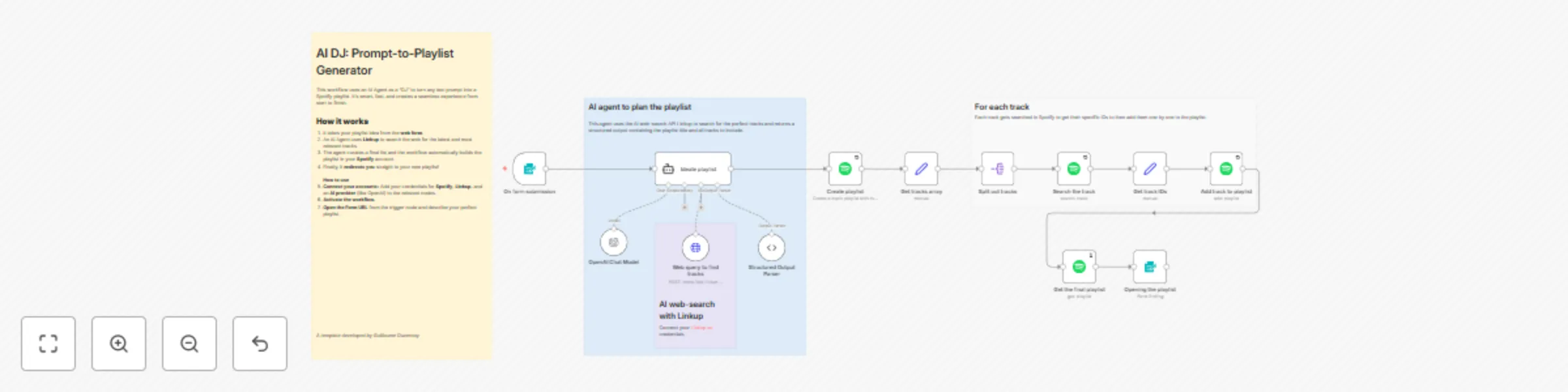
Stop manually searching for songs and let an AI DJ do the work for you. This template provides a complete, end-to-end system that transforms any text prompt into a ready-to-play Spotify playlist. It combines the creative understanding of a powerful AI Agent with the real-time web knowledge of Linkup to curate perfect, up-to-the-minute playlists for any occasion.

The experience is seamless: simply describe the vibe you're looking for in a web form, and the workflow will automatically create the playlist in your Spotify account and redirect you straight to it. Whether you need "upbeat funk for a sunny afternoon" or "moody electronic tracks for late-night coding," your personal AI DJ is ready to deliver.

Who is this for?

  • Music lovers: Create hyper-specific playlists for any mood, activity, or niche genre without the hassle of manual searching.
  • DJs & event planners: Quickly generate themed playlists for parties, weddings, or corporate events based on a simple brief.
  • Content creators: Easily create companion playlists for your podcasts, videos, or articles to share with your audience.
  • n8n developers: A powerful example of how to build an AI agent that uses an external web-search tool to accomplish a creative task.

What problem does this solve?

  • Creates up-to-date playlists: A standard AI doesn't know about music released yesterday. By using Linkup's live web search, this workflow can find and include the very latest tracks.
  • Automates the entire creation process: It handles everything from understanding a vague prompt (like "songs that feel like a summer road trip") to creating a fully populated Spotify playlist.
  • Saves time and effort: It completely eliminates the tedious task of searching for individual tracks, checking for relevance, and manually adding them to a playlist one by one.
  • Provides a seamless user experience: The workflow begins with a simple form and ends by automatically opening the finished playlist in your browser. There are no intermediate steps for you to manage.

How it works

  1. Submit your playlist idea: You describe the playlist you want and the desired number of tracks in a simple, Spotify-themed web form.
  2. The AI DJ plans the search: An AI Agent (acting as your personal DJ) analyzes your request. It then intelligently formulates a specific query to find the best music.
  3. Web research with Linkup: The agent uses its Linkup web-search tool to find artists and tracks from across the web that perfectly match your request, returning a list of high-quality suggestions.
  4. The AI DJ curates the list: The agent reviews the search results and finalizes the tracklist and a creative name for your playlist.
  5. Build the playlist in Spotify: The workflow takes the agent's final list, creates a new public playlist in your Spotify account, then searches for each individual track to get its ID and adds them all.
  6. Instant redirection: As soon as the last track is added, the workflow automatically redirects your browser to the newly created playlist on Spotify, ready to be played.

Setup

  1. Connect your accounts: You will need to add your credentials for:
    • Spotify: In the Spotify nodes.
    • Linkup: In the Web query to find tracks (HTTP Request Tool) node. Linkup's free plan is very generous!
    • Your AI provider (e.g., OpenAI): In the OpenAI Chat Model node.
  2. Activate the workflow: Toggle the workflow to "Active."
  3. Use the form: Open the URL from the On form submission trigger and start creating playlists!

Taking it further

  • Change the trigger: Instead of a form, trigger the playlist creation from a Telegram message, a Discord bot command, or even a webhook from another application.
  • Create collaborative playlists: Set up a workflow where multiple people can submit song ideas. You could then have a final AI step consolidate all the requests into a single, cohesive prompt to generate the ultimate group playlist.
  • Optimize for speed: The Web query to find tracks node is set to deep search mode for the highest quality results. You can change this to standard mode for faster and cheaper (but potentially less thorough) playlist creation.

1.2 Logical Blocks

This catalog entry is organized from the workflow JSON. The node-level section below shows the executable blocks available for review before importing the template.

2. Block-by-Block Analysis

Block 1 - Get track IDs

Type / Role
n8n-nodes-base.set - set
Config choices
Version 3.4

Block 2 - Create playlist

Type / Role
n8n-nodes-base.spotify - spotify
Config choices
Version 1

Block 3 - Split out tracks

Type / Role
n8n-nodes-base.splitOut - splitOut
Config choices
Version 1

Block 4 - Get tracks array

Type / Role
n8n-nodes-base.set - set
Config choices
Version 3.4

Block 5 - Add track to playlist

Type / Role
n8n-nodes-base.spotify - spotify
Config choices
Version 1

Block 6 - Get the final playlist

Type / Role
n8n-nodes-base.spotify - spotify
Config choices
Version 1

Block 7 - Search the track

Type / Role
n8n-nodes-base.spotify - spotify
Config choices
Version 1

Block 8 - Sticky Note4

Type / Role
n8n-nodes-base.stickyNote - stickyNote
Config choices
Version 1

Block 9 - Sticky Note6

Type / Role
n8n-nodes-base.stickyNote - stickyNote
Config choices
Version 1

Block 10 - On form submission

Type / Role
n8n-nodes-base.formTrigger - formTrigger
Config choices
Version 2.3

Block 11 - OpenAI Chat Model

Type / Role
@n8n/n8n-nodes-langchain.lmChatOpenAi - lmChatOpenAi
Config choices
Version 1.2

Block 12 - Web query to find tracks

Type / Role
n8n-nodes-base.httpRequestTool - httpRequestTool
Config choices
Version 4.2

Block 13 - Ideate playlist

Type / Role
@n8n/n8n-nodes-langchain.agent - agent
Config choices
Version 2.2

Block 14 - Structured Output Parser

Type / Role
@n8n/n8n-nodes-langchain.outputParserStructured - outputParserStructured
Config choices
Version 1.3

Block 15 - Opening the playlist

Type / Role
n8n-nodes-base.form - form
Config choices
Version 2.3

Block 16 - Sticky Note

Type / Role
n8n-nodes-base.stickyNote - stickyNote
Config choices
Version 1

Block 17 - Sticky Note1

Type / Role
n8n-nodes-base.stickyNote - stickyNote
Config choices
Version 1

3. Summary Table

Workflow AI DJ: Text-to-Spotify playlist generator with Linkup and GPT4
Complexity advanced
Nodes 17
Categories Content Creation
Author Guillaume Duvernay
Published 21 Sept 2025

4. Reproducing the Workflow from Scratch

  1. 1. Download the workflow JSON

    Use the JSON export at /data/workflows/8801/8801.json as the source template for this automation.

  2. 2. Import the template into n8n

    Open n8n, import the downloaded JSON, and review each node before activating the workflow.

  3. 3. Configure credentials and variables

    Replace placeholder credentials, API keys, webhook URLs, account IDs, and environment-specific values with your own settings.

  4. 4. Test with sample data

    Run the workflow manually or in a staging workspace, inspect node output, and confirm downstream systems receive the expected data.

  5. 5. Activate and monitor

    Enable the workflow only after testing, then monitor executions, errors, and rate limits during the first production runs.

5. General Notes & Resources

Review imported nodes carefully before activation. This catalog entry is intended to help you inspect the workflow structure, understand required services, and find related templates faster.

Node names, credentials, schedules, webhook paths, and external service limits may need adjustment for your workspace.

Frequently asked questions

What does AI DJ: Text-to-Spotify playlist generator with Linkup and GPT4 do?

Stop manually searching for songs and let an AI DJ do the work for you. This template provides a complete, end to end system that transforms any text prompt into a ready to play Spotify playlist. I...

What do I need before importing this workflow?

Review the workflow JSON, configure any required credentials in n8n, and test the automation in a safe workspace before using it in production.

Can I customize this workflow?

Yes. Use the block-by-block analysis and the downloadable JSON to inspect each node, then adjust credentials, prompts, schedules, filters, or destinations for your Content Creation use case.