Block 1 - When clicking ‘Test workflow’
- Type / Role
- n8n-nodes-base.manualTrigger - manualTrigger
- Config choices
- Version 1


 Early Deal
This workflow is provided as-is. Please review and test before using in production.
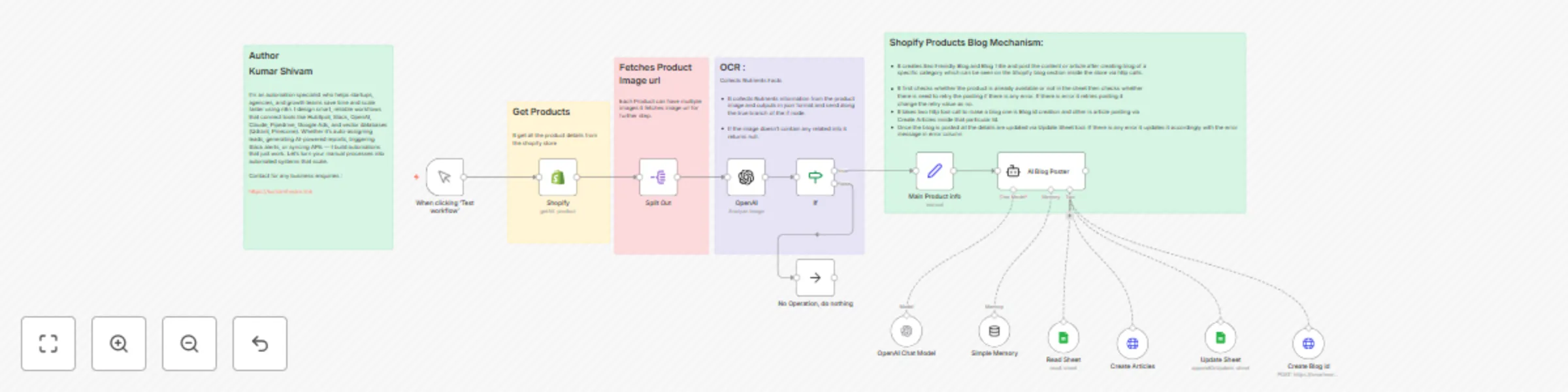
AI Blog Generator for Shopify Products using GPT 4o The AI Blog Generator is an advanced automation workflow powered by n8n , integrating GPT 4o and Google Sheets to generate SEO rich blog artic...
n8n-nodes-base.manualtrigger, n8n-nodes-base.shopify, n8n-nodes-base.splitout, @n8n/n8n-nodes-langchain.openai, @n8n/n8n-nodes-langchain.lmchatopenai, n8n-nodes-base.if, n8n-nodes-base.noop, n8n-nodes-base.httprequesttool
This workflow is cataloged by N8N Workflows and links back to its original n8n.io source page by Kumar Shivam.
Original n8n.io sourceThe AI Blog Generator is an advanced automation workflow powered by n8n, integrating GPT-4o and Google Sheets to generate SEO-rich blog articles for Shopify products. It automates the entire process — from pulling product data, analyzing images for nutritional information, to producing structured HTML content ready for publishing — with zero manual writing.
🔗 Shopify Product Sync
Automatically pulls product data (title, description, images, etc.) via Shopify API.
🤖 AI-Powered Nutrition Extraction
Uses GPT-4o to intelligently analyze product images and extract nutritional information.
✍️ SEO Blog Generation
GPT-4o generates blog titles, meta descriptions, and complete articles using both product metadata and extracted nutritional info.
🗂️ Structured Content Output
Produces well-formatted HTML with headers, bullet points, and nutrition tables for seamless Shopify blog integration.
📄 Google Sheets Integration
Tracks blog creation, manages retries, and prevents duplicate publishing using a centralized Google Sheet.
📤 Shopify Blog API Integration
Publishes the generated blog to Shopify using a two-step blog + article API call.
Manual Trigger
Initiate the process using a test trigger or a scheduler.
Fetch Products from Shopify
Retrieves all product details including descriptions and images.
Extract Product Images
Splits and processes each image individually.
OCR + Nutrition AI
GPT-4o reads nutrition facts from product images. Skips items without valid info.
Check Existing Logs
References a Google Sheet to avoid duplicates and determine retry status.
AI Blog Generation
Creates a blog with headings, bullet points, intro, and a nutrition table.
Shopify Blog + Article Posting
Uses the Shopify API to publish the blog and its content.
Update Google Sheet
Logs the blog URL, HTML content, errors, and status for future reference.
The workflow is modular. You can easily extend it with internal linking, language translation, or even social media sharing — all within the same n8n flow.
This catalog entry is organized from the workflow JSON. The node-level section below shows the executable blocks available for review before importing the template.
| Workflow | AI blog generator for Shopify product listings: Using GPT-4o and Google Sheets |
|---|---|
| Complexity | advanced |
| Nodes | 19 |
| Categories | Content Creation, Multimodal AI |
| Author | Kumar Shivam |
| Published | 06 Jun 2025 |
Use the JSON export at /data/workflows/4735/4735.json as the source template for this automation.
Open n8n, import the downloaded JSON, and review each node before activating the workflow.
Replace placeholder credentials, API keys, webhook URLs, account IDs, and environment-specific values with your own settings.
Run the workflow manually or in a staging workspace, inspect node output, and confirm downstream systems receive the expected data.
Enable the workflow only after testing, then monitor executions, errors, and rate limits during the first production runs.
Review imported nodes carefully before activation. This catalog entry is intended to help you inspect the workflow structure, understand required services, and find related templates faster.
Node names, credentials, schedules, webhook paths, and external service limits may need adjustment for your workspace.
AI Blog Generator for Shopify Products using GPT 4o The AI Blog Generator is an advanced automation workflow powered by n8n , integrating GPT 4o and Google Sheets to generate SEO rich blog artic...
Review the workflow JSON, configure any required credentials in n8n, and test the automation in a safe workspace before using it in production.
Yes. Use the block-by-block analysis and the downloadable JSON to inspect each node, then adjust credentials, prompts, schedules, filters, or destinations for your Content Creation, Multimodal AI use case.