K

Kumar Shivam

6
Workflows

Workflows by Kumar Shivam

Workflow preview: Automate lead intelligence & outreach with GPT-4o, LinkedIn, HubSpot & Outlook
Free advanced

Automate lead intelligence & outreach with GPT-4o, LinkedIn, HubSpot & Outlook

# AI Lead Intelligence & Outreach: Verified Emails, HubSpot Sync & Outlook Drafts ![leadoutreach](https://i.ibb.co/KpWWKSWq/Chat-GPT-Image-Oct-25-2025-02-57-54-PM.png) ## Who is this for? This workflow is designed for **sales/RevOps teams, B2B founders, SDR/AE teams, and agencies** who live in HubSpot and need consistent, compliant first-touch outreach at scale. If you regularly build reusable, multi-client n8n automations, this template will save you hours of manual work. --- ## What problem is this workflow solving? / Use case Manual lead handling is **slow and inconsistent**: - Leads arrive messy across forms, lists, and imports; ownership and priority are unclear. - Finding the right decision-maker and a deliverable email takes too long. - Outreach copy drifts from brand guidelines, and CRM updates get missed. This workflow solves the problem by **creating a reliable pipeline** from capture → enrichment → verification → CRM sync → Outlook draft, cutting handoffs and preserving auditability. --- ## What this workflow does 1. **Capture and batching** - Triggers on new/updated leads in HubSpot or pulls "ready" rows from Google Sheets; processes items sequentially to stay rate-safe. 2. **Normalize and score (ICP)** - Cleans names, company, and domains; applies configurable ICP rules and writes score plus reasoning back to HubSpot/Sheets. 3. **Enrich contacts** - Confirms official company details and identifies likely decision-makers via focused people searches; dedupes and role-normalizes. 4. **Verify emails** - Finds work emails, checks deliverability, and logs confidence and timestamps to a tracking sheet immediately after each result. 5. **Compose outreach** - Calls the approved template in `Email content`; personalizes only the first name; validates structure via `Structured Output Parser`. 6. **Draft in Outlook** - Uses Microsoft Graph to create an HTML draft; embeds an inline signature image fetched from Google Drive. 7. **CRM sync and tasks** - Creates/updates HubSpot contacts and associations, stores the composed email in properties, and opens a next-day follow-up task for the owner. 8. **Safety and observability** - Deterministic prompts, strict parsing, idempotent writes, and clear flags prevent duplicates; optional Slack/Teams alerts for failures. --- ## Setup 1. **Connect your accounts**: - HubSpot (app token) - Microsoft Graph (OAuth2) - Google Sheets - Google Drive - Your LLM provider (for `Level 2 Orchestrator` and `Email content`) 2. **Set your credentials** in the respective nodes. 3. **Adjust the Google Sheet IDs** to match your own sheet structure. 4. **Map HubSpot properties** (owner, contact/company IDs, custom fields for score, reasoning, and email content). 5. **Paste your approved HTML** in `Email content` and upload your signature image to Drive. 6. **Configure schedule**, batch size, and any Slack/Teams webhooks for notifications. --- ## How to customize this workflow to your needs - **ICP logic**: Edit scoring weights and required qualifiers (industry, region, size, tech stack). - **Personas**: Change role detection and caps (e.g., Ops, Finance, Procurement). - **Copy control**: Swap the template in `Email content` or add A/B variants while keeping structure validation. - **Triggers**: Use webhook capture from forms, list-based pulls, or time-based recrawls. - **Delivery**: Switch the mail node to Gmail API if preferred; keep the same compose/verify/track sequence. - **Governance**: Add holdouts, opt-out checks, and rate limits per domain or owner; expand logs for export to a data warehouse. --- ✨ With this workflow, you go from **messy inbound leads → verified contacts → synchronized HubSpot records → ready-to-send Outlook drafts** in just minutes, with almost no manual work. --- ## Need help customizing? Contact me for consulting and support: [click here](https://kumarshivam.link/)

K
Kumar Shivam
Lead Generation
25 Oct 2025
206
0

Workflow preview: AI Shopify product descriptions: GPT-4o Vision + Claude + Analytics
Free advanced

AI Shopify product descriptions: GPT-4o Vision + Claude + Analytics

# Complete AI Product Description Generator ## Transforms product images into high-converting copy with GPT-4o Vision + Claude 3.5 The Shopify AI Product Description Factory is a **production-grade n8n workflow** that converts product images and metadata into refined, SEO-aware descriptions—fully automated and region-agnostic. It blends GPT-4o vision for visible attribute extraction, Claude 3.5 Sonnet for premium copy, Perplexity research for verified brand context, Google Sheets for orchestration and audit trails, **plus automated daily sales analytics enrichment**. Link-header pagination and structured output enforcement ensure reliable scale. ![generatedimage 3.png](fileId:2627) *To refine according to your usecase connect via my profile* [@connect](https://kumarshivam.link/) ## Key Advantages ### Vision-first copywriting Uses **gpt-4o** to identify only visible physical attributes (closure, heel, materials, sole) from product images—no guesses. ### Premium copy generation **anthropic/claude-3.5-sonnet** crafts concise, benefit-led descriptions with consistent tone, length control, and clean formatting. ### Research-assisted accuracy **perplexityTool** verifies vendor/brand context from official sources to avoid speculation or fabricated claims. ### Pagination you can trust Automates Shopify REST pagination via Link headers and persists `page_info` for resumable runs. ### Google Sheets orchestration Centralized staging, status tracking, and QA in Products, with ProcessingState for batch/page markers, and Error_log for diagnostics. ### Bulletproof error feedback **errorTrigger + AI diagnosis** logs clear, non-technical and technical explanations to Error_log for fast recovery. ### Automated sales analytics **Daily sales tracking** automatically captures and enriches total sales data for comprehensive business intelligence and performance monitoring. ## How It Works ### Intake and filtering - `httpRequest` fetches `/admin/api/2024-04/products.json?limit=200&{page_info}` - `code` filters only items with: - Image present - Empty `body_html` - The `currSeas:SS2025` tag - Extracts tag metadata such as `x-styleCode`, `country_of_origin`, and `gender` when available ### Pagination controller - `code` parses Link headers for `rel="next"` and extracts `page_info` - `googleSheets` updates ProcessingState with `page_info_next` and increments the batch number for resumable polling ### Generation pipeline - `googleSheets` pulls rows with Status = Ready for AI Description; limit throttles batch size - `openAi` Analyze image (model **gpt-4o**) returns strictly visible features - `lmChatOpenRouter` (**Claude 3.5**) composes the SEO description, optionally blending verified vendor context from `perplexityTool` - `outputParserStructured` guarantees strict JSON: `product_id`, `product_title` (normalized), `generated_description`, `status` - `googleSheets` writes results back to Products for review/publish ### Sales analytics enrichment - **Schedule Trigger** runs daily at 2:01 PM to capture previous day's sales - `httpRequest` fetches paid orders from Shopify REST API with date range filtering - `splitOut` and `summarize` nodes calculate total daily sales - Automatic Google Sheets logging with date stamps and totals - Zero-sale days are properly recorded for complete analytics continuity ### Reliability and insight `errorTrigger` routes failures to an AI agent that explains the root cause and appends a concise note to Error_log. ## What's Inside (Node Map) ### Data + API - `httpRequest` (Shopify REST 2024-04 for products and orders) - `googleSheets` (multiple sheet operations) - `googleSheetsTool` (error logging) ### AI models - `openAi` (gpt-4o vision analysis) - `lmChatOpenRouter` (anthropic/claude-3.5-sonnet for content generation) - **AI Agent** (intelligent error diagnosis) ### Analytics & Processing - `splitOut` (order data processing) - `summarize` (sales totals calculation) - `set` nodes (data field mapping) ### Tools and guards - `perplexityTool` (brand research) - `outputParserStructured` (JSON validation) - `memoryBufferWindow` (conversation context) ### Control & Scheduling - `scheduleTrigger` (multiple time-based triggers) - `cron` (periodic execution) - `limit` (batch size control) - `if` (conditional logic) - `code` (custom filtering and pagination logic) ### Observability - `errorTrigger` + AI diagnosis to Error_log - Processing state tracking - Sales analytics logging ## Content & Compliance Rules - **Locale-agnostic copy**; brand voice is configurable per store - **Only image-verifiable attributes** (no guesses); clean HTML suitable for Shopify themes - Optional normalization rules (e.g., color/branding cleanup, title sanitization) - Style code inclusion supported when `x-styleCode` is present - Gender-aware content generation when `gender` tag is present - **Strict JSON output** and schema consistency for safe downstream publishing ## Setup Steps ### Core integrations - **Shopify Access Token** — Products read + Orders read (REST 2024-04) - **OpenAI API** — gpt-4o vision - **OpenRouter API** — Claude Sonnet (3.5) - **Perplexity API** — vendor/market verification via perplexityTool - **Google Sheets OAuth** — Products, ProcessingState, Error_log, Sales analytics ### Configure sheets - **ProcessingState** with fields: - batch number - `page_info_next` - **Products** with: - Product ID - Product Title - Product Type - Vendor - Image url - Status - country of origin - x_style_code - gender - Generated Description - **Error_log** with: - timestamp - Reason of Error - **Sales Analytics Sheet** with: - Date - Total Sales ## Workflow Capabilities ### Discovery and staging Auto-paginate Shopify; stage eligible products in Sheets with reasons and timestamps. ### Vision-grounded copywriting Descriptions reflect only visible attributes plus verified brand context; concise, mobile-friendly structure with gender-aware tone. ### Metadata awareness Auto-injects `x-styleCode`, `country_of_origin`, and `gender` when present; natural SEO for brand and product type. ### Sales intelligence **Automated daily sales tracking** with Melbourne timezone support, handles zero-sale days, and maintains complete historical records. ### Error analytics Layman + technical diagnosis logged to Error_log to shorten MTTR. ### Safe output Structured JSON via `outputParserStructured` for predictable row updates. ## Credentials Required - **Shopify Access Token** (Products + Orders read permissions) - **OpenAI API Key** (GPT-4o vision) - **OpenRouter API Key** (Claude Sonnet) - **Perplexity API Key** - **Google Sheets OAuth** ## Ideal For - **E-commerce teams** scaling compliant, on-brand product copy with comprehensive sales insights - **Agencies and SEO specialists** standardizing image-grounded descriptions with performance tracking and analytics - **Stores** needing resumable pagination, auditable content operations, and automated daily sales reporting in Sheets ## Advanced Features - **Dual-workflow architecture**: Content generation + Sales analytics in one system - Link-header pagination with `page_info` persistence in ProcessingState - Title/content normalization (e.g., color removal) configurable per brand - **Gender-aware copywriting** based on product tags - Memory windows (`memoryBufferWindow`) to keep multi-step prompts consistent - **Melbourne timezone support** for accurate daily sales cutoffs - **Zero-sales handling** ensures complete analytics continuity - Structured Output enforcement for downstream safety - **AI-powered error diagnosis** with technical and layman explanations ## Time & Scheduling (Universal) The workflow includes **two independent schedules**: - **Content Generation**: Every 5 minutes (configurable) for product processing - **Sales Analytics**: Daily at 2:01 PM Melbourne time for previous day's sales For globally distributed teams, schedule triggers and timestamps can be standardized on UTC to avoid regional drift. ## Pro Tip Start with small batches (`limit` set to 10 or fewer) to validate both copy generation and sales tracking flows. The workflow handles **dual operations** independently - content generation failures won't affect sales analytics and vice versa. Monitor the Error_log sheet for any issues and use the ProcessingState sheet to track pagination progress.

K
Kumar Shivam
Content Creation
14 Sep 2025
978
0

Workflow preview: Automate Shopify SEO content creation with GPT-4o & Claude multi-agent system
Free advanced

Automate Shopify SEO content creation with GPT-4o & Claude multi-agent system

The **AI-Powered Shopify SEO Content Automation** is an enterprise-grade workflow that transforms product content creation for e-commerce stores. This sophisticated multi-agent system integrates GPT-4o, Claude Sonnet 4, Claude 3.5, Perplexity AI, and Haloscan keyword research to generate SEO-optimized product descriptions, metafields, and meta descriptions with zero manual intervention and built-in cannibalization prevention. ## To see the demo connect via my profile [profile](https://kumarshivam.link/) ## 💡 Key Advantages ### 🎯 Multi-Agent AI Orchestration Central Orchestrator manages complex workflows with specialized agents for descriptions, metafields, and SEO, each optimized for specific content types. ### 🔍 Advanced Keyword Research & Cannibalization Prevention Integrates Haloscan API for premium keyword discovery and SERP overlap analysis to prevent keyword cannibalization across your product catalog. ### 📊 Enterprise SEO Optimization Specialized for e-commerce with semantic alignment, TF-IDF optimization, and compliance with industry regulations and best practices. ### 🧠 Intelligent Content Strategy Perplexity AI provides market intelligence, search intent analysis, and trending keyword discovery for data-driven content decisions. ### 🏗️ Comprehensive Content Generation Creates product descriptions, 6 specialized metafields, SEO meta descriptions, and rich text formatting for complete Shopify integration. ### 📋 Automated Workflow Management Airtable integration tracks content creation status, manages keyword databases, and provides centralized workflow control. ## ⚙️ How It Works 1. Content Type Selection Form-based trigger allows selection of content types: create_product_description, create_product_meta, or create_product_seo. 2. Product Data Collection Retrieves comprehensive product information from Shopify and Airtable, including titles, descriptions, handles, and vendor details. 3. Premium Keyword Discovery Haloscan API analyzes product titles for keyword opportunities Extracts search metrics, competitor keywords, and SERP data Perplexity provides market intelligence and search intent analysis 4. SEO Compliance Checking Performs SERP overlap analysis to identify existing rankings Filters keywords to prevent cannibalization Updates Airtable with curated keyword lists Generates actionable SEO content strategies 5. Multi-Agent Content Generation Product Description Agent (Claude Sonnet 4): Generates SEO-optimized product descriptions with verified facts Implements strict HTML structure with proper heading hierarchy Ensures compliance with e-commerce regulations and best practices Meta Fields Agent (Claude Sonnet 4): Creates 6 specialized metafields: ingredients, recommendations, nutritional values, warnings, short descriptions, and client arguments Enforces strict formatting rules and regulatory compliance Generates clean HTML compatible with Shopify themes SEO Fields Agent (Claude Sonnet 4): **Produces** optimized meta descriptions for search engines Integrates keyword research data for maximum organic visibility Applies current year SEO best practices and anti-keyword stuffing techniques 6. Shopify Integration & Updates Updates product descriptions via Shopify API Uploads metafields using GraphQL mutations Converts HTML to Shopify Rich Text format Tracks completion status in Airtable ## 🛠️ Setup Steps Core Integrations - Shopify Access Token – For product data retrieval and content updates - OpenRouter API – For GPT-4o and Claude model access Haloscan API – For keyword research and SERP analysis - Perplexity API – For market intelligence and content strategy - Airtable OAuth – For workflow management and keyword tracking Agent Configuration - Orchestrator Agent – Central workflow management with routing logic - Product Description Agent – SEO content generation with fact verification - Meta Fields Agent – Structured metafield creation with compliance rules - SEO Fields Agent – Meta description optimization with keyword integration Premium Keyword Discovery – Automated keyword research and analysis -SEO Compliance Checker – Cannibalization prevention and strategy generation Workflow Tools - MCP Server Integration – Airtable data management - HTTP Request Tools – Haloscan API communication Structured Output Parsers – Data validation and formatting Memory Buffer Windows – Conversation context management Rich Text Converters – Shopify-compatible content formatting ## 🎯 Workflow Capabilities Product Description Generation Length Control: 150-300 words with hard limits SEO Structure: Optimized heading hierarchy and keyword placement Fact Verification: Zero-invention policy with source validation Brand Compliance: Controlled brand mentions and positioning Metafield Creation 6 Specialized Fields: Arguments, ingredients, recommendations, nutrition, warnings, descriptions HTML Formatting: Clean structure with allowed tags only Regulatory Compliance: Industry-specific warnings and disclaimers Dynamic Content: Adapts to different product categories automatically Advanced SEO Features Keyword Research: Automated discovery with search volume analysis Cannibalization Prevention: SERP overlap detection and filtering Meta Optimization: Character-limited descriptions with CTR focus Content Strategy: AI-generated SEO roadmaps based on market data ## 🔐 Credentials Required Shopify Access Token – Product management and content publishing OpenRouter API Key – Multi-model AI access (GPT-4o, Claude variants) Haloscan API Key – Keyword research and SERP analysis Perplexity API Key – Market intelligence and content strategy Airtable OAuth – Database management and workflow tracking ## 👤 Ideal For E-commerce Teams scaling content creation across hundreds of products SEO Specialists implementing advanced cannibalization prevention strategies Shopify Store Owners seeking enterprise-level content automation Marketing Agencies building scalable, multi-client SEO workflows Product Managers requiring compliance-focused content generation 💬 Advanced Features Multi-Language Ready Workflow architecture supports easy extension to multiple markets and languages with minimal configuration changes. Compliance Framework Built-in regulatory compliance checking ensures content meets industry standards and legal requirements. Scalable Architecture Modular design allows adding new content types, AI models, or integration points without workflow restructuring. Error Handling & Retries Comprehensive error management with automatic retries and fallback mechanisms ensures reliable content generation. 💡 Pro Tip: This workflow represents a complete SEO content factory that can process hundreds of products daily while maintaining quality, compliance, and search engine optimization standards.

K
Kumar Shivam
Content Creation
17 Aug 2025
2391
0
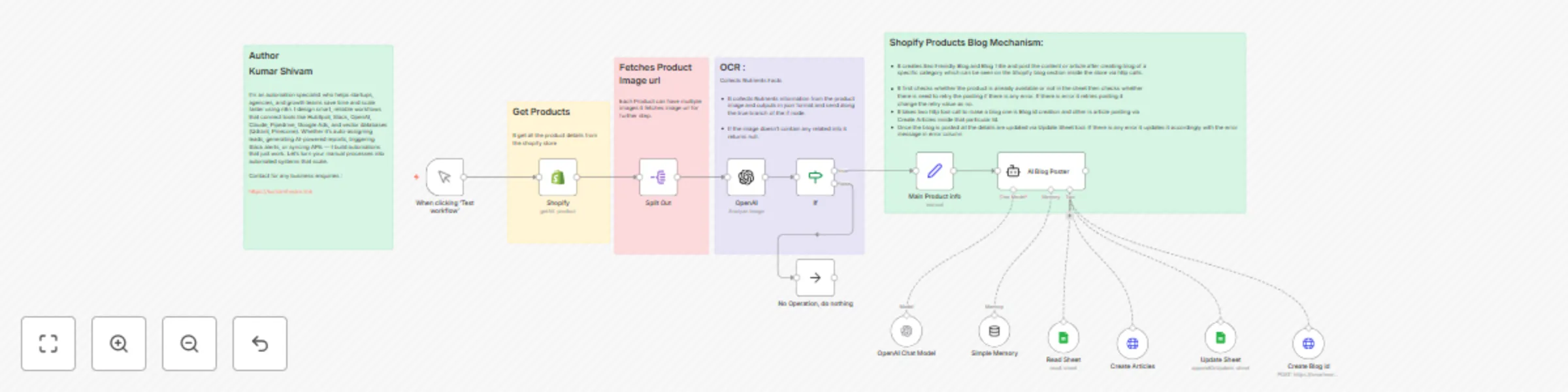
Workflow preview: AI blog generator for Shopify product listings:  Using GPT-4o and Google Sheets
Free advanced

AI blog generator for Shopify product listings: Using GPT-4o and Google Sheets

## 🧠 AI Blog Generator for Shopify Products using GPT-4o The **AI Blog Generator** is an advanced automation workflow powered by **n8n**, integrating **GPT-4o** and **Google Sheets** to generate SEO-rich blog articles for Shopify products. It automates the entire process — from pulling product data, analyzing images for nutritional information, to producing structured HTML content ready for publishing — with zero manual writing. --- ### 💡 Key Advantages - **🔗 Shopify Product Sync** Automatically pulls product data (title, description, images, etc.) via Shopify API. - **🤖 AI-Powered Nutrition Extraction** Uses **GPT-4o** to intelligently analyze product images and extract nutritional information. - **✍️ SEO Blog Generation** GPT-4o generates blog titles, meta descriptions, and complete articles using both product metadata and extracted nutritional info. - **🗂️ Structured Content Output** Produces well-formatted HTML with headers, bullet points, and nutrition tables for seamless Shopify blog integration. - **📄 Google Sheets Integration** Tracks blog creation, manages retries, and prevents duplicate publishing using a centralized Google Sheet. - **📤 Shopify Blog API Integration** Publishes the generated blog to Shopify using a two-step blog + article API call. --- ### ⚙️ How It Works 1. **Manual Trigger** Initiate the process using a test trigger or a scheduler. 2. **Fetch Products from Shopify** Retrieves all product details including descriptions and images. 3. **Extract Product Images** Splits and processes each image individually. 4. **OCR + Nutrition AI** GPT-4o reads nutrition facts from product images. Skips items without valid info. 5. **Check Existing Logs** References a Google Sheet to avoid duplicates and determine retry status. 6. **AI Blog Generation** Creates a blog with headings, bullet points, intro, and a nutrition table. 7. **Shopify Blog + Article Posting** Uses the Shopify API to publish the blog and its content. 8. **Update Google Sheet** Logs the blog URL, HTML content, errors, and status for future reference. --- ### 🛠️ Setup Steps - **Shopify Node**: Connects to your Shopify store and fetches product data. - **Split Out Node**: Divides product images for individual OCR processing. - **OpenAI Node**: Uses GPT-4o to extract nutrition data from images. - **If Node**: Filters for entries with valid nutrition information. - **Edit Fields Node**: Formats the product data for AI processing. - **AI Agent Node**: Generates SEO blog content. - **Google Sheets Nodes**: Reads and updates blog creation status. - **HTTP Request Nodes**: Posts the blog and article via Shopify’s API. --- ### 🔐 Credentials Required - **Shopify Access Token** – For retrieving product data and posting blogs - **OpenAI API Key** – For GPT-4o-based AI generation and image processing - **Google Sheets OAuth** – For accessing the log sheet --- ### 👤 Ideal For - Ecommerce teams looking to automate content for hundreds of products - Shopify store owners aiming to boost organic traffic through blogging - Marketing teams building scalable, AI-driven content workflows --- ### 💬 Bonus Tip The workflow is modular. You can easily extend it with internal linking, language translation, or even social media sharing — all within the same **n8n** flow.

K
Kumar Shivam
Content Creation
6 Jun 2025
8935
0

Workflow preview: AI-powered MIS agent
Free advanced

AI-powered MIS agent

The AI-powered MIS Agent is an intelligent, automated system built using n8n that streamlines email-based data collection and document organization for businesses. It classifies incoming emails, extracts and processes attachments or Drive links, and routes them to the correct destination folders in Google Drive. Additionally, it provides advanced file operations like cleaning, merging, joining, and transforming data. ### Advantages 📥 Automated Email and File Management Detects and processes emails containing attachments or Drive links, ensuring seamless classification and routing of business-critical files. ### 🧠 AI-Based Classification Uses LLMs (like GPT-4o Mini) to classify emails into categories such as Daily Sales, Customer Info, and Address based on their content. ### 📂 Smart File Routing and Upload Recognizes whether a file is a direct attachment or a Google Drive link, extracts the file ID if necessary, and uploads it to predefined folders. ### 📊 Powerful Data Operations Supports operations like append, join, group by, aggregation, and standardization of data directly from spreadsheets using Python and Pandas within the workflow. ### 🔁 Scheduled and Triggered Automation Supports scheduled runs and real-time email triggers, making it highly reliable and timely. ### 🔧 Fully Modular and Scalable Easily expandable with more logic, new folders, or different workflows. Clean architecture and annotations make maintenance simple. ### How It Works #### Email Trigger The system uses a Gmail trigger to monitor incoming emails with specific labels or attachments. #### Classification An LLM-based text classifier identifies the purpose of the email (e.g., sales data, address list, customer details). #### Conditional Logic Regex-based conditions check if the email contains Google Drive links or attachments. #### File Handling If it's a Drive link, it extracts the file ID and copies it to the correct folder. If it's an attachment, it uploads directly. #### Scheduled Data Management Periodically moves or logs files from predefined folders using a schedule trigger. #### Data Cleaning and Processing Performs data cleaning and transformation tasks like replacing missing values, standardizing formats, and joining datasets based on criteria provided by the user. #### Final Output Cleaned and processed files are saved in designated folders with their public links shared back through the system. ### Set Up Steps Configure Nodes: Gmail Trigger: Detects relevant incoming emails. - Text Classifier: Uses OpenAI model to categorize email content. - Regex Conditions: Determine whether a link or attachment is present. - Google Drive Operations: Upload or copy files to categorized folders. - Python Nodes: Handle data manipulation using Pandas. - Google Sheets Nodes: Extract, clean, and write structured data. - LLM-based Chat Models: Extract and apply cleaning configurations. ### Connect Nodes: - Seamlessly connect Gmail inputs, classification, file processing, and data logic. - Output links or processed files are uploaded back to Drive and ready to share. - Credentials: Ensure OAuth credentials for Gmail, Google Drive, and OpenAI are correctly set. ### Ideal For - Sales & CRM teams managing large volumes of email-based reports. - Data teams needing structured pipelines from unstructured email inputs. - Businesses looking to automate classification, storage, and transformation of routine data. ### Testing and Additional customization - If you want to test this bot capability before purchasing the workflow. ask me on my mail [email protected] I will share the chat url and the links of associated google drives to see the result once you are satisfied then we are good to go. I have just kept $1 for testing purposes because of paid open ai . -If there is any customization needed like charts and other request like adding databases feel free to let me know i can do it accordingly. - This is the first version i will come with more advancements based on the request and responses. ### Use it and let me know on [email protected]

K
Kumar Shivam
Document Extraction
23 May 2025
1106
0

Workflow preview: AI-powered restaurant order chatbot with GPT-4o for POS integration
Free advanced

AI-powered restaurant order chatbot with GPT-4o for POS integration

This workflow automates the restaurant POS (Point of Sale) data management process, facilitating seamless order handling, customer tracking, inventory management, and sales reporting. It retrieves order details, processes payment information, updates inventory, and generates real-time sales reports, all integrated into a centralized system that improves restaurant operations. The workflow integrates various systems, including a POS terminal to gather order data, payment gateways to process transactions, inventory management tools to update stock, and reporting tools like Google Sheets or an internal database for generating sales and performance reports. Who Needs Restaurant POS Automation? This POS automation workflow is ideal for restaurant owners, managers, and staff looking to streamline their operations: Restaurant Owners – Automate order processing, track sales, and monitor inventory to ensure smooth operations. Managers – Access real-time sales data and performance reports to make informed decisions. Staff – Reduce manual work, focusing on providing better customer service while the system handles orders and payments. Inventory Teams – Automatically update inventory levels based on orders and ingredient usage. If you need a reliable and automated POS solution to manage restaurant orders, payments, inventory, and reporting, this workflow minimizes human error, boosts efficiency, and saves valuable time. Why Use This Workflow? End-to-End Automation – Automates everything from order input to inventory updates and sales reporting. Seamless Integration – Connects POS, payment systems, inventory management, and reporting tools for smooth data flow.(if needed) Real-Time Data – Provides up-to-the-minute reports on sales, stock levels, and order statuses. Scalable & Efficient – Supports multiple locations, multiple users, and high order volumes. Step-by-Step: How This Workflow Manages POS Data Collect Orders – Retrieves order details from the POS system, including customer information, ordered items, and payment details. Update Inventory – Decreases inventory levels based on sold items, ensuring stock counts are always accurate. Generate Reports – Compiles sales, revenue, and inventory data into real-time reports and stores them in Google Sheets or an internal database. Track Customer Data – Keeps a log of customer details and order history for better service and marketing insights. Customization: Tailor to Your Needs Multiple POS Systems – Adapt the workflow to work with different POS systems or terminals based on your restaurant setup. Custom Reporting – Modify the reporting format or include specific sales metrics (e.g., daily totals, best-selling items, employee performance). Inventory Management – Adjust inventory updates to include alerts when stock reaches critical levels or needs reordering. Integration with Accounting Software – Connect with platforms like QuickBooks for automated financial tracking. 🔑 Prerequisites POS System Integration – Ensure the POS system can export order data in a compatible format. Payment Gateway API – Set up the necessary API keys for payment processing (e.g., Stripe, PayPal). Inventory Management Tools – Use inventory software or databases that can automatically update stock levels. Reporting Tools – Use Google Sheets or an internal database to store and generate sales and inventory reports. 🚀 Installation & Setup Configure Credentials Set up API credentials for payment gateways and inventory management tools. Import Workflow Import the workflow into your automation platform (e.g., n8n, Zapier). Link POS system, payment gateway, and inventory management systems. Test & Run Process a test order to ensure that data flows correctly through each step. Verify that inventory updates and reports are generated as expected. ⚠ Important Data Privacy – Ensure compliance with data protection regulations (e.g., GDPR, PCI DSS) when handling customer payment and order data. System Downtime – Monitor system performance to ensure that the workflow runs without disruptions during peak hours. Summary This restaurant POS automation workflow integrates order management, payment processing, inventory updates, and real-time reporting, enabling efficient restaurant operations. Whether you are running a single location or a chain of restaurants, this solution streamlines daily tasks, reduces errors, and provides valuable insights, saving time and improving customer satisfaction. 🚀

K
Kumar Shivam
Support Chatbot
8 May 2025
16077
0