Block 1 - Daily Competitor Scan
- Type / Role
- n8n-nodes-base.scheduleTrigger - scheduleTrigger
- Config choices
- Version 1.3


 Early Deal
This workflow is provided as-is. Please review and test before using in production.
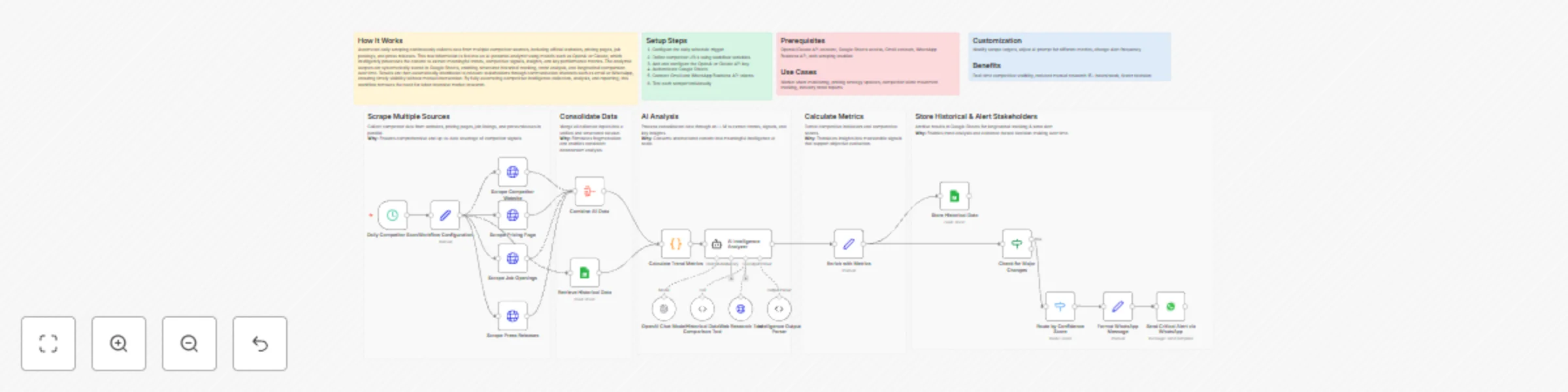
How It Works Automated daily scraping of competitor websites, pricing pages, job postings, and press releases feeds into an AI analyzer powered by OpenAI or Claude to extract trends, insights, and ...
n8n-nodes-base.scheduletrigger, n8n-nodes-base.set, n8n-nodes-base.httprequest, n8n-nodes-base.aggregate, @n8n/n8n-nodes-langchain.agent, @n8n/n8n-nodes-langchain.lmchatopenai, @n8n/n8n-nodes-langchain.outputparserstructured, @n8n/n8n-nodes-langchain.toolcode
This workflow is cataloged by N8N Workflows and links back to its original n8n.io source page by Cheng Siong Chin.
Original n8n.io sourceAutomated daily scraping of competitor websites, pricing pages, job postings, and press releases feeds into an AI analyzer powered by OpenAI or Claude to extract trends, insights, and key metrics. The analyzed results are stored in Google Sheets for historical tracking and longitudinal comparison, and are automatically shared with stakeholders via email or WhatsApp. This workflow eliminates manual competitive research, enabling product teams and executives to monitor market movements efficiently and make timely, data-driven decisions.
OpenAI/Claude API account, Google Sheets access, Gmail account, WhatsApp Business API, web scraping enabled
Market share monitoring, pricing strategy updates, competitor talent movement tracking, industry trend reports
Modify scrape targets, adjust AI prompt for different metrics, change alert frequency
Real-time competitive visibility, reduced manual research 15+ hours/week, faster decision-making
This catalog entry is organized from the workflow JSON. The node-level section below shows the executable blocks available for review before importing the template.
Showing the first 24 of 29 workflow blocks. Download the JSON for the full node graph.
| Workflow | Advanced market trends & competitor GPT-4o intelligence hub |
|---|---|
| Complexity | advanced |
| Nodes | 29 |
| Categories | Market Research, AI Summarization |
| Author | Cheng Siong Chin |
| Published | 14 Dec 2025 |
Use the JSON export at /data/workflows/11783/11783.json as the source template for this automation.
Open n8n, import the downloaded JSON, and review each node before activating the workflow.
Replace placeholder credentials, API keys, webhook URLs, account IDs, and environment-specific values with your own settings.
Run the workflow manually or in a staging workspace, inspect node output, and confirm downstream systems receive the expected data.
Enable the workflow only after testing, then monitor executions, errors, and rate limits during the first production runs.
Review imported nodes carefully before activation. This catalog entry is intended to help you inspect the workflow structure, understand required services, and find related templates faster.
Node names, credentials, schedules, webhook paths, and external service limits may need adjustment for your workspace.
How It Works Automated daily scraping of competitor websites, pricing pages, job postings, and press releases feeds into an AI analyzer powered by OpenAI or Claude to extract trends, insights, and ...
Review the workflow JSON, configure any required credentials in n8n, and test the automation in a safe workspace before using it in production.
Yes. Use the block-by-block analysis and the downloadable JSON to inspect each node, then adjust credentials, prompts, schedules, filters, or destinations for your Market Research, AI Summarization use case.