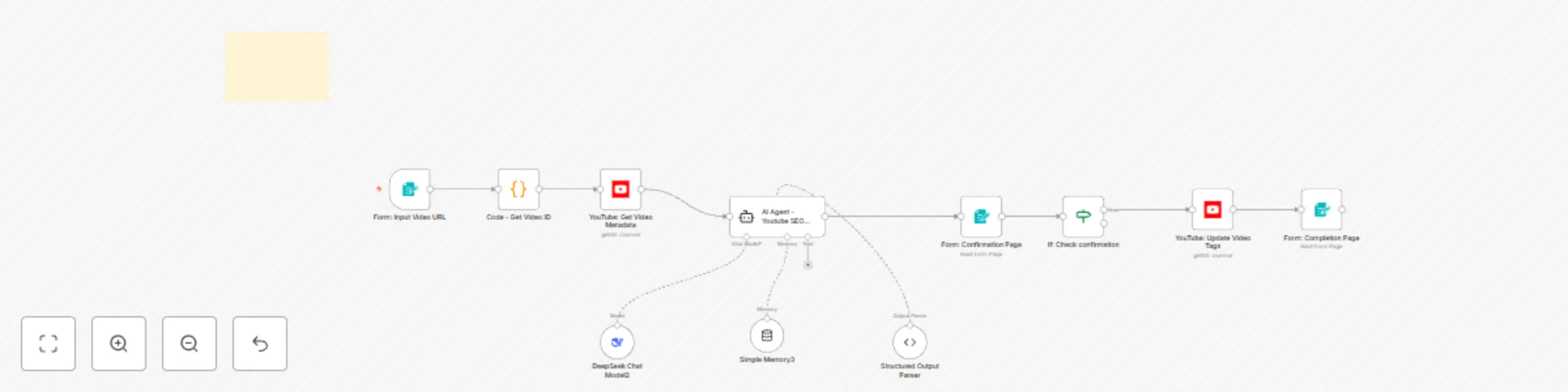
Advanced AI-powered YouTube SEO optimization & auto-update

Workflow preview

Workflow preview
100%
Advanced AI-powered YouTube SEO optimization & auto-update preview
Open on n8n.io

Important notice

This workflow is provided as-is. Please review and test before using in production.

1. Workflow Overview

Optimize Existing YouTube Video Metadata using AI and YouTube API This n8n workflow automatically enhances the Search Engine Optimization (SEO) of your existing YouTube videos. Provide a video link...

Best for

  • Content Creation automation workflows
  • Multimodal AI automation workflows
  • intermediate n8n builders looking for reusable templates

Tools used

@n8n/n8n-nodes-langchain.memorybufferwindow, @n8n/n8n-nodes-langchain.lmchatdeepseek, n8n-nodes-base.stickynote, n8n-nodes-base.formtrigger, n8n-nodes-base.code, n8n-nodes-base.youtube, @n8n/n8n-nodes-langchain.agent, n8n-nodes-base.form

Source and attribution

This workflow is cataloged by N8N Workflows and links back to its original n8n.io source page by Lucas Correia.

Original n8n.io source

1.1 Workflow description

Title
Advanced AI-powered YouTube SEO optimization & auto-update
Workflow name
Advanced AI-powered YouTube SEO optimization & auto-update

Optimize Existing YouTube Video Metadata using AI and YouTube API

This n8n workflow automatically enhances the Search Engine Optimization (SEO) of your existing YouTube videos. Provide a video link, and the workflow fetches its current data, uses advanced SEO techniques with AI to generate optimized titles, descriptions, and tags, and then updates the video directly on your YouTube channel.

Who is this for?

This workflow is designed for:

Content Creators & YouTubers:

Who want to improve the visibility and reach of their existing video library without manual effort.

Digital Marketers & Social Media Managers: Who manage YouTube channels and need an efficient way to revitalize older or underperforming content.

Agencies:

Managing multiple client YouTube channels and looking for scalable optimization solutions.

What problem is this workflow solving? / Use Case

Many creators have a backlog of published videos that aren't reaching their full potential due to suboptimal titles, descriptions, or tags. Manually reviewing and updating each video is time-consuming and requires SEO expertise.

This workflow solves that by:

  • Automating the re-optimization process: Saving significant time and effort.
  • Leveraging AI for SEO: Generating high-quality, relevant metadata based on the video's content.
  • Revitalizing existing content: Giving older videos a fresh chance to be discovered by the YouTube algorithm and new viewers.
  • Improving discoverability: Helping your videos rank better in Youtube and appear more often in recommendations.

What this workflow does

Input:

Takes a YouTube video URL as the starting point (e.g., via a manual trigger or form).

Fetch Data:

Connects to the YouTube API using the provided link to retrieve the video's current title, description, tags, and potentially transcript data (if accessible and configured).

AI Analysis & Generation:

Sends the current metadata and video information to an AI model (like OpenAI, Google AI, or Anthropic - depending on your setup).

The AI analyzes the content and generates new, SEO-optimized suggestions for the:

  • Video Title
  • Video Description
  • Video Tags
Update Video:

Connects to the YouTube API again using appropriate permissions and updates the specific video with the newly generated title, description, and tags, replacing the old ones.

How to customize this workflow to your needs

To use this workflow, you will need to:

Configure Credentials:
  • YouTube: Set up YouTube API credentials in n8n. You'll likely need OAuth2 credentials that allow editing video metadata (youtube.force-ssl scope). Follow Google Cloud Console instructions to create these.
  • AI Service: Set up credentials for your chosen AI provider (e.g., OpenAI API Key, Google AI API Key) in n8n.
  • Connect Credentials: Select your configured YouTube and AI credentials in the respective nodes within the workflow.
  • (Optional) Review AI Prompts: Check the prompts used in the AI node(s) to ensure they align with your desired tone and optimization strategy.

1.2 Logical Blocks

This catalog entry is organized from the workflow JSON. The node-level section below shows the executable blocks available for review before importing the template.

2. Block-by-Block Analysis

Block 1 - Simple Memory3

Type / Role
@n8n/n8n-nodes-langchain.memoryBufferWindow - memoryBufferWindow
Config choices
Version 1.3

Block 2 - DeepSeek Chat Model2

Type / Role
@n8n/n8n-nodes-langchain.lmChatDeepSeek - lmChatDeepSeek
Config choices
Version 1

Block 3 - Sticky Note1

Type / Role
n8n-nodes-base.stickyNote - stickyNote
Config choices
Version 1

Block 4 - Form: Input Video URL

Type / Role
n8n-nodes-base.formTrigger - formTrigger
Config choices
Version 2.2

Block 5 - Code - Get Video ID

Type / Role
n8n-nodes-base.code - code
Config choices
Version 2

Block 6 - YouTube: Get Video Metadata

Type / Role
n8n-nodes-base.youTube - youTube
Config choices
Version 1

Block 7 - AI Agent - Youtube SEO Generator

Type / Role
@n8n/n8n-nodes-langchain.agent - agent
Config choices
Version 1.7

Block 8 - YouTube: Update Video Tags

Type / Role
n8n-nodes-base.youTube - youTube
Config choices
Version 1

Block 9 - Form: Completion Page

Type / Role
n8n-nodes-base.form - form
Config choices
Version 1

Block 10 - If: Check confirmation

Type / Role
n8n-nodes-base.if - if
Config choices
Version 2.2

Block 11 - Structured Output Parser

Type / Role
@n8n/n8n-nodes-langchain.outputParserStructured - outputParserStructured
Config choices
Version 1.2

Block 12 - Form: Confirmation Page

Type / Role
n8n-nodes-base.form - form
Config choices
Version 1

3. Summary Table

Workflow Advanced AI-powered YouTube SEO optimization & auto-update
Complexity intermediate
Nodes 12
Categories Content Creation, Multimodal AI
Author Lucas Correia
Published 12 Apr 2025

4. Reproducing the Workflow from Scratch

  1. 1. Download the workflow JSON

    Use the JSON export at /data/workflows/3528/3528.json as the source template for this automation.

  2. 2. Import the template into n8n

    Open n8n, import the downloaded JSON, and review each node before activating the workflow.

  3. 3. Configure credentials and variables

    Replace placeholder credentials, API keys, webhook URLs, account IDs, and environment-specific values with your own settings.

  4. 4. Test with sample data

    Run the workflow manually or in a staging workspace, inspect node output, and confirm downstream systems receive the expected data.

  5. 5. Activate and monitor

    Enable the workflow only after testing, then monitor executions, errors, and rate limits during the first production runs.

5. General Notes & Resources

Review imported nodes carefully before activation. This catalog entry is intended to help you inspect the workflow structure, understand required services, and find related templates faster.

Node names, credentials, schedules, webhook paths, and external service limits may need adjustment for your workspace.

Frequently asked questions

What does Advanced AI-powered YouTube SEO optimization & auto-update do?

Optimize Existing YouTube Video Metadata using AI and YouTube API This n8n workflow automatically enhances the Search Engine Optimization (SEO) of your existing YouTube videos. Provide a video link...

What do I need before importing this workflow?

Review the workflow JSON, configure any required credentials in n8n, and test the automation in a safe workspace before using it in production.

Can I customize this workflow?

Yes. Use the block-by-block analysis and the downloadable JSON to inspect each node, then adjust credentials, prompts, schedules, filters, or destinations for your Content Creation, Multimodal AI use case.