Block 1 - Webhook
- Type / Role
- n8n-nodes-base.webhook - webhook
- Config choices
- Version 1


 Early Deal
This workflow is provided as-is. Please review and test before using in production.
Use Case In most companies, employees have a lot of great ideas. That was the same for us at n8n. We wanted to make it as easy as possible to allow everyone to add their ideas to some formatted dat...
n8n-nodes-base.webhook, n8n-nodes-base.stickynote, n8n-nodes-base.notion, n8n-nodes-base.switch, n8n-nodes-base.httprequest, n8n-nodes-base.set
This workflow is cataloged by N8N Workflows and links back to its original n8n.io source page by Niklas Hatje.
Original n8n.io sourceIn most companies, employees have a lot of great ideas. That was the same for us at n8n. We wanted to make it as easy as possible to allow everyone to add their ideas to some formatted database - it should be somewhere where everyone is all the time and could add a new idea without much extra effort. Since we're using Slack, this seemed to be the perfect place to easily add ideas and collect them in Notion.
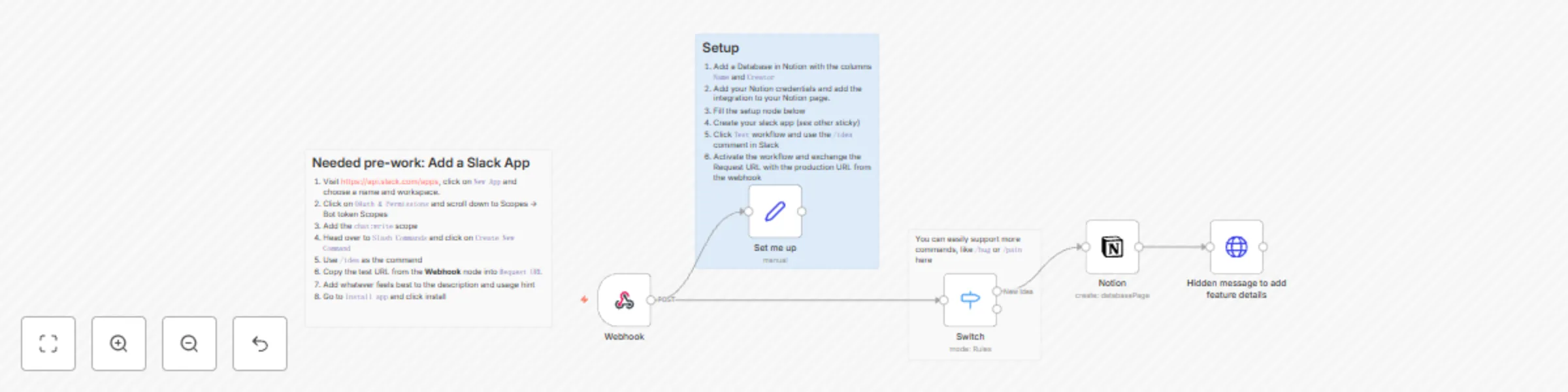
This workflow waits for a webhook call within Slack, that gets fired when users use the /idea command on a bot that you will create as part of this template. It then checks the command, adds the idea to Notion, and notifies the user about the newly added idea as you can see below:
New App and choose a name and workspace.OAuth & Permissions and scroll down to Scopes -> Bot token Scopeschat:write scopeSlash Commands and click on Create New Command/idea as the commandRequest URLInstall app and click installName and CreatorTest workflow and use the /idea comment in SlackAt n8n we use this workflow in combination with some others. E.g. we have the following things on top:
/bug Slack command that adds a new bug to Linear. Here we're using AI to classify the bugs and move it to the right team. (see this template and this template)/pain to be less solution-drivenVotes column that allows everyone to vote on ideas/pain points in the listThis catalog entry is organized from the workflow JSON. The node-level section below shows the executable blocks available for review before importing the template.
| Workflow | Add product ideas to Notion via a Slack command |
|---|---|
| Complexity | intermediate |
| Nodes | 8 |
| Categories | Project Management |
| Author | Niklas Hatje |
| Published | 28 Feb 2024 |
Use the JSON export at /data/workflows/2140/2140.json as the source template for this automation.
Open n8n, import the downloaded JSON, and review each node before activating the workflow.
Replace placeholder credentials, API keys, webhook URLs, account IDs, and environment-specific values with your own settings.
Run the workflow manually or in a staging workspace, inspect node output, and confirm downstream systems receive the expected data.
Enable the workflow only after testing, then monitor executions, errors, and rate limits during the first production runs.
Review imported nodes carefully before activation. This catalog entry is intended to help you inspect the workflow structure, understand required services, and find related templates faster.
Node names, credentials, schedules, webhook paths, and external service limits may need adjustment for your workspace.
Use Case In most companies, employees have a lot of great ideas. That was the same for us at n8n. We wanted to make it as easy as possible to allow everyone to add their ideas to some formatted dat...
Review the workflow JSON, configure any required credentials in n8n, and test the automation in a safe workspace before using it in production.
Yes. Use the block-by-block analysis and the downloadable JSON to inspect each node, then adjust credentials, prompts, schedules, filters, or destinations for your Project Management use case.