Classify YouTube videos & generate email summaries with GPT-4 and Gmail


DISCOUNT 20%

Classify YouTube Trends and Generate Email Summaries with GPT-4 and Gmail






Monitor YouTube channels, fetch stats, classify videos as viral (≥ 1000 likes) or normal, and auto‑generate LinkedIn/email summaries with GPT‑4. Deliver via Gmail or SMTP. Clear node names, examples, and auditable fields.
🎯 Overview
This template monitors YouTube channels via RSS or the YouTube Data API, retrieves video stats, classifies each video as viral (≥ 1000 likes) or normal, and produces concise LinkedIn/email summaries with OpenAI (GPT‑4 family). It can send a compact weekly briefing via Gmail (OAuth2) or SMTP. Built for creators, marketing teams, and agencies who want automated trend alerts and ready‑to‑use content.
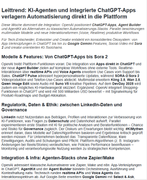
This screenshot shows the Gmail-ready weekly briefing generated by the Generate Weekly Briefing (HTML) node in my YouTube Trend Detector workflow, confirming the end-to-end pipeline: RSS/API → stats → like-based classification (≥ 1000 = viral) → LLM summaries → HTML email.
🧭 How It Works (Node Map)
- Manual Run – ad‑hoc execution
- Set Channel IDs – provide one or more YouTube
channelIdvalues - Split Channels – process channels one by one
- Fetch Latest Videos (RSS) – pull recent uploads via channel RSS
- Filter: Published in Last 72h – only recent items are kept
- Get Video Stats (YouTube API) – request
snippet,statisticsfor likes and details - Classify by Likes (Code) – sets
classificationtoviralornormal - Branch: Normal / Branch: Viral – separate LLM prompts per relevance
- Write Post (Normal / Viral) – generate LinkedIn‑style notes via OpenAI
- Aggregate Posts for Briefing – merge all texts into one block
- Generate Weekly Briefing (HTML) – produce a Gmail‑robust HTML email via GPT
- Send Weekly Briefing (Gmail/SMTP) – deliver briefing (you set recipients)
⚙️ Quick Start (≈ 3 minutes)
- Import the sanitized JSON into n8n (Menu → Import).
- Create credentials (use exact names):
YouTube_API_Key— Generic credential (field:apiKey)OpenAi account— OpenAI API KeyGmail account(OAuth2) orSMTP_Default(SMTP)
- Configure channels: In Set Channel IDs, list your YouTube
channelIdvalues (e.g.,UC…). - Set recipients: In Send Weekly Briefing, add your target email(s).
- Test: Run Execute Workflow and review outputs from the LLM and send nodes.
🔑 Required Credentials
- YouTube_API_Key — YouTube Data API v3 key (field
apiKey) - OpenAi account — OpenAI API key for LLM nodes
- Gmail account (OAuth2, recommended) or SMTP_Default (server/port/TLS + app password if 2FA)
🧩 Key Parameters & Adjustments
- Viral threshold: In
Classify by Likes (Code)→const THRESHOLD = 1000; - YouTube API parts: Use
part=snippet,statisticsto obtainlikeCount - Time window: The filter keeps videos from the last 72 hours
🧪 Troubleshooting
- Missing
likeCount/classification = "unknown"→ ensurepart=statisticsand a valid API key credential. - Gmail OAuth
redirect_mismatch/access_denied→ redirect must behttps://<your-n8n-host>/rest/oauth2-credential/callbackand test users added if restricted. - SMTP auth issues → set correct server/port/TLS and use an app password when 2FA is enabled.
- Empty LLM output → verify OpenAI key/quota and inspect node logs.
🧾 Example Outputs
1) Classification (single video)
{
  "videoId": "abc123XYZ",
  "title": "How to Ship an n8n Workflow with OpenAI",
  "likeCount": 1587,
  "classification": "viral",
  "needsStatsFetch": false
}
2) LinkedIn draft (viral)
Did you know how much faster prompt workflows get with structured inputs?
• Setup: n8n + YouTube API + OpenAI for auto-briefs
• Tip: include `part=statistics` for reliable like counts
Useful for teams tracking trending how-to content.
What’s your best “viral” signal besides likes?
#n8n #YouTubeAPI #OpenAI #Automation #Growth
3) Plain‑text email preview
Subject: Weekly AI Briefing — YouTube Trend Highlights

Hi team,
Highlights from our tracked channels:
• Viral: “How to Ship an n8n Workflow with OpenAI” (1.6k likes)
• Normal: “RSS vs API: What’s Best for Monitoring?”
Generated via n8n + GPT‑4.
✅ Submission Checklist (meets the guidelines)
- Title clarity: Mentions GPT‑4 and Gmail
- Language: Entire document in English
- Node naming: Descriptive, non‑generic labels
- HTML → Markdown: No HTML in this description; badges are Markdown images
- Examples: Included (JSON, LinkedIn draft, email)
- Security: No secrets in JSON; uses credentials by name
📸 Suggested Screenshots (optional)
- Full canvas overview (entire workflow)
- LLM output (expanded) showing generated summary
- Send‑node result with messageId/status
- Optional: aggregated briefing preview
📜 License & Support
License: MIT
Support/Contact: [email protected]