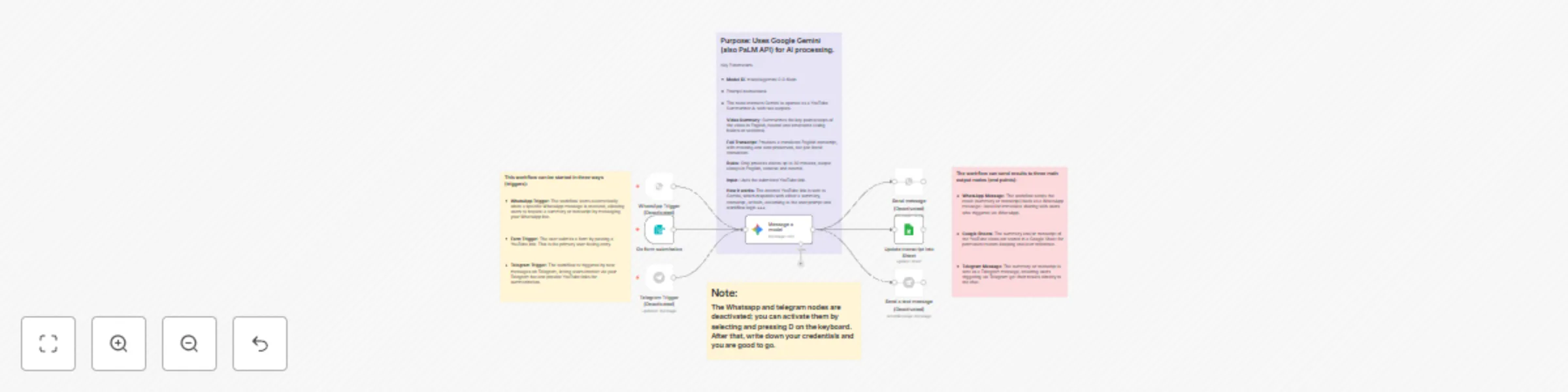
YouTube video summarizer with Gemini AI to WhatsApp, Telegram & Google Sheets

Workflow preview

Workflow preview
100%
YouTube video summarizer with Gemini AI to WhatsApp, Telegram & Google Sheets preview
Open on n8n.io

Important notice

This workflow is provided as-is. Please review and test before using in production.

1. Workflow Overview

Summarize YouTube Videos with Gemini AI, Google Sheets & WhatsApp/Telegram Aim The aim of the YouTube Video Summarizer Workflow is to automate the process of summarizing or extracting transcripts f...

Best for

  • Content Creation automation workflows
  • AI Summarization automation workflows
  • intermediate n8n builders looking for reusable templates

Tools used

n8n-nodes-base.formtrigger, @n8n/n8n-nodes-langchain.googlegemini, n8n-nodes-base.googlesheets, n8n-nodes-base.whatsapp, n8n-nodes-base.whatsapptrigger, n8n-nodes-base.telegramtrigger, n8n-nodes-base.telegram, n8n-nodes-base.stickynote

Source and attribution

This workflow is cataloged by N8N Workflows and links back to its original n8n.io source page by Yashraj singh sisodiya.

Original n8n.io source

1.1 Workflow description

Title
YouTube video summarizer with Gemini AI to WhatsApp, Telegram & Google Sheets
Workflow name
YouTube video summarizer with Gemini AI to WhatsApp, Telegram & Google Sheets

Summarize YouTube Videos with Gemini AI, Google Sheets & WhatsApp/Telegram

Aim

The aim of the YouTube Video Summarizer Workflow is to automate the process of summarizing or extracting transcripts from YouTube videos with the help of Gemini AI, while optionally storing results and distributing them to users via WhatsApp, Telegram, or Google Sheets. This enables fast, consistent generation and sharing of English summaries or transcripts from public YouTube content.

Goal

The goal is to:

  • Allow users to submit a YouTube link through various channels (Form Webhook, WhatsApp, Telegram).
  • Use Gemini AI to either summarize the content or transcribe the complete video, always outputting in English.
  • Return the output to the user via their original channel and optionally log it to Google Sheets for record-keeping.

Requirements

The workflow relies on specific integrations and configurations:

  • n8n Platform: Self-hosted or cloud n8n instance to host and automate the workflow.
  • Node Requirements:
    1. Form/Webhook Trigger: Web form for pasting the YouTube link.
    2. WhatsApp Trigger: Starts workflow from incoming WhatsApp messages (YouTube link as input).
    3. Telegram Trigger: Initiates workflow from Telegram chat messages containing YouTube links.
    4. Gemini AI Node: Consumes the YouTube link and processes it for summarization or transcription (always in English).
    5. Google Sheets Node: Writes the result (summary/transcript) into a Google Sheet for logging and future reference.
    6. WhatsApp/Telgram Send Message Nodes: Delivers summarized results or transcripts back to the user on the same platform where they triggered the workflow.
  • Credentials:
    • Gemini/Google AI Platform account for AI summarization and transcription.
    • Google Sheets account for storing output.
    • WhatsApp Business API for WhatsApp automation.
    • Telegram Bot API for Telegram automation.
  • Input Requirements:
    • Publicly-accessible YouTube video link (max ~30 min, as per summarized logic).
  • Output: English video summary or full transcript, delivered via user’s requested channel and/or stored in Google Sheets.

API Usage

The workflow integrates several APIs for optimal automation:

  • Gemini AI API: Used in the main summarization node. Receives the YouTube link and a prompt with detailed instructions. Returns either a clear, concise English summary or a full transcript translated into English, handling Hindi, English, or mixed-language videos. [Ref: Workflow JSON]
  • Google Sheets API: Used to log the output for each processed video, making it easy to reference histories or track requests. [Ref: Workflow JSON]
  • WhatsApp Business API: Sends back the summary or transcript to the user who initiated via WhatsApp. [Ref: Workflow JSON]
  • Telegram Bot API: Sends results back to Telegram users directly in chat. [Ref: Workflow JSON]

Output Formatting/Conversion

  • The AI output is always in English, tailored to the option chosen (summary vs transcript).
  • Structured output: Bulleted, neutral, and easy to read, suitable for sharing with users or for business documentation.
  • Google Sheets node maps and writes each video’s results to a dedicated row for easy history review.

How to Use

  • By default, the workflow uses a manual trigger via a web form, but you may add triggers for WhatsApp or Telegram to suit your needs.
  • Users paste a YouTube link, then select whether they want a summary or transcript (based on your implementation logic).
  • Results are returned in their channel and optionally logged to your Google Sheet.
  • All processing is handled securely using your Gemini API credentials.
  • You can expand this logic by adding more integrations (email, Slack, etc.).

Customising this Workflow

  • Custom prompts can be written for different styles or output formats (e.g., SEO key points, step-by-step guides).
  • Add logic for batch processing multiple videos or bulk export to different cloud drives.
  • Integrate into central dashboards, CRMs, or content pipelines using n8n’s hundreds of available integrations.

Good to Know

  • Gemini pricing: At the time of writing, each YouTube video summarization costs $0.039 USD. See official Gemini Pricing for current rates.
  • Geo-restriction: The Gemini video model may be geo-restricted (error: “model not found” outside some regions).
  • Video Limits: Intended for videos up to ~30 minutes for best processing reliability.
  • Scaling: Can be easily adapted for high-volume operations using n8n’s queue and scheduling features.

Workflow Summary

The YouTube Video Summarizer Workflow automates summarizing and transcribing YouTube videos using AI and n8n. Users send video links via web forms, WhatsApp, or Telegram. Results are generated via Gemini, sent back in-app, and logged to Google Sheets, enabling effortless knowledge sharing and organizational automation at scale.

Timestamp: 12:37 PM IST, Wednesday, September 17, 2025

1.2 Logical Blocks

This catalog entry is organized from the workflow JSON. The node-level section below shows the executable blocks available for review before importing the template.

2. Block-by-Block Analysis

Block 1 - On form submission

Type / Role
n8n-nodes-base.formTrigger - formTrigger
Config choices
Version 2.3

Block 2 - Message a model

Type / Role
@n8n/n8n-nodes-langchain.googleGemini - googleGemini
Config choices
Version 1

Block 3 - Update transcript into Sheet

Type / Role
n8n-nodes-base.googleSheets - googleSheets
Config choices
Version 4.7

Block 4 - Send message

Type / Role
n8n-nodes-base.whatsApp - whatsApp
Config choices
Version 1

Block 5 - WhatsApp Trigger

Type / Role
n8n-nodes-base.whatsAppTrigger - whatsAppTrigger
Config choices
Version 1

Block 6 - Telegram Trigger

Type / Role
n8n-nodes-base.telegramTrigger - telegramTrigger
Config choices
Version 1.2

Block 7 - Send a text message

Type / Role
n8n-nodes-base.telegram - telegram
Config choices
Version 1.2

Block 8 - Sticky Note

Type / Role
n8n-nodes-base.stickyNote - stickyNote
Config choices
Version 1

Block 9 - Sticky Note1

Type / Role
n8n-nodes-base.stickyNote - stickyNote
Config choices
Version 1

Block 10 - Sticky Note2

Type / Role
n8n-nodes-base.stickyNote - stickyNote
Config choices
Version 1

Block 11 - Sticky Note3

Type / Role
n8n-nodes-base.stickyNote - stickyNote
Config choices
Version 1

3. Summary Table

Workflow YouTube video summarizer with Gemini AI to WhatsApp, Telegram & Google Sheets
Complexity intermediate
Nodes 11
Categories Content Creation, AI Summarization
Author Yashraj singh sisodiya
Published 17 Sept 2025

4. Reproducing the Workflow from Scratch

  1. 1. Download the workflow JSON

    Use the JSON export at /data/workflows/8670/8670.json as the source template for this automation.

  2. 2. Import the template into n8n

    Open n8n, import the downloaded JSON, and review each node before activating the workflow.

  3. 3. Configure credentials and variables

    Replace placeholder credentials, API keys, webhook URLs, account IDs, and environment-specific values with your own settings.

  4. 4. Test with sample data

    Run the workflow manually or in a staging workspace, inspect node output, and confirm downstream systems receive the expected data.

  5. 5. Activate and monitor

    Enable the workflow only after testing, then monitor executions, errors, and rate limits during the first production runs.

5. General Notes & Resources

Review imported nodes carefully before activation. This catalog entry is intended to help you inspect the workflow structure, understand required services, and find related templates faster.

Node names, credentials, schedules, webhook paths, and external service limits may need adjustment for your workspace.

Frequently asked questions

What does YouTube video summarizer with Gemini AI to WhatsApp, Telegram & Google Sheets do?

Summarize YouTube Videos with Gemini AI, Google Sheets & WhatsApp/Telegram Aim The aim of the YouTube Video Summarizer Workflow is to automate the process of summarizing or extracting transcripts f...

What do I need before importing this workflow?

Review the workflow JSON, configure any required credentials in n8n, and test the automation in a safe workspace before using it in production.

Can I customize this workflow?

Yes. Use the block-by-block analysis and the downloadable JSON to inspect each node, then adjust credentials, prompts, schedules, filters, or destinations for your Content Creation, AI Summarization use case.