🎬 YouTube shorts automation tool πŸš€

Workflow preview

Workflow preview
100%
🎬 YouTube shorts automation tool πŸš€ preview
Open on n8n.io

Important notice

This workflow is provided as-is. Please review and test before using in production.

1. Workflow Overview

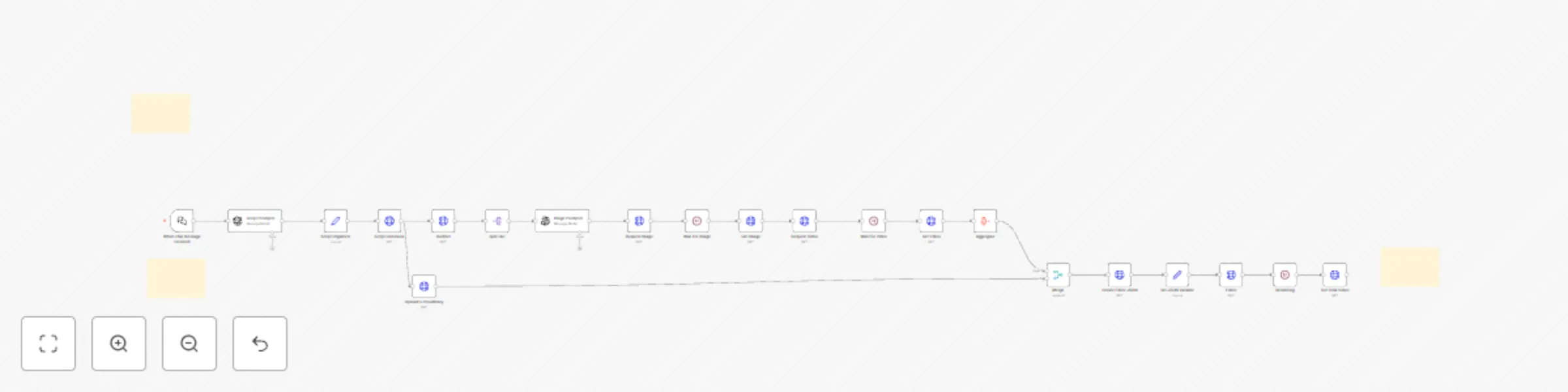
YouTube Shorts Automation Tool Automate the creation of high performing YouTube Shorts in minutes! Who is this for? Content Creators : Generate engaging short videos effortlessly. Marketin...

Best for

  • Content Creation automation workflows
  • Multimodal AI automation workflows
  • advanced n8n builders looking for reusable templates

Tools used

@n8n/n8n-nodes-langchain.chattrigger, n8n-nodes-base.httprequest, n8n-nodes-base.splitout, @n8n/n8n-nodes-langchain.openai, n8n-nodes-base.wait, n8n-nodes-base.merge, n8n-nodes-base.aggregate, n8n-nodes-base.set

Source and attribution

This workflow is cataloged by N8N Workflows and links back to its original n8n.io source page by Jonas Busch.

Original n8n.io source

1.1 Workflow description

Title
🎬 YouTube shorts automation tool πŸš€
Workflow name
🎬 YouTube shorts automation tool πŸš€

🎬 YouTube Shorts Automation Tool πŸš€

Automate the creation of high-performing YouTube Shorts in minutes!

Who is this for? 🎯

  • Content Creators: Generate engaging short videos effortlessly.
  • Marketing Agencies: Produce client-ready content quickly.
  • Business Owners: Promote products/services through viral short-form content.

What problem does this solve? πŸ› οΈ

Creating short-form video content is time-consuming, complex, and skill-intensive. This workflow automates video creation, eliminating the need for video editing expertise while ensuring SEO optimization, high-quality visuals, and professional voiceovers.

How it works 🌟

  1. Enter your video idea into the chat interface.
  2. AI generates a script optimized for engagement and SEO.
  3. Voiceover is created with realistic AI narration.
  4. Relevant visuals are selected to match the script.
  5. The video is assembled and delivered via a shareable link.

Setup βš™οΈ (5-10 min)

  • Connect required APIs (most have free tiers).
  • Follow the guided setup (video tutorial included).
  • Start generating professional YouTube Shorts instantly!

Required APIs πŸ”—

  • Content Generation: OpenAI, ElevenLabs (script & voiceover)
  • Media Processing: Cloudinary, Replicate (images & storage)
  • Integration Tools: 0codekit, Creatomate (video assembly)

Customization 🎨

  • Adjust script styles & voiceover preferences.
  • Modify visuals to match your brand.
  • Optimize video length and format.

πŸš€ Start automating your YouTube Shorts today and grow your audience effortlessly!

1.2 Logical Blocks

This catalog entry is organized from the workflow JSON. The node-level section below shows the executable blocks available for review before importing the template.

2. Block-by-Block Analysis

Block 1 - When chat message received

Type / Role
@n8n/n8n-nodes-langchain.chatTrigger - chatTrigger
Config choices
Version 1.1

Block 2 - Script Generator

Type / Role
n8n-nodes-base.httpRequest - httpRequest
Config choices
Version 4.2

Block 3 - Split Out

Type / Role
n8n-nodes-base.splitOut - splitOut
Config choices
Version 1

Block 4 - Image Prompter

Type / Role
@n8n/n8n-nodes-langchain.openAi - openAi
Config choices
Version 1.8

Block 5 - Request Image

Type / Role
n8n-nodes-base.httpRequest - httpRequest
Config choices
Version 4.2

Block 6 - Get Image

Type / Role
n8n-nodes-base.httpRequest - httpRequest
Config choices
Version 4.2

Block 7 - Request Video

Type / Role
n8n-nodes-base.httpRequest - httpRequest
Config choices
Version 4.2

Block 8 - Wait For Video

Type / Role
n8n-nodes-base.wait - wait
Config choices
Version 1.1

Block 9 - Get Video

Type / Role
n8n-nodes-base.httpRequest - httpRequest
Config choices
Version 4.2

Block 10 - Upload to Cloudinary

Type / Role
n8n-nodes-base.httpRequest - httpRequest
Config choices
Version 4.2

Block 11 - Merge

Type / Role
n8n-nodes-base.merge - merge
Config choices
Version 3

Block 12 - Aggregate

Type / Role
n8n-nodes-base.aggregate - aggregate
Config choices
Version 1

Block 13 - Create Editor JSON

Type / Role
n8n-nodes-base.httpRequest - httpRequest
Config choices
Version 4.2

Block 14 - Set JSON Variable

Type / Role
n8n-nodes-base.set - set
Config choices
Version 3.4

Block 15 - Editor

Type / Role
n8n-nodes-base.httpRequest - httpRequest
Config choices
Version 4.2

Block 16 - Rendering

Type / Role
n8n-nodes-base.wait - wait
Config choices
Version 1.1

Block 17 - Get Final Video

Type / Role
n8n-nodes-base.httpRequest - httpRequest
Config choices
Version 4.2

Block 18 - Script Organizer

Type / Role
n8n-nodes-base.set - set
Config choices
Version 3.4

Block 19 - Script Prompter

Type / Role
@n8n/n8n-nodes-langchain.openAi - openAi
Config choices
Version 1.8

Block 20 - Wait For Image

Type / Role
n8n-nodes-base.wait - wait
Config choices
Version 1.1

Block 21 - Outliner

Type / Role
n8n-nodes-base.httpRequest - httpRequest
Config choices
Version 4.2

Block 22 - Sticky Note

Type / Role
n8n-nodes-base.stickyNote - stickyNote
Config choices
Version 1

Block 23 - Sticky Note1

Type / Role
n8n-nodes-base.stickyNote - stickyNote
Config choices
Version 1

Block 24 - Sticky Note2

Type / Role
n8n-nodes-base.stickyNote - stickyNote
Config choices
Version 1

3. Summary Table

Workflow 🎬 YouTube shorts automation tool πŸš€
Complexity advanced
Nodes 24
Categories Content Creation, Multimodal AI
Author Jonas Busch
Published 19 Feb 2025

4. Reproducing the Workflow from Scratch

  1. 1. Download the workflow JSON

    Use the JSON export at /data/workflows/2941/2941.json as the source template for this automation.

  2. 2. Import the template into n8n

    Open n8n, import the downloaded JSON, and review each node before activating the workflow.

  3. 3. Configure credentials and variables

    Replace placeholder credentials, API keys, webhook URLs, account IDs, and environment-specific values with your own settings.

  4. 4. Test with sample data

    Run the workflow manually or in a staging workspace, inspect node output, and confirm downstream systems receive the expected data.

  5. 5. Activate and monitor

    Enable the workflow only after testing, then monitor executions, errors, and rate limits during the first production runs.

5. General Notes & Resources

Review imported nodes carefully before activation. This catalog entry is intended to help you inspect the workflow structure, understand required services, and find related templates faster.

Node names, credentials, schedules, webhook paths, and external service limits may need adjustment for your workspace.

Frequently asked questions

What does 🎬 YouTube shorts automation tool πŸš€ do?

YouTube Shorts Automation Tool Automate the creation of high performing YouTube Shorts in minutes! Who is this for? Content Creators : Generate engaging short videos effortlessly. Marketin...

What do I need before importing this workflow?

Review the workflow JSON, configure any required credentials in n8n, and test the automation in a safe workspace before using it in production.

Can I customize this workflow?

Yes. Use the block-by-block analysis and the downloadable JSON to inspect each node, then adjust credentials, prompts, schedules, filters, or destinations for your Content Creation, Multimodal AI use case.