Block 1 - Save to Notion
- Type / Role
- n8n-nodes-base.notion - notion
- Config choices
- Version 2.2


 Early Deal
This workflow is provided as-is. Please review and test before using in production.
Automated Podcast Note Taker for Notion ️ Transform voice notes into polished podcast scripts—automatically! What It Does This n8n workflow instantly converts Telegram voice messages into stru...
n8n-nodes-base.notion, n8n-nodes-base.telegram, n8n-nodes-base.telegramtrigger, @n8n/n8n-nodes-langchain.openai, n8n-nodes-base.code
This workflow is cataloged by N8N Workflows and links back to its original n8n.io source page by Wild Nomad.
Original n8n.io sourceAutomated Podcast Note-Taker for Notion 🎙️⚡ Transform voice notes into polished podcast scripts—automatically!
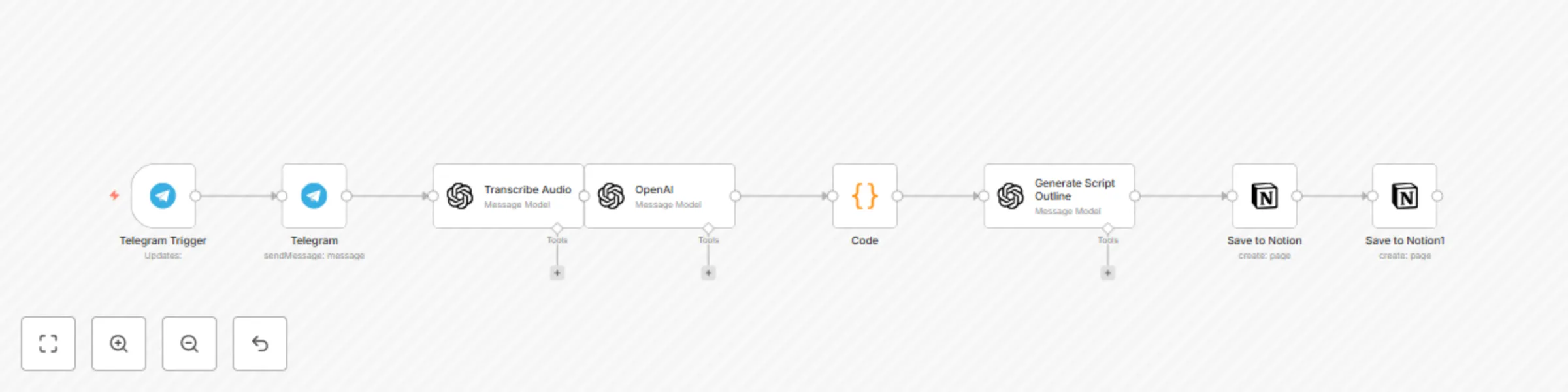
✨ What It Does This n8n workflow instantly converts Telegram voice messages into structured podcast content in Notion, including: ✅ AI-generated transcripts (via OpenAI Whisper) ✅ Smart content analysis (extracts titles, hooks, CTAs, and summaries) ✅ Ready-to-use script outlines (with sections for hooks, key points, transitions & more) ✅ Dual Notion integration (saves metadata to a database + full script to a page)
🚀 Perfect For ✔ Podcasters who brainstorm via voice notes ✔ Content teams that need fast turnarounds ✔ Solo creators who want to streamline scripting
⚙️ How It Works Send a voice note to your Telegram bot
AI transcribes & analyzes the content
Auto-generates a script outline (under 1800 chars for Notion compatibility)
Saves to Notion—neatly organized for editing or publishing
🔧 Technical Details Tools Used: n8n, OpenAI (Whisper + GPT), Notion, Telegram
Outputs:
Notion Database: Title, topic, quote, CTA
Notion Page: Full script outline (Markdown formatted)
Smart Limits: Ensures content fits Notion’s API constraints
💡 Why Buy? Save hours per episode on manual note-taking
Never lose ideas—voice notes become searchable, structured content
Professional scripts with consistent formatting
📦 What’s Included Ready-to-import n8n workflow file (JSON)
Setup guide (step-by-step instructions)
Tips for customization (e.g., tweaking AI prompts)
Price: $XX (one-time payment)
This catalog entry is organized from the workflow JSON. The node-level section below shows the executable blocks available for review before importing the template.
| Workflow | Voice to podcast script generator with OpenAI & Notion via Telegram |
|---|---|
| Complexity | intermediate |
| Nodes | 8 |
| Categories | Content Creation, Multimodal AI |
| Author | Wild Nomad |
| Published | 07 Aug 2025 |
Use the JSON export at /data/workflows/7142/7142.json as the source template for this automation.
Open n8n, import the downloaded JSON, and review each node before activating the workflow.
Replace placeholder credentials, API keys, webhook URLs, account IDs, and environment-specific values with your own settings.
Run the workflow manually or in a staging workspace, inspect node output, and confirm downstream systems receive the expected data.
Enable the workflow only after testing, then monitor executions, errors, and rate limits during the first production runs.
Review imported nodes carefully before activation. This catalog entry is intended to help you inspect the workflow structure, understand required services, and find related templates faster.
Node names, credentials, schedules, webhook paths, and external service limits may need adjustment for your workspace.
Automated Podcast Note Taker for Notion ️ Transform voice notes into polished podcast scripts—automatically! What It Does This n8n workflow instantly converts Telegram voice messages into stru...
Review the workflow JSON, configure any required credentials in n8n, and test the automation in a safe workspace before using it in production.
Yes. Use the block-by-block analysis and the downloadable JSON to inspect each node, then adjust credentials, prompts, schedules, filters, or destinations for your Content Creation, Multimodal AI use case.