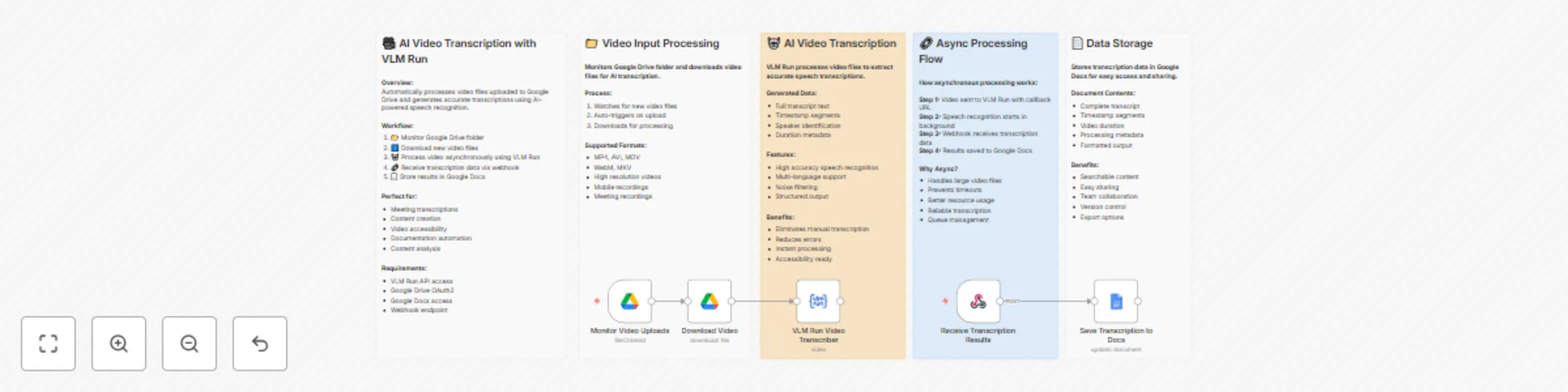
Video transcription automation with VLM Run, Google Drive and Docs

Workflow preview

Workflow preview
100%
Video transcription automation with VLM Run, Google Drive and Docs preview
Open on n8n.io

Important notice

This workflow is provided as-is. Please review and test before using in production.

1. Workflow Overview

This workflow contains community nodes that are only compatible with the self hosted version of n8n. What this workflow does 1. Monitors Google Drive for new video file uploads 2. Downloads and pro...

Best for

  • Document Extraction automation workflows
  • Multimodal AI automation workflows
  • intermediate n8n builders looking for reusable templates

Tools used

n8n-nodes-base.stickynote, @vlm-run/n8n-nodes-vlmrun.vlmrun, n8n-nodes-base.googledrivetrigger, n8n-nodes-base.webhook, n8n-nodes-base.googledrive, n8n-nodes-base.googledocs

Source and attribution

This workflow is cataloged by N8N Workflows and links back to its original n8n.io source page by Mirajul Mohin.

Original n8n.io source

1.1 Workflow description

Title
Video transcription automation with VLM Run, Google Drive and Docs
Workflow name
Video transcription automation with VLM Run, Google Drive and Docs

This workflow contains community nodes that are only compatible with the self-hosted version of n8n.

What this workflow does

  1. Monitors Google Drive for new video file uploads
  2. Downloads and processes videos using VLM Run AI transcription
  3. Generates accurate transcripts with timestamps, audio content, and video descriptions
  4. Saves formatted reports to Google Docs for instant access and sharing

Setup

Prerequisites: Google Drive account, VLM Run API credentials, Google Docs access, self-hosted n8n. You need to install VLM Run community node

Quick Setup:

  1. Configure Google Drive OAuth2 and create video upload folder
  2. Add VLM Run API credentials
  3. Set up Google Docs integration for transcript storage
  4. Update folder/document IDs in workflow nodes
  5. Test with sample video files and activate

Perfect for

  • Meeting transcription and documentation
  • Content creation and video accessibility
  • Educational content processing and analysis
  • Interview transcription and note-taking
  • Podcast and webinar documentation
  • Legal deposition and testimony recording
  • Customer support call analysis

Key Benefits

  • Asynchronous processing handles large video files without timeouts
  • Multi-format support for MP4, AVI, MOV, WebM, MKV formats
  • Dual content extraction captures both audio transcripts and video descriptions
  • Eliminates manual transcription saving hours of documentation time
  • High accuracy speech recognition with multi-language support
  • Structured output with timestamps and scene descriptions

How to customize

Extend by adding:

  • Speaker identification and voice separation
  • Sentiment analysis and keyword extraction
  • Integration with project management tools
  • Email notifications for transcription completion
  • Summary generation and key point extraction
  • Multi-language translation capabilities
  • Search indexing for transcript databases
  • Integration with video editing software

This workflow transforms manual video transcription into an automated, accurate, and efficient process, making video content accessible and searchable for your business operations, educational needs, or content creation workflows.

1.2 Logical Blocks

This catalog entry is organized from the workflow JSON. The node-level section below shows the executable blocks available for review before importing the template.

2. Block-by-Block Analysis

Block 1 - 🎥 Workflow Overview

Type / Role
n8n-nodes-base.stickyNote - stickyNote
Config choices
Version 1

Block 2 - 📄 Output Documentation

Type / Role
n8n-nodes-base.stickyNote - stickyNote
Config choices
Version 1

Block 3 - VLM Run Video Transcriber

Type / Role
@vlm-run/n8n-nodes-vlmrun.vlmRun - vlmRun
Config choices
Version 1

Block 4 - Monitor Video Uploads

Type / Role
n8n-nodes-base.googleDriveTrigger - googleDriveTrigger
Config choices
Version 1

Block 5 - Receive Transcription Results

Type / Role
n8n-nodes-base.webhook - webhook
Config choices
Version 2

Block 6 - Download Video

Type / Role
n8n-nodes-base.googleDrive - googleDrive
Config choices
Version 3

Block 7 - Save Transcription to Docs

Type / Role
n8n-nodes-base.googleDocs - googleDocs
Config choices
Version 2

Block 8 - 📁 Input Documentation1

Type / Role
n8n-nodes-base.stickyNote - stickyNote
Config choices
Version 1

Block 9 - 🤖 AI Processing Documentation1

Type / Role
n8n-nodes-base.stickyNote - stickyNote
Config choices
Version 1

Block 10 - 🔗 Async Processing Documentation1

Type / Role
n8n-nodes-base.stickyNote - stickyNote
Config choices
Version 1

3. Summary Table

Workflow Video transcription automation with VLM Run, Google Drive and Docs
Complexity intermediate
Nodes 10
Categories Document Extraction, Multimodal AI
Author Mirajul Mohin
Published 30 Jul 2025

4. Reproducing the Workflow from Scratch

  1. 1. Download the workflow JSON

    Use the JSON export at /data/workflows/6703/6703.json as the source template for this automation.

  2. 2. Import the template into n8n

    Open n8n, import the downloaded JSON, and review each node before activating the workflow.

  3. 3. Configure credentials and variables

    Replace placeholder credentials, API keys, webhook URLs, account IDs, and environment-specific values with your own settings.

  4. 4. Test with sample data

    Run the workflow manually or in a staging workspace, inspect node output, and confirm downstream systems receive the expected data.

  5. 5. Activate and monitor

    Enable the workflow only after testing, then monitor executions, errors, and rate limits during the first production runs.

5. General Notes & Resources

Review imported nodes carefully before activation. This catalog entry is intended to help you inspect the workflow structure, understand required services, and find related templates faster.

Node names, credentials, schedules, webhook paths, and external service limits may need adjustment for your workspace.

Frequently asked questions

What does Video transcription automation with VLM Run, Google Drive and Docs do?

This workflow contains community nodes that are only compatible with the self hosted version of n8n. What this workflow does 1. Monitors Google Drive for new video file uploads 2. Downloads and pro...

What do I need before importing this workflow?

Review the workflow JSON, configure any required credentials in n8n, and test the automation in a safe workspace before using it in production.

Can I customize this workflow?

Yes. Use the block-by-block analysis and the downloadable JSON to inspect each node, then adjust credentials, prompts, schedules, filters, or destinations for your Document Extraction, Multimodal AI use case.