Block 1 - On form submission
- Type / Role
- n8n-nodes-base.formTrigger - formTrigger
- Config choices
- Version 2.2


 Early Deal
This workflow is provided as-is. Please review and test before using in production.
Overview This n8n automation workflow streamlines the creation of professional video ad scripts tailored for Veo 3 by turning basic user inputs into cinematic, consistent, and highly structured ...
n8n-nodes-base.formtrigger, @n8n/n8n-nodes-langchain.openai, n8n-nodes-base.googledocs, n8n-nodes-base.stickynote
This workflow is cataloged by N8N Workflows and links back to its original n8n.io source page by David Olusola.
Original n8n.io source🚀 Overview
This n8n automation workflow streamlines the creation of professional video ad scripts tailored for Veo 3 by turning basic user inputs into cinematic, consistent, and highly structured prompts.
Whether you're a marketing agency, content creator, or small business, this workflow ensures high-quality AI video generation at scale—without needing a professional copywriter or creative director.
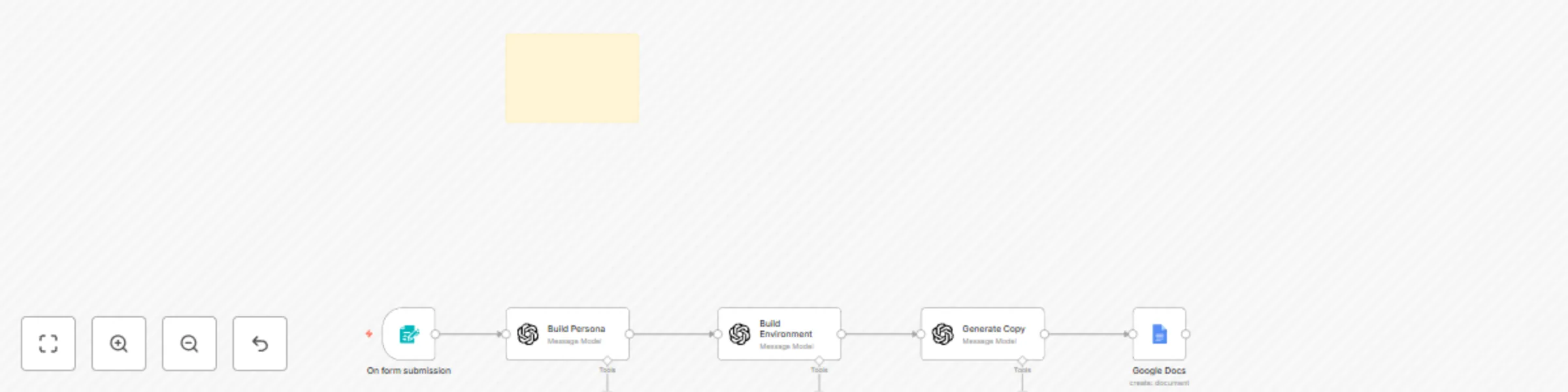
🛠️ How It Works
Ad Category: Dropdown (Before & After, Brand Awareness, UGC Style, Educational)
Environment: Text (short description of setting/location)
Script: Raw ad copy
Spokesperson: Basic character idea (e.g., “young woman, confident, skincare expert”)
2. 🧠 Build Persona Node
Uses GPT-4o-Mini to expand spokesperson input into a full character description.
Output includes:
Age
Race
Clothing
Hairstyle
Tone/Demeanor
Ensures visual consistency in AI-generated video scenes.
3. 🌆 Build Environment Node
Transforms environment text into a detailed, cinematic setting.
Adds descriptive elements like:
Lighting style
Architecture or background
Atmosphere (e.g., soft morning glow, modern interiors)
4. ✂️ Generate Copy Node
Breaks the full script into 10-second readable segments for smooth pacing.
Helps tools like Veo 3 maintain flow, coherence, and readability.
Outputs concise, camera-ready lines for each section.
5. 📄 Google Docs Integration
Auto-updates a ready-to-use script template in Google Docs.
Replaces placeholders with content from the 3 AI nodes:
Cinematic shot: (Build Persona) in (Build Environment).
They confidently address the camera: (Generate Copy).
Professional lighting emphasizes credibility throughout.
Final result: a polished video ad prompt, ready for Veo 3 or any AI video tool.
💸 Cost Efficiency Advantage
Using the Veo 3 API directly costs $0.50 per second — meaning a simple 5-second video costs $3.75, and a 6-clip project could run up to $24.
However, this workflow is optimized for Veo 3's Fast on Flow mode, which costs just $0.20 per clip.
🔍 Real Example: 6 clips = $1.20 Savings = Over 90% More room for testing, iteration, and scaling This isn’t just smart automation — it’s financially strategic.
🔧 Setup Instructions
✅ Prerequisites Active n8n instance (Cloud or Self-Hosted) OpenAI API Key (for GPT-4) Google Docs API credentials ⚙️ Configuration Steps Import the workflow into your n8n instance Add OpenAI credentials to the AI nodes Set up Google Docs integration in n8n Copy this template: 👉 Veo 3 Script Template Update the Google Docs node with your copy’s URL Test the flow by submitting the form 💼 Use Cases
Marketing Agencies: Quickly generate ad scripts for multiple campaigns Content Creators: Scale up content production without creative burnout AI Video Producers: Maintain detailed, consistent inputs for each render Small Business Owners: Create pro-grade ads without outsourcing 🎯 Benefits
✨ Consistency: AI ensures visual + narrative alignment ⚡ Speed: Go from rough idea to finished ad script in seconds 📈 Scalability: Handle multiple clients and campaigns simultaneously 🎥 Quality Output: Templates and pacing are optimized for real-world video use 💰 Cost Savings: Save up to 90% vs API-only generation..
This catalog entry is organized from the workflow JSON. The node-level section below shows the executable blocks available for review before importing the template.
| Workflow | Veo 3 ad script builder (GPT-4 + Google Docs integration) |
|---|---|
| Complexity | intermediate |
| Nodes | 6 |
| Categories | Content Creation, Multimodal AI |
| Author | David Olusola |
| Published | 15 Jun 2025 |
Use the JSON export at /data/workflows/4936/4936.json as the source template for this automation.
Open n8n, import the downloaded JSON, and review each node before activating the workflow.
Replace placeholder credentials, API keys, webhook URLs, account IDs, and environment-specific values with your own settings.
Run the workflow manually or in a staging workspace, inspect node output, and confirm downstream systems receive the expected data.
Enable the workflow only after testing, then monitor executions, errors, and rate limits during the first production runs.
Review imported nodes carefully before activation. This catalog entry is intended to help you inspect the workflow structure, understand required services, and find related templates faster.
Node names, credentials, schedules, webhook paths, and external service limits may need adjustment for your workspace.
Overview This n8n automation workflow streamlines the creation of professional video ad scripts tailored for Veo 3 by turning basic user inputs into cinematic, consistent, and highly structured ...
Review the workflow JSON, configure any required credentials in n8n, and test the automation in a safe workspace before using it in production.
Yes. Use the block-by-block analysis and the downloadable JSON to inspect each node, then adjust credentials, prompts, schedules, filters, or destinations for your Content Creation, Multimodal AI use case.