USDT and TRC20 wallet tracker API workflow for n8n

Workflow preview

Workflow preview
100%
USDT and TRC20 wallet tracker API workflow for n8n preview
Open on n8n.io

Important notice

This workflow is provided as-is. Please review and test before using in production.

1. Workflow Overview

Overview This n8n workflow is specifically designed to monitor USDT TRC20 transactions within a specified wallet. It utilizes the public blockchain database of TronSca...

Best for

  • Crypto Trading automation workflows
  • intermediate n8n builders looking for reusable templates

Tools used

n8n-nodes-base.splitout, n8n-nodes-base.set, n8n-nodes-base.filter, n8n-nodes-base.stickynote, n8n-nodes-base.httprequest, n8n-nodes-base.scheduletrigger, n8n-nodes-base.aggregate

Source and attribution

This workflow is cataloged by N8N Workflows and links back to its original n8n.io source page by Nskha.

Original n8n.io source

1.1 Workflow description

Title
USDT and TRC20 wallet tracker API workflow for n8n
Workflow name
USDT and TRC20 wallet tracker API workflow for n8n

Overview

This n8n workflow is specifically designed to monitor USDT TRC20 transactions within a specified wallet. It utilizes the public blockchain database of TronScan, requiring no API authentication, to periodically check and process transaction data. This workflow is ideal for users who need an automated solution to track their TRC20 wallet transactions.

Features

  • Automated Tracking: Executes every 15 minutes to capture new transactions.
  • Customizable Filters: Tailors the tracking based on specific parameters like transaction time and wallet addresses.
  • Data Aggregation: Compiles transaction data into a single, structured list.
  • Formatted Outputs: Presents transaction data in an organized and comprehensible format.

Requirements

  • N8N (self-hosted or cloud version) setup and operational.
  • Basic understanding of N8N workflows and nodes.

Setup and Configuration

  1. Import Workflow: Load the provided JSON workflow into your N8N instance.
  2. Configure Edit Fields Node:
  • Enter your TRC20 wallet address in the 'Your Wallet Address' field.
  • Adjust 'Number of transactions to retrieve per request' if necessary. (Default one set to 20 which is recommanded)
  1. TronScan Data Access: The workflow accesses TronScan's public blockchain data, so no additional configuration is required for API access.
  2. Schedule Trigger Node: Defaulted to trigger every 15 minutes. Modify as per your requirements.
  3. Test the Workflow: Execute the workflow manually to ensure everything is operating correctly.

How it Works

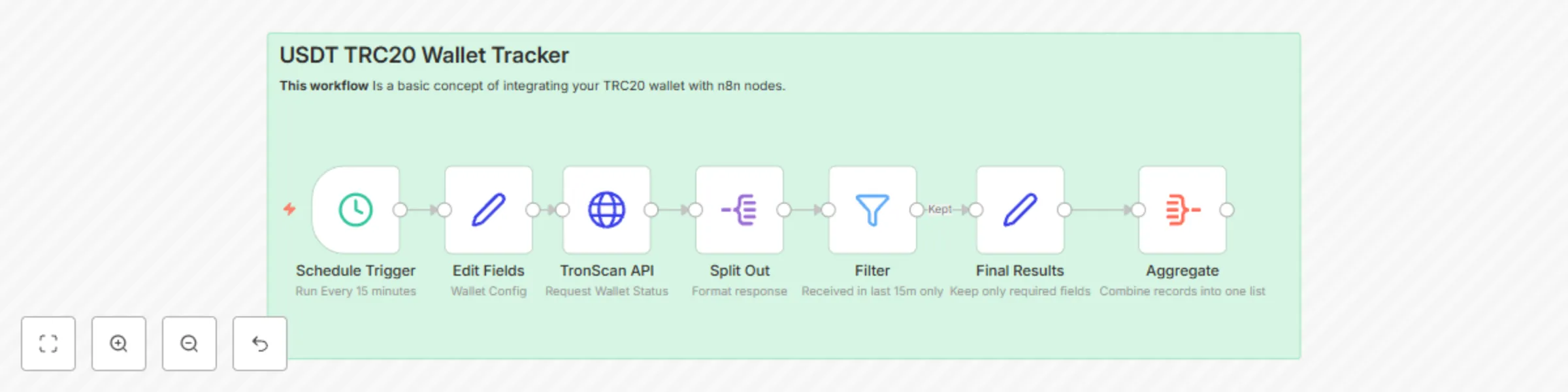
  1. Schedule Trigger: Initiates the workflow at predetermined intervals.
  2. Edit Fields: Sets up the wallet address and transaction retrieval count.
  3. TronScan Data Retrieval: Gathers transaction data from the TRC20 wallet using TronScan's public database.
  4. Split Out & Filter: Processes and filters the transaction data.
  5. Final Results: Organizes and formats the required transaction data for review.
  6. Aggregate: Consolidates all records (items) into a one comprehensive list (item).

Customization

  • Modify the filter conditions and fields to suit your tracking needs. (for example you can higher or lower the number of time to filter or IN / OUT transactions - Default is 15m/IN)
  • Adjust the schedule trigger frequency according to your preference (default is 15m).

Best Practices

  • Regularly test the workflow to ensure consistent performance.
  • Stay updated with any changes to the structure of TronScan's public data that might affect the workflow.

Contributing

Your feedback and contributions are greatly appreciated. Feel free to adapt, modify, and share enhancements with the n8n community.

1.2 Logical Blocks

This catalog entry is organized from the workflow JSON. The node-level section below shows the executable blocks available for review before importing the template.

2. Block-by-Block Analysis

Block 1 - Split Out

Type / Role
n8n-nodes-base.splitOut - splitOut
Config choices
Version 1

Block 2 - Edit Fields

Type / Role
n8n-nodes-base.set - set
Config choices
Version 3.2

Block 3 - Filter

Type / Role
n8n-nodes-base.filter - filter
Config choices
Version 1

Block 4 - Sticky Note

Type / Role
n8n-nodes-base.stickyNote - stickyNote
Config choices
Version 1

Block 5 - TronScan API

Type / Role
n8n-nodes-base.httpRequest - httpRequest
Config choices
Version 4.1

Block 6 - Final Results

Type / Role
n8n-nodes-base.set - set
Config choices
Version 3.2

Block 7 - Schedule Trigger

Type / Role
n8n-nodes-base.scheduleTrigger - scheduleTrigger
Config choices
Version 1.1

Block 8 - Aggregate

Type / Role
n8n-nodes-base.aggregate - aggregate
Config choices
Version 1

3. Summary Table

Workflow USDT and TRC20 wallet tracker API workflow for n8n
Complexity intermediate
Nodes 8
Categories Crypto Trading
Author Nskha
Published 16 Jan 2024

4. Reproducing the Workflow from Scratch

  1. 1. Download the workflow JSON

    Use the JSON export at /data/workflows/2053/2053.json as the source template for this automation.

  2. 2. Import the template into n8n

    Open n8n, import the downloaded JSON, and review each node before activating the workflow.

  3. 3. Configure credentials and variables

    Replace placeholder credentials, API keys, webhook URLs, account IDs, and environment-specific values with your own settings.

  4. 4. Test with sample data

    Run the workflow manually or in a staging workspace, inspect node output, and confirm downstream systems receive the expected data.

  5. 5. Activate and monitor

    Enable the workflow only after testing, then monitor executions, errors, and rate limits during the first production runs.

5. General Notes & Resources

Review imported nodes carefully before activation. This catalog entry is intended to help you inspect the workflow structure, understand required services, and find related templates faster.

Node names, credentials, schedules, webhook paths, and external service limits may need adjustment for your workspace.

Frequently asked questions

What does USDT and TRC20 wallet tracker API workflow for n8n do?

Overview This n8n workflow is specifically designed to monitor USDT TRC20 transactions within a specified wallet. It utilizes the public blockchain database of TronSca...

What do I need before importing this workflow?

Review the workflow JSON, configure any required credentials in n8n, and test the automation in a safe workspace before using it in production.

Can I customize this workflow?

Yes. Use the block-by-block analysis and the downloadable JSON to inspect each node, then adjust credentials, prompts, schedules, filters, or destinations for your Crypto Trading use case.