Unix timestamp to ISO date converter

Workflow preview

Workflow preview
100%
Unix timestamp to ISO date converter preview
Open on n8n.io

Important notice

This workflow is provided as-is. Please review and test before using in production.

1. Workflow Overview

This n8n workflow provides a simple yet powerful utility to convert Unix timestamps (seconds since epoch) into the universally recognized ISO 8601 date and time format. This is crucial for harmoniz...

Best for

  • Engineering automation workflows
  • intermediate n8n builders looking for reusable templates

Tools used

n8n-nodes-base.stickynote, n8n-nodes-base.webhook, n8n-nodes-base.set, n8n-nodes-base.respondtowebhook

Source and attribution

This workflow is cataloged by N8N Workflows and links back to its original n8n.io source page by ist00dent.

Original n8n.io source

1.1 Workflow description

Title
Unix timestamp to ISO date converter
Workflow name
Unix timestamp to ISO date converter

This n8n workflow provides a simple yet powerful utility to convert Unix timestamps (seconds since epoch) into the universally recognized ISO 8601 date and time format. This is crucial for harmonizing date data across different systems, databases, and applications.


πŸ”§ How it works

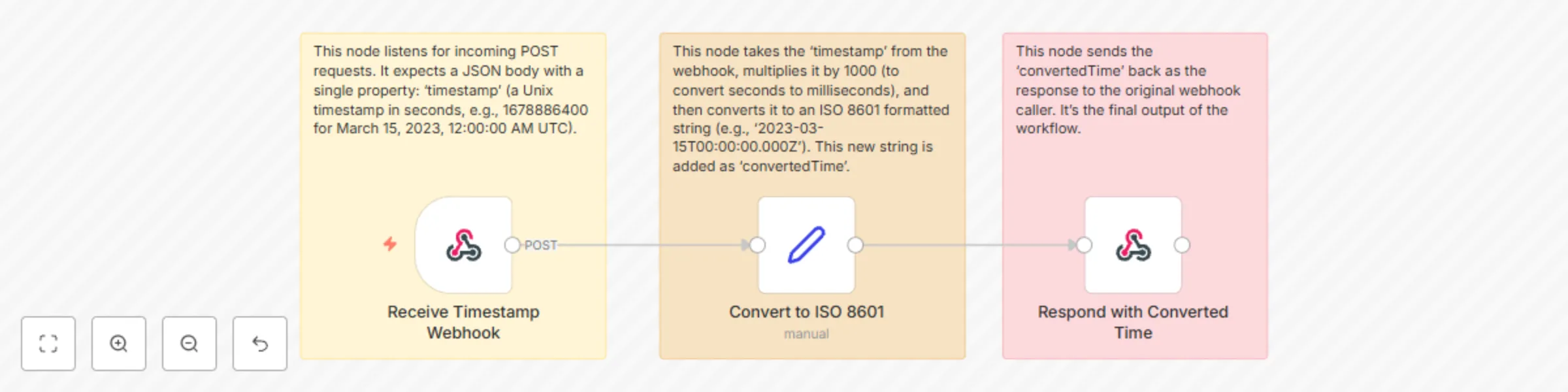
  • Receive Timestamp Webhook: This node acts as the entry point, listening for incoming POST requests. It expects a JSON body containing a single property: timestamp, which should be a Unix timestamp in seconds (e.g., 1678886400).
  • Convert to ISO 8601: This node takes the timestamp received from the webhook. Since JavaScript's Date object typically uses milliseconds, it multiplies the Unix timestamp by 1000. It then uses new Date(...).toISOString() to convert this into an ISO 8601 formatted string (e.g., 2023-03-15T00:00:00.000Z) and assigns it to a new property called convertedTime.
  • Respond with Converted Time: This node sends the convertedTime property back as the response to the original webhook caller.

πŸ‘€ Who is it for?

This workflow is extremely useful for:

  • Developers & Integrators: When working with APIs or databases that return dates as Unix timestamps, and you need to display them in a human-readable or standardized format in your applications or dashboards.
  • Data Analysts & Scientists: For cleaning and transforming raw timestamp data from logs, event streams, or legacy systems into a consistent format for analysis.
  • System Administrators: For debugging logs where timestamps are often in Unix format.
  • Anyone Managing Data Imports/Exports: Ensuring date compatibility when moving data between different platforms.
  • Automators: As a building block in larger workflows where incoming data has Unix timestamps that need to be normalized before further processing (e.g., adding to a spreadsheet, sending in an email, or performing date calculations).

πŸ“‘ Data Structure

When you trigger the webhook, send a POST request with a JSON body structured as follows:

{
  "timestamp": 1678886400
}

The workflow will return a JSON response similar to this:

{
  "convertedTime": "2023-03-15T00:00:00.000Z"
}

βš™οΈ Setup Instructions

  • Import Workflow: In your n8n editor, click "Import from JSON" and paste the provided workflow JSON.
  • Configure Webhook Path:
    • Double-click the Receive Timestamp Webhook node.
    • In the 'Path' field, set a unique and descriptive path (e.g., /convert-timestamp or /unix-to-iso).
  • Activate Workflow: Save and activate the workflow.

πŸ“ Tips

This simple conversion workflow can be drastically enhanced and leveraged in many ways:

  • Dynamic Output Formats:

    • Upgrade: Modify the Convert to ISO 8601 node (or add a Function node after it) to accept an optional format parameter in the webhook.
    • Leverage: Allow users to request formats like MM/DD/YYYY HH:mm:ss, YYYY-MM-DD, DD-MM-YYYY, or just the time, making the output directly usable in various contexts without further processing.
  • Example using a Function node:

const date = new Date($json.timestamp * 1000);
const format = $json.format || 'iso'; // Default to ISO
let output;

switch (format.toLowerCase()) {
    case 'iso':
        output = date.toISOString();
        break;
    case 'locale': // e.g., "3/15/2023, 12:00:00 AM UTC"
        output = date.toLocaleString('en-US', { timeZone: 'UTC' });
        break;
    case 'dateonly': // e.g., "2023-03-15"
        output = date.toISOString().split('T')[0];
        break;
    case 'timeonly': // e.g., "00:00:00 UTC"
        output = date.toLocaleTimeString('en-US', { timeZone: 'UTC', hour12: false });
        break;
    default:
        output = date.toISOString(); // Fallback
}
return [{ json: { convertedTime: output } }];
  • Timezone Conversion:

    • Upgrade: Combine this with the Time Zone Converter workflow (or integrate moment-timezone.js if using a Code node and have a self-hosted instance). Accept an optional targetTimeZone parameter in the webhook.
    • Leverage: Convert the Unix timestamp directly into a human-readable date and time in a specific target timezone, which is incredibly valuable for global scheduling or reporting.
  • Error Handling and Input Validation:

    • Upgrade: Add an IF node after the Receive Timestamp Webhook. Check if isNaN($json.body.timestamp) or if typeof $json.body.timestamp !== 'number'.
    • Leverage: If the input timestamp is invalid, branch to a Respond to Webhook node that returns a clear error message (e.g., "Invalid timestamp provided. Please provide a numeric Unix timestamp in seconds."). This makes your API more robust.
  • Reverse Conversion (ISO to Unix):

    • Upgrade: Create a separate workflow, or add another branch to this one, to convert an ISO 8601 string back to a Unix timestamp. This provides a complete conversion utility.
    • Example Set node value: ={{ new Date($json.body.isoString).getTime() / 1000 }}
  • Integration with Data Pipelines:

    • Upgrade: Use this workflow as a microservice in larger ETL (Extract, Transform, Load) pipelines.
    • Leverage: If you're pulling data from a source that provides Unix timestamps (e.g., a logging system, IoT device, certain databases), send that data through this workflow to normalize the dates before loading them into your analytics database, CRM, or data warehouse.
  • Automated Reporting:

    • Upgrade: If you have a system that generates reports with Unix timestamps, trigger this webhook for each timestamp.
    • Leverage: Produce reports with human-readable dates for better readability and decision-making for non-technical stakeholders.

This workflow is a cornerstone for any automation involving diverse date and time data. By implementing the suggested upgrades, you can transform it from a basic converter into a highly flexible and reliable date-time processing hub.

1.2 Logical Blocks

This catalog entry is organized from the workflow JSON. The node-level section below shows the executable blocks available for review before importing the template.

2. Block-by-Block Analysis

Block 1 - Note: Webhook Input

Type / Role
n8n-nodes-base.stickyNote - stickyNote
Config choices
Version 1

Block 2 - Note: Conversion Logic

Type / Role
n8n-nodes-base.stickyNote - stickyNote
Config choices
Version 1

Block 3 - Note: Webhook Response

Type / Role
n8n-nodes-base.stickyNote - stickyNote
Config choices
Version 1

Block 4 - Receive Timestamp Webhook

Type / Role
n8n-nodes-base.webhook - webhook
Config choices
Version 2

Block 5 - Convert to ISO 8601

Type / Role
n8n-nodes-base.set - set
Config choices
Version 3.4

Block 6 - Respond with Converted Time

Type / Role
n8n-nodes-base.respondToWebhook - respondToWebhook
Config choices
Version 1.2

3. Summary Table

Workflow Unix timestamp to ISO date converter
Complexity intermediate
Nodes 6
Categories Engineering
Author ist00dent
Published 03 Jun 2025

4. Reproducing the Workflow from Scratch

  1. 1. Download the workflow JSON

    Use the JSON export at /data/workflows/4623/4623.json as the source template for this automation.

  2. 2. Import the template into n8n

    Open n8n, import the downloaded JSON, and review each node before activating the workflow.

  3. 3. Configure credentials and variables

    Replace placeholder credentials, API keys, webhook URLs, account IDs, and environment-specific values with your own settings.

  4. 4. Test with sample data

    Run the workflow manually or in a staging workspace, inspect node output, and confirm downstream systems receive the expected data.

  5. 5. Activate and monitor

    Enable the workflow only after testing, then monitor executions, errors, and rate limits during the first production runs.

5. General Notes & Resources

Review imported nodes carefully before activation. This catalog entry is intended to help you inspect the workflow structure, understand required services, and find related templates faster.

Node names, credentials, schedules, webhook paths, and external service limits may need adjustment for your workspace.

Frequently asked questions

What does Unix timestamp to ISO date converter do?

This n8n workflow provides a simple yet powerful utility to convert Unix timestamps (seconds since epoch) into the universally recognized ISO 8601 date and time format. This is crucial for harmoniz...

What do I need before importing this workflow?

Review the workflow JSON, configure any required credentials in n8n, and test the automation in a safe workspace before using it in production.

Can I customize this workflow?

Yes. Use the block-by-block analysis and the downloadable JSON to inspect each node, then adjust credentials, prompts, schedules, filters, or destinations for your Engineering use case.