Turn websites into a Google Sheets database with MrScraper and Gmail

Workflow preview

Workflow preview
100%
Turn websites into a Google Sheets database with MrScraper and Gmail preview
Open on n8n.io

1. Workflow Overview

Turn Internet Into Database — n8n Workflow Description This n8n template automates the entire process of turning any website into a structured database — no manual scraping required. It uses MrScra...

Best for

  • Document Extraction automation workflows
  • advanced n8n builders looking for reusable templates

Tools used

n8n-nodes-base.code, n8n-nodes-base.manualtrigger, n8n-nodes-base.splitinbatches, n8n-nodes-base.stickynote, n8n-nodes-mrscraper.mrscraper, n8n-nodes-base.gmail, n8n-nodes-base.googlesheets

Source and attribution

This workflow is cataloged by N8N Workflows and links back to its original n8n.io source page by riandra.

Original n8n.io source

1.1 Workflow description

Title
Turn websites into a Google Sheets database with MrScraper and Gmail
Workflow name
Turn websites into a Google Sheets database with MrScraper and Gmail

Turn Internet Into Database — n8n Workflow

Description

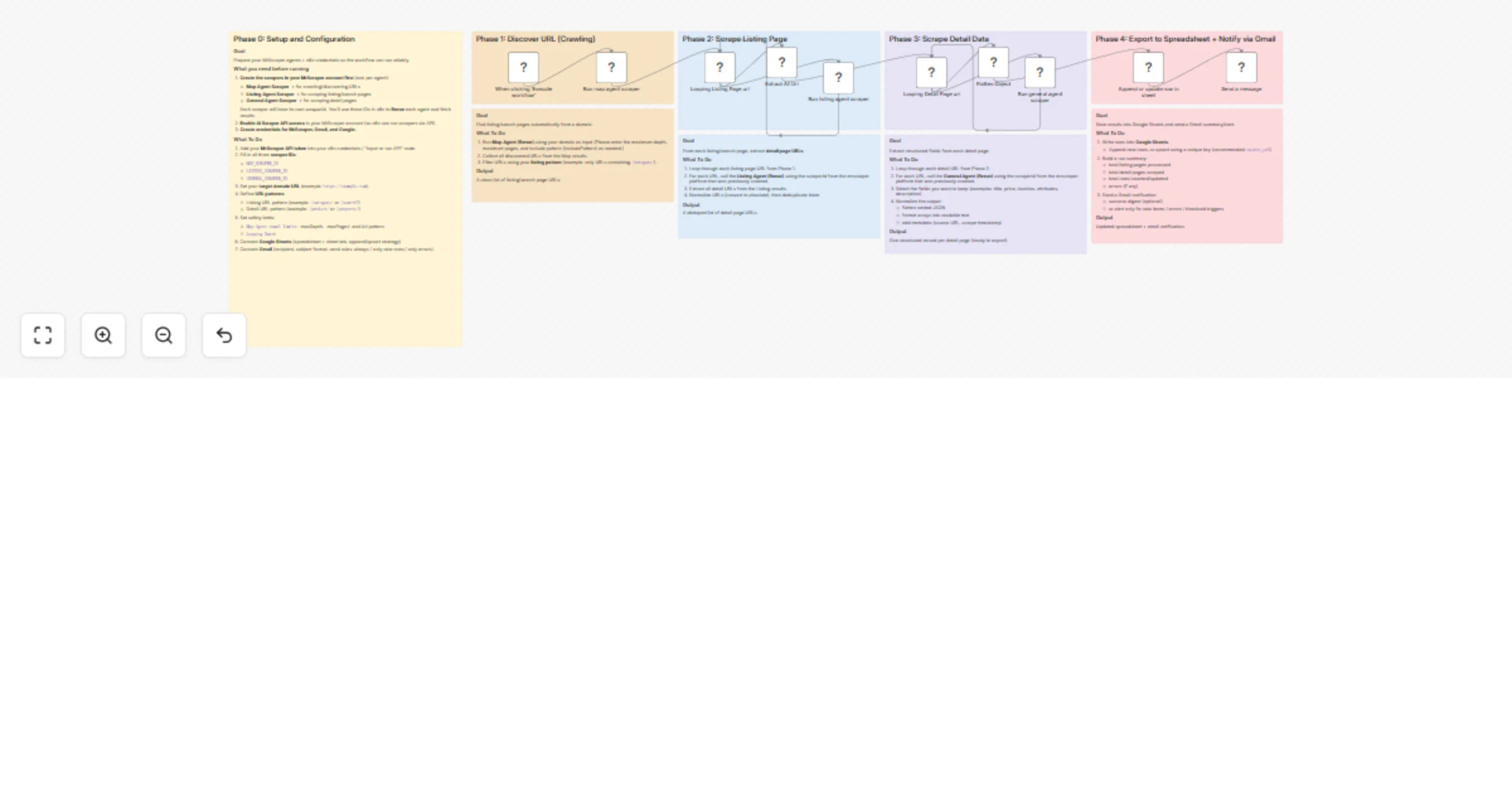
This n8n template automates the entire process of turning any website into a structured database — no manual scraping required. It uses MrScraper's AI-powered agents to crawl a domain, extract listing pages, scrape detail pages, and export everything into Google Sheets with an email notification via Gmail.

Whether you're building a real estate database, product catalog, job board aggregator, or competitor price tracker, this workflow handles the full pipeline end-to-end.


How It Works

  • Phase 1 – Discover URLs (Crawling): The Map Agent crawls your target domain and discovers all relevant URLs based on your include/exclude patterns. It returns a clean list of listing/search page URLs.
  • Phase 2 – Scrape Listing Pages: The workflow loops through each discovered listing URL and runs the Listing Agent to extract all detail page URLs. Duplicates are automatically removed.
  • Phase 3 – Scrape Detail Pages: Each detail URL is looped through the General Agent, which extracts structured fields (title, price, location, description, etc.). Nested JSON is automatically flattened into clean, spreadsheet-ready rows.
  • Phase 4 – Export & Notify: Scraped records are appended or upserted into Google Sheets using a unique key. Once complete, a Gmail notification is sent with a run summary.

How to Set Up

  1. Create 3 scrapers in your MrScraper account:
  • Map Agent Scraper (for crawling/URL discovery)
  • Listing Agent Scraper (for extracting detail URLs from listing pages)
  • General Agent Scraper (for extracting structured data from detail pages)
  • Copy the scraperId for each — you'll need these in n8n.
  1. Enable AI Scraper API access in your MrScraper account settings.

  2. Add your credentials in n8n:

  • MrScraper API token
  • Google Sheets OAuth2
  • Gmail OAuth2
  1. Configure the Map Agent node:
  • Set your target domain URL (e.g. https://example.com)
  • Set includePatterns to match listing pages (e.g. /category/)
  • Adjust maxDepth, maxPages, and limit as needed
  1. Configure the Listing Agent node:
  • Enter the Listing scraperId
  • Set maxPages based on how many pages per listing URL to scrape
  1. Configure the General Agent node:
  • Enter the General scraperId
  1. Connect Google Sheets:
  • Enter your spreadsheet and sheet tab URL
  • Choose append or upsert strategy (recommended: upsert by url)
  1. Configure Gmail:
  • Set recipient email, subject line, and message body

Requirements

  • MrScraper account with API access enabled
  • Google Sheets (OAuth2 connected)
  • Gmail (OAuth2 connected)

Good to Know

  • The workflow uses batch looping, so large sites with hundreds of pages are handled gracefully without overloading.
  • The Flatten Object node automatically normalizes nested JSON — no manual field mapping needed for most sites.
  • Set a unique match key (e.g. url) in the Google Sheets upsert step to avoid duplicate rows on re-runs.
  • Scraping speed and cost will depend on MrScraper's pricing plan and the number of pages processed.

Customising This Workflow

  • Different site types: Works for real estate listings, job boards, e-commerce catalogs, directory sites, and more — just adjust your URL patterns.
  • Add filtering: Insert a Code or Filter node after Phase 3 to drop incomplete records before saving.
  • Schedule it: Replace the manual trigger with a Schedule Trigger to run daily or weekly and keep your database fresh automatically.
  • Multi-site: Duplicate Phase 1–3 branches to scrape multiple domains in a single workflow run.

1.2 Logical Blocks

This catalog entry is organized from the workflow JSON. The node-level section below shows the executable blocks available for review before importing the template.

2. Block-by-Block Analysis

Block 1 - Extract All Url

Type / Role
n8n-nodes-base.code - code
Config choices
Version 2

Block 2 - When clicking ‘Execute workflow’

Type / Role
n8n-nodes-base.manualTrigger - manualTrigger
Config choices
Version 1

Block 3 - Flatten Object

Type / Role
n8n-nodes-base.code - code
Config choices
Version 2

Block 4 - Looping Listing Page url

Type / Role
n8n-nodes-base.splitInBatches - splitInBatches
Config choices
Version 3

Block 5 - Looping Detail Page url

Type / Role
n8n-nodes-base.splitInBatches - splitInBatches
Config choices
Version 3

Block 6 - Sticky Note

Type / Role
n8n-nodes-base.stickyNote - stickyNote
Config choices
Version 1

Block 7 - Sticky Note8

Type / Role
n8n-nodes-base.stickyNote - stickyNote
Config choices
Version 1

Block 8 - Run listing agent scraper

Type / Role
n8n-nodes-mrscraper.mrscraper - mrscraper
Config choices
Version 1

Block 9 - Run general agent scraper

Type / Role
n8n-nodes-mrscraper.mrscraper - mrscraper
Config choices
Version 1

Block 10 - Run map agent scraper

Type / Role
n8n-nodes-mrscraper.mrscraper - mrscraper
Config choices
Version 1

Block 11 - Send a message

Type / Role
n8n-nodes-base.gmail - gmail
Config choices
Version 2.2

Block 12 - Sticky Note9

Type / Role
n8n-nodes-base.stickyNote - stickyNote
Config choices
Version 1

Block 13 - Sticky Note10

Type / Role
n8n-nodes-base.stickyNote - stickyNote
Config choices
Version 1

Block 14 - Sticky Note11

Type / Role
n8n-nodes-base.stickyNote - stickyNote
Config choices
Version 1

Block 15 - Sticky Note12

Type / Role
n8n-nodes-base.stickyNote - stickyNote
Config choices
Version 1

Block 16 - Sticky Note13

Type / Role
n8n-nodes-base.stickyNote - stickyNote
Config choices
Version 1

Block 17 - Sticky Note14

Type / Role
n8n-nodes-base.stickyNote - stickyNote
Config choices
Version 1

Block 18 - Sticky Note15

Type / Role
n8n-nodes-base.stickyNote - stickyNote
Config choices
Version 1

Block 19 - Append or update row in sheet

Type / Role
n8n-nodes-base.googleSheets - googleSheets
Config choices
Version 4.7

3. Summary Table

Workflow Turn websites into a Google Sheets database with MrScraper and Gmail
Complexity advanced
Nodes 19
Categories Document Extraction
Author riandra
Published 02 Mar 2026

4. Reproducing the Workflow from Scratch

  1. 1. Download the workflow JSON

    Use the JSON export at /data/workflows/13798/13798.json as the source template for this automation.

  2. 2. Import the template into n8n

    Open n8n, import the downloaded JSON, and review each node before activating the workflow.

  3. 3. Configure credentials and variables

    Replace placeholder credentials, API keys, webhook URLs, account IDs, and environment-specific values with your own settings.

  4. 4. Test with sample data

    Run the workflow manually or in a staging workspace, inspect node output, and confirm downstream systems receive the expected data.

  5. 5. Activate and monitor

    Enable the workflow only after testing, then monitor executions, errors, and rate limits during the first production runs.

5. General Notes & Resources

Review imported nodes carefully before activation. This catalog entry is intended to help you inspect the workflow structure, understand required services, and find related templates faster.

Node names, credentials, schedules, webhook paths, and external service limits may need adjustment for your workspace.

Frequently asked questions

What does Turn websites into a Google Sheets database with MrScraper and Gmail do?

Turn Internet Into Database — n8n Workflow Description This n8n template automates the entire process of turning any website into a structured database — no manual scraping required. It uses MrScra...

What do I need before importing this workflow?

Review the workflow JSON, configure any required credentials in n8n, and test the automation in a safe workspace before using it in production.

Can I customize this workflow?

Yes. Use the block-by-block analysis and the downloadable JSON to inspect each node, then adjust credentials, prompts, schedules, filters, or destinations for your Document Extraction use case.