Translate and localize multilingual content with DeepL and GPT-4o-mini

Workflow preview

Workflow preview
100%
Translate and localize multilingual content with DeepL and GPT-4o-mini preview
Open on n8n.io

Important notice

This workflow is provided as-is. Please review and test before using in production.

1. Workflow Overview

Translate and localize content using DeepL and GPT 4o mini Managing high quality translations across multiple languages often requires more than just machine translation; it requires cultural conte...

Best for

  • Document Extraction automation workflows
  • AI Summarization automation workflows
  • advanced n8n builders looking for reusable templates

Tools used

n8n-nodes-base.stickynote, n8n-nodes-base.webhook, n8n-nodes-base.set, n8n-nodes-base.code, n8n-nodes-base.splitout, n8n-nodes-base.deepl, @n8n/n8n-nodes-langchain.agent, @n8n/n8n-nodes-langchain.lmchatopenai

Source and attribution

This workflow is cataloged by N8N Workflows and links back to its original n8n.io source page by masahiro hanawa.

Original n8n.io source

1.1 Workflow description

Title
Translate and localize multilingual content with DeepL and GPT-4o-mini
Workflow name
Translate and localize multilingual content with DeepL and GPT-4o-mini

Translate and localize content using DeepL and GPT-4o-mini

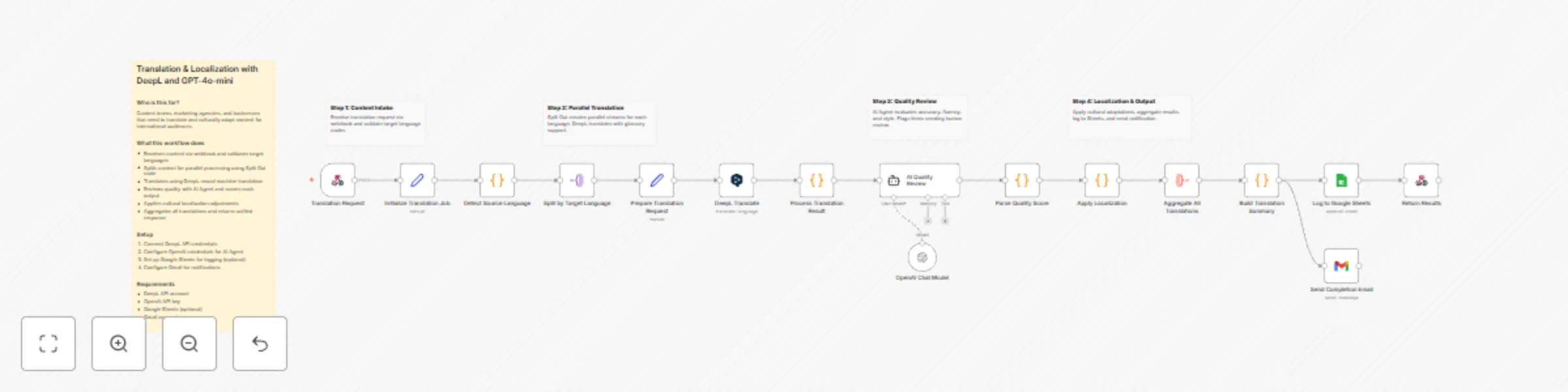
Managing high-quality translations across multiple languages often requires more than just machine translation; it requires cultural context and quality assurance. This workflow automates the entire pipeline, from initial translation to AI-driven quality scoring and cultural localization.

Who is this for?

  • Content Teams: To automate the first draft and review process for blog posts or documentation.
  • Marketing Agencies: To localize campaign copy for international markets quickly.
  • Product Managers: To manage UI/UX copy across different regions with consistent glossary support.

How it works

  1. Content Intake: A Webhook receives the source text and a list of target languages.
  2. Language Detection & Validation: The workflow identifies the source language and validates the requested target codes.
  3. Parallel Processing: Using the Split Out node, the workflow processes each target language simultaneously.
  4. DeepL Translation: High-quality neural machine translation is performed for each language.
  5. AI Quality Review: GPT-4o-mini acts as a professional linguist, scoring the translation on accuracy, fluency, and style, and flagging any issues.
  6. Cultural Localization: A specialized node applies region-specific formatting for dates and currencies.
  7. Aggregation & Reporting: All results are unified, logged to Google Sheets, emailed via Gmail, and returned as a JSON response to the initial requester.

How to set up

  1. Credentials: Connect your DeepL API, OpenAI, Google Sheets, and Gmail accounts.
  2. Google Sheets: Create a sheet with headers: Job ID, Source Text, Languages, Avg Quality, and Completed. Paste the Sheet ID into the Google Sheets node.
  3. Webhook: Use the production URL in your CMS or app to trigger the workflow with a POST request.

Requirements

  • DeepL API Key (Free or Pro)
  • OpenAI API Key (for GPT-4o-mini)
  • Google Account (for Sheets and Gmail)

How to customize

  • Adjust AI Rubric: Modify the "AI Quality Review" prompt to focus on specific brand voice guidelines or technical terminology.
  • Glossary Support: Update the DeepL node to include specific Glossary IDs for industry-specific jargon.
  • Localization Rules: Add more regions or specific formatting rules (like measurement conversions) in the "Apply Localization" Code node.

1.2 Logical Blocks

This catalog entry is organized from the workflow JSON. The node-level section below shows the executable blocks available for review before importing the template.

2. Block-by-Block Analysis

Block 1 - Sticky Note

Type / Role
n8n-nodes-base.stickyNote - stickyNote
Config choices
Version 1

Block 2 - Sticky Note1

Type / Role
n8n-nodes-base.stickyNote - stickyNote
Config choices
Version 1

Block 3 - Sticky Note2

Type / Role
n8n-nodes-base.stickyNote - stickyNote
Config choices
Version 1

Block 4 - Sticky Note3

Type / Role
n8n-nodes-base.stickyNote - stickyNote
Config choices
Version 1

Block 5 - Sticky Note4

Type / Role
n8n-nodes-base.stickyNote - stickyNote
Config choices
Version 1

Block 6 - Translation Request

Type / Role
n8n-nodes-base.webhook - webhook
Config choices
Version 2

Block 7 - Initialize Translation Job

Type / Role
n8n-nodes-base.set - set
Config choices
Version 3.4

Block 8 - Detect Source Language

Type / Role
n8n-nodes-base.code - code
Config choices
Version 2

Block 9 - Split by Target Language

Type / Role
n8n-nodes-base.splitOut - splitOut
Config choices
Version 1

Block 10 - Prepare Translation Request

Type / Role
n8n-nodes-base.set - set
Config choices
Version 3.4

Block 11 - DeepL Translate

Type / Role
n8n-nodes-base.deepL - deepL
Config choices
Version 1

Block 12 - Process Translation Result

Type / Role
n8n-nodes-base.code - code
Config choices
Version 2

Block 13 - AI Quality Review

Type / Role
@n8n/n8n-nodes-langchain.agent - agent
Config choices
Version 1.7

Block 14 - OpenAI Chat Model

Type / Role
@n8n/n8n-nodes-langchain.lmChatOpenAi - lmChatOpenAi
Config choices
Version 1.2

Block 15 - Parse Quality Score

Type / Role
n8n-nodes-base.code - code
Config choices
Version 2

Block 16 - Apply Localization

Type / Role
n8n-nodes-base.code - code
Config choices
Version 2

Block 17 - Aggregate All Translations

Type / Role
n8n-nodes-base.aggregate - aggregate
Config choices
Version 1

Block 18 - Build Translation Summary

Type / Role
n8n-nodes-base.code - code
Config choices
Version 2

Block 19 - Log to Google Sheets

Type / Role
n8n-nodes-base.googleSheets - googleSheets
Config choices
Version 4.5

Block 20 - Send Completion Email

Type / Role
n8n-nodes-base.gmail - gmail
Config choices
Version 2.1

Block 21 - Return Results

Type / Role
n8n-nodes-base.respondToWebhook - respondToWebhook
Config choices
Version 1.1

3. Summary Table

Workflow Translate and localize multilingual content with DeepL and GPT-4o-mini
Complexity advanced
Nodes 21
Categories Document Extraction, AI Summarization
Author masahiro hanawa
Published 15 Dec 2025

4. Reproducing the Workflow from Scratch

  1. 1. Download the workflow JSON

    Use the JSON export at /data/workflows/11822/11822.json as the source template for this automation.

  2. 2. Import the template into n8n

    Open n8n, import the downloaded JSON, and review each node before activating the workflow.

  3. 3. Configure credentials and variables

    Replace placeholder credentials, API keys, webhook URLs, account IDs, and environment-specific values with your own settings.

  4. 4. Test with sample data

    Run the workflow manually or in a staging workspace, inspect node output, and confirm downstream systems receive the expected data.

  5. 5. Activate and monitor

    Enable the workflow only after testing, then monitor executions, errors, and rate limits during the first production runs.

5. General Notes & Resources

Review imported nodes carefully before activation. This catalog entry is intended to help you inspect the workflow structure, understand required services, and find related templates faster.

Node names, credentials, schedules, webhook paths, and external service limits may need adjustment for your workspace.

Frequently asked questions

What does Translate and localize multilingual content with DeepL and GPT-4o-mini do?

Translate and localize content using DeepL and GPT 4o mini Managing high quality translations across multiple languages often requires more than just machine translation; it requires cultural conte...

What do I need before importing this workflow?

Review the workflow JSON, configure any required credentials in n8n, and test the automation in a safe workspace before using it in production.

Can I customize this workflow?

Yes. Use the block-by-block analysis and the downloadable JSON to inspect each node, then adjust credentials, prompts, schedules, filters, or destinations for your Document Extraction, AI Summarization use case.