Block 1 - Webhook Trigger
- Type / Role
- n8n-nodes-base.webhook - webhook
- Config choices
- Version 1


 Early Deal
This workflow is provided as-is. Please review and test before using in production.
YouTube to LinkedIn Poster – n8n Workflow Template Turn any YouTube video into a high performing LinkedIn post — automatically. This AI powered n8n workflow takes a YouTube video ID, fetches the...
n8n-nodes-base.webhook, n8n-nodes-base.httprequest, n8n-nodes-base.if, n8n-nodes-base.set, @n8n/n8n-nodes-langchain.openai, n8n-nodes-base.respondtowebhook, n8n-nodes-base.stickynote
This workflow is cataloged by N8N Workflows and links back to its original n8n.io source page by Gerald Denor.
Original n8n.io sourceTurn any YouTube video into a high-performing LinkedIn post — automatically.
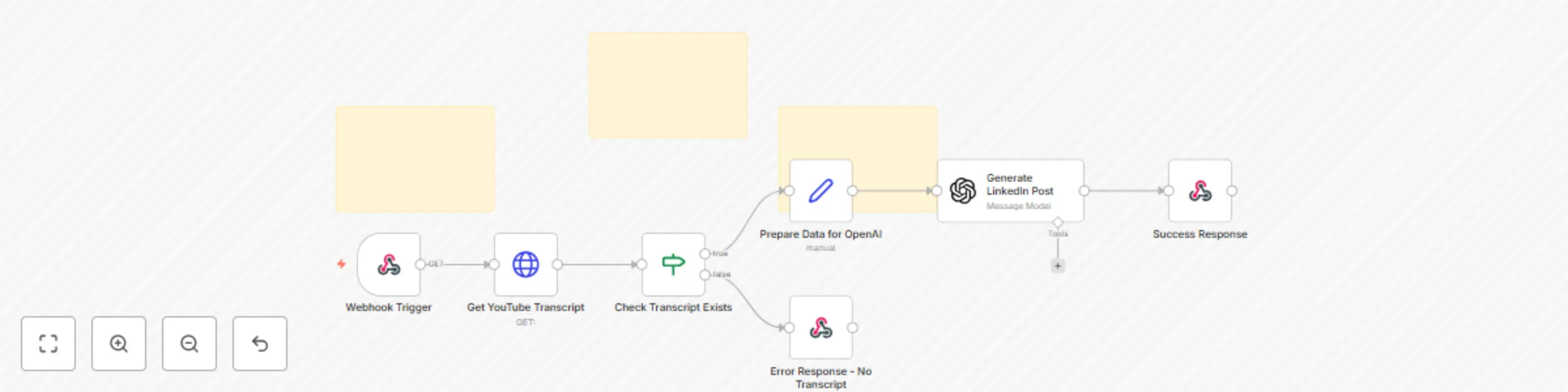
This AI-powered n8n workflow takes a YouTube video ID, fetches the transcript using SearchAPI.io, and transforms it into a professional, engaging LinkedIn post using OpenAI (via OpenRouter). Customize the writing style, automate your content repurposing, and scale your thought leadership.
📥 Accepts a YouTube video ID + preferred writing profile
📄 Retrieves transcript via SearchAPI.io
🧠 Uses LLM (OpenRouter / GPT-compatible) to generate a polished LinkedIn post
✍️ Supports writing style customization (e.g., educational, inspirational, storytelling)
🔁 Handles fallback if no transcript is found
✅ Webhook-based trigger (compatible with any frontend)
✅ YouTube transcript fetcher using SearchAPI.io
✅ Conditional logic to handle errors
✅ OpenAI content generation node with injected personality prompt
✅ Clean text response via webhook
🧠 n8n (self-hosted or cloud)
🔐 API key for SearchAPI.io
🧠 OpenRouter API key (free or paid)
🌐 A frontend form (e.g. WordPress + fetch(), Fillout, Postman, etc.)
Import the Workflow
Go to your n8n dashboard
Click Import and upload the JSON file
Configure SearchAPI
Sign up at SearchAPI.io
Add your API key inside the HTTP Request node labeled Get YouTube Transcript
Set Up OpenRouter
Go to Credentials → Add a new OpenRouter API credential
Paste your API key from OpenRouter.ai
Test with Postman or UI
Send a POST to the webhook URL with JSON:
{

  "video_id": "T1nX2yDeSzM",

  "llm_profile": "educational tone"

}
🎨 Change llm_profile to match different tones (e.g., "inspirational", "founder voice", "storyteller")
🔗 Integrate output directly into LinkedIn via a social media scheduler API
✏️ Edit the prompt in the OpenAI node for different content types (Twitter threads, blog intros)
🚨 Add rate limiting or credit logic using WordPress + myCred or n8n queue control
Content repurposing agency automating short-form content from videos
Personal brand managers scaling 1 → many posts from long-form video
Micro-SaaS founders turning webinars, tutorials, and walkthroughs into professional posts
YouTube creators expanding audience reach on LinkedIn
I used this exact workflow as the backend for a lead magnet SaaS tool that converts YouTube videos into LinkedIn posts. With a simple UI and webhook, users paste a video link, choose a tone, and instantly receive a high-quality post they can copy and share. It increased lead generation and engagement while costing nothing in backend dev. Check it out here: Youtube -> LinkedIn Post
The best part? I only used:
n8n + Webhook
SearchAPI.io
OpenRouter API
A WordPress front-end with credit gating
DM me on Twitter or reach out via email for setup help or white-label licensing: https://www.linkedin.com/in/gerald-akhidenor-1ab1a45/ or [email protected]
This catalog entry is organized from the workflow JSON. The node-level section below shows the executable blocks available for review before importing the template.
| Workflow | Transform YouTube videos into LinkedIn posts with SearchAPI & OpenAi |
|---|---|
| Complexity | intermediate |
| Nodes | 10 |
| Categories | Content Creation, Multimodal AI |
| Author | Gerald Denor |
| Published | 24 Jul 2025 |
Use the JSON export at /data/workflows/6397/6397.json as the source template for this automation.
Open n8n, import the downloaded JSON, and review each node before activating the workflow.
Replace placeholder credentials, API keys, webhook URLs, account IDs, and environment-specific values with your own settings.
Run the workflow manually or in a staging workspace, inspect node output, and confirm downstream systems receive the expected data.
Enable the workflow only after testing, then monitor executions, errors, and rate limits during the first production runs.
Review imported nodes carefully before activation. This catalog entry is intended to help you inspect the workflow structure, understand required services, and find related templates faster.
Node names, credentials, schedules, webhook paths, and external service limits may need adjustment for your workspace.
YouTube to LinkedIn Poster – n8n Workflow Template Turn any YouTube video into a high performing LinkedIn post — automatically. This AI powered n8n workflow takes a YouTube video ID, fetches the...
Review the workflow JSON, configure any required credentials in n8n, and test the automation in a safe workspace before using it in production.
Yes. Use the block-by-block analysis and the downloadable JSON to inspect each node, then adjust credentials, prompts, schedules, filters, or destinations for your Content Creation, Multimodal AI use case.