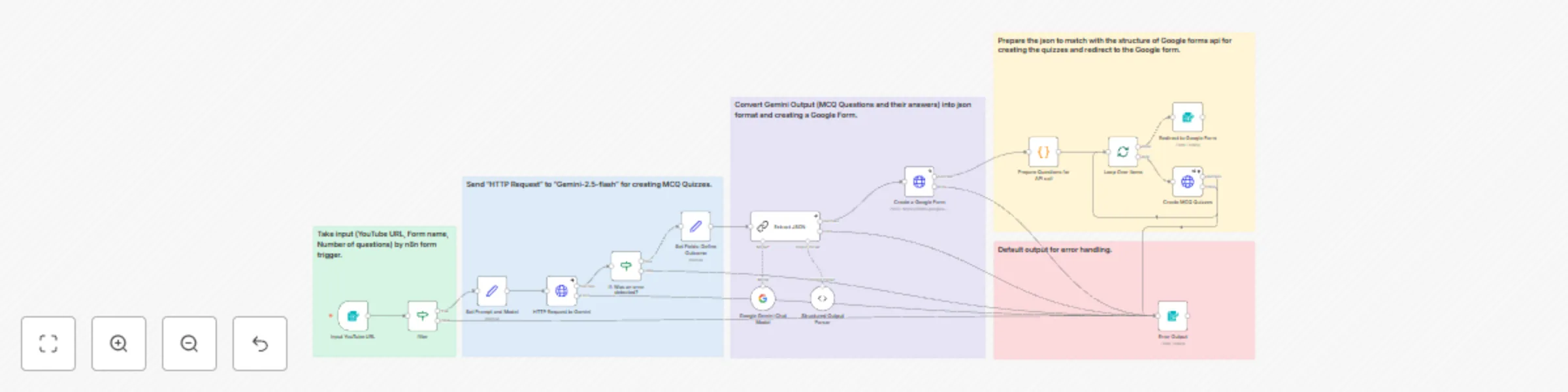
Transform YouTube videos into interactive MCQ quizzes with Google Forms & Gemini AI

Workflow preview

Workflow preview
100%
Transform YouTube videos into interactive MCQ quizzes with Google Forms & Gemini AI preview
Open on n8n.io

Important notice

This workflow is provided as-is. Please review and test before using in production.

1. Workflow Overview

AI Powered MCQ Quiz Generator from YouTube Videos Transform any YouTube video into an interactive MCQ quiz automatically! This workflow uses Google Gemini AI to analyze video content and generate c...

Best for

  • Document Extraction automation workflows
  • Multimodal AI automation workflows
  • advanced n8n builders looking for reusable templates

Tools used

n8n-nodes-base.set, n8n-nodes-base.if, @n8n/n8n-nodes-langchain.lmchatgooglegemini, @n8n/n8n-nodes-langchain.outputparserstructured, n8n-nodes-base.splitinbatches, n8n-nodes-base.formtrigger, n8n-nodes-base.httprequest, @n8n/n8n-nodes-langchain.chainllm

Source and attribution

This workflow is cataloged by N8N Workflows and links back to its original n8n.io source page by Md. Nazmul Islam.

Original n8n.io source

1.1 Workflow description

Title
Transform YouTube videos into interactive MCQ quizzes with Google Forms & Gemini AI
Workflow name
Transform YouTube videos into interactive MCQ quizzes with Google Forms & Gemini AI

AI-Powered MCQ Quiz Generator from YouTube Videos

Transform any YouTube video into an interactive MCQ quiz automatically! This workflow uses Google Gemini AI to analyze video content and generate comprehensive multiple-choice questions with automatic grading - perfect for educators, trainers, and content creators.

Who is this For

This workflow is perfect for:

  • Educators creating quizzes from educational YouTube content
  • Corporate Trainers developing assessments from training videos
  • Content Creators engaging their audience with interactive quizzes
  • Students testing their knowledge on video lectures
  • Online Course Creators building assessments from video content

Features

  • AI Video Analysis: Google Gemini 2.5 Flash analyzes entire YouTube videos (up to 50 minutes)
  • Dynamic Question Generation: Creates up to 90 MCQ questions with 3 options each
  • Automatic Form Creation: Generates Google Forms with quiz functionality
  • Smart Grading: Built-in correct answer identification and scoring
  • Error Handling: Robust error management with user feedback

How It Works

  1. User Input via n8n Web Form:

    • Form Name (Quiz Title)
    • Email Address
    • YouTube Video URL
    • Number of Questions (1-90)
  2. AI Processing Pipeline:

    • Google Gemini analyzes the YouTube video content
    • AI extracts key concepts and generates relevant questions
    • Structured output parser formats questions into JSON
  3. Google Forms Integration:

    • Automatically creates a new Google Form
    • Adds all generated questions with multiple choice options
    • Configures quiz settings with correct answers and scoring
  4. Completion & Access:

    • User receives direct link to the generated quiz
    • Form ready for immediate use or sharing
  5. Video Demo:

Set Up Steps

  1. Import the Workflow

    • Create a new workflow in n8n
    • Import the JSON file by clicking "three dots" (upper right corner) > "Import from file..."
  2. Configure Google Gemini API

    • Get your Google AI Studio API key from Google AI Studio
    • On “HTTP Request to Gemini” node replace the “API_KEY” from url with your API key.
    • Create a "Google Gemini (PaLM) API" credential in n8n
    • Add your API key to the credential
    • Connect the credential to the "Google Gemini Chat Model" node
  3. Set Up Google Forms Integration

    • Enable Google Forms API in Google Cloud Console
    • Create a "Google OAuth2 API" credential in n8n
    • Authorize the credential with Forms permissions
    • Connect the credential to both HTTP Request nodes (“Create a Google Form” node and “Create MCQ Quizzes” node)
  4. Configure Form Trigger

    • The workflow includes a built-in form trigger
    • No additional setup needed - the form URL will be generated automatically
    • Customize form fields if needed in the “Input YouTube URL" node
  5. Test the Workflow

    • Activate the workflow
    • Submit the form to generate a test quiz
    • Verify the Google Form is created successfully

Pre-requisites

  • Necessary Accounts:

    1. Google Account (for Forms API access)
    2. Google AI Studio Account (for Gemini API access)
    3. n8n Instance (cloud or self-hosted)
  • API Access:

    • Google Forms API enabled
    • Google drive API enabled
    • Google Generative AI API access
    • Valid API keys and OAuth credentials
  • N8N Requirements:

    • n8n version 1.95.2 or higher
    • LangChain nodes package installed
    • Internet access for API calls

Customization Guidance

  1. Question Generation Prompts:

    • Modify the prompt in "Set Prompt and model" node for different question styles
    • Adjust difficulty levels or focus areas
    • Change question format (True/False, Fill-in-blanks, etc.)
  2. Form Customization:

    • Update form title and description templates
    • Add additional input fields (difficulty level, subject area)
    • Customize success/error messages
  3. Advanced Features You Can Add:

    • Email Notifications: Send quiz links via email
    • Analytics Integration: Track quiz performance and completion rates
    • Multi-language Support: Generate quizzes in different languages
    • Question Bank Storage: Save generated questions to a database
    • Batch Processing: Generate multiple quizzes from a YouTube playlist
  4. Error Handling Enhancements:

    • Add retry logic for API failures
    • Implement fallback question generation
    • Create detailed error logging

Technical Specifications

  • Video Length: Up to 50 minutes supported
  • Question Limit: 1-90 questions per quiz
  • Processing Time: 2-10 minutes depending on video length
  • Supported Formats: YouTube videos (public and unlisted)
  • Output Format: Google Forms with automatic grading

Limitations & Considerations

  • YouTube video must be publicly accessible or unlisted
  • Processing time increases with video length and question count
  • API rate limits may apply for high-volume usage
  • Some complex visual content may not be fully analyzed

Ready to Transform Videos into Quizzes? This workflow streamlines the entire process from video analysis to quiz deployment. Perfect for educators and trainers looking to create engaging assessments from video content quickly and efficiently.

1.2 Logical Blocks

This catalog entry is organized from the workflow JSON. The node-level section below shows the executable blocks available for review before importing the template.

2. Block-by-Block Analysis

Block 1 - Set Fields: Define Outcome

Type / Role
n8n-nodes-base.set - set
Config choices
Version 3.4

Block 2 - If: Was an error detected?

Type / Role
n8n-nodes-base.if - if
Config choices
Version 2.2

Block 3 - Google Gemini Chat Model

Type / Role
@n8n/n8n-nodes-langchain.lmChatGoogleGemini - lmChatGoogleGemini
Config choices
Version 1

Block 4 - Structured Output Parser

Type / Role
@n8n/n8n-nodes-langchain.outputParserStructured - outputParserStructured
Config choices
Version 1.2

Block 5 - Loop Over Items

Type / Role
n8n-nodes-base.splitInBatches - splitInBatches
Config choices
Version 3

Block 6 - filter

Type / Role
n8n-nodes-base.if - if
Config choices
Version 2.2

Block 7 - Input YouTube URL

Type / Role
n8n-nodes-base.formTrigger - formTrigger
Config choices
Version 2.2

Block 8 - Set Prompt and Model

Type / Role
n8n-nodes-base.set - set
Config choices
Version 3.4

Block 9 - HTTP Request to Gemini

Type / Role
n8n-nodes-base.httpRequest - httpRequest
Config choices
Version 4.2

Block 10 - Extract JSON

Type / Role
@n8n/n8n-nodes-langchain.chainLlm - chainLlm
Config choices
Version 1.5

Block 11 - Create a Google Form

Type / Role
n8n-nodes-base.httpRequest - httpRequest
Config choices
Version 4.2

Block 12 - Prepare Questions for API call

Type / Role
n8n-nodes-base.code - code
Config choices
Version 2

Block 13 - Create MCQ Quizzes

Type / Role
n8n-nodes-base.httpRequest - httpRequest
Config choices
Version 4.2

Block 14 - Error Output

Type / Role
n8n-nodes-base.form - form
Config choices
Version 1

Block 15 - Redirect to Google Form

Type / Role
n8n-nodes-base.form - form
Config choices
Version 1

Block 16 - Sticky Note

Type / Role
n8n-nodes-base.stickyNote - stickyNote
Config choices
Version 1

Block 17 - Sticky Note1

Type / Role
n8n-nodes-base.stickyNote - stickyNote
Config choices
Version 1

Block 18 - Sticky Note2

Type / Role
n8n-nodes-base.stickyNote - stickyNote
Config choices
Version 1

Block 19 - Sticky Note3

Type / Role
n8n-nodes-base.stickyNote - stickyNote
Config choices
Version 1

Block 20 - Sticky Note4

Type / Role
n8n-nodes-base.stickyNote - stickyNote
Config choices
Version 1

3. Summary Table

Workflow Transform YouTube videos into interactive MCQ quizzes with Google Forms & Gemini AI
Complexity advanced
Nodes 20
Categories Document Extraction, Multimodal AI
Author Md. Nazmul Islam
Published 03 Jul 2025

4. Reproducing the Workflow from Scratch

  1. 1. Download the workflow JSON

    Use the JSON export at /data/workflows/5631/5631.json as the source template for this automation.

  2. 2. Import the template into n8n

    Open n8n, import the downloaded JSON, and review each node before activating the workflow.

  3. 3. Configure credentials and variables

    Replace placeholder credentials, API keys, webhook URLs, account IDs, and environment-specific values with your own settings.

  4. 4. Test with sample data

    Run the workflow manually or in a staging workspace, inspect node output, and confirm downstream systems receive the expected data.

  5. 5. Activate and monitor

    Enable the workflow only after testing, then monitor executions, errors, and rate limits during the first production runs.

5. General Notes & Resources

Review imported nodes carefully before activation. This catalog entry is intended to help you inspect the workflow structure, understand required services, and find related templates faster.

Node names, credentials, schedules, webhook paths, and external service limits may need adjustment for your workspace.

Frequently asked questions

What does Transform YouTube videos into interactive MCQ quizzes with Google Forms & Gemini AI do?

AI Powered MCQ Quiz Generator from YouTube Videos Transform any YouTube video into an interactive MCQ quiz automatically! This workflow uses Google Gemini AI to analyze video content and generate c...

What do I need before importing this workflow?

Review the workflow JSON, configure any required credentials in n8n, and test the automation in a safe workspace before using it in production.

Can I customize this workflow?

Yes. Use the block-by-block analysis and the downloadable JSON to inspect each node, then adjust credentials, prompts, schedules, filters, or destinations for your Document Extraction, Multimodal AI use case.