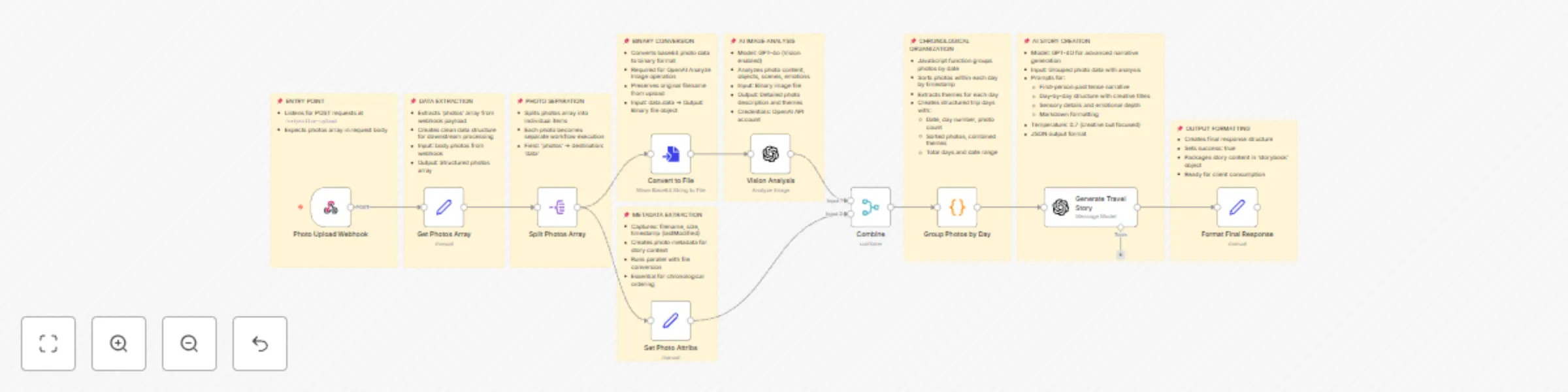
Transform travel photos into narrative stories with GPT-4O Vision

Workflow preview

Workflow preview
100%
Transform travel photos into narrative stories with GPT-4O Vision preview
Open on n8n.io

Important notice

This workflow is provided as-is. Please review and test before using in production.

1. Workflow Overview

Who is this for? This workflow is designed for travel bloggers, content creators, social media managers, and anyone who wants to transform their travel photos into engaging written narratives. It's...

Best for

  • Content Creation automation workflows
  • Multimodal AI automation workflows
  • advanced n8n builders looking for reusable templates

Tools used

n8n-nodes-base.splitout, @n8n/n8n-nodes-langchain.openai, n8n-nodes-base.set, n8n-nodes-base.converttofile, n8n-nodes-base.merge, n8n-nodes-base.code, n8n-nodes-base.webhook, n8n-nodes-base.stickynote

Source and attribution

This workflow is cataloged by N8N Workflows and links back to its original n8n.io source page by inderjeet Bhambra.

Original n8n.io source

1.1 Workflow description

Title
Transform travel photos into narrative stories with GPT-4O Vision
Workflow name
Transform travel photos into narrative stories with GPT-4O Vision

Who is this for?

This workflow is designed for travel bloggers, content creators, social media managers, and anyone who wants to transform their travel photos into engaging written narratives. It's perfect for travelers looking to create compelling stories from their photo collections without spending hours crafting content manually, families wanting to document memorable trips, and digital nomads who need to produce travel content efficiently.

What problem is this workflow solving?

Converting travel photos into engaging stories is time-consuming and requires both creative writing skills and the ability to analyze visual content meaningfully. This workflow solves the challenge of:

  • Transforming visual memories into compelling written narratives
  • Organizing photos chronologically to create logical story flow
  • Generating professional-quality travel content without writing expertise
  • Analyzing photo content to extract meaningful themes and emotions
  • Creating day-by-day structured narratives from unorganized photo collections
  • Reducing the time spent on manual content creation for travel documentation

What this workflow does

This AI-powered photo storyteller takes your travel photos and automatically generates immersive, first-person travel narratives. The workflow:

  • Accepts multiple photos through a webhook endpoint
  • Uses OpenAI Vision API (GPT-4o) to analyze each photo's content, emotions, and themes
  • Automatically organizes photos chronologically by date and timestamp
  • Groups photos by travel days and extracts daily themes
  • Leverages GPT-4.1 (minimum required) to craft engaging, first-person travel stories with creative day titles
  • Generates structured narratives with sensory details, cultural observations, and emotional insights
  • Outputs JSON formatted content ready for formatting
  • Creates day-by-day story structure with memorable moments and reflective conclusions

Setup

Required Credentials:

  • OpenAI API key configured in n8n for both Vision Analysis and Story Generation nodes
  • Ensure you have sufficient OpenAI credits for image analysis and text generation

Webhook Configuration:

  • The workflow creates a webhook endpoint at /tripteller-upload
  • Configure your photo upload interface to POST photos array to this endpoint
  • Photos should be sent as base64 encoded data with filename and metadata

Photo Requirements:

  • Supported formats: Standard image formats (JPEG, PNG, etc.)
  • Photos should include timestamp metadata for chronological organization

Caution

  • Do not upload all photos at once.
  • Start with a small number of photos, like 5 at a time.

How to customize this workflow to your needs

Story Style Customization:

  • Modify the system prompt in the "Generate Travel Story" node to adjust writing tone (nostalgic, adventurous, poetic, etc.)
  • Customize the story structure by editing the output format requirements
  • Add specific cultural or geographical context prompts for location-specific storytelling

Photo Analysis Enhancement:

  • Adjust the Vision Analysis node prompt to focus on specific elements (architecture, food, people, landscapes)
  • Modify the grouping logic in the "Group Photos by Day" node for different time-based organization
  • Add location extraction from EXIF data for geographical context

Output Format Adjustment:

  • Customize the final response structure in the "Format Final Response" node
  • Add integration with publishing platforms (blog APIs, social media, etc.)
  • Include additional metadata like location tags, travel duration, or trip statistics

Performance Optimization:

  • Adjust the execution timeout based on your typical photo volume
  • Modify the parallel processing approach for large photo collections
  • Add progress tracking for longer processing workflows

1.2 Logical Blocks

This catalog entry is organized from the workflow JSON. The node-level section below shows the executable blocks available for review before importing the template.

2. Block-by-Block Analysis

Block 1 - Split Photos Array

Type / Role
n8n-nodes-base.splitOut - splitOut
Config choices
Version 1

Block 2 - Vision Analysis

Type / Role
@n8n/n8n-nodes-langchain.openAi - openAi
Config choices
Version 1.8

Block 3 - Generate Travel Story

Type / Role
@n8n/n8n-nodes-langchain.openAi - openAi
Config choices
Version 1.8

Block 4 - Format Final Response

Type / Role
n8n-nodes-base.set - set
Config choices
Version 3.4

Block 5 - Convert to File

Type / Role
n8n-nodes-base.convertToFile - convertToFile
Config choices
Version 1.1

Block 6 - Get Photos Array

Type / Role
n8n-nodes-base.set - set
Config choices
Version 3.4

Block 7 - Set Photo Attribs

Type / Role
n8n-nodes-base.set - set
Config choices
Version 3.4

Block 8 - Combine

Type / Role
n8n-nodes-base.merge - merge
Config choices
Version 3.2

Block 9 - Group Photos by Day

Type / Role
n8n-nodes-base.code - code
Config choices
Version 2

Block 10 - Photo Upload Webhook

Type / Role
n8n-nodes-base.webhook - webhook
Config choices
Version 2.1

Block 11 - Sticky Note

Type / Role
n8n-nodes-base.stickyNote - stickyNote
Config choices
Version 1

Block 12 - Sticky Note1

Type / Role
n8n-nodes-base.stickyNote - stickyNote
Config choices
Version 1

Block 13 - Sticky Note2

Type / Role
n8n-nodes-base.stickyNote - stickyNote
Config choices
Version 1

Block 14 - Sticky Note3

Type / Role
n8n-nodes-base.stickyNote - stickyNote
Config choices
Version 1

Block 15 - Sticky Note4

Type / Role
n8n-nodes-base.stickyNote - stickyNote
Config choices
Version 1

Block 16 - Sticky Note5

Type / Role
n8n-nodes-base.stickyNote - stickyNote
Config choices
Version 1

Block 17 - Sticky Note6

Type / Role
n8n-nodes-base.stickyNote - stickyNote
Config choices
Version 1

Block 18 - Sticky Note7

Type / Role
n8n-nodes-base.stickyNote - stickyNote
Config choices
Version 1

Block 19 - Sticky Note8

Type / Role
n8n-nodes-base.stickyNote - stickyNote
Config choices
Version 1

3. Summary Table

Workflow Transform travel photos into narrative stories with GPT-4O Vision
Complexity advanced
Nodes 19
Categories Content Creation, Multimodal AI
Author inderjeet Bhambra
Published 08 Aug 2025

4. Reproducing the Workflow from Scratch

  1. 1. Download the workflow JSON

    Use the JSON export at /data/workflows/7161/7161.json as the source template for this automation.

  2. 2. Import the template into n8n

    Open n8n, import the downloaded JSON, and review each node before activating the workflow.

  3. 3. Configure credentials and variables

    Replace placeholder credentials, API keys, webhook URLs, account IDs, and environment-specific values with your own settings.

  4. 4. Test with sample data

    Run the workflow manually or in a staging workspace, inspect node output, and confirm downstream systems receive the expected data.

  5. 5. Activate and monitor

    Enable the workflow only after testing, then monitor executions, errors, and rate limits during the first production runs.

5. General Notes & Resources

Review imported nodes carefully before activation. This catalog entry is intended to help you inspect the workflow structure, understand required services, and find related templates faster.

Node names, credentials, schedules, webhook paths, and external service limits may need adjustment for your workspace.

Frequently asked questions

What does Transform travel photos into narrative stories with GPT-4O Vision do?

Who is this for? This workflow is designed for travel bloggers, content creators, social media managers, and anyone who wants to transform their travel photos into engaging written narratives. It's...

What do I need before importing this workflow?

Review the workflow JSON, configure any required credentials in n8n, and test the automation in a safe workspace before using it in production.

Can I customize this workflow?

Yes. Use the block-by-block analysis and the downloadable JSON to inspect each node, then adjust credentials, prompts, schedules, filters, or destinations for your Content Creation, Multimodal AI use case.