Transform Gmail newsletters into insightful LinkedIn posts using OpenAI

Workflow preview

Workflow preview
100%
Transform Gmail newsletters into insightful LinkedIn posts using OpenAI preview
Open on n8n.io

Important notice

This workflow is provided as-is. Please review and test before using in production.

1. Workflow Overview

Who Is This For? This workflow is perfect for content creators, marketers, and business professionals who receive regular newsletters and want to effortlessly convert them into engaging LinkedIn po...

Best for

  • Content Creation automation workflows
  • Multimodal AI automation workflows
  • intermediate n8n builders looking for reusable templates

Tools used

n8n-nodes-base.manualtrigger, n8n-nodes-base.gmail, n8n-nodes-base.splitout, @n8n/n8n-nodes-langchain.openai, n8n-nodes-base.linkedin, n8n-nodes-base.stickynote

Source and attribution

This workflow is cataloged by N8N Workflows and links back to its original n8n.io source page by Ramsey Njire.

Original n8n.io source

1.1 Workflow description

Title
Transform Gmail newsletters into insightful LinkedIn posts using OpenAI
Workflow name
Transform Gmail newsletters into insightful LinkedIn posts using OpenAI

Who Is This For?

This workflow is perfect for content creators, marketers, and business professionals who receive regular newsletters and want to effortlessly convert them into engaging LinkedIn posts. By automating the extraction and repurposing process, you can save time and consistently share thoughtful updates with your network.

What Problem Does This Workflow Solve?

Manually reading newsletters, extracting the key points, and then formatting that content into professional, engaging LinkedIn posts can be time-consuming and error-prone. This workflow automates those steps by:

  • Filtering Emails: Uses the Gmail node to process only those emails from a specific sender (e.g., [email protected]).
  • Extracting Content: Leverages OpenAI to identify and summarize the top news items in your newsletter.
  • Generating Posts: Crafts concise, insightful LinkedIn posts in a smart, deadpan style with a touch of subtle humor.
  • Publishing: Posts the generated content directly to LinkedIn.

What This Workflow Does

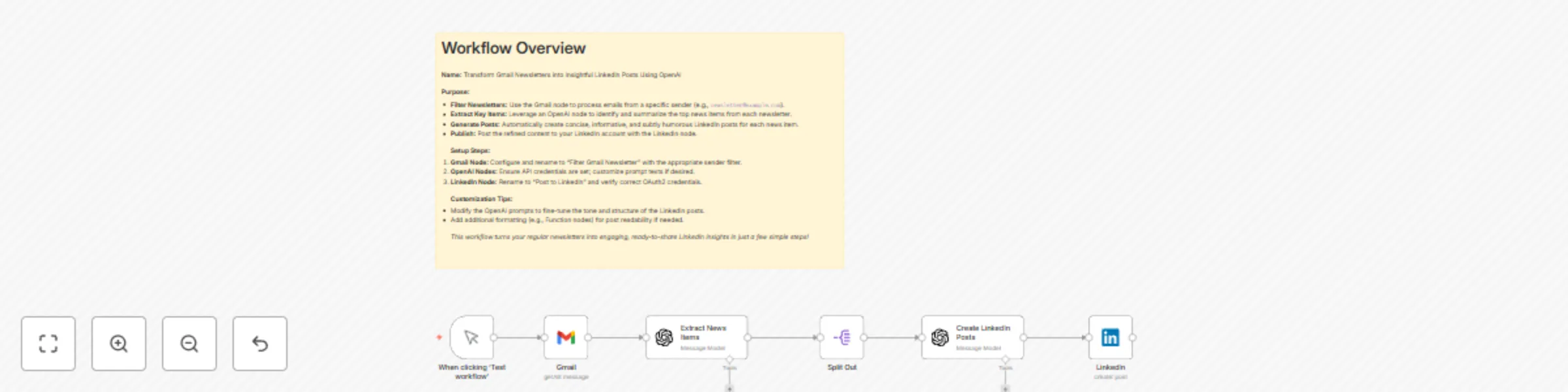
  • Filter Newsletters: The Gmail node is set up to only handle emails from your chosen sender, ensuring that only relevant newsletters are processed.
  • Extract Key Content: An OpenAI node analyzes the newsletter text to pull out the most important news items, including headlines and summaries.
  • Split Content: A Split Out node divides the extracted content so each news item is processed on its own.
  • Generate LinkedIn Posts: Another OpenAI node takes each news item's details and produces a well-structured LinkedIn post that delivers practical insights and ends with a reflective observation or question.
  • Publish to LinkedIn: The LinkedIn node publishes the crafted posts directly to your account.

Setup

  1. Gmail Node: Rename it to “Filter Gmail Newsletter” and configure it to filter emails by your newsletter sender.
  2. OpenAI Nodes: Ensure your OpenAI API credentials are set up correctly. Customize the prompt if needed to match your desired tone.
  3. LinkedIn Node: Rename it to “Post to LinkedIn” and confirm that your LinkedIn OAuth2 credentials are properly configured.

How to Customize

  • OpenAI Prompts: Adjust the prompts in the OpenAI nodes to fine-tune the post tone and output formatting.
  • Email Filter: Change the Gmail filter to match the sender of your newsletters.
  • Post Processing: Optionally, add extra formatting (using Function nodes) to further enhance the readability of the generated LinkedIn posts.

This template offers an automated, hands-off solution to transform your newsletter content into engaging LinkedIn updates, keeping your audience informed and inspired with minimal effort.

1.2 Logical Blocks

This catalog entry is organized from the workflow JSON. The node-level section below shows the executable blocks available for review before importing the template.

2. Block-by-Block Analysis

Block 1 - When clicking ‘Test workflow’

Type / Role
n8n-nodes-base.manualTrigger - manualTrigger
Config choices
Version 1

Block 2 - Gmail

Type / Role
n8n-nodes-base.gmail - gmail
Config choices
Version 2.1

Block 3 - Split Out

Type / Role
n8n-nodes-base.splitOut - splitOut
Config choices
Version 1

Block 4 - Extract News Items

Type / Role
@n8n/n8n-nodes-langchain.openAi - openAi
Config choices
Version 1.8

Block 5 - Create LinkedIn Posts

Type / Role
@n8n/n8n-nodes-langchain.openAi - openAi
Config choices
Version 1.8

Block 6 - LinkedIn

Type / Role
n8n-nodes-base.linkedIn - linkedIn
Config choices
Version 1

Block 7 - Sticky Note

Type / Role
n8n-nodes-base.stickyNote - stickyNote
Config choices
Version 1

3. Summary Table

Workflow Transform Gmail newsletters into insightful LinkedIn posts using OpenAI
Complexity intermediate
Nodes 7
Categories Content Creation, Multimodal AI
Author Ramsey Njire
Published 10 Apr 2025

4. Reproducing the Workflow from Scratch

  1. 1. Download the workflow JSON

    Use the JSON export at /data/workflows/3509/3509.json as the source template for this automation.

  2. 2. Import the template into n8n

    Open n8n, import the downloaded JSON, and review each node before activating the workflow.

  3. 3. Configure credentials and variables

    Replace placeholder credentials, API keys, webhook URLs, account IDs, and environment-specific values with your own settings.

  4. 4. Test with sample data

    Run the workflow manually or in a staging workspace, inspect node output, and confirm downstream systems receive the expected data.

  5. 5. Activate and monitor

    Enable the workflow only after testing, then monitor executions, errors, and rate limits during the first production runs.

5. General Notes & Resources

Review imported nodes carefully before activation. This catalog entry is intended to help you inspect the workflow structure, understand required services, and find related templates faster.

Node names, credentials, schedules, webhook paths, and external service limits may need adjustment for your workspace.

Frequently asked questions

What does Transform Gmail newsletters into insightful LinkedIn posts using OpenAI do?

Who Is This For? This workflow is perfect for content creators, marketers, and business professionals who receive regular newsletters and want to effortlessly convert them into engaging LinkedIn po...

What do I need before importing this workflow?

Review the workflow JSON, configure any required credentials in n8n, and test the automation in a safe workspace before using it in production.

Can I customize this workflow?

Yes. Use the block-by-block analysis and the downloadable JSON to inspect each node, then adjust credentials, prompts, schedules, filters, or destinations for your Content Creation, Multimodal AI use case.