Transform books into 100+ social media posts with DeepSeek AI and Google Drive

Workflow preview

Workflow preview
100%
Transform books into 100+ social media posts with DeepSeek AI and Google Drive preview
Open on n8n.io

Important notice

This workflow is provided as-is. Please review and test before using in production.

1. Workflow Overview

Your Automated Content Factory: Turn Any Book into 100+ Social Media Ideas Instantly Never run out of content again by automatically generating a massive library of social media posts from a ...

Best for

  • Content Creation automation workflows
  • Multimodal AI automation workflows
  • advanced n8n builders looking for reusable templates

Tools used

@n8n/n8n-nodes-langchain.vectorstoreqdrant, @n8n/n8n-nodes-langchain.textsplitterrecursivecharactertextsplitter, @n8n/n8n-nodes-langchain.documentdefaultdataloader, @n8n/n8n-nodes-langchain.agent, @n8n/n8n-nodes-langchain.memorybufferwindow, n8n-nodes-base.code, n8n-nodes-base.googledrive, n8n-nodes-base.httprequest

Source and attribution

This workflow is cataloged by N8N Workflows and links back to its original n8n.io source page by Abdellah Homrani.

Original n8n.io source

1.1 Workflow description

Title
Transform books into 100+ social media posts with DeepSeek AI and Google Drive
Workflow name
Transform books into 100+ social media posts with DeepSeek AI and Google Drive

📚🤖✨ Your Automated Content Factory: Turn Any Book into 100+ Social Media Ideas Instantly Never run out of content again by automatically generating a massive library of social media posts from a single document.

🚀 Overview

This automation is a game-changer for content creators, marketers, and authors. It transforms any book or long document into a treasure trove of over 100 ready-to-use, short-form content ideas for platforms like TikTok, Instagram Reels, and YouTube Shorts. Drop a file, and get a batch of viral-ready posts back.

😩 The Problem

You have amazing, valuable content locked away in books, e-books, or long reports. Turning that content into a steady stream of engaging social media posts is a painful, manual grind. You spend countless hours rereading chapters, trying to pinpoint interesting facts, brainstorming catchy hooks, and writing dozens of unique posts. It's a creative bottleneck that drains your time and energy, making it impossible to post consistently and scale your reach.

✨ The Solution

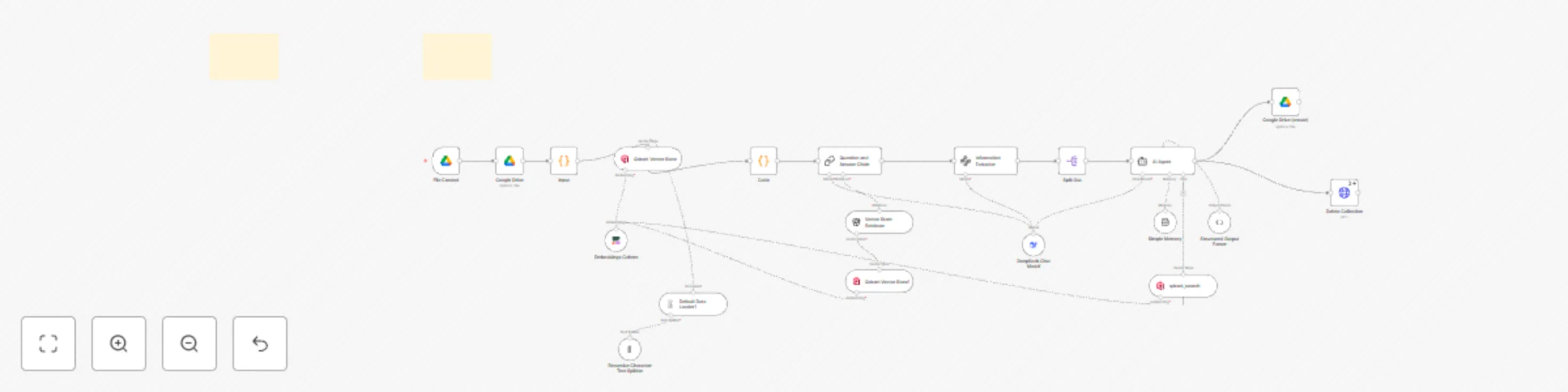
This workflow acts as your personal AI content team, working 24/7. Simply drop a book file (like a PDF or TXT) into a designated Google Drive folder. The automation instantly gets to work:

  1. It reads and understands the entire book, breaking it down chapter by chapter.
  2. An advanced AI agent then analyzes the core ideas, emotional hooks, and surprising facts within the text.
  3. It generates 5-10 unique, viral content ideas for each chapter, complete with an irresistible hook, the core message, and a call-to-action to drive engagement.
  4. Finally, it neatly saves all of these brilliant ideas into a new document in another Google Drive folder, ready for you to use. It's a complete, hands-off content repurposing machine.

⚙️ Simple Setup

This workflow is a pre-built blueprint, designed to be up and running in minutes!

  • 1. Upload: Simply upload the provided JSON file into your n8n instance.
  • 2. Detailed Setup: Follow all the instructions of the Detailed Setup.
  • 3. Activate: Turn the workflow on, and it's ready to go! Let your new automated employee get to work.

🌐 Explore more workflows ❤️ Buy more workflows at: adamcrafts 🦾 Custom workflows at: [email protected] [email protected]

1.2 Logical Blocks

This catalog entry is organized from the workflow JSON. The node-level section below shows the executable blocks available for review before importing the template.

2. Block-by-Block Analysis

Block 1 - Qdrant Vector Store

Type / Role
@n8n/n8n-nodes-langchain.vectorStoreQdrant - vectorStoreQdrant
Config choices
Version 1

Block 2 - Recursive Character Text Splitter

Type / Role
@n8n/n8n-nodes-langchain.textSplitterRecursiveCharacterTextSplitter - textSplitterRecursiveCharacterTextSplitter
Config choices
Version 1

Block 3 - Default Data Loader1

Type / Role
@n8n/n8n-nodes-langchain.documentDefaultDataLoader - documentDefaultDataLoader
Config choices
Version 1

Block 4 - AI Agent

Type / Role
@n8n/n8n-nodes-langchain.agent - agent
Config choices
Version 1.8

Block 5 - Simple Memory

Type / Role
@n8n/n8n-nodes-langchain.memoryBufferWindow - memoryBufferWindow
Config choices
Version 1.3

Block 6 - Code

Type / Role
n8n-nodes-base.code - code
Config choices
Version 2

Block 7 - Google Drive (create)

Type / Role
n8n-nodes-base.googleDrive - googleDrive
Config choices
Version 3

Block 8 - Delete Collection

Type / Role
n8n-nodes-base.httpRequest - httpRequest
Config choices
Version 4.2

Block 9 - Question and Answer Chain

Type / Role
@n8n/n8n-nodes-langchain.chainRetrievalQa - chainRetrievalQa
Config choices
Version 1.5

Block 10 - Vector Store Retriever

Type / Role
@n8n/n8n-nodes-langchain.retrieverVectorStore - retrieverVectorStore
Config choices
Version 1

Block 11 - Qdrant Vector Store1

Type / Role
@n8n/n8n-nodes-langchain.vectorStoreQdrant - vectorStoreQdrant
Config choices
Version 1.1

Block 12 - qdrant_search

Type / Role
@n8n/n8n-nodes-langchain.vectorStoreQdrant - vectorStoreQdrant
Config choices
Version 1.1

Block 13 - Embeddings Cohere

Type / Role
@n8n/n8n-nodes-langchain.embeddingsCohere - embeddingsCohere
Config choices
Version 1

Block 14 - Information Extractor

Type / Role
@n8n/n8n-nodes-langchain.informationExtractor - informationExtractor
Config choices
Version 1

Block 15 - Split Out

Type / Role
n8n-nodes-base.splitOut - splitOut
Config choices
Version 1

Block 16 - Google Drive

Type / Role
n8n-nodes-base.googleDrive - googleDrive
Config choices
Version 3

Block 17 - File Created

Type / Role
n8n-nodes-base.googleDriveTrigger - googleDriveTrigger
Config choices
Version 1

Block 18 - input

Type / Role
n8n-nodes-base.code - code
Config choices
Version 2

Block 19 - DeepSeek Chat Model

Type / Role
@n8n/n8n-nodes-langchain.lmChatDeepSeek - lmChatDeepSeek
Config choices
Version 1

Block 20 - Sticky Note7

Type / Role
n8n-nodes-base.stickyNote - stickyNote
Config choices
Version 1

Block 21 - Structured Output Parser

Type / Role
@n8n/n8n-nodes-langchain.outputParserStructured - outputParserStructured
Config choices
Version 1.2

Block 22 - Sticky Note

Type / Role
n8n-nodes-base.stickyNote - stickyNote
Config choices
Version 1

3. Summary Table

Workflow Transform books into 100+ social media posts with DeepSeek AI and Google Drive
Complexity advanced
Nodes 22
Categories Content Creation, Multimodal AI
Author Abdellah Homrani
Published 23 Jun 2025

4. Reproducing the Workflow from Scratch

  1. 1. Download the workflow JSON

    Use the JSON export at /data/workflows/5156/5156.json as the source template for this automation.

  2. 2. Import the template into n8n

    Open n8n, import the downloaded JSON, and review each node before activating the workflow.

  3. 3. Configure credentials and variables

    Replace placeholder credentials, API keys, webhook URLs, account IDs, and environment-specific values with your own settings.

  4. 4. Test with sample data

    Run the workflow manually or in a staging workspace, inspect node output, and confirm downstream systems receive the expected data.

  5. 5. Activate and monitor

    Enable the workflow only after testing, then monitor executions, errors, and rate limits during the first production runs.

5. General Notes & Resources

Review imported nodes carefully before activation. This catalog entry is intended to help you inspect the workflow structure, understand required services, and find related templates faster.

Node names, credentials, schedules, webhook paths, and external service limits may need adjustment for your workspace.

Frequently asked questions

What does Transform books into 100+ social media posts with DeepSeek AI and Google Drive do?

Your Automated Content Factory: Turn Any Book into 100+ Social Media Ideas Instantly Never run out of content again by automatically generating a massive library of social media posts from a ...

What do I need before importing this workflow?

Review the workflow JSON, configure any required credentials in n8n, and test the automation in a safe workspace before using it in production.

Can I customize this workflow?

Yes. Use the block-by-block analysis and the downloadable JSON to inspect each node, then adjust credentials, prompts, schedules, filters, or destinations for your Content Creation, Multimodal AI use case.