Transcribing bank statements to markdown using Gemini Vision AI

Workflow preview

Workflow preview
100%
Transcribing bank statements to markdown using Gemini Vision AI preview
Open on n8n.io

Important notice

This workflow is provided as-is. Please review and test before using in production.

1. Workflow Overview

This n8n workflow demonstrates an approach to parsing bank statement PDFs with multimodal LLMs as an alternative to traditional OCR. This allows for much more accurate data extraction from the docu...

Best for

  • Document Extraction automation workflows
  • Multimodal AI automation workflows
  • advanced n8n builders looking for reusable templates

Tools used

n8n-nodes-base.manualtrigger, @n8n/n8n-nodes-langchain.lmchatgooglegemini, n8n-nodes-base.sort, n8n-nodes-base.stickynote, n8n-nodes-base.googledrive, n8n-nodes-base.httprequest, n8n-nodes-base.compression, n8n-nodes-base.code

Source and attribution

This workflow is cataloged by N8N Workflows and links back to its original n8n.io source page by Jimleuk.

Original n8n.io source

1.1 Workflow description

Title
Transcribing bank statements to markdown using Gemini Vision AI
Workflow name
Transcribing bank statements to markdown using Gemini Vision AI

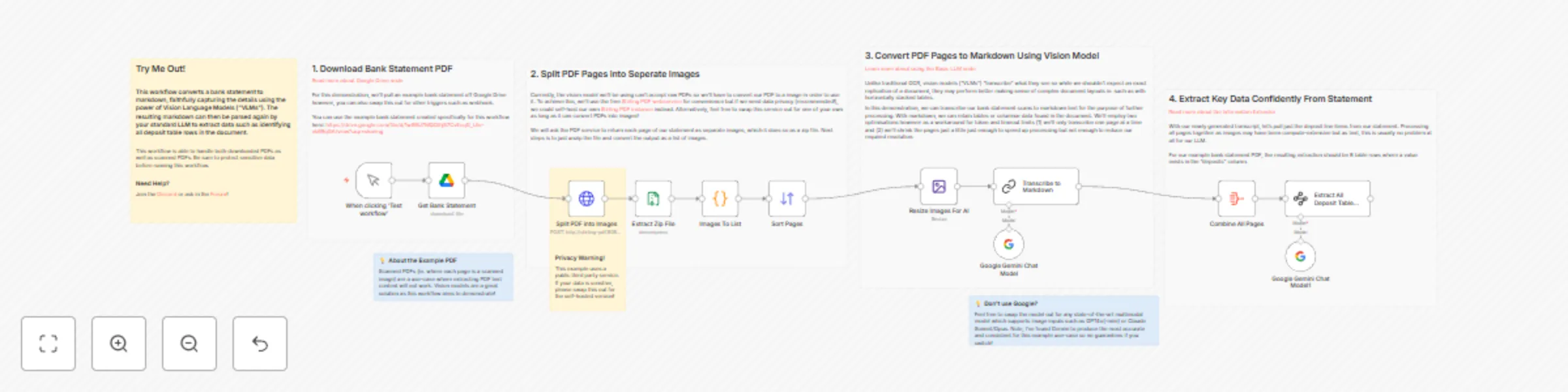
This n8n workflow demonstrates an approach to parsing bank statement PDFs with multimodal LLMs as an alternative to traditional OCR. This allows for much more accurate data extraction from the document especially when it comes to tables and complex layouts.

Multimodal Parsing is better than traditiona OCR because:

  • It reduces complexity and overhead by avoiding the need to preprocess the document into text format such as markdown before passing to the LLM.
  • It handles non-standard PDF formats which may produce garbled output via traditional OCR text conversion.
  • It's orders of magnitude cheaper than premium OCR models that still require post-processing cleanup and formatting. LLMs can format to any schema or language you desire!

How it works

You can use the example bank statement created specifically for this workflow here: https://drive.google.com/file/d/1wS9U7MQDthj57CvEcqG_Llkr-ek6RqGA/view?usp=sharing

  • A PDF bank statement is imported via Google Drive. For this demo, I've created a mock bank statement which includes complex table layouts of 5 columns. Typically, OCR will be unable to align the columns correctly and mistake some deposits for withdrawals.
  • Because multimodal LLMs do not accept PDFs directly, well have to convert the PDF to a series of images. We can achieve this by using a tool such as Stirling PDF. Stirling PDF is self-hostable which is handy for sensitive data such as bank statements.
  • Stirling PDF will return our PDF as a series of JPGs (one for each page) in a zipped file. We can use n8n's decompress node to extract the images and ensure they are ordered by using the Sort node.
  • Next, we'll resize each page using the Edit Image node to ensure the right balance between resolution limits and processing speed.
  • Each resized page image is then passed into the Basic LLM node which will use our multimodal LLM of choice - Gemini 1.5 Pro. In the LLM node's options, we'll add a "user message" of type binary (data) which is how we add our image data as an input.
  • Our prompt will instruct the multimodal LLM to transcribe each page to markdown. Note, you do not need to do this - you can just ask for data points to extract directly! Our goal for this template is to demonstrate the LLMs ability to accurately read the page.
  • Finally, with our markdown version of all pages, we can pass this to another LLM node to extract required data such as deposit line items.

Requirements

  • Google Gemini API for Multimodal LLM.
  • Google Drive access for document storage.
  • Stirling PDF instance for PDF to Image conversion

Customising the workflow

  • At time of writing, Gemini 1.5 Pro is the most accurate in text document parsing with a relatively low cost. If you are not using Google Gemini however you can switch to other multimodal LLMs such as OpenAI GPT or Antrophic Claude.

  • If you don't need the markdown, simply asking what to extract directly in the LLM's prompt is also acceptable and would save a few extra steps.

  • Not parsing any bank statements any time soon? This template also works for Invoices, inventory lists, contracts, legal documents etc.

1.2 Logical Blocks

This catalog entry is organized from the workflow JSON. The node-level section below shows the executable blocks available for review before importing the template.

2. Block-by-Block Analysis

Block 1 - When clicking ‘Test workflow’

Type / Role
n8n-nodes-base.manualTrigger - manualTrigger
Config choices
Version 1

Block 2 - Google Gemini Chat Model

Type / Role
@n8n/n8n-nodes-langchain.lmChatGoogleGemini - lmChatGoogleGemini
Config choices
Version 1

Block 3 - Sort Pages

Type / Role
n8n-nodes-base.sort - sort
Config choices
Version 1

Block 4 - Sticky Note

Type / Role
n8n-nodes-base.stickyNote - stickyNote
Config choices
Version 1

Block 5 - Get Bank Statement

Type / Role
n8n-nodes-base.googleDrive - googleDrive
Config choices
Version 3

Block 6 - Split PDF into Images

Type / Role
n8n-nodes-base.httpRequest - httpRequest
Config choices
Version 4.2

Block 7 - Extract Zip File

Type / Role
n8n-nodes-base.compression - compression
Config choices
Version 1.1

Block 8 - Images To List

Type / Role
n8n-nodes-base.code - code
Config choices
Version 2

Block 9 - Resize Images For AI

Type / Role
n8n-nodes-base.editImage - editImage
Config choices
Version 1

Block 10 - Sticky Note1

Type / Role
n8n-nodes-base.stickyNote - stickyNote
Config choices
Version 1

Block 11 - Sticky Note2

Type / Role
n8n-nodes-base.stickyNote - stickyNote
Config choices
Version 1

Block 12 - Sticky Note3

Type / Role
n8n-nodes-base.stickyNote - stickyNote
Config choices
Version 1

Block 13 - Google Gemini Chat Model1

Type / Role
@n8n/n8n-nodes-langchain.lmChatGoogleGemini - lmChatGoogleGemini
Config choices
Version 1

Block 14 - Sticky Note4

Type / Role
n8n-nodes-base.stickyNote - stickyNote
Config choices
Version 1

Block 15 - Sticky Note6

Type / Role
n8n-nodes-base.stickyNote - stickyNote
Config choices
Version 1

Block 16 - Combine All Pages

Type / Role
n8n-nodes-base.aggregate - aggregate
Config choices
Version 1

Block 17 - Sticky Note5

Type / Role
n8n-nodes-base.stickyNote - stickyNote
Config choices
Version 1

Block 18 - Extract All Deposit Table Rows

Type / Role
@n8n/n8n-nodes-langchain.informationExtractor - informationExtractor
Config choices
Version 1

Block 19 - Sticky Note7

Type / Role
n8n-nodes-base.stickyNote - stickyNote
Config choices
Version 1

Block 20 - Transcribe to Markdown

Type / Role
@n8n/n8n-nodes-langchain.chainLlm - chainLlm
Config choices
Version 1.4

3. Summary Table

Workflow Transcribing bank statements to markdown using Gemini Vision AI
Complexity advanced
Nodes 20
Categories Document Extraction, Multimodal AI
Author Jimleuk
Published 18 Sept 2024

4. Reproducing the Workflow from Scratch

  1. 1. Download the workflow JSON

    Use the JSON export at /data/workflows/2421/2421.json as the source template for this automation.

  2. 2. Import the template into n8n

    Open n8n, import the downloaded JSON, and review each node before activating the workflow.

  3. 3. Configure credentials and variables

    Replace placeholder credentials, API keys, webhook URLs, account IDs, and environment-specific values with your own settings.

  4. 4. Test with sample data

    Run the workflow manually or in a staging workspace, inspect node output, and confirm downstream systems receive the expected data.

  5. 5. Activate and monitor

    Enable the workflow only after testing, then monitor executions, errors, and rate limits during the first production runs.

5. General Notes & Resources

Review imported nodes carefully before activation. This catalog entry is intended to help you inspect the workflow structure, understand required services, and find related templates faster.

Node names, credentials, schedules, webhook paths, and external service limits may need adjustment for your workspace.

Frequently asked questions

What does Transcribing bank statements to markdown using Gemini Vision AI do?

This n8n workflow demonstrates an approach to parsing bank statement PDFs with multimodal LLMs as an alternative to traditional OCR. This allows for much more accurate data extraction from the docu...

What do I need before importing this workflow?

Review the workflow JSON, configure any required credentials in n8n, and test the automation in a safe workspace before using it in production.

Can I customize this workflow?

Yes. Use the block-by-block analysis and the downloadable JSON to inspect each node, then adjust credentials, prompts, schedules, filters, or destinations for your Document Extraction, Multimodal AI use case.