Block 1 - When chat message received
- Type / Role
- @n8n/n8n-nodes-langchain.chatTrigger - chatTrigger
- Config choices
- Version 1.1


 Early Deal
This workflow is provided as-is. Please review and test before using in production.
About: This workflow automates the transcription of YouTube videos by processing a video URL provided via a chat message. Designed for users who need quick access to video...
@n8n/n8n-nodes-langchain.chattrigger, n8n-nodes-base.code, n8n-nodes-base.if, n8n-nodes-base.respondtowebhook, n8n-nodes-base.stickynote, n8n-nodes-base.set, n8n-nodes-base.httprequest, @n8n/n8n-nodes-langchain.openai
This workflow is cataloged by N8N Workflows and links back to its original n8n.io source page by ivn.
Original n8n.io sourceThis workflow automates the transcription of YouTube videos by processing a video URL provided via a chat message. Designed for users who need quick access to video content in text form, this workflow ensures a seamless experience for transcribing videos on demand, regardless of the topic.
This workflow is designed for individuals who need quick and accurate transcriptions of YouTube videos without watching them in full. It is particularly useful for:
Students who need text-based notes from educational videos.
Researchers looking to extract information from lectures or discussions.
Professionals who prefer reading over watching videos.
Casual users who want an efficient way to summarize video content.
Manually transcribing YouTube videos is time-consuming and prone to errors. Watching long videos just to extract key information is inefficient. This workflow automates transcription, allowing users to quickly convert video content into text. Use cases include:
Summarizing lectures or webinars.
Extracting insights from interviews and discussions.
Creating searchable text from video content.
Generating reference material without watching entire videos.
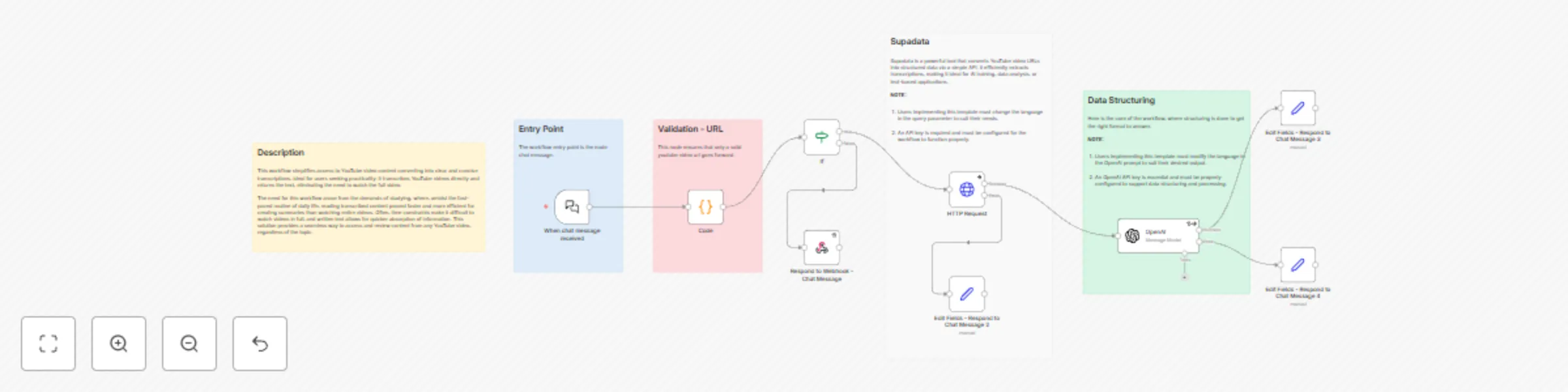
This workflow automates the transcription of YouTube videos by:
Accepting Input: User provide a YouTube video URL through a chat message.
Processing the Video: It utilizes an external transcription service to retrieve the full transcript of the YouTube video from the provided URL.
Enhancing Output: An AI model (OpenAI) refines the transcription for accuracy and readability.
Delivering Results: The final text transcript is returned to the user via the chat interface.
Install n8n: Ensure you have n8n installed and running.
Import the Workflow: Copy the JSON workflow file into your n8n instance.
Configure API Keys:
Run the Workflow: Provide a YouTube video URL and receive a transcription in response.
The workflow is flexible and can be tailored to suit specific requirements. Here are some customization ideas:
Language Support: Adjust the transcription language in both the HTTP Request and OpenAI nodes to support transcriptions in different languages (e.g., French, German).
Integrate with Other Services: Store transcriptions in a database, send them via email, or connect with a document management system.
Notification: Add a notification node (e.g., email or Slack) to alert you when the transcription is complete, especially for long videos.
Quality Check: Integrate an additional AI step to summarize or highlight key points in the transcript for quicker insights.
This workflow is designed to be scalable, efficient, and adaptable to various transcription needs.
Video Length Limitation: Very long videos may not have a complete transcription due to constraints in processing capacity or service limitations.
Transcription Dependency: The accuracy of the transcription relies entirely on the presence of video captions or subtitles. If a video lacks these, no transcription will be generated.
Access Restrictions: Private or restricted YouTube videos may not be accessible for transcription due to permission limitations.
Processing Time: The time required to process a video can vary significantly, especially for longer videos, depending on the transcription service and server resources.
Regional Restrictions: Some YouTube videos may have geographic or regional access limitations, which could prevent the workflow from retrieving the content for transcription.
This catalog entry is organized from the workflow JSON. The node-level section below shows the executable blocks available for review before importing the template.
| Workflow | Transcribe YouTube videos with AI enhancement via chat interface |
|---|---|
| Complexity | intermediate |
| Nodes | 14 |
| Categories | Content Creation, Multimodal AI |
| Author | ivn |
| Published | 30 Mar 2025 |
Use the JSON export at /data/workflows/3381/3381.json as the source template for this automation.
Open n8n, import the downloaded JSON, and review each node before activating the workflow.
Replace placeholder credentials, API keys, webhook URLs, account IDs, and environment-specific values with your own settings.
Run the workflow manually or in a staging workspace, inspect node output, and confirm downstream systems receive the expected data.
Enable the workflow only after testing, then monitor executions, errors, and rate limits during the first production runs.
Review imported nodes carefully before activation. This catalog entry is intended to help you inspect the workflow structure, understand required services, and find related templates faster.
Node names, credentials, schedules, webhook paths, and external service limits may need adjustment for your workspace.
About: This workflow automates the transcription of YouTube videos by processing a video URL provided via a chat message. Designed for users who need quick access to video...
Review the workflow JSON, configure any required credentials in n8n, and test the automation in a safe workspace before using it in production.
Yes. Use the block-by-block analysis and the downloadable JSON to inspect each node, then adjust credentials, prompts, schedules, filters, or destinations for your Content Creation, Multimodal AI use case.