Track student attendance from CSV, email parents, and build an HTML dashboard

Workflow preview

Workflow preview
100%
Track student attendance from CSV, email parents, and build an HTML dashboard preview
Open on n8n.io

1. Workflow Overview

Overview Automatically monitors daily student attendance from CSV files, identifies absent students, sends parent email alerts via SMTP, calculates risk scores, and generates an interactive HTML...

Best for

  • Miscellaneous automation workflows
  • AI Summarization automation workflows
  • advanced n8n builders looking for reusable templates

Tools used

n8n-nodes-base.stickynote, n8n-nodes-base.code, n8n-nodes-base.scheduletrigger, n8n-nodes-base.readwritefile, n8n-nodes-base.spreadsheetfile, n8n-nodes-base.if, n8n-nodes-base.merge, n8n-nodes-base.emailsend

Source and attribution

This workflow is cataloged by N8N Workflows and links back to its original n8n.io source page by Tejasv Makkar.

Original n8n.io source

1.1 Workflow description

Title
Track student attendance from CSV, email parents, and build an HTML dashboard
Workflow name
Track student attendance from CSV, email parents, and build an HTML dashboard

🚀 Overview

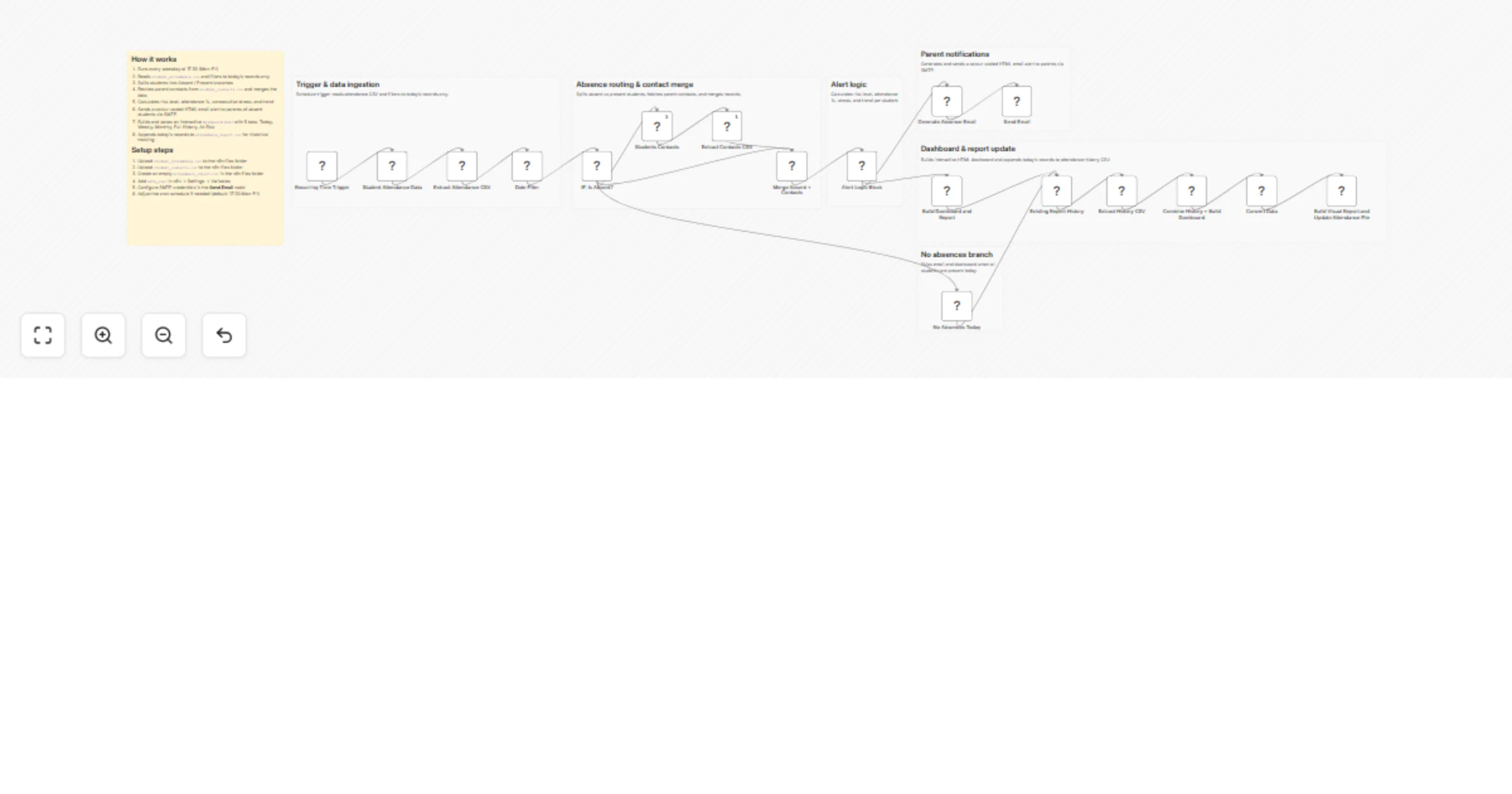
Automatically monitors daily student attendance from CSV files, identifies absent students, sends parent email alerts via SMTP, calculates risk scores, and generates an interactive HTML dashboard — all on a weekday schedule with no manual work needed.


⚙️ How it works

  1. Schedule trigger — runs Monday–Friday at 17:30
  2. Data ingestion — reads student_attendance.csv and filters to today's records only
  3. Absence check — splits students into Absent / Present branches
  4. Contact merge — matches absent students with parent data from student_contacts.csv
  5. Alert logic — calculates risk level, attendance %, consecutive streak, and trend (Improving / Stable / Worsening)
  6. Parent email — sends a colour-coded HTML alert via SMTP for each absent student
  7. Dashboard builder — generates dashboard.html with 5 tabs: Today, Weekly, Monthly, Full History, and At-Risk
  8. Report update — appends records to attendance_report.csv for historical tracking

đź›  Setup steps

  1. Upload student_attendance.csv to the n8n files folder
  2. Upload student_contacts.csv to the n8n files folder
  3. Create an empty attendance_report.csv in the n8n files folder
  4. Add smtp_user in Settings → Variables
  5. Configure SMTP credentials in the Send Email node
  6. Adjust the cron schedule if needed (default: 17:30 Mon–Fri)

đź”§ Required CSV formats

student_attendance.csv

StudentID Date Status Class Subject Teacher
S101 12-01-2026 Absent Grade 6 Math Mr Singh

student_contacts.csv

StudentID ParentName Email Phone
S101 Anita Kumar [email protected] +919999999999

📊 Dashboard Preview

1.2 Logical Blocks

This catalog entry is organized from the workflow JSON. The node-level section below shows the executable blocks available for review before importing the template.

2. Block-by-Block Analysis

Block 1 - Sticky Note

Type / Role
n8n-nodes-base.stickyNote - stickyNote
Config choices
Version 1

Block 2 - Group Trigger Ingestion

Type / Role
n8n-nodes-base.stickyNote - stickyNote
Config choices
Version 1

Block 3 - Group Routing Merge

Type / Role
n8n-nodes-base.stickyNote - stickyNote
Config choices
Version 1

Block 4 - Group Alert Logic

Type / Role
n8n-nodes-base.stickyNote - stickyNote
Config choices
Version 1

Block 5 - Group Notifications

Type / Role
n8n-nodes-base.stickyNote - stickyNote
Config choices
Version 1

Block 6 - Group No Absence

Type / Role
n8n-nodes-base.stickyNote - stickyNote
Config choices
Version 1

Block 7 - No Absences Today

Type / Role
n8n-nodes-base.code - code
Config choices
Version 2

Block 8 - Recurring Time Trigger

Type / Role
n8n-nodes-base.scheduleTrigger - scheduleTrigger
Config choices
Version 1.1

Block 9 - Student Attendance Data

Type / Role
n8n-nodes-base.readWriteFile - readWriteFile
Config choices
Version 1

Block 10 - Extract Attendance CSV

Type / Role
n8n-nodes-base.spreadsheetFile - spreadsheetFile
Config choices
Version 2

Block 11 - IF: Is Absent?

Type / Role
n8n-nodes-base.if - if
Config choices
Version 2

Block 12 - Students Contacts

Type / Role
n8n-nodes-base.readWriteFile - readWriteFile
Config choices
Version 1

Block 13 - Extract Contacts CSV

Type / Role
n8n-nodes-base.spreadsheetFile - spreadsheetFile
Config choices
Version 2

Block 14 - Merge Absent + Contacts

Type / Role
n8n-nodes-base.merge - merge
Config choices
Version 2.1

Block 15 - Alert Logic Block

Type / Role
n8n-nodes-base.code - code
Config choices
Version 2

Block 16 - Generate Absence Email

Type / Role
n8n-nodes-base.code - code
Config choices
Version 2

Block 17 - Build Dashboard and Report

Type / Role
n8n-nodes-base.code - code
Config choices
Version 2

Block 18 - Send Email

Type / Role
n8n-nodes-base.emailSend - emailSend
Config choices
Version 2.1

Block 19 - Existing Report History

Type / Role
n8n-nodes-base.readWriteFile - readWriteFile
Config choices
Version 1

Block 20 - Extract History CSV

Type / Role
n8n-nodes-base.spreadsheetFile - spreadsheetFile
Config choices
Version 2

Block 21 - Combine History + Build Dashboard

Type / Role
n8n-nodes-base.code - code
Config choices
Version 2

Block 22 - Convert Data

Type / Role
n8n-nodes-base.convertToFile - convertToFile
Config choices
Version 1

Block 23 - Build Visual Report and Update Attendance File

Type / Role
n8n-nodes-base.readWriteFile - readWriteFile
Config choices
Version 1

Block 24 - Date Filter

Type / Role
n8n-nodes-base.filter - filter
Config choices
Version 2.3

Showing the first 24 of 25 workflow blocks. Download the JSON for the full node graph.

3. Summary Table

Workflow Track student attendance from CSV, email parents, and build an HTML dashboard
Complexity advanced
Nodes 25
Categories Miscellaneous, AI Summarization
Author Tejasv Makkar
Published 15 Mar 2026

4. Reproducing the Workflow from Scratch

  1. 1. Download the workflow JSON

    Use the JSON export at /data/workflows/14068/14068.json as the source template for this automation.

  2. 2. Import the template into n8n

    Open n8n, import the downloaded JSON, and review each node before activating the workflow.

  3. 3. Configure credentials and variables

    Replace placeholder credentials, API keys, webhook URLs, account IDs, and environment-specific values with your own settings.

  4. 4. Test with sample data

    Run the workflow manually or in a staging workspace, inspect node output, and confirm downstream systems receive the expected data.

  5. 5. Activate and monitor

    Enable the workflow only after testing, then monitor executions, errors, and rate limits during the first production runs.

5. General Notes & Resources

Review imported nodes carefully before activation. This catalog entry is intended to help you inspect the workflow structure, understand required services, and find related templates faster.

Node names, credentials, schedules, webhook paths, and external service limits may need adjustment for your workspace.

Frequently asked questions

What does Track student attendance from CSV, email parents, and build an HTML dashboard do?

Overview Automatically monitors daily student attendance from CSV files, identifies absent students, sends parent email alerts via SMTP, calculates risk scores, and generates an interactive HTML...

What do I need before importing this workflow?

Review the workflow JSON, configure any required credentials in n8n, and test the automation in a safe workspace before using it in production.

Can I customize this workflow?

Yes. Use the block-by-block analysis and the downloadable JSON to inspect each node, then adjust credentials, prompts, schedules, filters, or destinations for your Miscellaneous, AI Summarization use case.