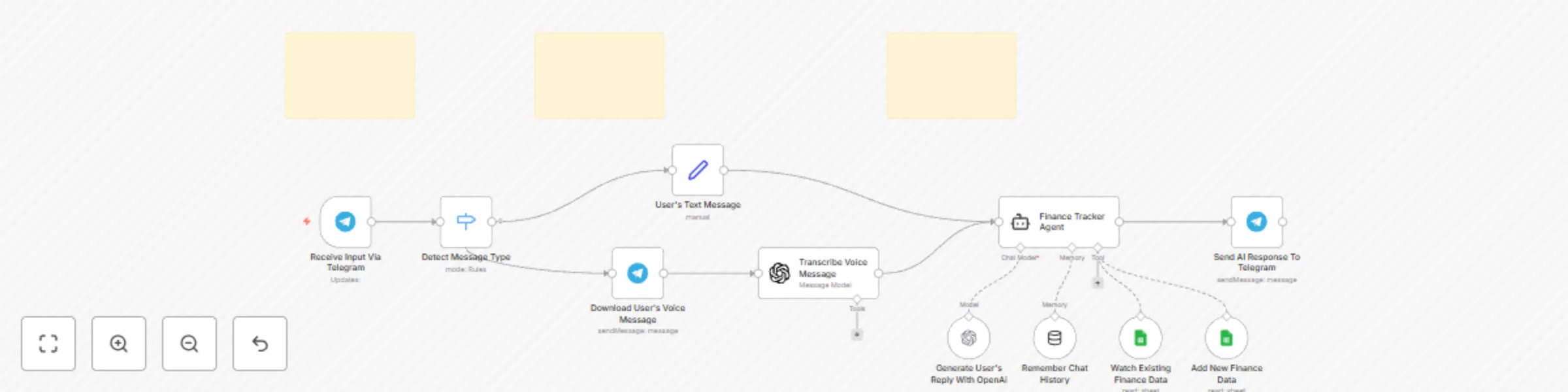
Track personal finances with GPT-4 via Telegram & Google Sheets

Workflow preview

Workflow preview
100%
Track personal finances with GPT-4 via Telegram & Google Sheets preview
Open on n8n.io

Important notice

This workflow is provided as-is. Please review and test before using in production.

1. Workflow Overview

Track your expenses, gain insights, and manage money smarter – right from Telegram. Who is this For This workflow is perfect for individuals and freelancers who want financial control without app o...

Best for

  • Personal Productivity automation workflows
  • AI Chatbot automation workflows
  • intermediate n8n builders looking for reusable templates

Tools used

n8n-nodes-base.telegramtrigger, @n8n/n8n-nodes-langchain.openai, n8n-nodes-base.telegram, n8n-nodes-base.set, n8n-nodes-base.switch, @n8n/n8n-nodes-langchain.agent, n8n-nodes-base.googlesheetstool, @n8n/n8n-nodes-langchain.lmchatopenai

Source and attribution

This workflow is cataloged by N8N Workflows and links back to its original n8n.io source page by Md. Nazmul Islam.

Original n8n.io source

1.1 Workflow description

Title
Track personal finances with GPT-4 via Telegram & Google Sheets
Workflow name
Track personal finances with GPT-4 via Telegram & Google Sheets

Track your expenses, gain insights, and manage money smarter – right from Telegram.


Who is this For

This workflow is perfect for individuals and freelancers who want financial control without app overload. Launch it in your n8n environment and start tracking your money smarter today!

Features

  • Natural Language Expense Input: Log expenses by simply messaging “Spent $50 on groceries”.
  • Income Logging: Add income sources such as salary, freelance, or passive income.
  • Voice Support: Speak to the bot—Whisper API converts voice to text.
  • Google Sheets Integration: All data is synced to a spreadsheet in real time.

How It Works

  1. User Input (Text or Voice): Send messages on your telegram bot like:
    • “Spent $25 on transportation”
    • “Received $300 from freelancing”
    • Or just voice record a message
  2. AI Parsing & Categorization:
    • GPT-4 processes and categorizes the entry using pre-trained financial logic.
  3. Data Logging:
    • n8n stores data in: Google Sheets (via Google Sheets API)
  4. Video Demo:

Set Up Steps

  1. Import the Workflow
    • Create a new workflow
    • Import the JSON file by clicking "three dot" (upper right corner) > "import from file..." (I will provide the JSON file after buying).
  2. Set Up Telegram Bot - Create a bot via @BotFather - Create a telegram credential to connect telegram with n8n. - Grab the token from @BotFather and paste into the Telegram credential. - Connect that credential with telegram nodes.
  3. Enable Google Sheets Integration
    • Create a google sheet credential to connect google sheet with n8n.
    • Connect that credential with Google sheets tools.
    • Create a google sheet including these columns: "chat_id", "date_and_time", "income (dollar)", "income source", "cost (dollar)", "cost category"
    • Provide access that sheet to n8n.
  4. Configure OpenAI (GPT & Whisper)
    • Create an OpenAi credential to connect openai with n8n.
    • Add your OpenAI API Key in the credentials tab
    • Connect that credential with openai nodes.
  5. Pre-requisites
    • Necessary credentials:
      1. Telegram Account
      2. OpenAi Account
      3. Google Sheets Account
    • N8N version 1.92.2 or upper

Customization Guidance

  1. You can customize the ai agent prompt based on your needs.
  2. And also you can customize the sheet's columns based on your needs.
  3. And you can add additional features like:
    • Monthly budgeting alert
    • Expense report generation
    • Smart Recommendations for cost cutting tips

Ready to Automate Your Finances?

Buy the workflow for only 30$, You will get full setup guide after buying.

1.2 Logical Blocks

This catalog entry is organized from the workflow JSON. The node-level section below shows the executable blocks available for review before importing the template.

2. Block-by-Block Analysis

Block 1 - Receive Input Via Telegram

Type / Role
n8n-nodes-base.telegramTrigger - telegramTrigger
Config choices
Version 1.1

Block 2 - Transcribe Voice Message

Type / Role
@n8n/n8n-nodes-langchain.openAi - openAi
Config choices
Version 1.8

Block 3 - Send AI Response To Telegram

Type / Role
n8n-nodes-base.telegram - telegram
Config choices
Version 1.2

Block 4 - User's Text Message

Type / Role
n8n-nodes-base.set - set
Config choices
Version 3.4

Block 5 - Download User's Voice Message

Type / Role
n8n-nodes-base.telegram - telegram
Config choices
Version 1.2

Block 6 - Detect Message Type

Type / Role
n8n-nodes-base.switch - switch
Config choices
Version 3.2

Block 7 - Finance Tracker Agent

Type / Role
@n8n/n8n-nodes-langchain.agent - agent
Config choices
Version 1.8

Block 8 - Watch Existing Finance Data

Type / Role
n8n-nodes-base.googleSheetsTool - googleSheetsTool
Config choices
Version 4.5

Block 9 - Add New Finance Data

Type / Role
n8n-nodes-base.googleSheetsTool - googleSheetsTool
Config choices
Version 4.5

Block 10 - Generate User's Reply With OpenAi

Type / Role
@n8n/n8n-nodes-langchain.lmChatOpenAi - lmChatOpenAi
Config choices
Version 1.2

Block 11 - Remember Chat History

Type / Role
@n8n/n8n-nodes-langchain.memoryBufferWindow - memoryBufferWindow
Config choices
Version 1.3

Block 12 - Sticky Note

Type / Role
n8n-nodes-base.stickyNote - stickyNote
Config choices
Version 1

Block 13 - Sticky Note1

Type / Role
n8n-nodes-base.stickyNote - stickyNote
Config choices
Version 1

Block 14 - Sticky Note2

Type / Role
n8n-nodes-base.stickyNote - stickyNote
Config choices
Version 1

3. Summary Table

Workflow Track personal finances with GPT-4 via Telegram & Google Sheets
Complexity intermediate
Nodes 14
Categories Personal Productivity, AI Chatbot
Author Md. Nazmul Islam
Published 08 May 2025

4. Reproducing the Workflow from Scratch

  1. 1. Download the workflow JSON

    Use the JSON export at /data/workflows/3932/3932.json as the source template for this automation.

  2. 2. Import the template into n8n

    Open n8n, import the downloaded JSON, and review each node before activating the workflow.

  3. 3. Configure credentials and variables

    Replace placeholder credentials, API keys, webhook URLs, account IDs, and environment-specific values with your own settings.

  4. 4. Test with sample data

    Run the workflow manually or in a staging workspace, inspect node output, and confirm downstream systems receive the expected data.

  5. 5. Activate and monitor

    Enable the workflow only after testing, then monitor executions, errors, and rate limits during the first production runs.

5. General Notes & Resources

Review imported nodes carefully before activation. This catalog entry is intended to help you inspect the workflow structure, understand required services, and find related templates faster.

Node names, credentials, schedules, webhook paths, and external service limits may need adjustment for your workspace.

Frequently asked questions

What does Track personal finances with GPT-4 via Telegram & Google Sheets do?

Track your expenses, gain insights, and manage money smarter – right from Telegram. Who is this For This workflow is perfect for individuals and freelancers who want financial control without app o...

What do I need before importing this workflow?

Review the workflow JSON, configure any required credentials in n8n, and test the automation in a safe workspace before using it in production.

Can I customize this workflow?

Yes. Use the block-by-block analysis and the downloadable JSON to inspect each node, then adjust credentials, prompts, schedules, filters, or destinations for your Personal Productivity, AI Chatbot use case.