Block 1 - Workflow Overview
- Type / Role
- n8n-nodes-base.stickyNote - stickyNote
- Config choices
- Version 1


 Early Deal
This workflow is provided as-is. Please review and test before using in production.
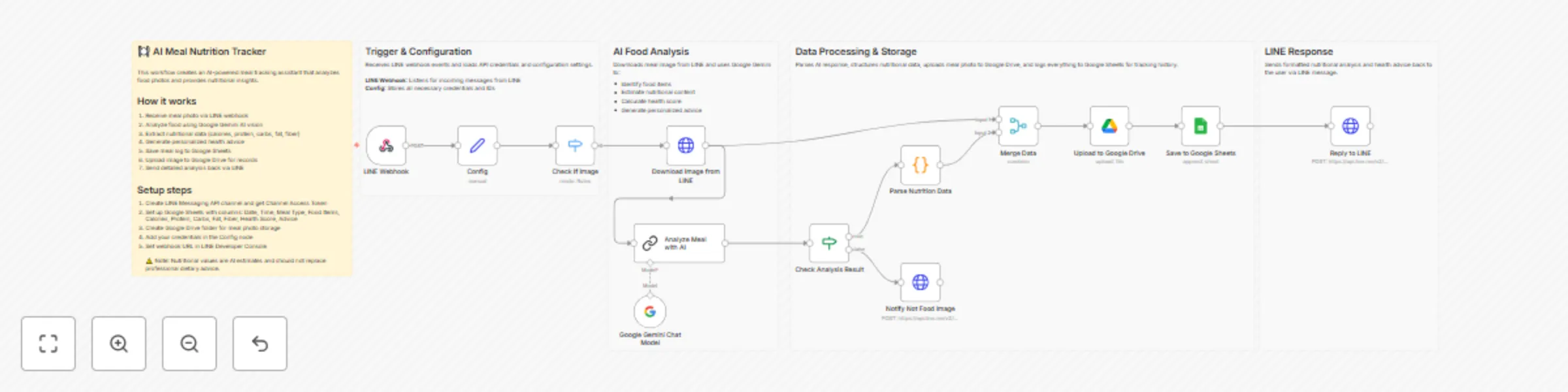
AI Meal Nutrition Tracker with LINE and Google Sheets Who's it for This workflow is designed for health conscious individuals, fitness enthusiasts, and anyone who wants to track their daily food in...
n8n-nodes-base.stickynote, n8n-nodes-base.webhook, n8n-nodes-base.set, n8n-nodes-base.switch, n8n-nodes-base.httprequest, @n8n/n8n-nodes-langchain.lmchatgooglegemini, @n8n/n8n-nodes-langchain.chainllm, n8n-nodes-base.if
This workflow is cataloged by N8N Workflows and links back to its original n8n.io source page by Oka Hironobu.
Original n8n.io sourceThis workflow is designed for health-conscious individuals, fitness enthusiasts, and anyone who wants to track their daily food intake without manual calorie counting.
It is best suited for users who want a simple, AI-powered meal logging system that analyzes food photos one at a time and provides instant nutritional feedback via LINE.
This workflow processes a single meal photo sent via LINE, analyzes it using Google Gemini AI to identify foods and estimate nutritional content, and stores the data in Google Sheets for tracking.
The workflow focuses on simplicity and encouragement: it receives a meal image, performs AI-based food recognition, estimates calories and macronutrients, calculates a health score, provides personalized advice, and replies with a detailed nutritional breakdown on LINE.
This workflow is intentionally designed to handle one image per execution.
To use this workflow, you will need:
These limitations are intentional to keep the workflow simple and easy to understand.
Note:
This workflow was tested using real meal photos sent individually via the LINE Messaging API.
Nutritional estimates are approximations and may vary from actual values. For accurate dietary tracking, consult a registered dietitian.
This catalog entry is organized from the workflow JSON. The node-level section below shows the executable blocks available for review before importing the template.
| Workflow | Track meal nutrition from meal photos with LINE, Google Gemini and Google Sheets |
|---|---|
| Complexity | advanced |
| Nodes | 18 |
| Categories | Personal Productivity, AI Chatbot |
| Author | Oka Hironobu |
| Published | 02 Jan 2026 |
Use the JSON export at /data/workflows/12380/12380.json as the source template for this automation.
Open n8n, import the downloaded JSON, and review each node before activating the workflow.
Replace placeholder credentials, API keys, webhook URLs, account IDs, and environment-specific values with your own settings.
Run the workflow manually or in a staging workspace, inspect node output, and confirm downstream systems receive the expected data.
Enable the workflow only after testing, then monitor executions, errors, and rate limits during the first production runs.
Review imported nodes carefully before activation. This catalog entry is intended to help you inspect the workflow structure, understand required services, and find related templates faster.
Node names, credentials, schedules, webhook paths, and external service limits may need adjustment for your workspace.
AI Meal Nutrition Tracker with LINE and Google Sheets Who's it for This workflow is designed for health conscious individuals, fitness enthusiasts, and anyone who wants to track their daily food in...
Review the workflow JSON, configure any required credentials in n8n, and test the automation in a safe workspace before using it in production.
Yes. Use the block-by-block analysis and the downloadable JSON to inspect each node, then adjust credentials, prompts, schedules, filters, or destinations for your Personal Productivity, AI Chatbot use case.